MagicMirror Forum
    • Recent
    • Tags
    • Unsolved
    • Solved
    • MagicMirror² Repository
    • Documentation
    • 3rd-Party-Modules
    • Donate
    • Discord
    • Register
    • Login
    A New Chapter for MagicMirror: The Community Takes the Lead
    Read the statement by Michael Teeuw here.

    Let it snow now Magic Mirror

    Scheduled Pinned Locked Moved Entertainment
    23 Posts 7 Posters 5.8k Views 7 Watching
    Loading More Posts
    • Oldest to Newest
    • Newest to Oldest
    • Most Votes
    Reply
    • Reply as topic
    Log in to reply
    This topic has been deleted. Only users with topic management privileges can see it.
    • C Offline
      cgillinger
      last edited by

      And this is my second module, again for the entertainment of my daughters. This one just adds a nice snow fall across the screen - for the winter festivities.

      I made it on a Linux computer, but realised when testing it on my Raspberry Pi 3B, that the Pi really struggled with it. So it now has two settings: light and “rich” - the latter for more powerful platforms.

      This is a part of me trying to learn how to make modules, so any input is welcome.

      Next: Im thinking of connecting it to one of the providers from the Weather module, to maybe make it snow when the temperature is freezing, or if the forcast warns of snow.

      But for now, just a simple snowfall on your MagicMirror.

      https://github.com/cgillinger/MMM-SnowEffect

      S C 2 Replies Last reply Reply Quote 3
      • S Offline
        sdetweil @cgillinger
        last edited by

        @cgillinger cool. the weather modules broadcast their info. so you could pick it up from the notification

        Sam

        How to add modules

        learning how to use browser developers window for css changes

        1 Reply Last reply Reply Quote 0
        • C Offline
          cgillinger @cgillinger
          last edited by

          Oh, nice. I was looking at the api-solution for SMHI (being a swede and also, the SMHI api requires no key), but that sounds even better. I’ll definately look into that.

          KristjanESPERANTOK S 2 Replies Last reply Reply Quote 0
          • KristjanESPERANTOK Offline
            KristjanESPERANTO Module Developer @cgillinger
            last edited by

            @cgillinger Nice! Don’t forget to add it to the module list. And please add a screenshot 🙂❄️

            C 1 Reply Last reply Reply Quote 0
            • S Offline
              sdetweil @cgillinger
              last edited by

              @cgillinger weather sends 2 different broadcasts

              1 for current weather

              		if (this.weatherProvider.currentWeather()) {
              			this.sendNotification("CURRENTWEATHER_TYPE", { type: this.weatherProvider.currentWeather().weatherType.replace("-", "_") });
              		}
              

              and 1 for all the weather info

              		const notificationPayload = {
              			currentWeather: this.config.units === "imperial"
              				? WeatherUtils.convertWeatherObjectToImperial(this.weatherProvider?.currentWeatherObject?.simpleClone()) ?? null
              				: this.weatherProvider?.currentWeatherObject?.simpleClone() ?? null,
              			forecastArray: this.config.units === "imperial"
              				? this.weatherProvider?.weatherForecastArray?.map((ar) => WeatherUtils.convertWeatherObjectToImperial(ar.simpleClone())) ?? []
              				: this.weatherProvider?.weatherForecastArray?.map((ar) => ar.simpleClone()) ?? [],
              			hourlyArray: this.config.units === "imperial"
              				? this.weatherProvider?.weatherHourlyArray?.map((ar) => WeatherUtils.convertWeatherObjectToImperial(ar.simpleClone())) ?? []
              				: this.weatherProvider?.weatherHourlyArray?.map((ar) => ar.simpleClone()) ?? [],
              			locationName: this.weatherProvider?.fetchedLocationName,
              			providerName: this.weatherProvider.providerName
              		};
              
              		this.sendNotification("WEATHER_UPDATED", notificationPayload);
              

              Sam

              How to add modules

              learning how to use browser developers window for css changes

              C 1 Reply Last reply Reply Quote 1
              • C Offline
                cgillinger @KristjanESPERANTO
                last edited by cgillinger

                @KristjanESPERANTO Added to the module list, and working on a screenshot ( I cleared my MM installtion of modules to test this, so I have to re add them, otherwise its just a black image with snow icons on them…)

                S 1 Reply Last reply Reply Quote 1
                • S Offline
                  sdetweil @cgillinger
                  last edited by

                  @cgillinger said in Let it snow now Magic Mirror:

                  I cleared my MM installtion of modules to test this

                  just fyi… you can use another config.js
                  without removing the existing or removing any modules

                  in the terminal window you are using to start/stop/test mm

                  export MM_CONFIG_FILE=config/_other_config_name.js
                  

                  then npm start will use _other_config_name.js for config
                  (and in that other config you can point to a different custom.css!)
                  see https://docs.magicmirror.builders/configuration/introduction.html

                  Sam

                  How to add modules

                  learning how to use browser developers window for css changes

                  C H 2 Replies Last reply Reply Quote 1
                  • C Offline
                    cgillinger @sdetweil
                    last edited by

                    @sdetweil I had no idea this could be done. Thank you!

                    S 1 Reply Last reply Reply Quote 0
                    • S Offline
                      sdetweil @cgillinger
                      last edited by

                      @cgillinger see the doc
                      with a useful example
                      https://docs.magicmirror.builders/configuration/introduction.html#advanced-configuration-and-frequently-asked-how-to-configure-examples

                      Sam

                      How to add modules

                      learning how to use browser developers window for css changes

                      1 Reply Last reply Reply Quote 1
                      • O Offline
                        OliWer
                        last edited by

                        Hey, thanks for the module! Really like it.
                        Just two things that come to my mind:

                        1. From other modules I’m used to only do the config in the config.js (only compliments is different, but for a good reason). For your module I have to add it in config.js, but do the module configuration in a separate file. I’d really would appreciate it, if you could move the configuration also to the config.js. Also not sure if it the config would be reverted if I have to update the module or something.
                        2. there are two Flake Counts, one in the “defaults” part and one in the performancePresets, same for size. Not sure which wins in which situation.

                        Thanks again for the module!

                        C 1 Reply Last reply Reply Quote 1
                        • C Offline
                          cgillinger @OliWer
                          last edited by

                          @OliWer I’ll fix this, this is one of my first modules, so I’ve done quite a few errors when it comes to following the frame work standard. And I think the flake count is because I sort of panicked when I realised that my Raspberry Pi almost choked on my first iteration, and I speed fixed the performance part. Ill look into it.

                          C 1 Reply Last reply Reply Quote 0
                          • C Offline
                            cgillinger @cgillinger
                            last edited by

                            And think I got it going, after reworking the module yesterday.

                            1 Reply Last reply Reply Quote 0
                            • O Offline
                              OliWer
                              last edited by

                              Just updated and changed my config. Thanks for your fast response and changes!
                              Good work now and easier for me to play with to find perfect settings for my screen =)

                              1 Reply Last reply Reply Quote 1
                              • H Offline
                                HNpis @sdetweil
                                last edited by

                                @sdetweil said in Let it snow now Magic Mirror:

                                @cgillinger said in Let it snow now Magic Mirror:

                                I cleared my MM installtion of modules to test this

                                just fyi… you can use another config.js
                                without removing the existing or removing any modules

                                in the terminal window you are using to start/stop/test mm

                                export MM_CONFIG_FILE=config/_other_config_name.js
                                

                                then npm start will use _other_config_name.js for config
                                (and in that other config you can point to a different custom.css!)
                                see https://docs.magicmirror.builders/configuration/introduction.html

                                Thanks for the tip, that’s a great suggestion. Using export MM_CONFIG_FILE=config/_other_config_name.js makes testing easier without removing modules or modifying the main config.js. Plus, being able to point to a different custom.css in that alternate config is really useful. I’ll give it a try!

                                S 1 Reply Last reply Reply Quote 0
                                • S Offline
                                  sdetweil @HNpis
                                  last edited by sdetweil

                                  @HNpis you never have to uninstall modules. just add

                                  disabled:true.
                                  

                                  on a line after the module: line

                                  you can also run multiple MagicMirror instances at once off the same folder and using any of the modules installed, even same module in both instances.(warning some modules write data to their folder)

                                  AND altho i wrote config/

                                  it can be any folder off the MagicMirror folder

                                  we run testing with the tests folder

                                  Sam

                                  How to add modules

                                  learning how to use browser developers window for css changes

                                  1 Reply Last reply Reply Quote 0
                                  • C Offline
                                    cgillinger @sdetweil
                                    last edited by cgillinger

                                    @sdetweil I think I actually managed to implement it—so now snow falls whenever “Current conditions” report any of the various “snow” messages.

                                    I renamed the module and uploaded it as a standalone: “MMM-DynamicSnow”

                                    👉 https://github.com/cgillinger/MMM-DynamicSnow

                                    It should work with all weather providers. I created a separate dictionary for it, but so far, I’ve only had time to test it with Swedish SMHI. Also not easy to test during this mild winter, but I did finally manage to find a place where it snowed up north here in Sweden.

                                    C S 2 Replies Last reply Reply Quote 1
                                    • C Offline
                                      cgillinger @cgillinger
                                      last edited by cgillinger

                                      And here are the precipitation words used by the different providers:
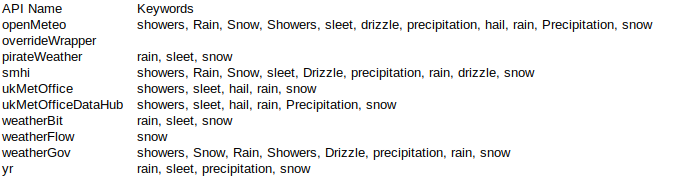
                                      3a85aa60-96f9-4494-9fb1-97200b351f75-image.png
                                      openMeteo showers, Rain, Snow, Showers, sleet, drizzle, precipitation, hail, rain, Precipitation, snow
                                      overrideWrapper
                                      pirateWeather rain, sleet, snow
                                      smhi showers, Rain, Snow, sleet, Drizzle, precipitation, rain, drizzle, snow
                                      ukMetOffice showers, sleet, hail, rain, snow
                                      ukMetOfficeDataHub showers, sleet, hail, rain, Precipitation, snow
                                      weatherBit rain, sleet, snow
                                      weatherFlow snow
                                      weatherGov showers, Snow, Rain, Showers, Drizzle, precipitation, rain, snow
                                      yr rain, sleet, precipitation, snow

                                      I did notice a lot of just plain “precipitation” and one future fix might be combining a broadcast of “precipitation” and negative degrees centigrades, as that would also indicate snow.

                                      Also thinking of adding rain functionality, after testing the module more.

                                      D 1 Reply Last reply Reply Quote 0
                                      • S Offline
                                        Sebi76 0 @cgillinger
                                        last edited by

                                        @cgillinger

                                        I want to run the module but actually i hang on the Problem with Openweather an the API V3.0.
                                        Do you have a Solution for your Module?

                                        C 1 Reply Last reply Reply Quote 0
                                        • D Offline
                                          det @cgillinger
                                          last edited by

                                          @cgillinger said in Let it snow now Magic Mirror:

                                          Also thinking of adding rain functionality

                                          Hello,
                                          that’s a wonderful idea, to combine the two.
                                          And then add “sunshine”, “clouds” (for overcast).
                                          Great. Thanks, keep it up…

                                          C 1 Reply Last reply Reply Quote 0
                                          • C Offline
                                            cgillinger @det
                                            last edited by cgillinger

                                            @det I actually did add rain: https://github.com/cgillinger/MMM-WeatherEffects

                                            Cheers,
                                            C

                                            1 Reply Last reply Reply Quote 0

                                            Hello! It looks like you're interested in this conversation, but you don't have an account yet.

                                            Getting fed up of having to scroll through the same posts each visit? When you register for an account, you'll always come back to exactly where you were before, and choose to be notified of new replies (either via email, or push notification). You'll also be able to save bookmarks and upvote posts to show your appreciation to other community members.

                                            With your input, this post could be even better 💗

                                            Register Login

                                            • 1
                                            • 2
                                            • 3 / 2
                                            • First post
                                              Last post
                                            Enjoying MagicMirror? Please consider a donation!
                                            MagicMirror created by Michael Teeuw.
                                            Forum managed by Sam, technical setup by Karsten.
                                            This forum is using NodeBB as its core | Contributors
                                            Contact | Privacy Policy