I just wanted to share with you this video of transparent displays from Samsung. I haven’t seen any in real life yet, but those look really impressive. This would make a MagicMirror even more magical 💸💸💸
 K
Offline
K
Offline
A New Chapter for MagicMirror: The Community Takes the Lead
Read the statement by Michael Teeuw here.
Read the statement by Michael Teeuw here.
KristjanESPERANTO
@KristjanESPERANTO
Working on
- https://modules.magicmirror.builders/
- removing electron-rebuild from 3rd Party Modules
- core modernisation
-
Transparent displays
-
RE: MMM-RAIN-MAP (new: version 2.x)
With the new
v3.1.0release, MMM-RAIN-MAP gets two new features:- You can now choose LibreWXR (https://librewxr.net/) as an alternative provider, which can be useful in regions with limited RainViewer coverage. You can even host it yourself :)
- A new
opacityoption makes it possible to adjust the radar layer, especially when using a dark map theme. @mdiorio Thanks for the suggestion!
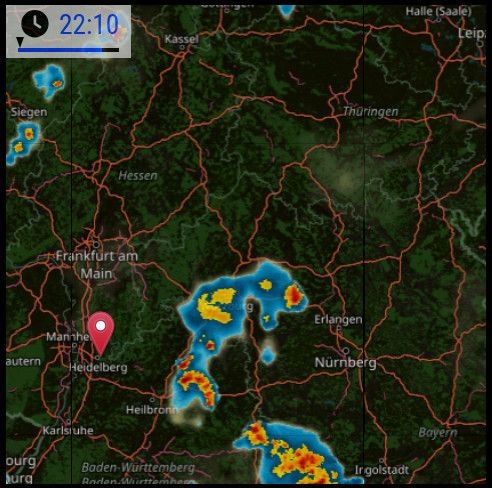
-
RE: Website Launched
I didn’t want to start a separate thread for this, but I didn’t want to leave it unmentioned here in the forum either 🙂 The website has undergone a major modernization. Mainly technical changes under the hood and the design has been retained except for a few details.
But there are also a few things that regular users of the site might notice: For example there is now a dark mode, responsiveness and accessibility have been improved, there is a favicon, an animated GIF showing the MagicMirror interface and faster loading times.
-
RE: Automatic checking of all MagicMirror² modules
@karsten13 said in Automatic checking of all MagicMirror² modules:
as most modules are hosted on github: You can get such info’s over their api.
Wow. That’s really nice! There are certainly some things that can be put to good use.
After you showed me the examples, I tinkered a bit with a simple frontend (without dependencies): check it out. I just have to fill it with real data.
-
Module list updates since the middle of December
Many changes have been made to the official module list since my last overview on December 12. I have created a new overview for these changes. Since not everyone regularly follows the changes to the list, such a list may be helpful for some of you.
This is the second post like this. I don’t know yet if I will create further in the future and even maybe automate the process a bit. I am quite up to date with the changes as I am working on a new unofficial module list which is based on the official list.
These are the changes from 12th December 2023 to 29th January 2024. The list may be incomplete, as some parts required manual work.
New in the list
Check out these new modules:
Title Author Description 1. MMM-AccuWeatherForecastDeluxe maxbethge Display weather information using the AccuWeather API. 2. MMM-EarthquakeMonitor rcollie This module allows you to display global earthquake data from the USGS. 3. MMM-DHT22 J0n4e Displays temperature/humidity readings from DHT22 sensor. 4. MMM-FranceInfo bugsounet [FR] Affiche les flux rss de franceinfo sur MagicMirror². 5. MMM-GPIO-HANDLER Sjohn21 Handle GPIO, Inputs (Buttons, PIR, Other) and Outputs (including PWM), with notifications from and to other modules. 6. MMM-ImagesPhotos roramirez Show images and photos. 7. MMM-Liquipedia-Matches buxxi Displays current and upcoming pro matches in different e-sport games from Liquipedia (dota2, cs, lol etc). 8. MMM-MarsWeather rcollie Display current weather on Mars as provided by The {MAAS} API. 9. MMM-MTG crisvdn Fetches a random MTG card on a configured interval and displays this. 10. MMM-MysqlData tabsl Connect to a MySQL database, run a select query (one value) and display the result. 11. MMM-OneDrive hermanho Display your photos from Microsoft OneDrive. 12. MMM-OneTracker seeshaughnessy Use OneTracker app to deliveries/packages by forwarding from any email address. 13. MMM-OTIS Gomez0015 Machine learning AI to take input and pass it through the AI to get an answer, best use is when combined with other modules to have full control over MagicMirror² with voice. 14. MMM-PhoneDetect Pierre Gode Automatically controls the screen’s power based on the presence of specified phones or devices within the network. 15. MMM-Snake superuserx Play the retro game Snake on your mirror using your smartphone. 16. MMM-TomTomCalculateRouteTraffic teemoo7 Calculate routes with TomTom API (free), and display travel time with traffic delays. 17. MMM-WebSpeechTTS KristjanESPERANTO A Text-To-Speech module which uses the Web Speech API of the browser. It is in an early stage of development. So far only German is supported. Maintainer changed
If you use one of this modules, you should consider to switch to the new repository.
Title Author Description 1. MMM-EFA-departures sourceforge807 Station monitor for local transport companies using the EFA system. 2. MMM-Dad-Jokes brucetony Simple display of dad jokes from icanhazdadjoke.com. Marked as outdated
If you use one of these modules, consider looking for an alternative or adopting the module as a maintainer.
Title Author Description State 1. MMM-GoogleAssistant gauravsacc Google Assistant integration using python library. Activated using hotword ‘Ok Google’. Abandoned. No reactions to issues since years. Seems not to work anymore. 2. MMM-Glance eouia Show specific module(s) and hide others for a some time by notification or command. AbandonedArchived. Repo has been archived at 2020-06-10.3. Hello-Lucy Mykle1 Hide/Show individual modules and pages of modules with custom audio responses that you create. Abandoned. No reactions to issues since years. The installation instructions do not work with up-to-date systems. 4. MMM-NOAA3 cowboysdude Different providers for users to choose from. Shows current plus 3 day forecast. Mouseover shows forecast, with Air, UV, Humidity, Sunrise and Set. Abandoned. No reactions to issues and PRs since years. 5. MMM-PIR-Sensor-Lite Grena A module managing monitor with PIR motion sensor (automatic standby when presence isn’t detected). Abandoned. Repo has been archived at 2024-01-10. There seems to be an active fork, but the clone command has not yet been adapted. 6. MMM-SFMuniBusTimes vikramraja1995 Displays the ETA of San Francisco’s MUNI Bus and Rail systems based on the given stops and routes. Abandoned. The API used no longer works, there is a new API but the developer no longer seems to be active. 7. MMM-SORT Mykle1 Static Or Rotating Tides module. Replaces/combines MMM-SimpleTides and MMM-StaticTides. Abandoned. No reactions to issues since years. Missing instructions to install ‘request’. 8. MMM-SunRiseSet Mykle1 More information than you ever wanted to know about the rising and setting of the sun. Abandoned. No reactions to issues since years. Missing instructions to install ‘request’. 9. wuforecast MattLugar Weather Underground Forecast Module Retrieves forecast from Weather Underground. Also adds a percentage probability of precipitation to forecast display. Deprecated. Wunderground API isn’t working anymore. 10. MMM-WunderGround RedNax67 Display weather based on wunderground API. Deprecated. Wunderground API isn’t working anymore. Check out MMM-MyWeather which is a fork with another API. 11. MMM-wundergroundBar Fifteen15Studios Minimalist Weather for the bottom_bar or thirds position of your mirror. Deprecated. Wunderground API isn’t working anymore. Help request
Can someone with an Meteoblue API key tell whether module MMM-meteoblueCurrent still works?
-
MMM-page-indicator now easier to style
MMM-page-indicator has been updated. The main change is that there are new classes that make it easier to customize the styling of the indicators and a new styling section in the README that describes some styling examples. Like this:

or this:

So if you use MMM-page-indicator, check it out 😀
The styling was also possible before, but was a little more complicated and the examples certainly help to develop your own cool styles.
Thanks to @mumblebaj for getting this rolling!
-
RE: Automatic checking of all MagicMirror² modules
I made some progress: https://kristjanesperanto.github.io/MagicMirror-3rd-Party-Modules/
There’s still a lot on the to-do list and some things aren’t working quite smoothly yet. But the website is now filled with data from all modules from the wiki.
When changes are made in the wiki, it doesn’t take much effort to update the data in this project - I just have to run a few scripts. Furthermore, no manual work is necessary.
-
The most popular 3rd party modules
Hello everyone!
Have you ever wondered what the most popular MagicMirror² modules are? Until now it wasn’t easy to find out. Recently, I added a new sorting feature to the new module list I am working on. It allows you to sort by GitHub stars! So now it’s easier than ever to find out which modules are the community’s favorites 😀
At the moment the top ten modules are:
- MMM-Remote-Control (476 stars)
- mmpm (168 stars)
- MMM-Screencast (160 stars)
- MMM-GooglePhotos (154 stars)
- MMM-Todoist (147 stars)
- MMM-Traffic (139 stars)
- MMM-BackgroundSlideshow (130 stars)
- MMM-pages (102 stars)
- MMM-ModuleScheduler (96 stars)
- WallberryTheme (94 stars)
Why is it important to star modules? Starring modules on GitHub is a great way to show your appreciation for the developers’ hard work. It also helps other users find popular modules.
How can I star a module? To star a module, simply go to the module’s GitHub page and click the “Star” button.
I encourage you to star all the modules you use and appreciate ⭐ And don’t forget to give the MagicMirror project itself a star! 🙃
I hope this new sorting option helps you find the perfect modules for your MagicMirror² setup!
Your feedback is welcome: Would you have expected these modules to be in the top 10? Which modules are not in the top 10 and should get more stars in your opinion?
-
RE: MMM-GoogleMapsTraffic error removal
@chrisfr1976 Nice work! Since there are much older unresponded Pull Requests, I suggest to replace the original module with your fork on the module list. If the upstream project gets active again, we can undo that change in the list. What do you think?
-
RE: Developer Wanted To Modify Default Newsfeed Module
@MMRIZE Since more than one user is using MMM-AnotherNewsFeed, would it make sense to add it to the list of 3rd party modules? :slightly_smiling_face:
-
RE: Anybody that still provides good two way mirrors in europe?
@canlio Yes, it would be great if you added your research findings there; others will benefit from them later :)
-
RE: Module MMM-pages not working after Upgrading to 2.38
@p1lspeda Thanks for the update! Could you share your current MMM-pages config and the console messages from startup until you switch pages manually?
-
RE: problème youtube MMM-ISS-Live
@manu85340 Hi, that message comes from YouTube itself, so your Electron settings are probably fine. Please make sure no DNS filter (e.g. Pi-hole or AdGuard Home) is active, since the video only plays for me once Pi-hole is switched off. Then try this config:
{
  module: "MMM-ISS-Live",
  position: "top_left",
  config: {
    url: "https://youtu.be/fO9e9jnhYK8"
  }
},
If you use a different
urlat the moment, it may be a stream whose owner disabled embedding. Does the video play with this one? -
RE: Module MMM-pages not working after Upgrading to 2.38
@p1lspeda Could you share the first error shown in the browser console? Where exactly does Hafas display
UNDEFINED, and isstationNameset?Which versions of MMM-pages, MMM-PublicTransportHafas and Node.js are you running?
Which MMM-Wallpaper module are you using: kolbyjack’s or jupadin’s?
-
RE: MMM-OneCallWeather
MMM-ISS-Livestill works on my setup (when I disable my pihole).Your shared config parts are a mess.
unitsappears twice in your config; if those curly quotes are in the actual file, please replace them with straight quotes.sudo apt install -y libvlc-dev libvlccore-dev vlc
Why did you think installing this helps?
Since this isn’t related to
MMM-OneCallWeather, please open a separate forum topic or a GitHub issue forMMM-ISS-Liveand include the exact player error. -
v2.38.0
Release Notes
Thanks to: @ago1776, @alkank, @Antra, @Blackspirits, @deBasMan21, @flightlesstux, @i-xul, @jamalkamaladdin, @khassel, @KristjanESPERANTO, @MannXo, @pascalpfammatter, @rejas
⚠️ This release needs nodejs version >=22.22.2 <23 || >=24
Compare to previous Release v2.37.0
[core]
- Prepare Release 2.38.0 (#4285)
- fix: let Electron select the Wayland display (#4268)
- fix(http): improve access error messages (#4281)
- fix: always redact client configuration (#4275)
- refactor: migrate browser scripts to ESM (#4272)
- refactor: convert animateCSS to ES module (#4266)
- use filter instead of find to get all allowed secrets when multiple instances of a module are active (#4265)
- refactor: convert notificationFx to ES module (#4263)
- refactor: enforce function expression style (#4262)
- fix: validate client IP behind trusted proxies (#4261)
- prefer arrow over function (#4252)
- refactor(utils): simplify configuration validation and error handling (#4240)
- fix(server): validate request origins (#4234)
- remove codeql warning (#4231)
- refactor(socket): use direct ESM import in main (#4225)
- refactor(socket): load Socket.IO client via ESM (#4224)
- style: simplify Electron startup checks (#4213)
- refactor: consolidate electron bootstrap into async function (#4210)
- refactor(module): simplify and fix configMerge (#4203)
- refactor: convert Translator to ES module (#4202)
- docs: add CodeQL review steps and restructure after-release checklist (#4200)
- refactor: centralize server port resolution (#4198)
- refactor: use const instead of let for variable declarations (#4196)
- refactor: replace Loader object with named exports (#4195)
- set next release dev number
- refactor(eslint): enforce prefer-arrow-callback rule (#4251)
- refactor(http_fetcher): make dynamic URL handling explicit (#4282)
- refactor: use explicit global config (#4233)
- expand logic of hideConfigSecrets, add more tests (#4229)
- refactor: make browser startup more explicit (#4214)
[dependencies]
- update dependencies (#4276)
- update dependencies incl. electron to v44 (#4250)
- chore: update eslint incl. plugins + review rules (#4236)
- Bump actions/stale from 10 to 11 (#4215)
- update dependencies (#4221)
- Bump actions/setup-node from 6 to 7 (#4204)
- chore: update dependencies (#4201)
- Bump electron from 42.5.2 to 43.0.0 (#4192)
[modules/alert]
- Move alert translations into common translations (#4284)
[modules/calendar]
- Fixes issue 4243: Ensure while loop in calendar module does not get stuck when no entries (#4244)
- fix(calendar): escape HTML in event title and location (#4260)
- calendar: allow custom events to override symbol class (#4257)
- Fix calendar crash when yearmatchgroup regex does not match (#4239)
- fix(calendar): keep yearly events in DTSTART’s month when BYMONTH is missing (#4222)
- fix(calendar): correct multi-day slice day counts (#4232)
- chore: update dependencies + adapt calendar tests (#4211)
- fix(calendar): sliced multi-day events start at 00:00, not 23:59 (#4208)
[modules/newsfeed]
- newsfeed: don’t use cors url in njk template (#4279)
- refactor(newsfeed): extract feed item normalization into feeditem.js (#4271)
- refactor(newsfeed): replace feedme lib with feedparser (#4269)
- newsfeed: fix allowedBasicHtmlTags (#4258)
- newsfeed: update checkArticleUrl (#4256)
[modules/updatenotification]
- feat(updatenotification): implement trusted module configuration for update commands (#4259)
[modules/weather]
- feat: add FMI weather provider (#4278)
- feat(weather): enable CSS ordering for forecast and hourly columns (#4118)
- fix(weather): respect initial load delay (#4254)
- fix(weather): restrict provider loading to the providers directory (#4235)
- refactor(weather): extract WeatherProvider base class (#4228)
[testing]
- ci: fail lint on warnings (#4230)
- add test if install works for minimal node version (#4197)
[translation]
- feat(i18n): add Azerbaijani translation (#4283)
- feat(i18n): complete Turkish translations (#4277)
- Improve Portuguese translations (#4274)
-
RE: MMM-OneCallWeather
Could you share a screenshot? Are all weather icons stretched, or only some? Could you temporarily disable your custom CSS and check whether the icons are still stretched?
-
RE: Newsfeed Fetcher Error. Authorization Failed.
I don’t see a solution in the default module either, but I’m preparing a PR to improve the error message. The API key thing is a bit misleading.
-
RE: New weather provider: FMI Open Data for the built-in weather module
@i-xul Great! One more local provider without an API key! It will be in the next release :)