Read the statement by Michael Teeuw here.
"npm run start" does not work. Returns "sh 1 ./node_modules/.bin/electron not found"
-
“sh 1 ./node_modules/.bin/electron not found”
This is what I get when I attempt “npm run start” on my Pi3 b with Raspi OS and following the instructions from the documentation.
Initially had issues with the npm and node.js versions. I had to start from scratch with the SD card and update/upgrade then some “global” installation to get lates version of node.js.
Now this is and issue and I did global install electron but it was after the magicmirror install script…Do I need to install electron before the magicmirror install script? I was under the impression electron was installed as a part of that process.
-
I appreciate all the hard work and assistance. So I believe it is working now. So I rebooted the Raspi and when it came up it showed there were updates. I allowed those updates to install. I then went into terminal and sudo update/sudo upgrade. After that, your script worked as advertised.
Now I did not get through it all until this morning and have not been able to launch it again. I do know the pm2 works because it kept restarting MM every few seconds when I was trying to shut down the Raspi. I will mess with it tonight after i figure out how to disable the autostart. I believe it was “pm2 stop mm” or “pm2 stop MagicMirror”.
-
@tony-72 global npm install put the files OUTSIDE the magicmirror folder
so ./node_modules/.bin/electron
is the same as
$HOME/MagicMirror/node_modules/.bin/electronthe file is not there
IF you use my install script… it does everthing, BUT sometimes npm doesn’t install electron for some reason…
if you want to start NOW with the script, I recommend starting with a new SD card flash
then running the script.you can try manually (which usualy succeeds)
cd ~/MagicMirror npm install electron@31.6.0 -
@sdetweil First, thanks for such a speedy response, I will attempt your script when I get home. I did see it as the alternative but wanted to try the supposedly straight forward step by step. So I will start over with a new SD card flash and follow your script, at which point will I need to use the manual method you referenced above?
-
@tony-72 said in "npm run start" does not work. Returns "sh 1 ./node_modules/.bin/electron not found":
at which point will I need to use the manual method you referenced above
maybe
we made electron install optional, as its not available on pi0w(armv6l) anymore
and the install would fail if not optionaland I made a setup for using another browser over the MM server instead
(and use it when I detect electron wasn’t installed, see the external_browser config at the bottom of the scripts page) -
Awesome, I will update once I have an opportunity to try this. Thank you.
-
@sdetweil, Ok, so this is what I get when I ran your script as suggested…
install log being saved to /home/Hastyhome/install.log
Updating packages …
W: Problem unlinking the file /var/lib/apt/lists/partial/.apt-acquire-privs-test.IzBHn1 - IsAccessibleBySandboxUser (74: Bad message)
W: Problem unlinking the file /var/lib/apt/lists/partial/.apt-acquire-privs-test.s8By5q - IsAccessibleBySandboxUser (74: Bad message)
W: Problem unlinking the file /var/lib/apt/lists/partial/deb.debian.org_debian_dists_bookworm_InRelease - PrepareFiles (74: Bad message)
W: Problem unlinking the file /var/lib/apt/lists/partial/deb.debian.org_debian-security_dists_bookworm-security_InRelease - PrepareFiles (74: Bad message)
W: Problem unlinking the file /var/lib/apt/lists/partial/deb.debian.org_debian-security_dists_bookworm-security_Release - PrepareFiles (74: Bad message)
E: The repository ‘http://deb.debian.org/debian-security bookworm-security Release’ no longer has a Release file.
W: Problem unlinking the file /var/lib/apt/lists/partial/deb.debian.org_debian_dists_bookworm-updates_main_binary-arm64_Packages.xz - PrepareFiles (74: Bad message)
W: Problem unlinking the file /var/lib/apt/lists/partial/deb.debian.org_debian_dists_bookworm-updates_main_binary-armhf_Packages.xz - PrepareFiles (74: Bad message)
W: Problem unlinking the file /var/lib/apt/lists/partial/deb.debian.org_debian_dists_bookworm-updates_main_binary-arm64_Packages.xz - PrepareFiles (74: Bad message)
W: Problem unlinking the file /var/lib/apt/lists/partial/deb.debian.org_debian_dists_bookworm-updates_main_binary-armhf_Packages.xz - PrepareFiles (74: Bad message)
W: Problem unlinking the file /var/lib/apt/lists/partial/deb.debian.org_debian_dists_bookworm-updates_main_binary-arm64_Packages - PrepareFiles (74: Bad message)
W: Problem unlinking the file /var/lib/apt/lists/partial/deb.debian.org_debian_dists_bookworm-updates_main_binary-arm64_Packages - PrepareFiles (74: Bad message)
Update failed, retrying installation …
Installing helper tools …
W: Problem unlinking the file /var/lib/apt/lists/partial/.apt-acquire-privs-test.Kd9RjG - IsAccessibleBySandboxUser (74: Bad message)
W: Problem unlinking the file /var/lib/apt/lists/partial/.apt-acquire-privs-test.Ipb98I - IsAccessibleBySandboxUser (74: Bad message)
W: Problem unlinking the file /var/lib/apt/lists/partial/deb.debian.org_debian_dists_bookworm_InRelease - PrepareFiles (74: Bad message)
W: Problem unlinking the file /var/lib/apt/lists/partial/deb.debian.org_debian-security_dists_bookworm-security_InRelease - PrepareFiles (74: Bad message)
W: Problem unlinking the file /var/lib/apt/lists/partial/deb.debian.org_debian-security_dists_bookworm-security_Release - PrepareFiles (74: Bad message)
E: The repository ‘http://deb.debian.org/debian-security bookworm-security Release’ no longer has a Release file.
W: Problem unlinking the file /var/lib/apt/lists/partial/deb.debian.org_debian_dists_bookworm-updates_main_binary-armhf_Packages.xz - PrepareFiles (74: Bad message)
W: Problem unlinking the file /var/lib/apt/lists/partial/deb.debian.org_debian_dists_bookworm-updates_main_binary-arm64_Packages.xz - PrepareFiles (74: Bad message)
W: Problem unlinking the file /var/lib/apt/lists/partial/deb.debian.org_debian_dists_bookworm-updates_main_binary-armhf_Packages.xz - PrepareFiles (74: Bad message)
W: Problem unlinking the file /var/lib/apt/lists/partial/deb.debian.org_debian_dists_bookworm-updates_main_binary-arm64_Packages.xz - PrepareFiles (74: Bad message)
W: Problem unlinking the file /var/lib/apt/lists/partial/deb.debian.org_debian_dists_bookworm-updates_main_binary-arm64_Packages - PrepareFiles (74: Bad message)
W: Problem unlinking the file /var/lib/apt/lists/partial/deb.debian.org_debian_dists_bookworm-updates_main_binary-arm64_Packages - PrepareFiles (74: Bad message) -
@tony-72 what image are you using? on what device?
i have not seen that on any system
-
@sdetweil Well thats disheartening, lol. I am rebooting, will sudo apt-get update and upgrade again. Then I will try your script again to see if I get anything different.
-
@sdetweil I am using the Raspberry pi OS 64 (recommended) on a Raspberry pi 4 model B. Using a micro SD and Raspberry pi imager to flash the SD card.
-
@tony-72 well, what a mess
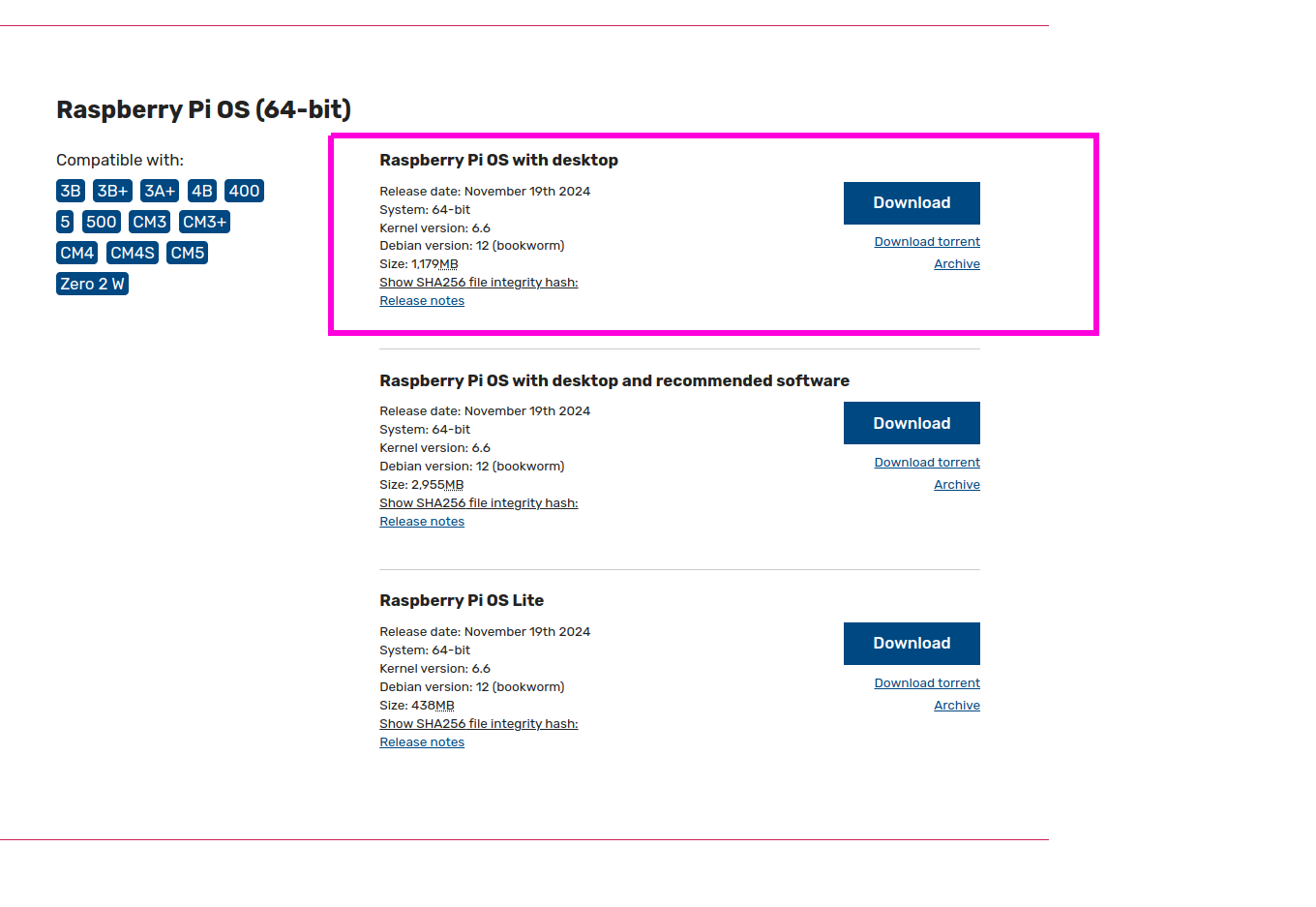
the full (recommended) 64bit image for me boots to a Busybox prompt, tried 3 times w the rasp imager and another …
SO, had to do the other 64 bit image (not full)
then I had sd card problems… (I was working on my pi4 behind the 7 in touch screen which crashed the other day after a power failure… ) that sd card is trash
so I used another… SO slow… (sd card toast)
so I used ANOTHER… finally…
but apt has some problem so reflashed AGAINthis time it installed correctly…
BUT… I didnt see the problems you meantioned at all
this is the image I used
-
I appreciate all the hard work and assistance. So I believe it is working now. So I rebooted the Raspi and when it came up it showed there were updates. I allowed those updates to install. I then went into terminal and sudo update/sudo upgrade. After that, your script worked as advertised.
Now I did not get through it all until this morning and have not been able to launch it again. I do know the pm2 works because it kept restarting MM every few seconds when I was trying to shut down the Raspi. I will mess with it tonight after i figure out how to disable the autostart. I believe it was “pm2 stop mm” or “pm2 stop MagicMirror”.
-
@tony-72 pm2’s job is to keep the app running, so if it crashes pm2 restarts
pm2 stop all
pm2 logs --lines=50
to look at the logs
i strongly suggest stopping pm2 use while you install and test modules
use npm start in the MagicMirror folder, ctrl-c to end, or ctrl-q on the browser
this way you can see the messages from npm start easier
-
Awesome and thanks, everything working as advertised at the moment. About to attempt my first module install and config. Question, is there a text editor installed with your script? I was trying to figure out how to get VScode installed and where to install it, then realized there may be one on here already. What do you suggest, I have zero coding experience but I understand the concept and know a little from studying Cybersecurity.
-
@tony-72 nano is the built in text editor, its text only
vscode goes in system folders, has nothing to do with MM
you could try my MMM-Config module which generates a form for config…
https://github.com/sdetweil/MMM-Configalso see this
https://forum.magicmirror.builders/topic/19193/best-way-to-develop-from-windows-machinesee the first link in my sig below for installing modules… (I didn’t write it)
-
S sdetweil has marked this topic as solved on
Hello! It looks like you're interested in this conversation, but you don't have an account yet.
Getting fed up of having to scroll through the same posts each visit? When you register for an account, you'll always come back to exactly where you were before, and choose to be notified of new replies (either via email, or push notification). You'll also be able to save bookmarks and upvote posts to show your appreciation to other community members.
With your input, this post could be even better 💗
Register Login