Read the statement by Michael Teeuw here.
MMM-MyHomeWizard
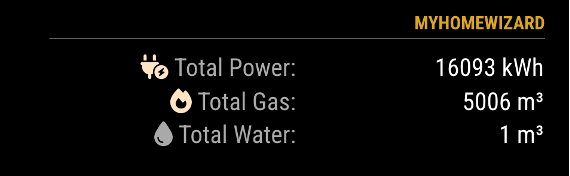
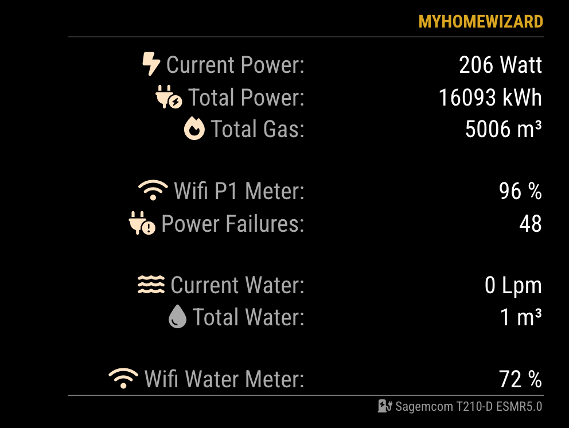
-
@vansman
The first thing I see in your configuration isposition: 'right'As far as I know, that doesn’t work in MagicMirror and you should get an error when you’re loading MagicMirror.
[2026-02-17 18:10:22.072] [WARN]  [check_config] Module 5 ("MMM-MyHomeWizard") uses unknown position: "right"
[2026-02-17 18:10:22.073] [WARN]  [check_config] Known positions are: fullscreen_below, top_bar, top_left, top_center, top_right, upper_third, middle_center, lower_third, bottom_bar, bottom_left, bottom_center, bottom_right, fullscreen_above
Can you change this to
top_rightand try what does happens?Checking your IP Addresses:
You can check if your IP Addresses give information. Put in the next URL in a browser. If the IP Address is correct, you should get something like:P1 Meter:
http://192.168.178.152/api/v1/data/
Water:http://192.168.101.14/api/v1/data/Result:
  "wifi_ssid": "WiFi Network Name",
  "wifi_strength": 100,
  "smr_version": 50,
  "meter_model": "Sagemcom T210-D ESMR5.0",
  "unique_id": "ID",
  "active_tariff": 2,
  "total_power_import_kwh": 18833.243,
  "total_power_import_t1_kwh": 10804.883,
  "total_power_import_t2_kwh": 8028.36,
  "total_power_export_kwh": 0.166,
  "total_power_export_t1_kwh": 0.166,
  "total_power_export_t2_kwh": 0,
  "active_power_w": 398,
  "active_power_l1_w": 257,
  "active_power_l2_w": 27,
  "active_power_l3_w": 113,
  "active_voltage_l1_v": 230,
  "active_voltage_l2_v": 231,
  "active_voltage_l3_v": 230,
  "active_current_a": 1.726,
  "active_current_l1_a": 1.117,
  "active_current_l2_a": 0.117,
  "active_current_l3_a": 0.491,
  "voltage_sag_l1_count": 4,
  "voltage_sag_l2_count": 4,
  "voltage_sag_l3_count": 4,
  "voltage_swell_l1_count": 0,
  "voltage_swell_l2_count": 0,
  "voltage_swell_l3_count": 0,
  "any_power_fail_count": 54,
  "long_power_fail_count": 9,
  "total_gas_m3": 5595.841,
  "gas_timestamp": 260217182000,
  "gas_unique_id": "ID",
  "external": [
    {
      "unique_id": "ID",
      "type": "gas_meter",
      "timestamp": 260217182000,
      "value": 5595.841,
      "unit": "m3"
    }
  ]
}
{ "wifi_ssid": "WiFi Network Name", "wifi_strength": 86, "total_liter_m3": 19.652, "active_liter_lpm": 0, "total_liter_offset_m3": 0 }(still trying to learn JS, but not afraid to ask and AI is my best friend) ☺
-
@htilburgs - can you please tell me how do you measure your gas consumption? Do you use any device that monitor the Gas counter?
-
@MZ-BER
It is measured with the P1 meter.
It does both. -
@htilburgs Api is working. Actually i am using an older version of mmm.homewizard wich is working. I see that your version can provide more data including the watermeter. When i use config file below is see the data from mmm.homewizard but mmm.myhomewizard gives Header plus Loading…
I changed the position to bottom_right but that doesn’t have effect. For the older version i use only right wich works in my config ., { module: "MMM-HomeWizard", position: "right", header: "Electricity & Gas", config: { url: "http://192.168.178.152/api/v1/data", updateInterval: 2000 } }, { module: 'MMM-MyHomeWizard', position: 'bottom_right', header: 'HomeWizard', disabled: false, config: { P1_IP: "192.168.178.152", // IP Address HomeWizard P1 meter WM_IP: "192.168.101.14", // IP Address HomeWizrd Water meter - Remove when not used extraInfo: true, // Show extra information from P1 meter currentPower: true, // Show the current Power Consumption currentWater: true, // Show the current Water Consumption showGas: true, // Show the Gas option showFooter: true, // Show footer (name Power Meter) updateInterval: 5000, // Update every 5 seconds maxWidth: "500px", // Max Module width showLastUpdate: true, // Show the last update for the History Data in the footer showDeltaPower: true, // Show Delta between History and Current data (Power) showDeltaGas: true, // Show Delta between History and Current data (Gas) showDeltaWater: true // Show Delta between History and Current data (Water) } }, {I tried also 192.168.178.152/api/v1/data but that doesn’t work also.
-
@vansman
In the Homewizard app on your phone, you have to activatie the use of local api. What I think is strange is that when you go tohttp://192.168.178.152/api/v1/datathat you don’t get any data. This mechanisme is the same as in MMM-Homewizard (see the config for your first app)
Activating Local API
Go to Settings > Meters > ‘‘Your meter’’, and enable Local API for the P1 Meter and/or the Water Meter at the botom of the page.The same for the Watermeter. If they are off, they don’t work.