MagicMirror Forum
    • Recent
    • Tags
    • Unsolved
    • Solved
    • MagicMirror² Repository
    • Documentation
    • 3rd-Party-Modules
    • Donate
    • Discord
    • Register
    • Login
    A New Chapter for MagicMirror: The Community Takes the Lead
    Read the statement by Michael Teeuw here.

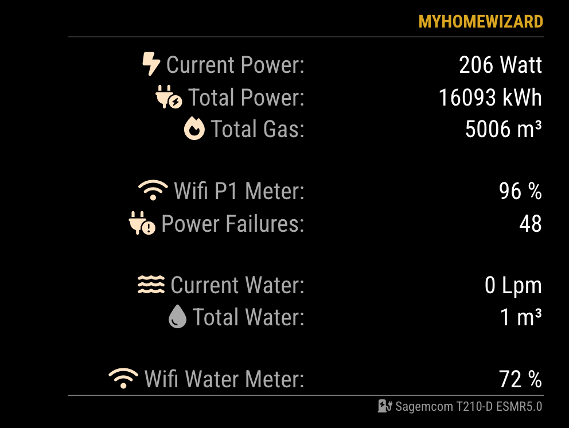
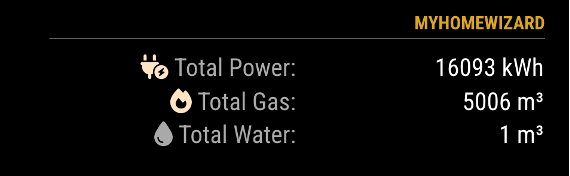
    MMM-MyHomeWizard
    Scheduled Pinned Locked Moved Productivity
    19 Posts 4 Posters 1.2k Views 4 Watching
    Loading More Posts
    • Oldest to Newest
    • Newest to Oldest
    • Most Votes
    Reply
    • Reply as topic
    Log in to reply
    This topic has been deleted. Only users with topic management privileges can see it.
    • MZ-BERM Offline
      MZ-BER @htilburgs
      last edited by

      @htilburgs - can you please tell me how do you measure your gas consumption? Do you use any device that monitor the Gas counter?

      htilburgsH 1 Reply Last reply Reply Quote 0
      • htilburgsH Online
        htilburgs @MZ-BER
        last edited by

        @MZ-BER
        It is measured with the P1 meter.
        It does both.

        (still trying to learn JS, but not afraid to ask and AI is my best friend) ☺

        1 Reply Last reply Reply Quote 0
        • V Offline
          vansman @htilburgs
          last edited by

          @htilburgs Api is working. Actually i am using an older version of mmm.homewizard wich is working. I see that your version can provide more data including the watermeter. When i use config file below is see the data from mmm.homewizard but mmm.myhomewizard gives Header plus Loading…
          I changed the position to bottom_right but that doesn’t have effect. For the older version i use only right wich works in my config .

          ,
            
            
                  {
                          module: "MMM-HomeWizard",
                          position: "right",
                          header: "Electricity & Gas",
                          config: {
                                  url: "http://192.168.178.152/api/v1/data",
                                  updateInterval: 2000
                          }
                  },
          	
          	{
            module: 'MMM-MyHomeWizard',
            position: 'bottom_right',
            header: 'HomeWizard',
            disabled: false,
            config: {
          		P1_IP: "192.168.178.152",	    // IP Address HomeWizard P1 meter
          		WM_IP: "192.168.101.14",	    // IP Address HomeWizrd Water meter - Remove when not used
          		extraInfo: true, 	    // Show extra information from P1 meter
          		currentPower: true,	// Show the current Power Consumption
          		currentWater: true,	// Show the current Water Consumption
          		showGas: true,		    // Show the Gas option
          		showFooter: true,	    // Show footer (name Power Meter)
          		updateInterval: 5000,   // Update every 5 seconds
          		maxWidth: "500px",	    // Max Module width
                  showLastUpdate: true,	// Show the last update for the History Data in the footer
                  showDeltaPower: true,	// Show Delta between History and Current data (Power)
                  showDeltaGas: true,		// Show Delta between History and Current data (Gas)
                  showDeltaWater: true	// Show Delta between History and Current data (Water)
            		}
          },
              
            
            {
          

          I tried also 192.168.178.152/api/v1/data but that doesn’t work also.

          htilburgsH 1 Reply Last reply Reply Quote 0
          • htilburgsH Online
            htilburgs @vansman
            last edited by htilburgs

            @vansman
            In the Homewizard app on your phone, you have to activatie the use of local api. What I think is strange is that when you go to

            http://192.168.178.152/api/v1/data
            

            that you don’t get any data. This mechanisme is the same as in MMM-Homewizard (see the config for your first app)

            Activating Local API
            Go to Settings > Meters > ‘‘Your meter’’, and enable Local API for the P1 Meter and/or the Water Meter at the botom of the page.

            The same for the Watermeter. If they are off, they don’t work.

            (still trying to learn JS, but not afraid to ask and AI is my best friend) ☺

            htilburgsH 1 Reply Last reply Reply Quote 0
            • htilburgsH Online
              htilburgs @htilburgs
              last edited by

              @vansman
              Did it work?

              (still trying to learn JS, but not afraid to ask and AI is my best friend) ☺

              V 2 Replies Last reply Reply Quote 0
              • V Offline
                vansman @htilburgs
                last edited by

                @htilburgs Progress! When i remove the line (IP adress) of the watermeter i see the data of the P1 meter.
                It looks like Homewizard create its own network in the 192.168.101.-- range. I also have an KWH1 meter wich also has an 192.168.101 adress. What i don’t understand how MagicMirror connects to the other ip network?
                And if i get the watermeter to work, is it also easy to add de KW1 meter also?

                1 Reply Last reply Reply Quote 0
                • V Offline
                  vansman @htilburgs
                  last edited by

                  @htilburgs I think i found my problem. The Watermeter and the KWh1 meter are connected to the guest network. So that makes sense that they on a different network. I gonna change it and let you know.

                  htilburgsH V 2 Replies Last reply Reply Quote 0
                  • htilburgsH Online
                    htilburgs @vansman
                    last edited by

                    @vansman
                    Oké, sounds good. Succes!

                    (still trying to learn JS, but not afraid to ask and AI is my best friend) ☺

                    1 Reply Last reply Reply Quote 0
                    • V Offline
                      vansman @vansman
                      last edited by

                      @htilburgs P1 and Water works now. Thanks for your help and making this module.
                      I’ve also looked for the KWH enerymeter data myself but i get no data when i try to see it in the browser. Manual for the api on Homewizard site talks about V1 and V2. That for later :-)

                      I also add (Ai) current_voltage data on my screen, maybe nice to add native in your code.

                      htilburgsH 1 Reply Last reply Reply Quote 0
                      • htilburgsH Online
                        htilburgs @vansman
                        last edited by

                        @vansman said in MMM-MyHomeWizard:

                        current_voltage data

                        What do you mean with current_voltage data?
                        When I look into HomeWizard, I don’t see this.

                        If you mean active_voltage, than I don’t see any use to know that my voltage is 230V, because if I’m right than this never changes (I hope ;-))


                        (still trying to learn JS, but not afraid to ask and AI is my best friend) ☺

                        V 1 Reply Last reply Reply Quote 0
                        • 1
                        • 2
                        • 1 / 2
                        • First post
                          Last post
                        Enjoying MagicMirror? Please consider a donation!
                        MagicMirror created by Michael Teeuw.
                        Forum managed by Sam, technical setup by Karsten.
                        This forum is using NodeBB as its core | Contributors
                        Contact | Privacy Policy