MagicMirror Forum
    • Recent
    • Tags
    • Unsolved
    • Solved
    • MagicMirror² Repository
    • Documentation
    • 3rd-Party-Modules
    • Donate
    • Discord
    • Register
    • Login
    A New Chapter for MagicMirror: The Community Takes the Lead
    Read the statement by Michael Teeuw here.

    MMM-MyHomeWizard

    Scheduled Pinned Locked Moved Productivity
    12 Posts 4 Posters 1.1k Views 4 Watching
    Loading More Posts
    • Oldest to Newest
    • Newest to Oldest
    • Most Votes
    Reply
    • Reply as topic
    Log in to reply
    This topic has been deleted. Only users with topic management privileges can see it.
    • htilburgsH Offline
      htilburgs
      last edited by

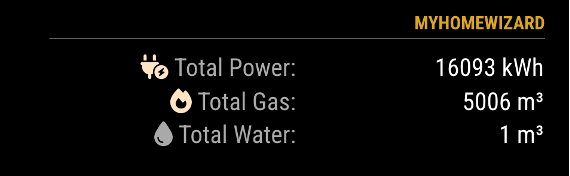
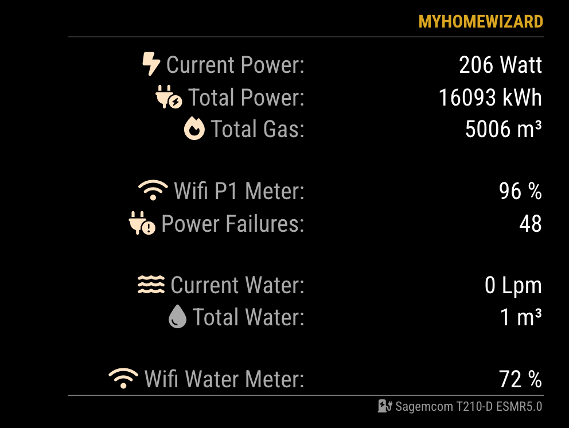
      MMM-MyHomeWizard is a MagicMirror module that shows the information from the HomeWizard P1 meter and/or the HomeWizard WaterMeter.
      The HomeWizard P1 Meter gives you detailed insight into your gas consumption, electricity consumption and solar surplus.
      The HomeWizard Watermeter gives you live insight into your water consumption.

      Homepage: MMM-MyHomeWizard

      aee9f9cb-1285-4eea-a266-af54a0e06b66-image.png

      834e222c-910a-4639-91e7-ef53675a5c52-image.png

      (still trying to learn JS, but not afraid to ask and AI is my best friend) ☺

      S 1 Reply Last reply Reply Quote 1
      • S Offline
        sdetweil @htilburgs
        last edited by

        @htilburgs that would be cool… sadly in the US we don’t have general access to the data

        Sam

        How to add modules

        learning how to use browser developers window for css changes

        htilburgsH 1 Reply Last reply Reply Quote 0
        • htilburgsH Offline
          htilburgs @sdetweil
          last edited by

          @sdetweil In the netherlands, we do have that!
          Fortunately, otherwise I would not have been able to write this MagicMirror module ;-)

          (still trying to learn JS, but not afraid to ask and AI is my best friend) ☺

          htilburgsH 1 Reply Last reply Reply Quote 1
          • htilburgsH Offline
            htilburgs @htilburgs
            last edited by htilburgs

            Update to v2.0.0

            In this updated version, the data is saved daily at 11:59 p.m. This makes it possible to see the current difference during a day.
            You can enable and disable this option via the showDeltaXXXX options in config.js.

            Module page: MMM-MyHomeWizard

            (still trying to learn JS, but not afraid to ask and AI is my best friend) ☺

            1 Reply Last reply Reply Quote 0
            • V Offline
              vansman
              last edited by

              I installed the module and edit the config file including the ip adressen from the P1 and the watermeter.
              When i start MagicMirror is see de header Homewizard but it says Loading…
              Any suggetions what this could be?

              htilburgsH 1 Reply Last reply Reply Quote 0
              • htilburgsH Offline
                htilburgs @vansman
                last edited by

                @vansman
                Good morning. This can be a lot of things. You provided no info.
                Can you pleaase post your config (without any personal info)
                When you start MM with PM2, than please stop it.
                Go to ~/MagicMirror folder and start npm start dev and look if there are any errors.

                (still trying to learn JS, but not afraid to ask and AI is my best friend) ☺

                V 1 Reply Last reply Reply Quote 0
                • V Offline
                  vansman @htilburgs
                  last edited by

                  @htilburgs Good day, I don’t start MM with PM2 .

                  This is a part in of my config.js

                  {
                  		module: "MMM-DHT-Sensor",
                  		position: "bottom_right",
                  		header: "Badkamer temperatuur",
                  		config: {
                  			sensorPin: 4,
                      	sensorType: 11, // 11 for DHT11 or 22 for DHT22 / AM2302
                      	updateInterval: 60000, //milliseconden
                      	
                  		}
                    },
                    
                  	
                  	{
                    module: 'MMM-MyHomeWizard',
                    position: 'right',
                    header: 'HomeWizard',
                    disabled: false,
                    config: {
                  		P1_IP: "192.168.178.152",	    // IP Address HomeWizard P1 meter
                  		WM_IP: "192.168.101.14",	    // IP Address HomeWizrd Water meter - Remove when not used
                  		extraInfo: true, 	    // Show extra information from P1 meter
                  		currentPower: true,	// Show the current Power Consumption
                  		currentWater: true,	// Show the current Water Consumption
                  		showGas: true,		    // Show the Gas option
                  		showFooter: true,	    // Show footer (name Power Meter)
                  		updateInterval: 5000,   // Update every 5 seconds
                  		maxWidth: "500px",	    // Max Module width
                          showLastUpdate: true,	// Show the last update for the History Data in the footer
                          showDeltaPower: true,	// Show Delta between History and Current data (Power)
                          showDeltaGas: true,		// Show Delta between History and Current data (Gas)
                          showDeltaWater: true	// Show Delta between History and Current data (Water)
                    		}
                  },
                      
                    
                    {
                    module: 'MMM-Pir',
                    position: 'top_center',
                  

                  When i run npm start dev and filter on myhomewizard i see no errors,

                  Load script: modules/MMM-MyHomeWizard/MMM-MyHomeWizard.js
                  module.js:483 Module registered: MMM-MyHomeWizard
                  loader.js:137 Bootstrapping module: MMM-MyHomeWizard
                  loader.js:141 Scripts loaded for: MMM-MyHomeWizard
                  loader.js:179 Load stylesheet: modules/MMM-MyHomeWizard/MMM-MyHomeWizard.css
                  loader.js:144 Styles loaded for: MMM-MyHomeWizard
                  translator.js:103 MMM-MyHomeWizard - Load translation: translations/nl.json
                  loader.js:147 Translations loaded for: MMM-MyHomeWizard
                  MMM-MyHomeWizard.js:38 Starting module: MMM-MyHomeWizard

                  Thanks

                  htilburgsH 1 Reply Last reply Reply Quote 0
                  • htilburgsH Offline
                    htilburgs @vansman
                    last edited by htilburgs

                    @vansman
                    The first thing I see in your configuration is

                    position: 'right'
                    

                    As far as I know, that doesn’t work in MagicMirror and you should get an error when you’re loading MagicMirror.

                    [2026-02-17 18:10:22.072] [WARN]  [check_config] Module 5 ("MMM-MyHomeWizard") uses unknown position: "right" 
                    [2026-02-17 18:10:22.073] [WARN]  [check_config] Known positions are: fullscreen_below, top_bar, top_left, top_center, top_right, upper_third, middle_center, lower_third, bottom_bar, bottom_left, bottom_center, bottom_right, fullscreen_above 
                    

                    Can you change this to top_right and try what does happens?

                    Checking your IP Addresses:
                    You can check if your IP Addresses give information. Put in the next URL in a browser. If the IP Address is correct, you should get something like:

                    P1 Meter: http://192.168.178.152/api/v1/data/
                    Water: http://192.168.101.14/api/v1/data/

                    Result:

                    
                      "wifi_ssid": "WiFi Network Name",
                      "wifi_strength": 100,
                      "smr_version": 50,
                      "meter_model": "Sagemcom T210-D ESMR5.0",
                      "unique_id": "ID",
                      "active_tariff": 2,
                      "total_power_import_kwh": 18833.243,
                      "total_power_import_t1_kwh": 10804.883,
                      "total_power_import_t2_kwh": 8028.36,
                      "total_power_export_kwh": 0.166,
                      "total_power_export_t1_kwh": 0.166,
                      "total_power_export_t2_kwh": 0,
                      "active_power_w": 398,
                      "active_power_l1_w": 257,
                      "active_power_l2_w": 27,
                      "active_power_l3_w": 113,
                      "active_voltage_l1_v": 230,
                      "active_voltage_l2_v": 231,
                      "active_voltage_l3_v": 230,
                      "active_current_a": 1.726,
                      "active_current_l1_a": 1.117,
                      "active_current_l2_a": 0.117,
                      "active_current_l3_a": 0.491,
                      "voltage_sag_l1_count": 4,
                      "voltage_sag_l2_count": 4,
                      "voltage_sag_l3_count": 4,
                      "voltage_swell_l1_count": 0,
                      "voltage_swell_l2_count": 0,
                      "voltage_swell_l3_count": 0,
                      "any_power_fail_count": 54,
                      "long_power_fail_count": 9,
                      "total_gas_m3": 5595.841,
                      "gas_timestamp": 260217182000,
                      "gas_unique_id": "ID",
                      "external": [
                        {
                          "unique_id": "ID",
                          "type": "gas_meter",
                          "timestamp": 260217182000,
                          "value": 5595.841,
                          "unit": "m3"
                        }
                      ]
                    }
                    
                    {
                      "wifi_ssid": "WiFi Network Name",
                      "wifi_strength": 86,
                      "total_liter_m3": 19.652,
                      "active_liter_lpm": 0,
                      "total_liter_offset_m3": 0
                    }
                    

                    (still trying to learn JS, but not afraid to ask and AI is my best friend) ☺

                    MZ-BERM V 2 Replies Last reply Reply Quote 0
                    • MZ-BERM Offline
                      MZ-BER @htilburgs
                      last edited by

                      @htilburgs - can you please tell me how do you measure your gas consumption? Do you use any device that monitor the Gas counter?

                      htilburgsH 1 Reply Last reply Reply Quote 0
                      • htilburgsH Offline
                        htilburgs @MZ-BER
                        last edited by

                        @MZ-BER
                        It is measured with the P1 meter.
                        It does both.

                        (still trying to learn JS, but not afraid to ask and AI is my best friend) ☺

                        1 Reply Last reply Reply Quote 0
                        • 1
                        • 2
                        • 2 / 2
                        • First post
                          Last post
                        Enjoying MagicMirror? Please consider a donation!
                        MagicMirror created by Michael Teeuw.
                        Forum managed by Sam, technical setup by Karsten.
                        This forum is using NodeBB as its core | Contributors
                        Contact | Privacy Policy