Read the statement by Michael Teeuw here.
Query on MMM-CalendarExt3 modification
-
I’ve setup the MagicMirror as digital calendar using a raspberry pi and portable touchscreen (in portrait orientation). The display in essence resembles the image shown here.
![alt text]https://drive.google.com/file/d/1-sQmG7VDPnp1sjRKCc-74JwL0Dd8rJCB/view?usp=sharingThe calendar module I’ve used is the MMM-CalendarExt3 module. What I am trying to achieve is add 3 buttons to the MMM-CalendarExt3.js code that will allow me dynamically switch (on demand) the current calendar view from the current month, to either the previous month or next, and back.
The settings of my MMM-CalendarExt3 module in config.js are pretty basic, like so:
…,
{
module: “MMM-CalendarExt3”,
position: “bottom_bar”,
title: “Our Family Calendar”,
config: {
mode: “month”,
cellDateOptions: { day: ‘numeric’ }, // suppress month from appear in cellDate
monthIndex: 0, //0=curr_month, -1=prev, 1=next
instanceId: “basicCalendar”,
maxEventLines: 6,
firstDayOfWeek: 0,
calendarSet: [],
fontSize: ‘18px’,
}
}, …The (failed) modifications I’ve made to the getDom() function in the MMM-CalendarExt3.js module are as follows:
getDom() {
    let dom = document.createElement("div");
    dom.innerHTML = "";
    dom.classList.add("bodice", `CX3_${this.activeConfig.instanceId}`, "CX3");

    if (this.activeConfig.fontSize) {
        dom.style.setProperty("--fontsize", this.activeConfig.fontSize);
    }

    // Add button container
    const buttonContainer = document.createElement("div");
    buttonContainer.style.display = "flex";
    buttonContainer.style.justifyContent = "center";
    buttonContainer.style.marginBottom = "10px";
    buttonContainer.style.position = "absolute"; // Ensure it stays on top
    buttonContainer.style.top = "10px"; // Position it at the top
    buttonContainer.style.left = "50%"; // Center horizontally
    buttonContainer.style.transform = "translateX(-50%)"; // Adjust centering
    buttonContainer.style.zIndex = "1000"; // Ensure it stays above other elements
    buttonContainer.style.backgroundColor = "rgba(255, 255, 255, 0.9)"; // Optional: Add background for better visibility
    buttonContainer.style.padding = "5px"; // Optional: Add padding for aesthetics
    buttonContainer.style.borderRadius = "5px"; // Optional: Add rounded corners

    const prevButton = document.createElement("button");
    prevButton.innerHTML = "Previous Month";
    prevButton.style.margin = "0 5px";
    prevButton.onclick = () => {
        this.sendNotification("CX3_SET_CONFIG", { monthIndex: this.activeConfig.monthIndex - 1 });
    };

    const currentButton = document.createElement("button");
    currentButton.innerHTML = "Current Month";
    currentButton.style.margin = "0 5px";
    currentButton.onclick = () => {
        this.sendNotification("CX3_SET_CONFIG", { monthIndex: 0 });
    };

    const nextButton = document.createElement("button");
    nextButton.innerHTML = "Next Month";
    nextButton.style.margin = "0 5px";
    nextButton.onclick = () => {
        this.sendNotification("CX3_SET_CONFIG", { monthIndex: this.activeConfig.monthIndex + 1 });
    };

    buttonContainer.appendChild(prevButton);
    buttonContainer.appendChild(currentButton);
    buttonContainer.appendChild(nextButton);

    dom.appendChild(buttonContainer);

    if (!this.library?.loaded) {
        Log.warn("[CX3] Module is not prepared yet, wait a while.");
        return dom;
    }

    dom = this.draw(dom, this.activeConfig);

    if (this.refreshTimer) {
        clearTimeout(this.refreshTimer);
        this.refreshTimer = null;
        this.refreshTimer = setTimeout(() => {
            clearTimeout(this.refreshTimer);
            this.refreshTimer = null;
            this.updateAnimate();
        }, this.activeConfig.refreshInterval);
    }

    return dom;
}
The 3 issues I’ve encountered with the above code are as follows:
-
The above modification added the 3 buttons below the month heading (not beside, as shown in my image link). This is not really an issue.
-
The buttons appear momentarily at startup, and then get eclipsed (covered over) by the rest of the calendar cells when they render and appear. This is a problem since the buttons are not visible for users to tap.
-
MagicMirror seems to have disabled the “mouse cursor” and hence the ability for the buttons (previous month, current month, next month) to respond to user taps on the touchscreen.
Does anyone know of a workaround or suitable modules I can deploy to fit my requirements? If so, I would be grateful to hear from you.
-
-
@sharkbait I use MMM-pages to do that with 3 instances of MMM-CalendarExt3 (this month, next(jan) and next (feb) (auto rolling to current/next/next+1)
(you would use monthIndex -1, 0, 1)
i also use MMM-PageIndicator which provides buttons… and you can click to move to diferent pagesthose module configs
 {
        module: "MMM-CalendarExt3",
        position: "middle_center",
        classes: "page1",
        config: {
          mode: "month",
          headerWeekDayOptions: {
            weekday: "narrow"
          },
          fontSize: "30px",
          monthIndex: 0,
          refreshInterval: 600000
        },
        disabled: false
      },
      {
        module: "MMM-CalendarExt3",
        position: "middle_center",
        classes: "page2",
        config: {
          mode: "month",
          headerWeekDayOptions: {
            weekday: "narrow"
          },
          fontSize: "30px",
          monthIndex: 1,
          refreshInterval: 120000
        },
        disabled: false
      },
      {
        module: "MMM-CalendarExt3",
        position: "middle_center",
        classes: "page3",
        config: {
          mode: "month",
                    headerWeekDayOptions: {
                      weekday: "narrow"
                    },
                    fontSize: "30px",
                     monthIndex: 2,
                    refreshInterval: 120000
       }
},
// the indicator
      {
        module: "MMM-page-indicator",
        position: "bottom_bar",
        order: "*",
        config: {},
        disabled: false,
        classes: "fixed"
      },
// pages
      {
        module: "MMM-pages",
        disabled: false,
        config: {
          modules: [
            [
              "page1"
            ],
            [
              "page2"
            ],
            [
              "page3"
            ]
          ],
          fixed: [
            "fixed"
          ],
          animationTime: 10000, // time of fade in/out on page change
          rotationTime: 10000,  // if you make this 0, then the pages only turn manually or via notification from somewhere else (indicator)
          hiddenPages: {
          }
        },
        order: "*"
      },
calendar config minus urls
      {
        module: "calendar",
//     position:  --- commented out to not show
        classes: "page1",  // added if I decide to add a position  so it will show while I test the base config of calendar
        config: {
          broadcastPastEvents: true,
          maximumEntries: 200,
          fetchInterval: 120000,
          urgency: 0,
          dateFormat: "Do.MMM, HH:mm",
          fullDayEventDateFormat: "Do.MMM",
          getRelative: 0,
          calendars:[
         ]
     }
}
no modules are modified
to enable cursor on MM in custom.css do
html {
 cursor: default;
}
to override the cursor:none; in main.css
-
@sharkbait
and you can change the pageindicator circles to full button icons thru csssee
https://forum.magicmirror.builders/topic/18876/mmm-carousel-pagination-icons/9?_=1735070775315 -
MagicMirror is an open-source project with a modular structure. Modifying the original modules can make updates difficult, so it’s best to avoid it when possible. Fortunately, in CX3, you can easily implement the desired functionality by creating and adding a simple custom module without directly modifying the source code.
To dynamically change CX3’s view at runtime, you can use the method suggested by sdetweil, which involves creating multiple instances and switching them out one by one. However, this can also be implemented more simply using only notifications.
The example module below demonstrates how to add two simple buttons to the screen. This module utilizes MagicMirror’s notification architecture to transform CX3’s view when the button is clicked.
MMM-ButtonExample
/* modules/MMM-ButtonExample/MMM-ButtonExample.js */
Module.register("MMM-ButtonExample", {
  getDom: function () {
    const wrapper = document.createElement("div")
    const button1 = document.createElement("button")
    button1.innerHTML = "Current Month"
    button1.onclick = () => {
      this.sendNotification("CX3_RESET", {
        callback: (currentConfig) => {
          console.log("Return to the original config")
        }
      })
    }
    const button2 = document.createElement("button")
    button2.innerHTML = "Next Month"
    button2.onclick = () => {
      this.sendNotification("CX3_GET_CONFIG", {
        callback: (currentConfig) => {
          this.sendNotification("CX3_SET_CONFIG", {
            monthIndex: currentConfig.monthIndex + 1
          })
        }
      })
    }
    wrapper.appendChild(button1)
    wrapper.appendChild(button2)
    return wrapper
  }
})
/* config/config.js */ ... { module: "MMM-CalendarExt3", position: "bottom_bar", config: { mode: 'month', } }, { module: "MMM-ButtonExample", position: "bottom_bar", }, ...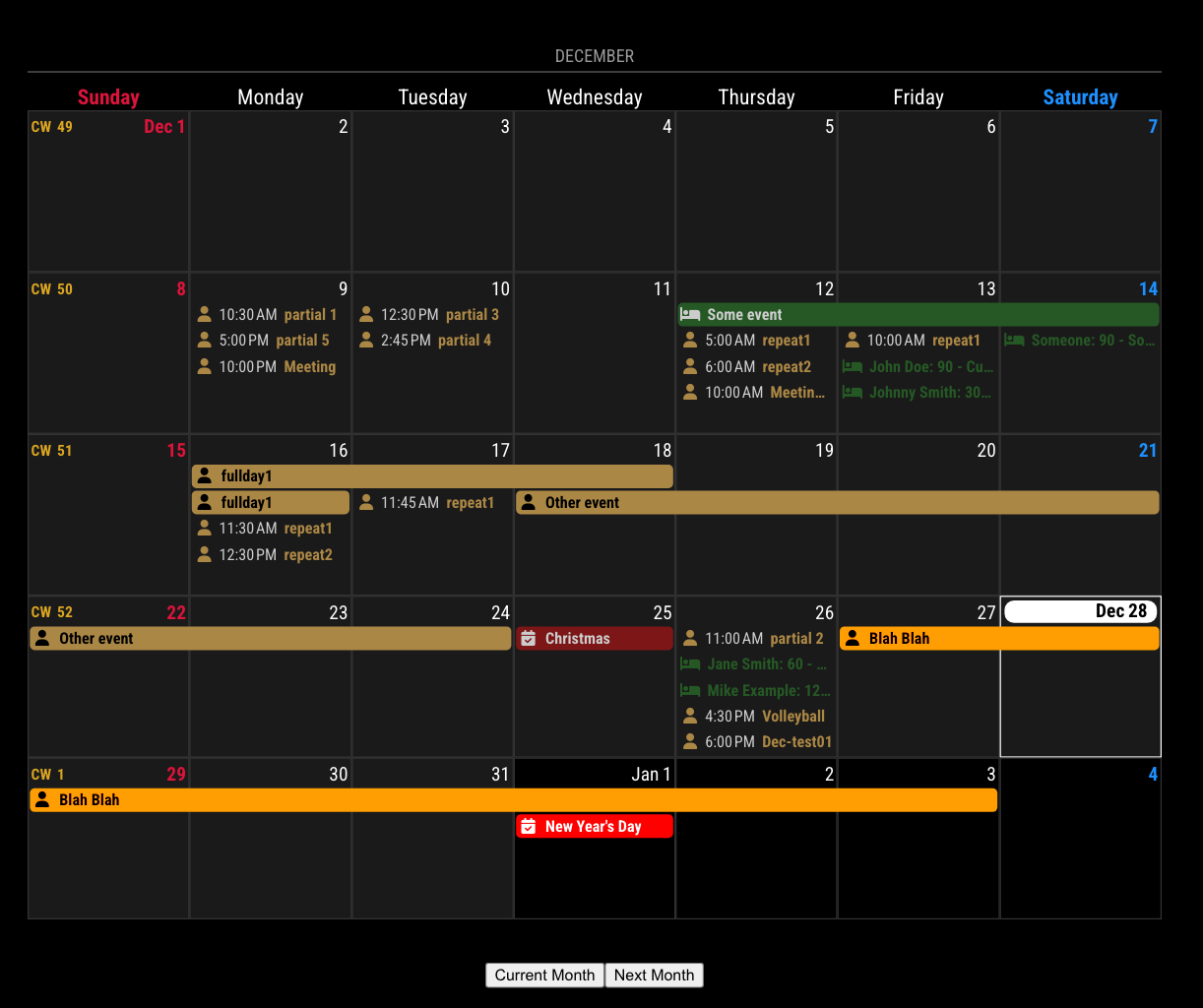
-
@sharkbait
More polished version.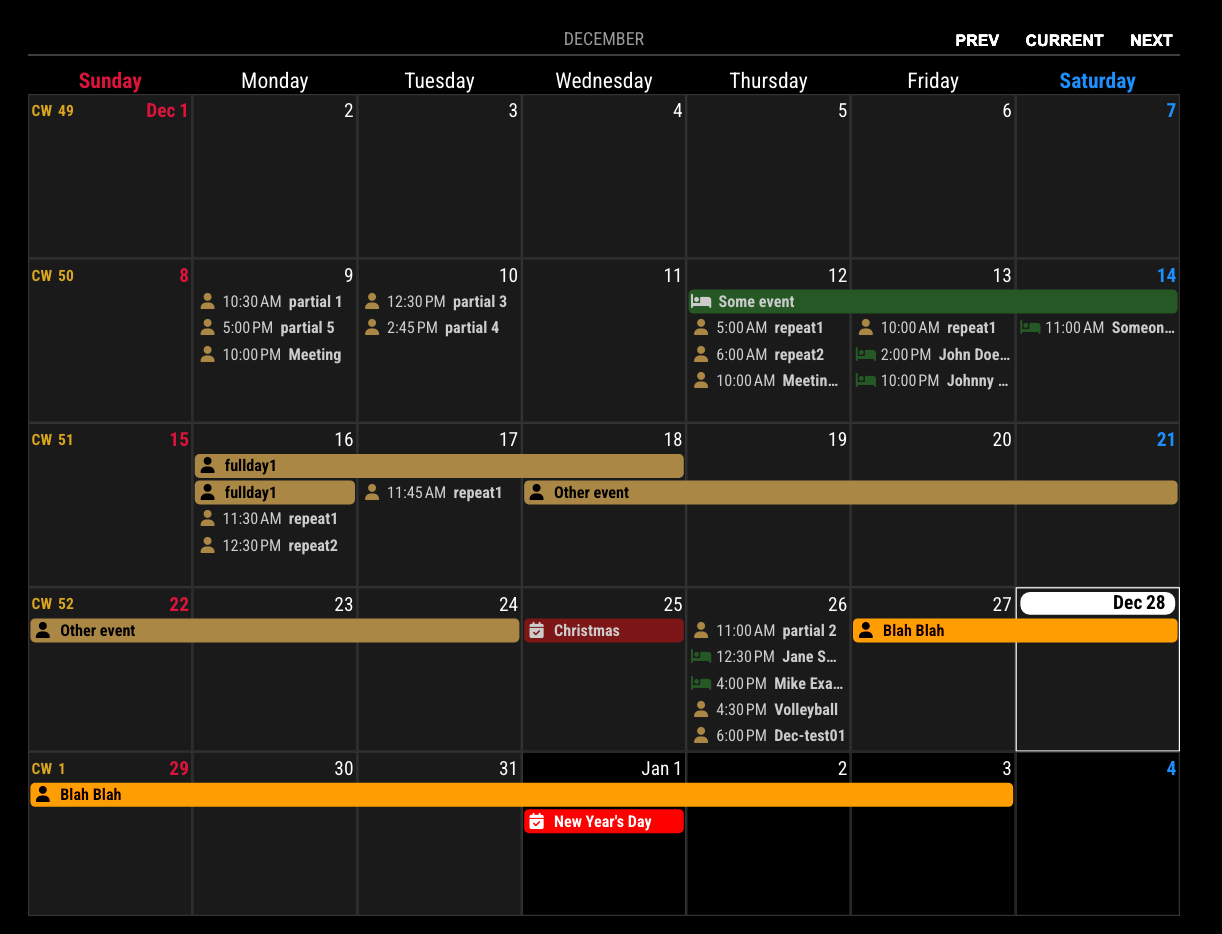
MMM-CustomInjection
/* modules/MMM-CustomInjection/MMM-CustomInjection.js */
Module.register("MMM-CustomInjection", {
  getStyles: function () {
    return [
      this.file("MMM-CustomInjection.css")
    ]
  },

  notificationReceived: function (notification, payload, sender) {
    if (notification === "CX3_DOM_UPDATED") {
      const { instanceId } = payload
      this.inject(instanceId)
    }
  },

  inject: function (instanceId) {
    const moduleDom = document.querySelector(`#${instanceId}`)
    if (!moduleDom) return
    moduleDom.classList.add('custom-injected')
    const buttons = document.createElement('div')
    buttons.className = 'calendar-header-buttons'
    const prev = document.createElement('button')
    prev.className = 'calendar-header-button'
    prev.innerHTML = 'PREV'
    prev.onclick = () => {
      this.sendNotification('CX3_GET_CONFIG', {
        callback: (currentConfig) => {
          this.sendNotification('CX3_SET_CONFIG', {
            monthIndex: currentConfig.monthIndex - 1,
          })
        }
      })
    }
    const current = document.createElement('button')
    current.className = 'calendar-header-button'
    current.innerHTML = 'CURRENT'
    current.onclick = () => {
      this.sendNotification('CX3_RESET', {})
    }
    const next = document.createElement('button')
    next.className = 'calendar-header-button'
    next.innerHTML = 'NEXT'
    next.onclick = () => {
      this.sendNotification('CX3_GET_CONFIG', {
        callback: (currentConfig) => {
          this.sendNotification('CX3_SET_CONFIG', {
            monthIndex: currentConfig.monthIndex + 1,
          })
        }
      })
    }
    buttons.appendChild(prev)
    buttons.appendChild(current)
    buttons.appendChild(next)
    moduleDom.appendChild(buttons)
  }
})
/* modules/MMM-CustomInjection/MMM-CustomInjection.css */ .custom-injected { position: relative; .calendar-header-buttons { position: absolute; top: 30px; right: 0; display: flex; flex-direction: row; justify-content: space-between; gap: 10px; width: fit-content; .calendar-header-button { background-color: transparent; border: none; color: white; font-weight: bold; } } } -
@sdetweil Thank you for taking the time to read my post and providing the guidance, and the additional modules I could try out. I have tried the 2 extensions as per your recommendation. The transition between pages is slick when set to auto rotate but for some reason, the page indicator module doesn’t allow me to switch (tap) between pages manually on my touchscreen, when I disable the auto-rotate .
-
@MMRIZE Thank you for the taking the effort to provide me with the set of code. I’ve tested it and it works wonderfully.
-
@MMRIZE I tried to implement this CustomInjection code but the rendered display turned out like this ![alt text]https://drive.google.com/file/d/1OUJ3EBz1CNMVqA9ds7kQhc4sTuovUoUA/view?usp=sharing.
My setting in config.js is as follows:
…,
{
module: “MMM-CustomInjection”,
position: “bottom_bar”,
},Instead of buttons, what I see is just the module name (MMM-CustomInjection, and below that module_5_MMM-CustomInjection).
This is definitely a more polished solution, but I’m not sure why the display could not be rendered.
-
@sharkbait
and you setrotationTime: 0,correct??
it works for me…
and u did change the cursor setting in css… right?
-
S sdetweil referenced this topic on
-
@sharkbait
MMM-CustomInjectiondoesn’t need to be positioned because that module works on background./* config/config.js */ { module: "MMM-CalendarExt3", position: "bottom_bar", config: { mode: 'month', } }, { module: "MMM-CustomInjection", }, -
@sdetweil I added this entry to custom.css:
html { cursor: default; }For config.js, my settings for “MMM-CalendarExt3”, “MMM-pages” and “MMM-page-indicator” were as follows:
{ module: "MMM-CalendarExt3", position: "bottom_bar", classes:"page3", title: "Our Family Calendar", config: { mode: "month", headerWeekDayOptions: { weekday: "narrow" }, cellDateOptions: { day: 'numeric' }, // suppress month from appear in cellDate monthIndex: 0, //0=curr_month, -1=prev, 1=next maxEventLines: {0:6, 6:5}, firstDayOfWeek: 0, calendarSet: [], fontSize: '18px', refreshInterval: 120000, }, disabled: false, }, { module: "MMM-page-indicator", position: "bottom_bar", order: "*", config: {}, disabled: false, classes: "fixed" }, // pages { module: "MMM-pages", disabled: false, config: { modules: [ [ "page1" ], [ "page2" ], [ "page3" ] ], fixed: [ "fixed" ], animationTime: 10000, // time of fade in/out on page change rotationTime: 0, // if you make this 0, then the pages only turn manually or via notification from somewhere else (indicator) hiddenPages: { } }, order: "*" },A white circular dot at the bottom indicates whether the rendered page is page1 or page2 or page3. I tried tapping on the white dots but wasn’t able to switch among page views. Could it be a touchscreen (portrait orientation) xinput issue ?
-
@MMRIZE I’ve removed the position of the “MMM-CustomInjection” module from the config.js as per your kind advice. The 3 buttons [prev], [current ] and [next] are still not appearing in the Calendar HeaderTitle (i.e. in my case -> DECEMBER 2024).
This settings for my config.js are as follows:
..., { module: "MMM-CalendarExt3", position: "bottom_bar", title: "Our Family Calendar", config: { mode: "month", cellDateOptions: { day: 'numeric' }, // suppress month from appear in cellDate monthIndex: 0, //0=curr_month, -1=prev, 1=next instanceId: "basicCalendar", maxEventLines: {0:6, 6:5}, // Dynamically sized; 5 events for months with 6 weeks. 6 events for all others. firstDayOfWeek: 0, calendarSet: [], fontSize: '18px', } }, { module: "MMM-CustomInjection", }, ...The code deployed for the MMM-CustomInjection.js was:
/* modules/MMM-CustomInjection/MMM-CustomInjection.js */ Module.register("MMM-CustomInjection", { getStyles: function () { return [ this.file("MMM-CustomInjection.css") ] }, notificationReceived: function (notification, payload, sender) { if (notification === "CX3_DOM_UPDATED") { const { instanceId } = payload this.inject(instanceId) } }, inject: function (instanceId) { const moduleDom = document.querySelector(`#${instanceId}`) if (!moduleDom) return moduleDom.classList.add('custom-injected') const buttons = document.createElement('div') buttons.className = 'calendar-header-buttons' const prev = document.createElement('button') prev.className = 'calendar-header-button' prev.innerHTML = 'PREV' prev.onclick = () => { this.sendNotification('CX3_GET_CONFIG', { callback: (currentConfig) => { this.sendNotification('CX3_SET_CONFIG', { monthIndex: currentConfig.monthIndex - 1, }) } }) } const current = document.createElement('button') current.className = 'calendar-header-button' current.innerHTML = 'CURRENT' current.onclick = () => { this.sendNotification('CX3_RESET', {}) } const next = document.createElement('button') next.className = 'calendar-header-button' next.innerHTML = 'NEXT' next.onclick = () => { this.sendNotification('CX3_GET_CONFIG', { callback: (currentConfig) => { this.sendNotification('CX3_SET_CONFIG', { monthIndex: currentConfig.monthIndex + 1, }) } }) } buttons.appendChild(prev) buttons.appendChild(current) buttons.appendChild(next) moduleDom.appendChild(buttons) } })The accompanying “MMM-CustomInjection.css” settings were:
/* modules/MMM-CustomInjection/MMM-CustomInjection.css */ .custom-injected { position: relative; .calendar-header-buttons { position: absolute; top: 30px; right: 0; display: flex; flex-direction: row; justify-content: space-between; gap: 10px; width: fit-content; .calendar-header-button { background-color: transparent; border: none; color: white; font-weight: bold; } } } -
@sharkbait said in Query on MMM-CalendarExt3 modification:
A white circular dot at the bottom indicates whether the rendered page is page1 or page2 or page3. I tried tapping on the white dots but wasn’t able to switch among page views. Could it be a touchscreen
I don’t know… but we can find out pretty easily , using the developers window…
start mm
using the keyboard on the MM screen, open the developers window, ctrl-shift-i
(or use npm start dev to open from the commandline, don’t use pm2)
select the elements tab and then click the arrow on top leftthen click one of the circles…
that should open the document view with the buttons selected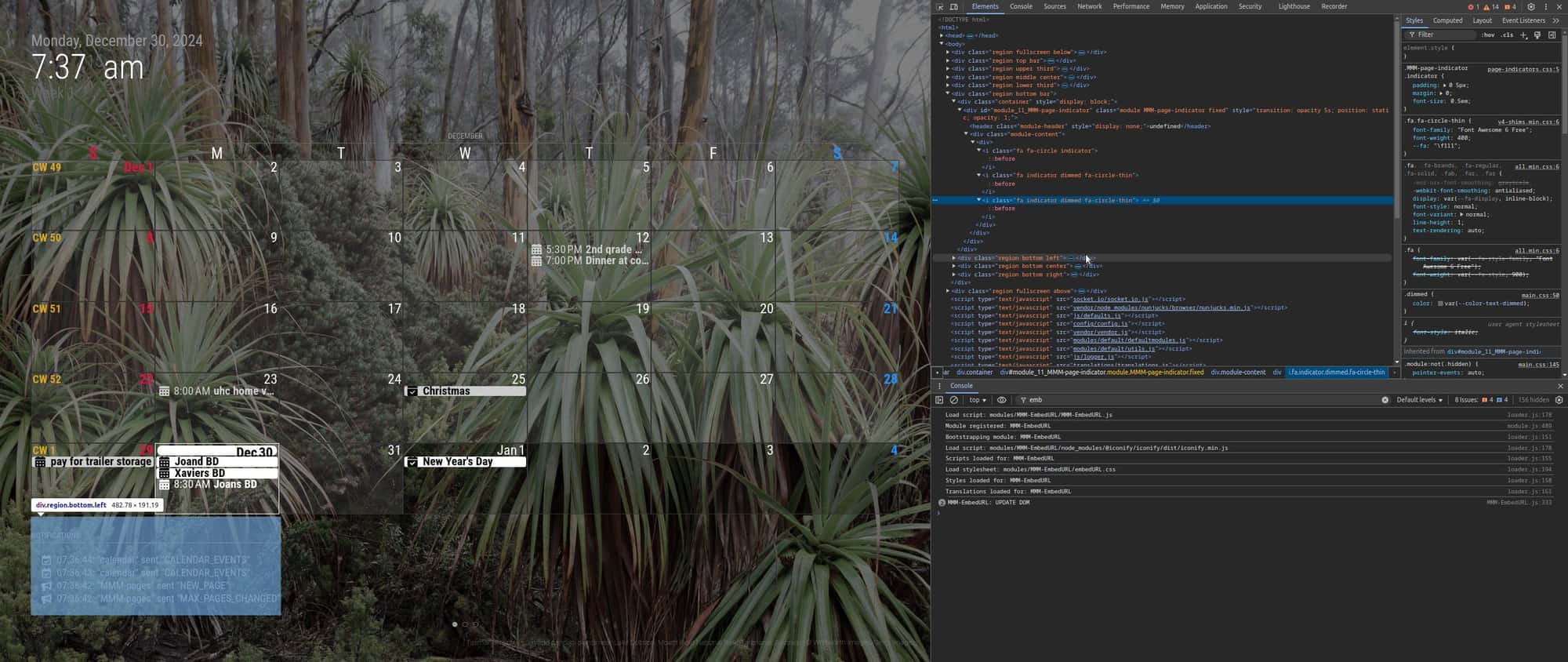
you can expand the sections to show the buttons (<a)
now select the sources tab, expand modules in left nav, select MMM-PageIndicator, select MMM-PagIndicator.js, its source should appear in the right pane
scroll down and click on the number on line 66, it should highlight, like this
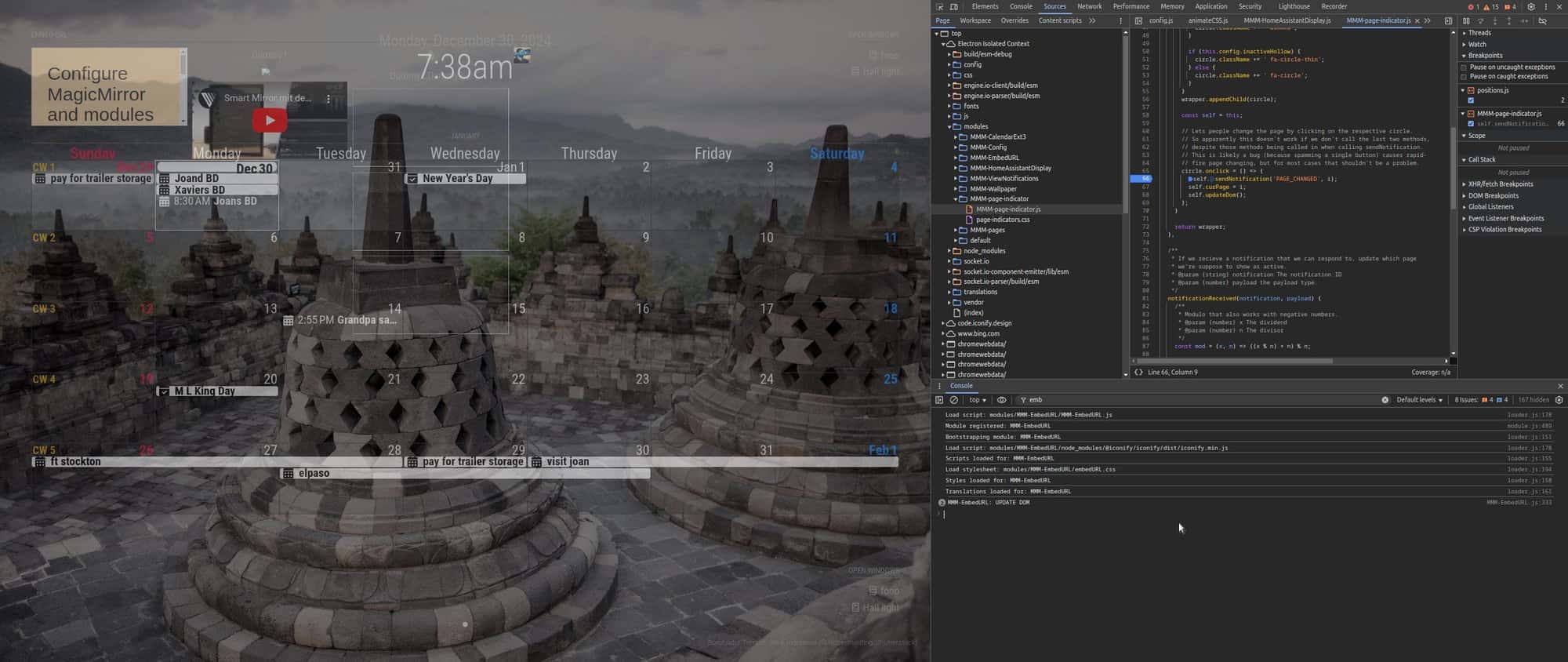
now click one of the page indicator buttons… mouse or finger
it should show and stop on the line 66 instruction
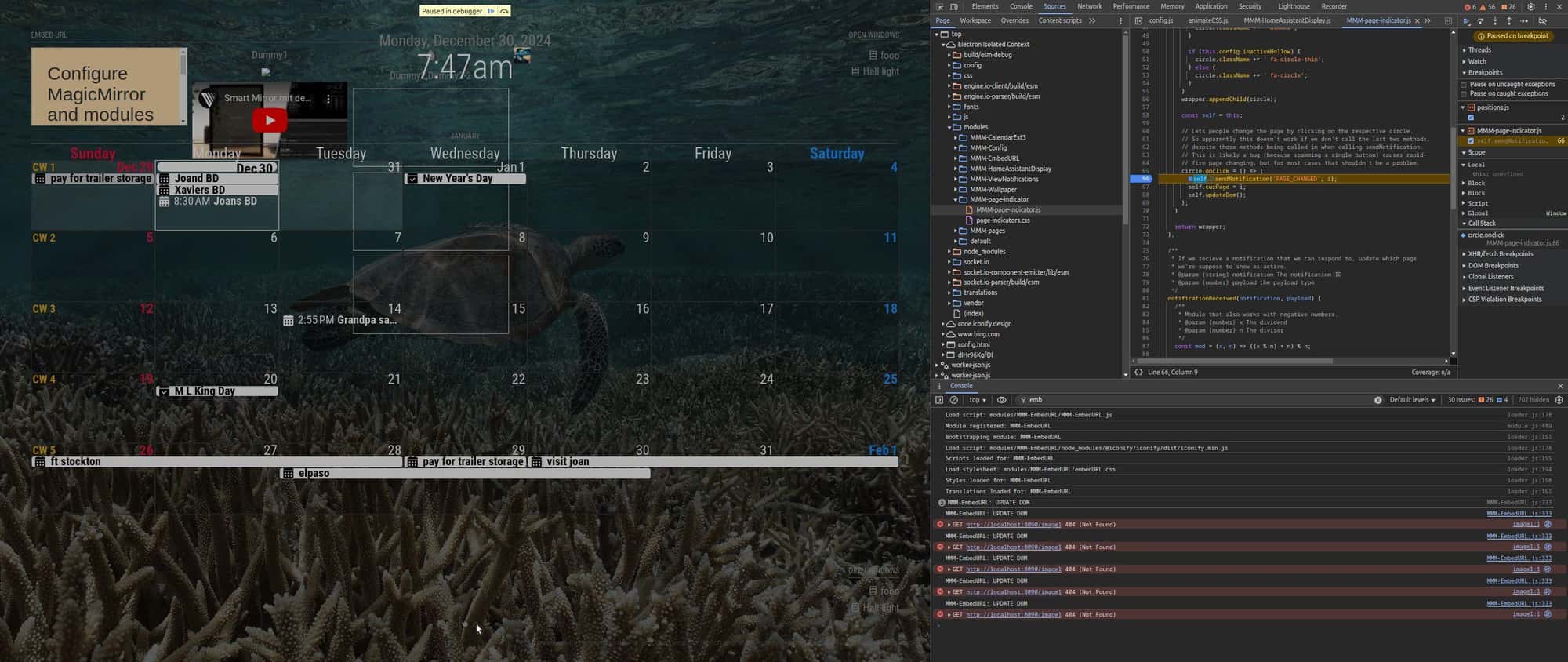
if it did then it is operating
if it didn’t… hmm…if it stopped, click the line 66 again , and the highlight will be removed, and then push the blue arrow on the top right, to continue the application
I will test on my touch screen laptop, no expectation that it will fail.
mm is just a page in a browser… nothing special.(from an OS perspective)edit: tested on my laptop, worked with mouse and touch as expected
edit: ctrl-shift-i to close the developer window -
@sharkbait
Your CX3 may not be the latest version.(1.9.4)
Hello! It looks like you're interested in this conversation, but you don't have an account yet.
Getting fed up of having to scroll through the same posts each visit? When you register for an account, you'll always come back to exactly where you were before, and choose to be notified of new replies (either via email, or push notification). You'll also be able to save bookmarks and upvote posts to show your appreciation to other community members.
With your input, this post could be even better 💗
Register Login