Read the statement by Michael Teeuw here.
Digital Clock minutes darker
-
Hello
I would like to change the style of the standard clock. I already know how to change the font and size.
Now I would like to change the color of the minutes.
So the hour display should be completely white and the minutes should be grayish.
And I would like to hide the seconds display completely.
the command “displayseconds” in the configuration does not workPlease help
-
but the displayseconds is misspelled
displaySeconds
MagicMirror is case sensitivealways best to copy/paste from the doc
https://docs.magicmirror.builders/modules/clock.html#using-the-modulecolor, see the second link in my signature below to use the developers window
-
@alfi153 also, sadly the clock is displayed in one html element
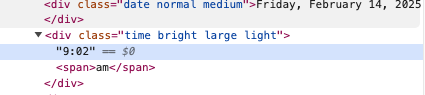
-
but make these changes to the modules/default/clock/clock.js
add property
		sendNotifications: false,
		splittime:false,  // add this line
and this code
		if (this.config.displayType !== "analog" && this.config.showTime) {
			if (this.config.splittime) {   // add these lines
				let ts = timeString.split(':')
				timeString = `<span class="clockhour">${ts[0]}</span>:<span class="clockminute">${ts[1]}</span>`
			}   // end of addition
			timeWrapper.innerHTML = timeString;
then in config.js for clock
    config: {
      splittime: true,
   ...
and in css/custom.css
.clock .clockminute { color: red; } -
Thank you 🙂
-
@alfi153 i will submit something for permanent support
I have added
https://github.com/MagicMirrorOrg/MagicMirror/pull/3737
Hello! It looks like you're interested in this conversation, but you don't have an account yet.
Getting fed up of having to scroll through the same posts each visit? When you register for an account, you'll always come back to exactly where you were before, and choose to be notified of new replies (either via email, or push notification). You'll also be able to save bookmarks and upvote posts to show your appreciation to other community members.
With your input, this post could be even better 💗
Register Login