Read the statement by Michael Teeuw here.
MMM-CalendarExt3 and MMM-MonthlyCalendar blank
-
I have rad this post here which describes exactly the issue I am having. Both the CalendarExt3 and MonthlyCalendar modules are not populating with events even though they are being broadcast.
I have V2.31.0 after putting on the clipping fix. config is below.
        {
            module: "calendar",
            position: "top_left",
            header: "TestCalendar",
            config: {
                broadcastPastEvents: true, // <= IMPORTANT to see past events
                instanceId: "WeeklyCalendar",
                calendars: [
                    {
                        url: "webcal://www.calendarlabs.com/ical-calendar/ics/76/US_Holidays.ics",
                        name: "hols",
                        color: "red",
                        symbol: true
                    },
                ],
            }
        },

        {
            module: "MMM-MonthlyCalendar",
            position: "bottom_bar",
            config: { // See "Configuration options" for more information.
                mode: "fourWeeks",
          }
        }
// CX3 Module
/*        {
            module: "MMM-CalendarExt3",
            position: "bottom_bar",
            title: "Calendar",
            config: {
                mode: "week",
                instanceId: "WeeklyCalendar",
                locale: 'en-GB',
                maxEventLines: 5,
                firstDayOfWeek: 0,
                weekIndex: 0,
                weeksInView: 4,
                waitFetch: 1000 * 10, //        (ms) waiting the fetching of last calendar to prevent flickering view by too frequent fetching.
                refreshInterval: 1000 * 60 * 10, //     (ms) refresh view by force if you need it.
                glanceTime: 1000 * 60 * 10,     // (ms) Return to original view when you move to other moment by notification.
                eventTimeOptions: {
                    timeStyle: "short"
                },
                useSymbol: true,
                calendarSet: ['hols'],
                }
        },
*/
There is a warning in the console using the CalendarExt3 but not the Monthly Calendar, not sure if it is relevant to this.
I am fairly new to this so quite likely I have missed something obvious. I have MM running on a Pi Zero 2W and a Pi 5, both installed using the install script and then clipping fix and same isssue on both.
slicing events total maxcount=10 MMM-CalendarExt3.js:390 [CX3] Module is not prepared yet, wait a while. getDom @ MMM-CalendarExt3.js:390 (anonymous) @ main.js:132 updateDom @ main.js:112 (anonymous) @ main.js:55 createDomObjects @ main.js:14 modulesStarted @ main.js:604 startModules @ loader.js:46 await in startModules loadNextModule @ loader.js:239 await in loadNextModule loadNextModule @ loader.js:232 await in loadNextModule loadNextModule @ loader.js:232 await in loadNextModule loadNextModule @ loader.js:232 await in loadNextModule loadNextModule @ loader.js:232 await in loadNextModule loadModules @ loader.js:242 await in loadModules init @ main.js:588 await in init (anonymous) @ main.js:737Understand this warningAI calendar.js:703 sorting events count=23 -
@Scott-M said in MMM-CalendarExt3 and MMM-MonthlyCalendar blank:
sudo apt-get -y -o Dpkg::Options::=“–force-confdef” -o Dpkg::Options::=“–force-confnew” full-upgrade | tee -a $logfile
updated script, removed pv , give it a try if you have time
-
@Scott-M if you run under pm2, look at the logs for the timestamps to compare for startup (waitfetch) time needed
-
@sdetweil I don’t run under pm2 but will look at that just now
-
@Scott-M said in MMM-CalendarExt3 and MMM-MonthlyCalendar blank:
broadcastPastEvents: true,
also, this is the default for calendar
| correction… broadcastEvents is true
| broadcastPastEvents defaults to false… -
@Scott-M said in MMM-CalendarExt3 and MMM-MonthlyCalendar blank:
/* {
module: “MMM-CalendarExt3”,
disabled: true,also, you can add disabled:true,
instead of having to comment out
see https://docs.magicmirror.builders/modules/configuration.html#module-configuration -
@Scott-M said in MMM-CalendarExt3 and MMM-MonthlyCalendar blank:
calendar.js:703 sorting events count=23
where is the broadcasting message?
do the events show in the default calendar display?
-
Even setting the waitFetch to 60 secods doesn’t help, the regualr calendar populates straight way, well before the Ext3 shows.
[2025-03-20 15:43:53.544] [LOG] Starting MagicMirror: v2.31.0-develop [2025-03-20 15:43:53.554] [LOG] Loading config ... [2025-03-20 15:43:53.555] [LOG] config template file not exists, no envsubst [2025-03-20 15:43:53.732] [INFO] Checking config file /home/scott/MagicMirror/config/config.js ... [2025-03-20 15:43:53.758] [INFO] Your configuration file doesn't contain syntax errors :) [2025-03-20 15:43:53.758] [INFO] Checking modules structure configuration ... [2025-03-20 15:43:53.795] [INFO] Your modules structure configuration doesn't contain errors :) [2025-03-20 15:43:53.797] [LOG] Loading module helpers ... [2025-03-20 15:43:53.797] [LOG] No helper found for module: alert. [2025-03-20 15:43:53.797] [LOG] No helper found for module: clock. [2025-03-20 15:43:53.842] [LOG] Initializing new module helper ... [2025-03-20 15:43:53.843] [LOG] Module helper loaded: calendar [2025-03-20 15:43:53.843] [LOG] No helper found for module: MMM-CalendarExt3. [2025-03-20 15:43:53.843] [LOG] All module helpers loaded. [2025-03-20 15:43:53.846] [LOG] Starting server on port 8089 ... [2025-03-20 15:43:54.112] [LOG] Server started ... [2025-03-20 15:43:54.113] [LOG] Connecting socket for: calendar [2025-03-20 15:43:54.113] [LOG] Starting node helper for: calendar [2025-03-20 15:43:54.113] [LOG] Sockets connected & modules started ... [2025-03-20 15:43:54.311] [LOG] Launching application. [2025-03-20 15:43:54.742] [INFO] System information: ### SYSTEM: manufacturer: ; model: ; virtual: false ### OS: platform: linux; distro: Debian GNU/Linux; release: 12; arch: arm64; kernel: 6.6.74+rpt-rpi-2712 ### VERSIONS: electron: 32.2.7; used node: 23.9.0; installed node: 23.9.0; npm: 10.9.2; pm2: 5.4.3 ### OTHER: timeZone: Europe/London; ELECTRON_ENABLE_GPU: undefined [2025-03-20 15:43:55.080] [LOG] Create new calendarfetcher for url: http://www.calendarlabs.com/ical-calendar/ics/76/US_Holidays.ics - Interval: 3600000 [2025-03-20 15:43:55.817] [INFO] Calendar-Fetcher: Broadcasting 23 events from http://www.calendarlabs.com/ical-calendar/ics/76/US_Holidays.ics. -
@Scott-M ok, open the developers window, ctrl-shift-i on the MagicMirror
pageselect the console tab,
put ext3 in the filter fieldare there any errors reported?
you did run npm install in the MMM-CalendarExt3 folder after git clone, right?
-
I did run nmp install in the MMM-CalendarExt3 folder!
This is the result of the Ext3 filter in the console
Load script: modules/MMM-CalendarExt3/MMM-CalendarExt3.js module.js:489 Module registered: MMM-CalendarExt3 loader.js:151 Bootstrapping module: MMM-CalendarExt3 loader.js:155 Scripts loaded for: MMM-CalendarExt3 loader.js:194 Load stylesheet: modules/MMM-CalendarExt3/MMM-CalendarExt3.css loader.js:158 Styles loaded for: MMM-CalendarExt3 loader.js:161 Translations loaded for: MMM-CalendarExt3 MMM-CalendarExt3.js:390 [CX3] Module is not prepared yet, wait a while. getDom @ MMM-CalendarExt3.js:390Understand this warningAI -
@Scott-M I don’t know… I just re-enabled my ext3
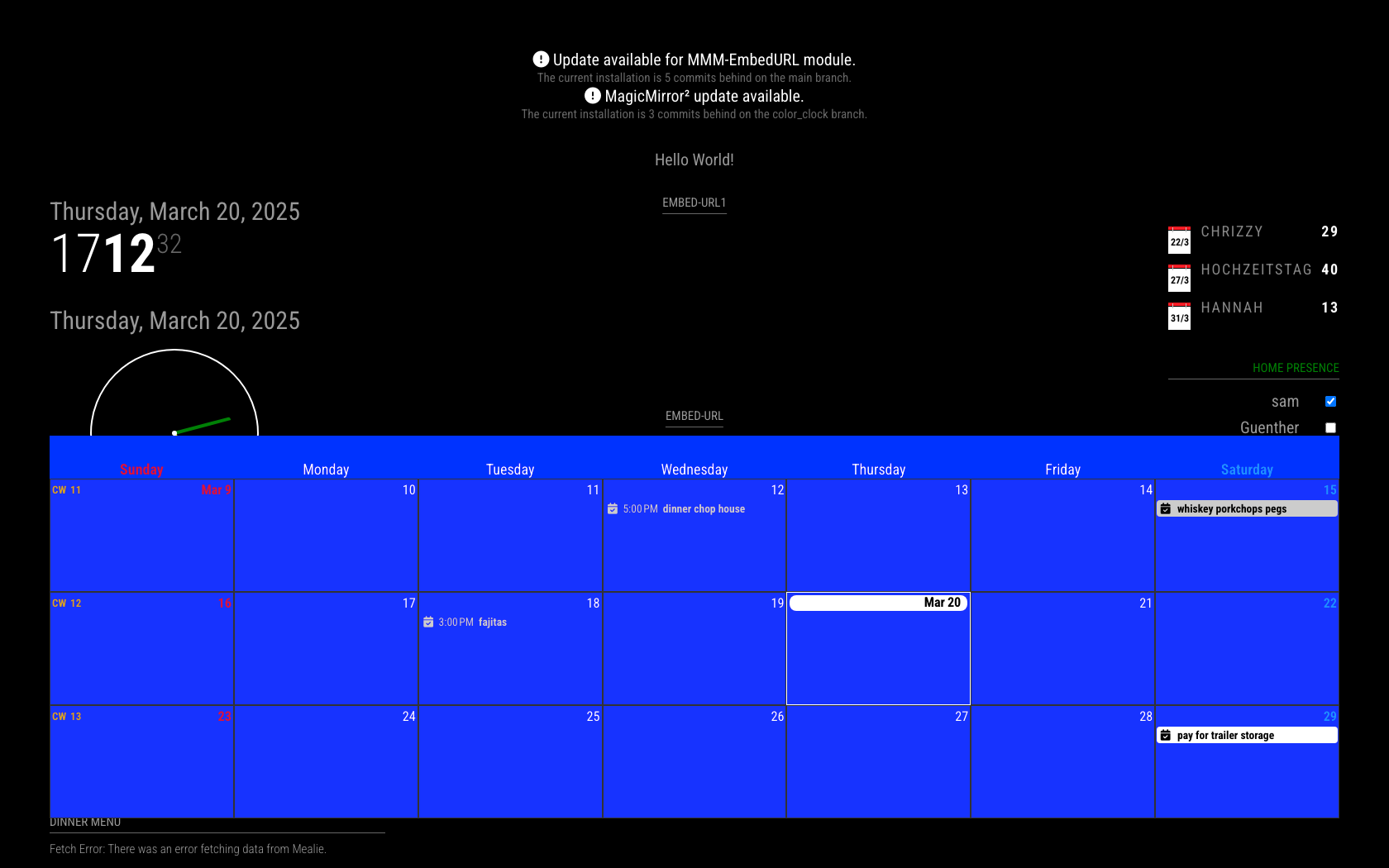
my ext3 config
      {
        module: "MMM-CalendarExt3",
        position: "bottom_bar",
        disabled: false,
        order: "*",
        hiddenOnStartup: false,
        configDeepMerge: false,
        animateIn: "None",
        animateOut: "None",
        config: {
          eventFilter: (ev) =>  {
 return true
},
          eventTransformer: (ev) =>  {
 return ev
},
          manipulateDateCell: (cellDom, events) =>  {
},
          weatherPayload: (payload) =>  {
 return payload
},
          eventPayload: (payload) =>  {
 return payload
}
        }
      },
note this is output from MMM-Confg setting all the extra options
-
Thanks for posting that but even with that config it is still blank. I have to leave it for now but will start on it fresh tomorrow and rebuild it and see what happens. Hopefully it is just something simple I missed.
-
I wasted most of today writing new Pi images to new SD cards, using the script to install MagicMirror again, only to have it crash / hang on the [LOG] Starting server on port 8089 … message every time.
I gave up and went back to my working SD card and it seems to work now. I had been using this from some sample code I found online, just to test and get the MMM-CalendarExt3 module working
{
		url: "webcal://www.calendarlabs.com/ical-calendar/ics/76/US_Holidays.ics",
		name: "holiday",
		fetchInterval:  60000,
},
I decided to add a couple of other calendars in and all of the others I tried show up in the Ext3 view, except this one. Not sure what the problem with it is but I won’t be using it so will move on.
I now have 4 random calendars and the code above in the calendar module and they all work, except the US_Holidays, the events for that one show in the list view but not in Ext3.
Thank you for taking the time to reply and help, sorry it seems to have been a bit of a waste of time.
-
@Scott-M just fyi, we replace webcal: with https: under the covers…
I’d like to know more about the system hang…
what OS, what UI engine (x11 wayland vs labwc)
note we added new start commands for the different engines…see https://forum.magicmirror.builders/topic/19269/new-magicmirror-start-options-in-version-2-30-0
[LOG] Starting server on port 8089if you are doing npm run server, that is the end of the messages
until a browser connects… (it might LOOK like a hang… but its just waiting)IF the installer detects that electron did not install for some reason (armv6, or …)
THEN it sets up my script (run-start.sh) to run browser over server
( you can check by examining the start: clause in package.json)and ASSUMES chromium is the browser..the end of the scripts web page explains how to use some other browser
if chromium is not found, an error message will be logged in the npm start output, but nothing will be shown on the screen
now, in ANY case, did you install the clipping fix?
see https://forum.magicmirror.builders/topic/19282/version-2-30-0-calendar-fix-for-clipping-broadcast-eventwhich accidentally chopped off the messages sent to ext3 (and others)
my fault… it passed test60 seconds to fetch holidays will trigger a block on calendarlabs as they warned us a couple years ago about being pounded by hundreds of mirrors getting content too often (we changed that fetch to once a week)
ext3 is designed to NOT flash the screen on every update… all calendars are processed concurrently but independently and broadcast when they have data.
ext3 wants to WAIT til all the data has arrived, (waitFetch config time, 5 seconds by default)IF the data does NOT arrive for A calendar before waitFetch, THEN it will NOT BE DISPLAYED until the refreshInterval time (default 30 minutes)
(or you MANUALLY refresh the page (ctrl-r)) -
Back to the SD card that hangs on the starting server message…
I used Raspberry Pi OS (64 Bit) Bookworm, onto a Pi5, labwc compositor. I did install the clipping fix after the MagicMirror install
I ran with
npm run startwith this result, it may just be waiting but CRTL C does nothing and I have to close the ssh connection and reconnect.
scott@MagicMirror:~/MagicMirror $ npm start > magicmirror@2.31.0-develop start > npm run start:x11 > magicmirror@2.31.0-develop start:x11 > DISPLAY="${DISPLAY:=:0}" ./node_modules/.bin/electron js/electron.js [2025-03-21 15:14:51.442] [LOG] Starting MagicMirror: v2.31.0-develop [2025-03-21 15:14:51.451] [LOG] Loading config ... [2025-03-21 15:14:51.453] [LOG] config template file not exists, no envsubst [2025-03-21 15:14:52.019] [INFO] Checking config file /home/scott/MagicMirror/config/config.js ... [2025-03-21 15:14:52.045] [INFO] Your configuration file doesn't contain syntax errors :) [2025-03-21 15:14:52.045] [INFO] Checking modules structure configuration ... [2025-03-21 15:14:52.081] [INFO] Your modules structure configuration doesn't contain errors :) [2025-03-21 15:14:52.083] [LOG] Loading module helpers ... [2025-03-21 15:14:52.084] [LOG] No helper found for module: alert. [2025-03-21 15:14:52.093] [LOG] Initializing new module helper ... [2025-03-21 15:14:52.094] [LOG] Module helper loaded: updatenotification [2025-03-21 15:14:52.094] [LOG] No helper found for module: clock. [2025-03-21 15:14:52.231] [LOG] Initializing new module helper ... [2025-03-21 15:14:52.231] [LOG] Module helper loaded: calendar [2025-03-21 15:14:52.237] [LOG] No helper found for module: weather. [2025-03-21 15:14:52.339] [LOG] Initializing new module helper ... [2025-03-21 15:14:52.339] [LOG] Module helper loaded: newsfeed [2025-03-21 15:14:52.339] [LOG] All module helpers loaded. [2025-03-21 15:14:52.342] [LOG] Starting server on port 8089 ... -
@Scott-M ok, starting server is correct…
did you npm install or npm run install-mm
after installing the clipping fix?? (its required) -
@sdetweil said in MMM-CalendarExt3 and MMM-MonthlyCalendar blank:
@Scott-M ok, starting server is correct…
did you npm install or npm run install-mm
after installing the clipping fix?? (its required)I see, my mistake. I assumed from the forum post that this was if you use the development branch, as the instructions said
cd ~/MagicMirror
git fetch origin pull/3679/head:_fix_clipping
git switch _fix_clipping
# if you get an error error, rm package-lock.json
# and repeat the git switch
restart MM
with npm run install-mm further down the post. I must have done this on the older one I am using though as it works.
Away all weekend so won’t be able to check until Monday.
Thanks again!
-
Just to pick back up on this, I checked my bash history and I did npm run install-mm after the clipping fix.
I have tried a few times now to do this with the same result, this time without the clipping fix.
Reflashed the image and then the following steps are my bash history from first run of the OS. Only change to the config file is changing the port and the full whitelist. I selected No to the pm2 question, the screensaver was not disabled, just a waring about not knowing how to disable on an labwc compositor.
bash -c  "$(curl -sL https://raw.githubusercontent.com/sdetweil/MagicMirror_scripts/master/raspberry.sh)"
cd ~/MagicMirror/config
nano config.js
npm run start
With the following results, MagicMirror doesn’t start. and doesn’t get any futher that the whitelist warning. Same result without the full whitlist though…
scott@MagicMirror:~/MagicMirror/config $ npm run start

> magicmirror@2.30.0 start
> npm run start:x11


> magicmirror@2.30.0 start:x11
> DISPLAY="${DISPLAY:=:0}" ./node_modules/.bin/electron js/electron.js

[2025-03-25 09:38:22.852] [LOG]   Starting MagicMirror: v2.30.0
[2025-03-25 09:38:22.861] [LOG]   Loading config ...
[2025-03-25 09:38:22.862] [LOG]   config template file not exists, no envsubst
[2025-03-25 09:38:23.052] [INFO]  Checking config file /home/scott/MagicMirror/config/config.js ...
[2025-03-25 09:38:23.078] [INFO]  Your configuration file doesn't contain syntax errors :)
[2025-03-25 09:38:23.078] [INFO]  Checking modules structure configuration ...
[2025-03-25 09:38:23.117] [INFO]  Your modules structure configuration doesn't contain errors :)
[2025-03-25 09:38:23.119] [LOG]   Loading module helpers ...
[2025-03-25 09:38:23.119] [LOG]   No helper found for module: alert.
[2025-03-25 09:38:23.122] [LOG]   Initializing new module helper ...
[2025-03-25 09:38:23.122] [LOG]   Module helper loaded: updatenotification
[2025-03-25 09:38:23.122] [LOG]   No helper found for module: clock.
[2025-03-25 09:38:23.169] [LOG]   Initializing new module helper ...
[2025-03-25 09:38:23.169] [LOG]   Module helper loaded: calendar
[2025-03-25 09:38:23.170] [LOG]   No helper found for module: compliments.
[2025-03-25 09:38:23.170] [LOG]   No helper found for module: weather.
[2025-03-25 09:38:23.208] [LOG]   Initializing new module helper ...
[2025-03-25 09:38:23.208] [LOG]   Module helper loaded: newsfeed
[2025-03-25 09:38:23.208] [LOG]   All module helpers loaded.
[2025-03-25 09:38:23.211] [LOG]   Starting server on port 8089 ...
[2025-03-25 09:38:23.216] [WARN]  You're using a full whitelist configuration to allow for all IPs
Would be useful is someone can replicate this and see if it is something peculiar to my enviroment.
Raspberry Pi5 with 64 Bit Debian Bookworm with desktop.
I am just about to try with the 32 bit image but the whole process takes a while.
Update: couldn’t get it to install on the 32 bit version. New install of 32 bit bookworm, ran the install script and it fails with:
installing correct version of node and npm, please wait
/usr/local/bin/n: line 753: /usr/local/bin/node: cannot execute: required file not found
bash: line 309: /usr/local/bin/node: cannot execute: required file not found
node failed to install, exiting -
@Scott-M i will examine and fix the installer
32bit on pi5 might never run as there were conflicting hardware changes
can you try to start for wayland?
npm run start:waylandsee https://forum.magicmirror.builders/topic/19269/new-magicmirror-start-options-in-version-2-30-0
-
@sdetweil said in MMM-CalendarExt3 and MMM-MonthlyCalendar blank:
npm run start:wayland
> magicmirror@2.30.0 start:wayland > WAYLAND_DISPLAY="${WAYLAND_DISPLAY:=wayland-1}" ./node_modules/.bin/electron js/electron.js --enable-features=UseOzonePlatform --ozone-platform=wayland did not find extension DRI_Mesa version 1 failed to bind extensions did not find extension DRI_Mesa version 1 failed to bind extensions did not find extension DRI_Mesa version 1 failed to bind extensions did not find extension DRI_Mesa version 1 failed to bind extensions [2025-03-25 13:07:24.800] [LOG] Starting MagicMirror: v2.30.0 [2025-03-25 13:07:24.809] [LOG] Loading config ... [2025-03-25 13:07:24.811] [LOG] config template file not exists, no envsubst [2025-03-25 13:07:25.425] [INFO] Checking config file /home/scott/MagicMirror/config/config.js ... [2025-03-25 13:07:25.451] [INFO] Your configuration file doesn't contain syntax errors :) [2025-03-25 13:07:25.451] [INFO] Checking modules structure configuration ... [2025-03-25 13:07:25.489] [INFO] Your modules structure configuration doesn't contain errors :) [2025-03-25 13:07:25.491] [LOG] Loading module helpers ... [2025-03-25 13:07:25.492] [LOG] No helper found for module: alert. [2025-03-25 13:07:25.498] [LOG] Initializing new module helper ... [2025-03-25 13:07:25.499] [LOG] Module helper loaded: updatenotification [2025-03-25 13:07:25.499] [LOG] No helper found for module: clock. [2025-03-25 13:07:25.640] [LOG] Initializing new module helper ... [2025-03-25 13:07:25.640] [LOG] Module helper loaded: calendar [2025-03-25 13:07:25.642] [LOG] No helper found for module: compliments. [2025-03-25 13:07:25.647] [LOG] No helper found for module: weather. [2025-03-25 13:07:25.761] [LOG] Initializing new module helper ... [2025-03-25 13:07:25.762] [LOG] Module helper loaded: newsfeed [2025-03-25 13:07:25.762] [LOG] All module helpers loaded. [2025-03-25 13:07:25.765] [LOG] Starting server on port 8089 ... [2025-03-25 13:07:25.770] [WARN] You're using a full whitelist configuration to allow for all IPs [1800:0325/130726.055765:ERROR:wayland_connection.cc(198)] Failed to connect to Wayland display: No such file or directory (2) [1800:0325/130726.055835:ERROR:ozone_platform_wayland.cc(264)] Failed to initialize Wayland platform [1800:0325/130726.055842:ERROR:env.cc(258)] The platform failed to initialize. Exiting. /home/scott/MagicMirror/node_modules/electron/dist/electron exited with signal SIGSEGV -
@Scott-M this is confusing… by default the system is setup for wayland/labwc,
not x11 (which npm start does)just another test, using manual install into another folder
cd ~
git clone https://github.com/MagicMirrorOrg/MagicMirror.git fribble
cd fribble
npm run install-mm
npm start
if that fails then try erasing the saved electron info
cd ~
rm -rf .config/Electron
cd MagicMirror
npm start
you try the fribble directory too
Hello! It looks like you're interested in this conversation, but you don't have an account yet.
Getting fed up of having to scroll through the same posts each visit? When you register for an account, you'll always come back to exactly where you were before, and choose to be notified of new replies (either via email, or push notification). You'll also be able to save bookmarks and upvote posts to show your appreciation to other community members.
With your input, this post could be even better 💗
Register Login