MagicMirror Forum
    • Recent
    • Tags
    • Unsolved
    • Solved
    • MagicMirror² Repository
    • Documentation
    • 3rd-Party-Modules
    • Donate
    • Discord
    • Register
    • Login
    A New Chapter for MagicMirror: The Community Takes the Lead
    Read the statement by Michael Teeuw here.

    MMM-CalendarExt3 Number

    Scheduled Pinned Locked Moved Unsolved Troubleshooting
    12 Posts 3 Posters 73 Views 3 Watching
    Loading More Posts
    • Oldest to Newest
    • Newest to Oldest
    • Most Votes
    Reply
    • Reply as topic
    Log in to reply
    This topic has been deleted. Only users with topic management privileges can see it.
    • R Offline
      Racing88
      last edited by

      Hello,
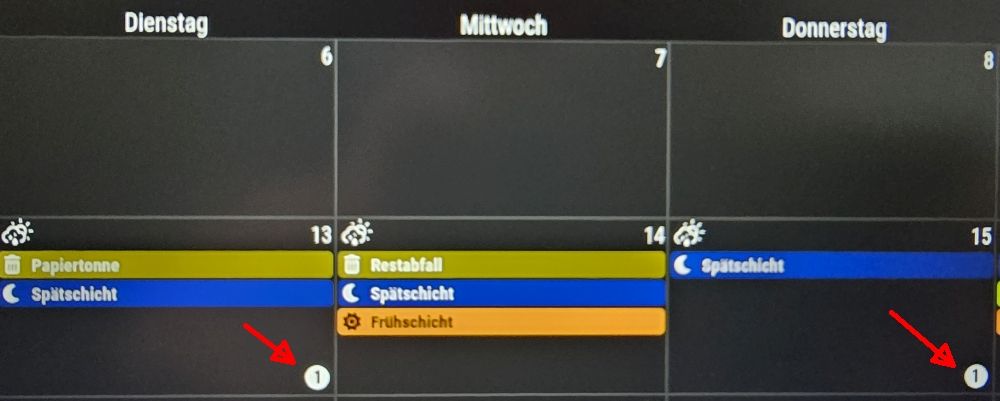
      Can someone explain what this number means?

      config: maxEventLines: 5

      Thanks

      20260110_134733.jpg

      S S 2 Replies Last reply Reply Quote 0
      • S Offline
        sdetweil @Racing88
        last edited by

        @Racing88 can you post your config for MMM-CalendarExt3? I don’t see that on any of my instances

        Sam

        How to add modules

        learning how to use browser developers window for css changes

        R S 2 Replies Last reply Reply Quote 0
        • R Offline
          Racing88 @sdetweil
          last edited by

          @sdetweil

            module: "MMM-CalendarExt3",
            position: "bottom_bar",
            title: "Mein Kalender",
            config: {
              mode: "week",
              instanceId: "basicCalendar",
              locale: 'de-DE',
              weeksInView: 3,
              weekIndex: 0,
              maxEventLines: 5,
              firstDayOfWeek: 1,
              calendarSet: [],
          
          S 1 Reply Last reply Reply Quote 0
          • S Offline
            sdetweil @Racing88
            last edited by

            @Racing88 thx… mine has all those, in middle_center instead of bottom_bar

            Sam

            How to add modules

            learning how to use browser developers window for css changes

            R 1 Reply Last reply Reply Quote 0
            • S Offline
              S374n @sdetweil
              last edited by

              @sdetweil
              This is the number of lines in the day cell. Change it to 8 and restart mm2. You’ll understand it immediately.

              1 Reply Last reply Reply Quote 0
              • S Offline
                S374n @Racing88
                last edited by

                @Racing88 if you mean the arrow number and not the max lines in the cell - 5.
                It’s your duplicated calendar event. It’s not showing the event twice but notifying you that’s it’s double.

                1 Reply Last reply Reply Quote 0
                • R Offline
                  Racing88 @sdetweil
                  last edited by

                  @sdetweil Thanks
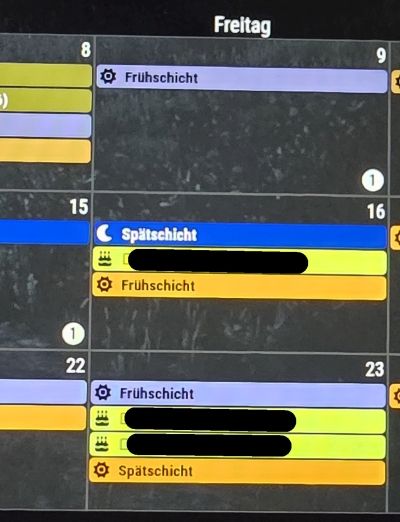
                  With the position set to “bottom bar”, the result is the same. However, the module is now no longer anchored at the bottom but in the center of the screen.
                  The strange thing is that most cells display everything correctly, even with four appointments. Only the cells with the number (1) are missing one appointment. There’s still plenty of space in the cell.
                  I’m feeling a bit helpless now. I’ve tried everything I could think of, unfortunately without success.
                  20260111_084057.jpg

                  S 1 Reply Last reply Reply Quote 0
                  • S Offline
                    sdetweil @Racing88
                    last edited by

                    @Racing88 ok, I am not the module author.
                    But you gave me the clue. That is the number of events not shown in the day.

                    If you change max events to 4 then it should go away
                    Otherwise you will have to change the fontsize or the cell size

                    Sam

                    How to add modules

                    learning how to use browser developers window for css changes

                    R 1 Reply Last reply Reply Quote 0
                    • R Offline
                      Racing88 @sdetweil
                      last edited by

                      @sdetweil Ahhhhhh…
                      I found the problem. It’s a duplicate appointment. They’re two different calendars, but both have the same appointment.

                      My calendar is labeled “Early Shift,” and my wife’s is also labeled “Early Shift.” Since both calendars have the entry “Early Shift,” only one is displayed.
                      Is it possible to configure the settings to also display duplicate appointments?

                      Thank you so much for your help. You put me on the right track.

                      Have a nice Sunday.

                      S 1 Reply Last reply Reply Quote 0
                      • S Offline
                        sdetweil @Racing88
                        last edited by

                        @Racing88

                        Because you didn’t specify calendarset it jammed them all together and there was a dupe
                        i ‘think’
                        If you add a name: property to each calendar url config block
                        And then specify the names in the set, then they will not be dupes

                        Sam

                        How to add modules

                        learning how to use browser developers window for css changes

                        R 1 Reply Last reply Reply Quote 0
                        • 1
                        • 2
                        • 1 / 2
                        • First post
                          Last post
                        Enjoying MagicMirror? Please consider a donation!
                        MagicMirror created by Michael Teeuw.
                        Forum managed by Sam, technical setup by Karsten.
                        This forum is using NodeBB as its core | Contributors
                        Contact | Privacy Policy