MagicMirror Forum
    • Recent
    • Tags
    • Unsolved
    • Solved
    • MagicMirror² Repository
    • Documentation
    • 3rd-Party-Modules
    • Donate
    • Discord
    • Register
    • Login
    A New Chapter for MagicMirror: The Community Takes the Lead
    Read the statement by Michael Teeuw here.

    Default Weather Module Stuck on loading.

    Scheduled Pinned Locked Moved Unsolved Troubleshooting
    23 Posts 3 Posters 288 Views 4 Watching
    Loading More Posts
    • Oldest to Newest
    • Newest to Oldest
    • Most Votes
    Reply
    • Reply as topic
    Log in to reply
    This topic has been deleted. Only users with topic management privileges can see it.
    • F Offline
      fnmuffinman @fnmuffinman
      last edited by

      @sdetweil Hi, just checking in to see if you saw my last reply above! If not, I was going to create a new thread with all the troubleshooting you have graciously help me out with to start from there

      S 1 Reply Last reply Reply Quote 0
      • S Offline
        sdetweil @fnmuffinman
        last edited by

        @fnmuffinman I did, sorry been traveling.

        Can you Open the developers window
        ctrl-shift-I
        Select the console tab
        Add weath to the filter field

        Sam

        How to add modules

        learning how to use browser developers window for css changes

        F 1 Reply Last reply Reply Quote 0
        • F Offline
          fnmuffinman @sdetweil
          last edited by

          @sdetweil No worries, I figured you were probably busy! Here is what comes up
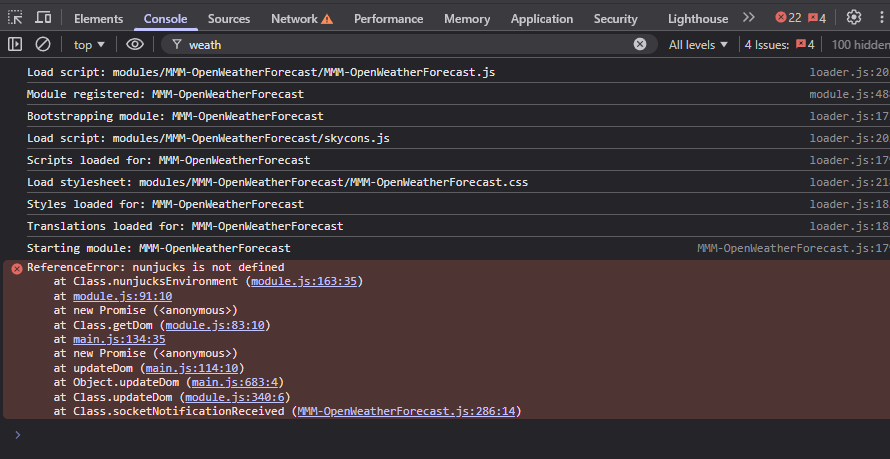
          6f6ef1b0-041d-41e6-b728-bce681446fdb-image.png

          S 1 Reply Last reply Reply Quote 0
          • S Offline
            sdetweil @fnmuffinman
            last edited by sdetweil

            @fnmuffinman ok, a little more debug

            cd ~/MagicMirror
            grep nunj package.json
            

            should return

            		"nunjucks": "^3.2.4",
            

            then

            cd node_modules
            ls nunjucks -laF
            

            should return (I am on mac at the moment, with MagicMirror just installed, so dates will be different

            drwxr-xr-x   10 sam  staff    320 Feb  3 08:20 ./
            drwxr-xr-x  685 sam  staff  21920 Feb  3 08:21 ../
            drwxr-xr-x    4 sam  staff    128 Feb  3 08:20 bin/
            drwxr-xr-x   10 sam  staff    320 Feb  3 08:20 browser/
            -rw-r--r--    1 sam  staff   2309 Feb  3 08:20 index.js
            -rw-r--r--    1 sam  staff   1311 Feb  3 08:20 LICENSE
            drwxr-xr-x    3 sam  staff     96 Feb  3 08:20 node_modules/
            -rw-r--r--    1 sam  staff   3138 Feb  3 08:20 package.json
            -rw-r--r--    1 sam  staff   2127 Feb  3 08:20 README.md
            drwxr-xr-x   23 sam  staff    736 Feb  3 08:20 src/
            

            then I want to redo the MagicMirror npm install

            cd ~/MagicMirror
            rm -rf node_modules
            npm install
            

            then restart MagicMirror however you do it…

            Sam

            How to add modules

            learning how to use browser developers window for css changes

            F 1 Reply Last reply Reply Quote 0
            • F Offline
              fnmuffinman @sdetweil
              last edited by

              @sdetweil alright so i ran those commands. when I got to

              ls nunjucks -laF

              It returned that directory did not exist, which i would imagine is part of my issue. I then continued with the rest of the commands, then I got this error.
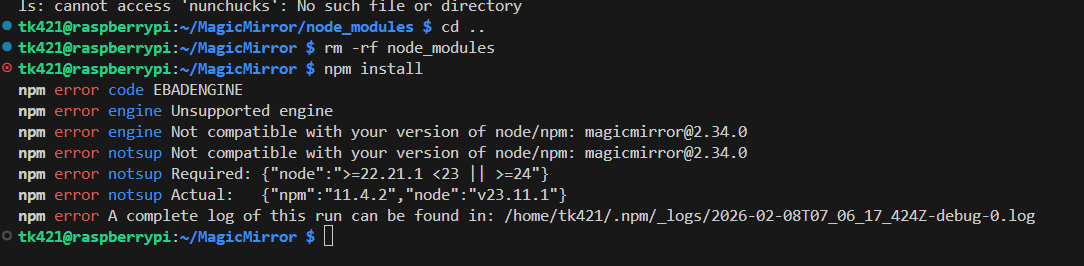
              71aa8446-16f6-4377-93d0-0d2bd6645455-image.png

              For context, recently I saw notifications on my mirror stating some modules needed to be updated. I ran through the docs for updating those but it’s possible I messed that up and caused myself a bigger problem here.

              S 1 Reply Last reply Reply Quote 0
              • S Offline
                sdetweil @fnmuffinman
                last edited by

                @fnmuffinman ah…

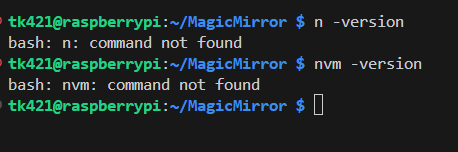
                Node 23 is bad , so we won’t install there

                So try either of these commands

                n —version
                nvm —version

                Do either exist?

                Sam

                How to add modules

                learning how to use browser developers window for css changes

                F 1 Reply Last reply Reply Quote 1
                • F Offline
                  fnmuffinman @sdetweil
                  last edited by

                  @sdetweil it appears neither do

                  5f165a38-a364-45d8-a9fd-b300a3427c23-image.png

                  S 1 Reply Last reply Reply Quote 0
                  • S Offline
                    sdetweil @fnmuffinman
                    last edited by sdetweil

                    @fnmuffinman good, thx

                    Do this

                    sudo npm install -g n
                    sudo n 22.21.1
                    hash -r
                    node -v
                    

                    Should show v 22.21.1
                    If not stop and advise

                    If ok
                    Then do

                    cd ~/MagicMirror 
                    npm install
                    

                    Then start MagicMirror

                    Sam

                    How to add modules

                    learning how to use browser developers window for css changes

                    1 Reply Last reply Reply Quote 0
                    • 1
                    • 2
                    • 3
                    • 2 / 3
                    • First post
                      Last post
                    Enjoying MagicMirror? Please consider a donation!
                    MagicMirror created by Michael Teeuw.
                    Forum managed by Sam, technical setup by Karsten.
                    This forum is using NodeBB as its core | Contributors
                    Contact | Privacy Policy