MagicMirror Forum
    • Recent
    • Tags
    • Unsolved
    • Solved
    • MagicMirror² Repository
    • Documentation
    • 3rd-Party-Modules
    • Donate
    • Discord
    • Register
    • Login
    A New Chapter for MagicMirror: The Community Takes the Lead
    Read the statement by Michael Teeuw here.

    [MMM-RTSPStream] - Video Streaming from Live Feeds & Security Cameras

    Scheduled Pinned Locked Moved Utilities
    602 Posts 67 Posters 2.1m Views 68 Watching
    Loading More Posts
    • Oldest to Newest
    • Newest to Oldest
    • Most Votes
    Reply
    • Reply as topic
    Log in to reply
    This topic has been deleted. Only users with topic management privileges can see it.
    • G Offline
      goprojojo @BKeyport
      last edited by

      @bkeyport said in [MMM-RTSPStream] - Video Streaming from Live Feeds & Security Cameras:

      Believe it or not, I found that OMX is by far the most stable of setups in my use case. Odd, I know.

      I do restart my Mirror daily, however.

      Are you using a script to auto restart and could you share?

      Cr4z33C BKeyportB 2 Replies Last reply Reply Quote 0
      • Cr4z33C Offline
        Cr4z33 @goprojojo
        last edited by

        @goprojojo I guess he just scheduled the reboot command into cron (Google for it). ;)

        1 Reply Last reply Reply Quote 0
        • BKeyportB Offline
          BKeyport Module Developer @goprojojo
          last edited by BKeyport

          @goprojojo

          Cron.

          #      m       h        dom    mon     dow     command
                 15      2        *      *       *       sudo reboot
          

          Why 2:15 you might ask? 2 AM daily my camera reboots and usually corrupts the display - takes about 10 minutes for it to restart where it don’t, and 5 more minutes to make sure it’s clear of it’s reboot and upgrade routines.

          I recommend https://crontab.guru/ to help you build cron tasks.

          The "E" in "Javascript" stands for "Easy"

          1 Reply Last reply Reply Quote 1
          • P Offline
            p4lsec
            last edited by

            Does anyone know if it’s possible to use moduleOffset from within a single stream (stream3)? I couldn’t get it to work.

            I have three streams going. The first two are side-by-side, but the third is centered under them. I would like the third to be left-justified. Any ideas?

            J 1 Reply Last reply Reply Quote 0
            • J Offline
              jngo @p4lsec
              last edited by

              This post is deleted!
              1 Reply Last reply Reply Quote 0
              • J Offline
                jngo @evroom
                last edited by jngo

                @evroom
                I am a newbie with Magic Mirror and Raspberry world so I would really appreciate if you could provide me a step-by-step instruction.
                I have the same challenge like yours: Although I set my stream video window to “bottom_right”, it appears to be in the between of “bottom_center” and “bottom_right”. In another word, it is completely located at the weirdest position: a little bit above the “bottom_center”, too much “left” from the “bottom_right” of the screen, etc…

                I follow your post to change the parameter of “moduleOffset” value but as you already stated, the moduleOffset did not work. The stream video window is still way off from where I want it to be. I am not familiar with the “.css” yet so if you are so kind, please point me to how I can make change to it?

                So, if possible, could you please kindly provide me a step-by-step instruction on how to align the stream windows with the “bottom_right” where it lines-up with the “current_weather” module (top-right)

                Thank you

                1 Reply Last reply Reply Quote 0
                • evroomE Online
                  evroom
                  last edited by evroom

                  @jngo
                  Can you post the moduleWidth, moduleHeight and the width and height from the stream?

                  And if you see it in the pm2 logs, this info:

                  Starting stream stream1 with args: [
                      "--avdict",
                      "rtsp_transport:tcp",
                      "--win",
                      "738, 63, 1090, 305",
                  

                  MagicMirror version: 2.33.0
                  Raspberry Pi 4 Model B Rev 1.5 (8 GB RAM)
                  Raspbian GNU/Linux 12 (bookworm)

                  Test environment:
                  MagicMirror version: v2.33.0
                  Raspberry Pi 3 Model B Plus Rev 1.3 (1 GB RAM)
                  Raspbian GNU/Linux 12 (bookworm)

                  1 Reply Last reply Reply Quote 0
                  • evroomE Online
                    evroom
                    last edited by evroom

                    Just to make it clear, I am not using any module anymore that uses omxplayer.
                    For me MMM-RTSPStream stopped to work for my install and use a while ago (reason unknown) and for MMM-Dreambox I do not have place on my screen (but a nice module nevertheless).
                    I have kept my MagicMirror pretty simple and static, just 5 modules and a video stream from my outdoor IP-camera.
                    No fancy things with rotating, voice commands, gesture commands, etc.
                    Everything that really matters in one view.

                    As an alternative for MMM-RTSPStream, I just use pm2 for my video stream.
                    The omxplayer is an overlay in all uses anyway, so I just ‘overlay’ it on top of the MM modules.
                    I left space on the left side of the MagicMirror by only using top and bottom positions.
                    pm2 controls the processes, like with MM (I enabled it using the same commands for MM, except that I used axis iso mm).

                    That being said, I can try activating MMM-RTSPStream again to be able support a bit.

                    pi@MagicPi:~ $ pwd
                    /home/pi
                    pi@MagicPi:~ $ cat axis.sh
                    #!/bin/bash
                    echo "Starting Axis stream ..."
                    
                    # No rotation
                    #omxplayer --avdict rtsp_transport:tcp --live --video_queue 4 --fps 30 --win "0 625 590 957" rtsp://axisviewer:Trosknurt12@192.168.178.56/axis-media/media.amp?resolution=640x360
                    
                    # Rotate to match custom.css rotation
                    # 640x360 == --win 'x1 y1 x2 y2' == "600 300 960 940" == x2 - x1 & y2 - y1
                    omxplayer --avdict rtsp_transport:tcp --orientation 270 --live --video_queue 4 --fps 30 --win "600 300 960 940" rtsp://user:password@192.168.178.56/axis-media/media.amp?resolution=640x360
                    pi@MagicPi:~ $ pm2 list
                    ┌──────────┬────┬─────────┬──────┬───────┬────────┬─────────┬────────┬─────┬────────────┬──────┬──────────┐
                    │ App name │ id │ version │ mode │ pid   │ status │ restart │ uptime │ cpu │ mem        │ user │ watching │
                    ├──────────┼────┼─────────┼──────┼───────┼────────┼─────────┼────────┼─────┼────────────┼──────┼──────────┤
                    │ axis     │ 1  │ 2.5.0   │ fork │ 11127 │ online │ 1066    │ 2h     │ 0%  │ 220.0 KB   │ pi   │ disabled │
                    │ mm       │ 0  │ 2.5.0   │ fork │ 4658  │ online │ 41      │ 14D    │ 0%  │ 12.0 KB    │ pi   │ disabled │
                    

                    MagicMirror version: 2.33.0
                    Raspberry Pi 4 Model B Rev 1.5 (8 GB RAM)
                    Raspbian GNU/Linux 12 (bookworm)

                    Test environment:
                    MagicMirror version: v2.33.0
                    Raspberry Pi 3 Model B Plus Rev 1.3 (1 GB RAM)
                    Raspbian GNU/Linux 12 (bookworm)

                    1 Reply Last reply Reply Quote 0
                    • J Offline
                      jngo
                      last edited by jngo

                      @evroom
                      I keep pretty much all modules as default (just like yours): calendar, event, weather now, forecast, news feed, and this stream video from my camera. That’s all I need.
                      My screen is a 22" Dell monitor and I do not rotate it so it’s horizontal. But because the stream video window appears in the middle of the whole thing, the layout of the modules on the screen looks so bad so I hope I could find the way to aligned it (bottom-right) with the right edge of my weather now (which is at top-right)

                      My info is below

                      Starting stream stream1 with args: [
                      “–avdict”,
                      “rtsp_transport:tcp”,
                      “–win”,
                      “1268, 511, 1620, 753”,
                      “–live”,
                      “–video _queue”,

                      My stream video window size is 640 x 360 px

                      1 Reply Last reply Reply Quote 0
                      • evroomE Online
                        evroom
                        last edited by

                        And from your config.js the moduleWidth, moduleHeight and the width and height from the stream, please.

                        MagicMirror version: 2.33.0
                        Raspberry Pi 4 Model B Rev 1.5 (8 GB RAM)
                        Raspbian GNU/Linux 12 (bookworm)

                        Test environment:
                        MagicMirror version: v2.33.0
                        Raspberry Pi 3 Model B Plus Rev 1.3 (1 GB RAM)
                        Raspbian GNU/Linux 12 (bookworm)

                        J 1 Reply Last reply Reply Quote 0
                        • J Offline
                          jngo @evroom
                          last edited by

                          @evroom
                          from the config.js file:

                          moduleWidth: 640
                          moduleHeight: 360

                          The wdth and height from the stream is also 640 x 360 px

                          Is this you are looking for?

                          1 Reply Last reply Reply Quote 0
                          • evroomE Online
                            evroom
                            last edited by

                            @jngo said in [MMM-RTSPStream] - Video Streaming from Live Feeds & Security Cameras:

                            Is this you are looking for?

                            Yes, but cannot promise anything :-)

                            Cannot get the module to run on my MM.
                            Most probably a new install will work miracles, but I do not want to spend too much time /effort on it.

                            MagicMirror version: 2.33.0
                            Raspberry Pi 4 Model B Rev 1.5 (8 GB RAM)
                            Raspbian GNU/Linux 12 (bookworm)

                            Test environment:
                            MagicMirror version: v2.33.0
                            Raspberry Pi 3 Model B Plus Rev 1.3 (1 GB RAM)
                            Raspbian GNU/Linux 12 (bookworm)

                            J 1 Reply Last reply Reply Quote 0
                            • J Offline
                              jngo @evroom
                              last edited by

                              @evroom
                              Yeah, anything would help but i totally understand that you have your MM working now and certainly do not want to mess that up!
                              If you could point me what code and where to look at, I may be able to play along… Right now, I have no idea what to adjust…
                              Thank you

                              1 Reply Last reply Reply Quote 0
                              • evroomE Online
                                evroom
                                last edited by

                                @jngo
                                One more question: what is the size of your display in pixels ?

                                MagicMirror version: 2.33.0
                                Raspberry Pi 4 Model B Rev 1.5 (8 GB RAM)
                                Raspbian GNU/Linux 12 (bookworm)

                                Test environment:
                                MagicMirror version: v2.33.0
                                Raspberry Pi 3 Model B Plus Rev 1.3 (1 GB RAM)
                                Raspbian GNU/Linux 12 (bookworm)

                                J 1 Reply Last reply Reply Quote 0
                                • J Offline
                                  jngo @evroom
                                  last edited by

                                  @evroom
                                  My screen size is 1920 x 1080 pixel

                                  1 Reply Last reply Reply Quote 0
                                  • evroomE Online
                                    evroom
                                    last edited by evroom

                                    @jngo
                                    If I understand omxplayer correct and did the calculations right, then this is what you see.

                                    Basically you are seeing a streaming window of just 334x242.
                                    I do not know where the model window is, but I suppose it is on the same location.
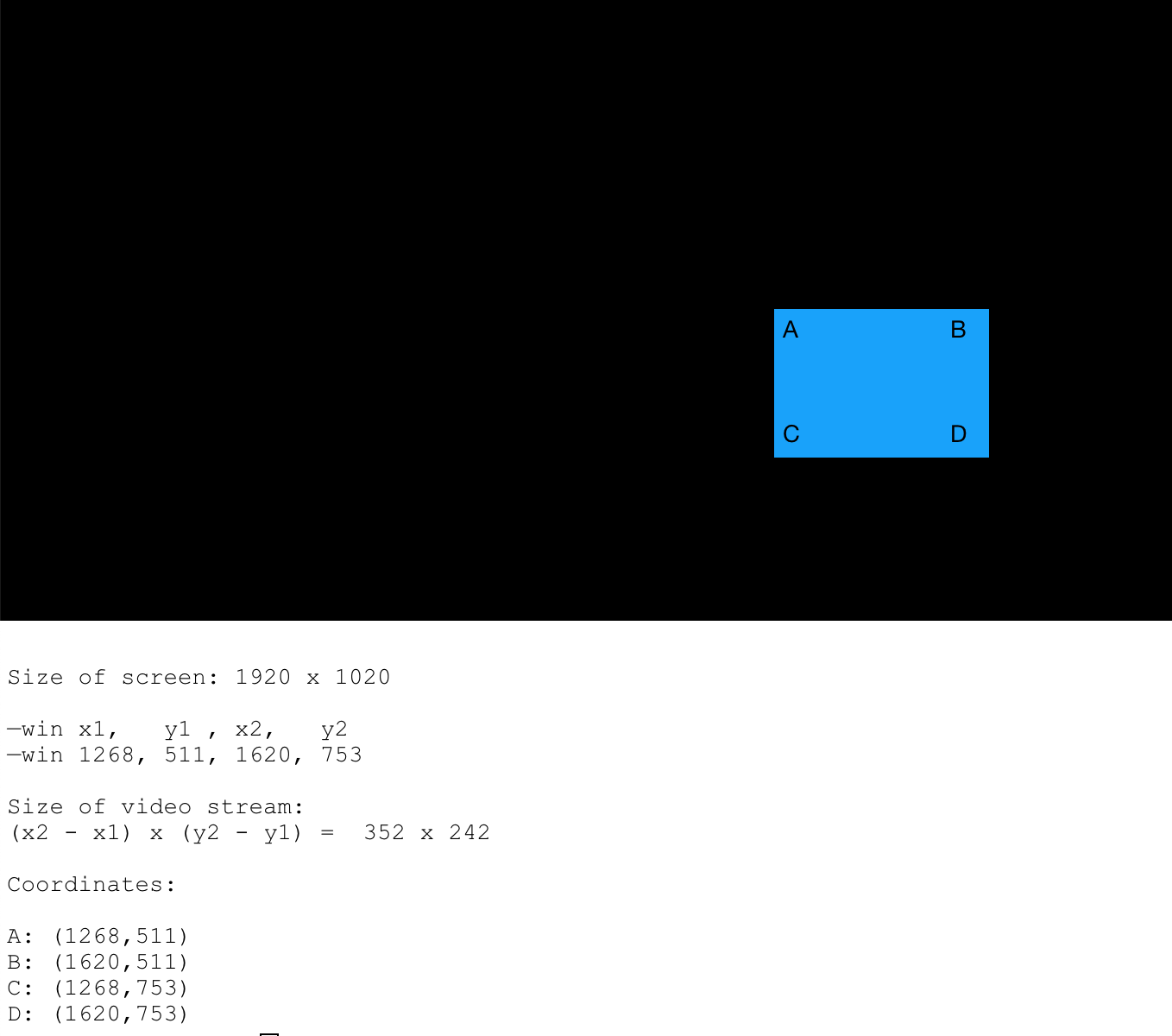
                                    0_1552939990312_omxplayer_coordinates_01.png

                                    MagicMirror version: 2.33.0
                                    Raspberry Pi 4 Model B Rev 1.5 (8 GB RAM)
                                    Raspbian GNU/Linux 12 (bookworm)

                                    Test environment:
                                    MagicMirror version: v2.33.0
                                    Raspberry Pi 3 Model B Plus Rev 1.3 (1 GB RAM)
                                    Raspbian GNU/Linux 12 (bookworm)

                                    J 1 Reply Last reply Reply Quote 0
                                    • J Offline
                                      jngo @evroom
                                      last edited by

                                      @evroom
                                      You are genius… Yes, the square that you draw is what I am seeing now…
                                      Is there a way to move the whole thing to the right and lower a bit?
                                      Thank you again

                                      1 Reply Last reply Reply Quote 0
                                      • evroomE Online
                                        evroom
                                        last edited by

                                        If you edit your custom.css file and restart MM then you can see the module position better:

                                        $ vi /home/pi/MagicMirror/css/custom.css
                                        :
                                        :
                                        .MMM-RTSPStream .innerWrapper {
                                          //border-style: none;
                                          border: 1px solid red;
                                        }
                                        

                                        You can use the editor of your liking of course.

                                        Btw, I see (wrong ??) fixed values MMM-RTSPStream.css:

                                        $ cat /home/pi/MagicMirror/modules/MMM-RTSPStream/MMM-RTSPStream.css
                                        :
                                        :
                                        .MMM-RTSPStream .innerWrapper {
                                          position: relative;
                                          width: 352px; /* Video width + 2*border + 2*padding */
                                          height: 242px;
                                          border: 1px solid white;
                                          /*float: left;*/
                                          display: inline-block;
                                          text-align: center;
                                          margin: 2px;
                                        }
                                        

                                        So, whatever your settings are in config.js, the result will be the same.
                                        I would try to change it to:

                                        width: 658px; /* Video width + 2*border + 2*padding */
                                        height: 360px;
                                        

                                        And then check pm2 logs for the --win settings it results to.
                                        Or even comment it out and see what happens:

                                        //  width: 352px; /* Video width + 2*border + 2*padding */
                                        //  height: 242px;
                                        

                                        Let me know the result and the pm2 log output (–win part).

                                        MagicMirror version: 2.33.0
                                        Raspberry Pi 4 Model B Rev 1.5 (8 GB RAM)
                                        Raspbian GNU/Linux 12 (bookworm)

                                        Test environment:
                                        MagicMirror version: v2.33.0
                                        Raspberry Pi 3 Model B Plus Rev 1.3 (1 GB RAM)
                                        Raspbian GNU/Linux 12 (bookworm)

                                        J 1 Reply Last reply Reply Quote 0
                                        • J Offline
                                          jngo @evroom
                                          last edited by jngo

                                          @evroom
                                          I adjusted the width and height in the css file like you instructed and restart MM. The result is that, the video stream window indeed gets bigger (W 658 x H 360) now but it does not really “move” to the right of the screen. Plus, at this size of the width, it becomes too wide that it covers the complimentary wording partially…
                                          the “-win” is now “1127, 512, 1767, 872”
                                          And with the “red” border of the stream window enabled, I can see that the red border frame aligned perfectly with the right-side of the screen however, the video feed itself does not fit within this red frame but is “top-left” off from the red frame
                                          Any idea how I can move the video feed to fit the red border frame and, do not cover the complimentary wordings?
                                          Thank you really, for your helps

                                          evroomE 2 Replies Last reply Reply Quote 0
                                          • C Offline
                                            costascontis
                                            last edited by

                                            how can i test with omxplayer that my camera link is playing ok?With vlc my link is ok but using omxplayer with the module i get nothing,empty box.


                                            J 1 Reply Last reply Reply Quote 0

                                            Hello! It looks like you're interested in this conversation, but you don't have an account yet.

                                            Getting fed up of having to scroll through the same posts each visit? When you register for an account, you'll always come back to exactly where you were before, and choose to be notified of new replies (either via email, or push notification). You'll also be able to save bookmarks and upvote posts to show your appreciation to other community members.

                                            With your input, this post could be even better 💗

                                            Register Login

                                            • 1
                                            • 2
                                            • 12
                                            • 13
                                            • 14
                                            • 15
                                            • 16
                                            • 30
                                            • 31
                                            • 14 / 31
                                            • First post
                                              Last post
                                            Enjoying MagicMirror? Please consider a donation!
                                            MagicMirror created by Michael Teeuw.
                                            Forum managed by Sam, technical setup by Karsten.
                                            This forum is using NodeBB as its core | Contributors
                                            Contact | Privacy Policy
