MagicMirror Forum
    • Recent
    • Tags
    • Unsolved
    • Solved
    • MagicMirror² Repository
    • Documentation
    • 3rd-Party-Modules
    • Donate
    • Discord
    • Register
    • Login
    A New Chapter for MagicMirror: The Community Takes the Lead
    Read the statement by Michael Teeuw here.

    [MMM-RTSPStream] - Video Streaming from Live Feeds & Security Cameras

    Scheduled Pinned Locked Moved Utilities
    602 Posts 67 Posters 2.1m Views 68 Watching
    Loading More Posts
    • Oldest to Newest
    • Newest to Oldest
    • Most Votes
    Reply
    • Reply as topic
    Log in to reply
    This topic has been deleted. Only users with topic management privileges can see it.
    • J Offline
      jngo
      last edited by jngo

      @evroom
      I keep pretty much all modules as default (just like yours): calendar, event, weather now, forecast, news feed, and this stream video from my camera. That’s all I need.
      My screen is a 22" Dell monitor and I do not rotate it so it’s horizontal. But because the stream video window appears in the middle of the whole thing, the layout of the modules on the screen looks so bad so I hope I could find the way to aligned it (bottom-right) with the right edge of my weather now (which is at top-right)

      My info is below

      Starting stream stream1 with args: [
      “–avdict”,
      “rtsp_transport:tcp”,
      “–win”,
      “1268, 511, 1620, 753”,
      “–live”,
      “–video _queue”,

      My stream video window size is 640 x 360 px

      1 Reply Last reply Reply Quote 0
      • evroomE Offline
        evroom
        last edited by

        And from your config.js the moduleWidth, moduleHeight and the width and height from the stream, please.

        MagicMirror version: 2.33.0
        Raspberry Pi 4 Model B Rev 1.5 (8 GB RAM)
        Raspbian GNU/Linux 12 (bookworm)

        Test environment:
        MagicMirror version: v2.33.0
        Raspberry Pi 3 Model B Plus Rev 1.3 (1 GB RAM)
        Raspbian GNU/Linux 12 (bookworm)

        J 1 Reply Last reply Reply Quote 0
        • J Offline
          jngo @evroom
          last edited by

          @evroom
          from the config.js file:

          moduleWidth: 640
          moduleHeight: 360

          The wdth and height from the stream is also 640 x 360 px

          Is this you are looking for?

          1 Reply Last reply Reply Quote 0
          • evroomE Offline
            evroom
            last edited by

            @jngo said in [MMM-RTSPStream] - Video Streaming from Live Feeds & Security Cameras:

            Is this you are looking for?

            Yes, but cannot promise anything :-)

            Cannot get the module to run on my MM.
            Most probably a new install will work miracles, but I do not want to spend too much time /effort on it.

            MagicMirror version: 2.33.0
            Raspberry Pi 4 Model B Rev 1.5 (8 GB RAM)
            Raspbian GNU/Linux 12 (bookworm)

            Test environment:
            MagicMirror version: v2.33.0
            Raspberry Pi 3 Model B Plus Rev 1.3 (1 GB RAM)
            Raspbian GNU/Linux 12 (bookworm)

            J 1 Reply Last reply Reply Quote 0
            • J Offline
              jngo @evroom
              last edited by

              @evroom
              Yeah, anything would help but i totally understand that you have your MM working now and certainly do not want to mess that up!
              If you could point me what code and where to look at, I may be able to play along… Right now, I have no idea what to adjust…
              Thank you

              1 Reply Last reply Reply Quote 0
              • evroomE Offline
                evroom
                last edited by

                @jngo
                One more question: what is the size of your display in pixels ?

                MagicMirror version: 2.33.0
                Raspberry Pi 4 Model B Rev 1.5 (8 GB RAM)
                Raspbian GNU/Linux 12 (bookworm)

                Test environment:
                MagicMirror version: v2.33.0
                Raspberry Pi 3 Model B Plus Rev 1.3 (1 GB RAM)
                Raspbian GNU/Linux 12 (bookworm)

                J 1 Reply Last reply Reply Quote 0
                • J Offline
                  jngo @evroom
                  last edited by

                  @evroom
                  My screen size is 1920 x 1080 pixel

                  1 Reply Last reply Reply Quote 0
                  • evroomE Offline
                    evroom
                    last edited by evroom

                    @jngo
                    If I understand omxplayer correct and did the calculations right, then this is what you see.

                    Basically you are seeing a streaming window of just 334x242.
                    I do not know where the model window is, but I suppose it is on the same location.
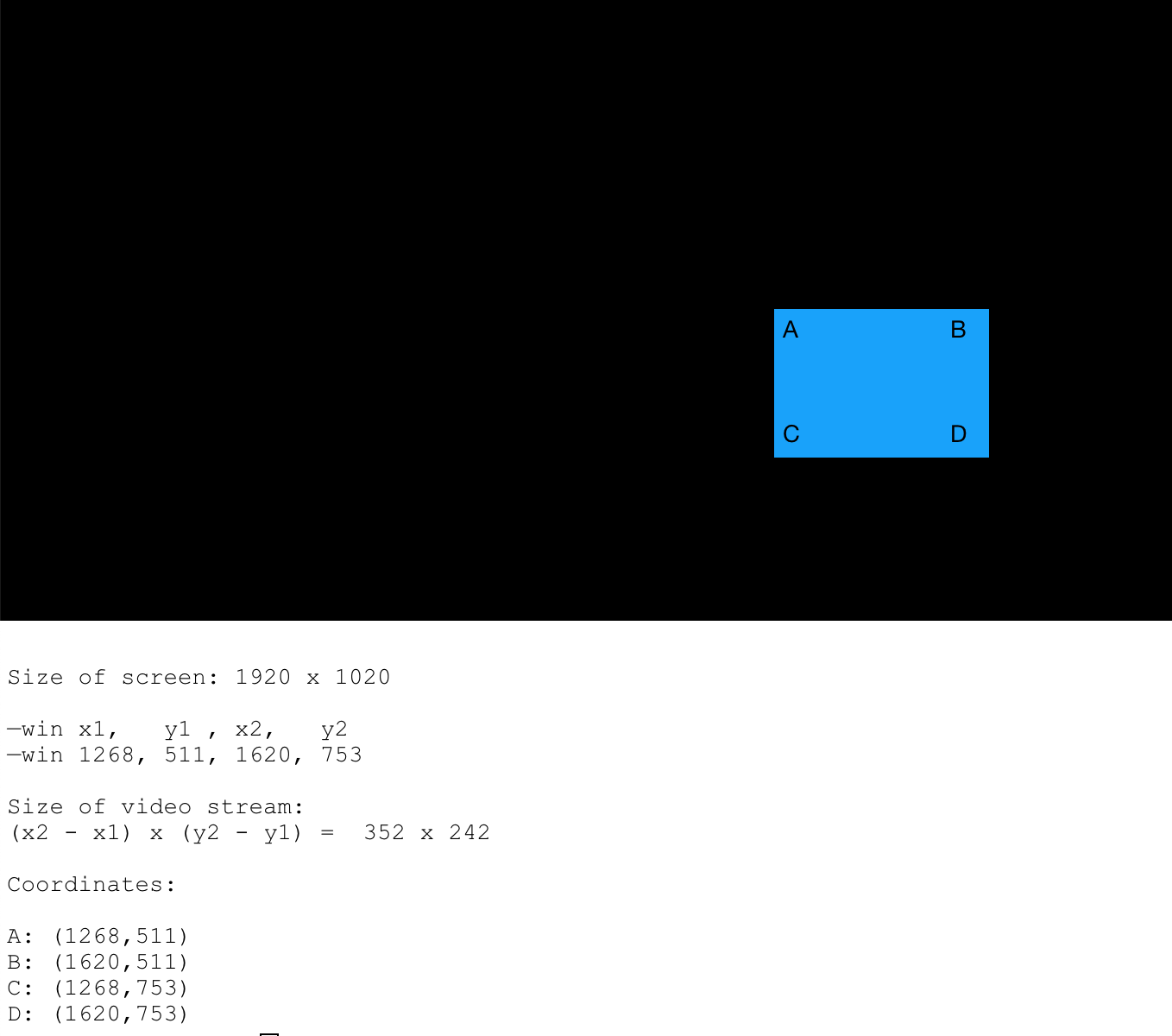
                    0_1552939990312_omxplayer_coordinates_01.png

                    MagicMirror version: 2.33.0
                    Raspberry Pi 4 Model B Rev 1.5 (8 GB RAM)
                    Raspbian GNU/Linux 12 (bookworm)

                    Test environment:
                    MagicMirror version: v2.33.0
                    Raspberry Pi 3 Model B Plus Rev 1.3 (1 GB RAM)
                    Raspbian GNU/Linux 12 (bookworm)

                    J 1 Reply Last reply Reply Quote 0
                    • J Offline
                      jngo @evroom
                      last edited by

                      @evroom
                      You are genius… Yes, the square that you draw is what I am seeing now…
                      Is there a way to move the whole thing to the right and lower a bit?
                      Thank you again

                      1 Reply Last reply Reply Quote 0
                      • evroomE Offline
                        evroom
                        last edited by

                        If you edit your custom.css file and restart MM then you can see the module position better:

                        $ vi /home/pi/MagicMirror/css/custom.css
                        :
                        :
                        .MMM-RTSPStream .innerWrapper {
                          //border-style: none;
                          border: 1px solid red;
                        }
                        

                        You can use the editor of your liking of course.

                        Btw, I see (wrong ??) fixed values MMM-RTSPStream.css:

                        $ cat /home/pi/MagicMirror/modules/MMM-RTSPStream/MMM-RTSPStream.css
                        :
                        :
                        .MMM-RTSPStream .innerWrapper {
                          position: relative;
                          width: 352px; /* Video width + 2*border + 2*padding */
                          height: 242px;
                          border: 1px solid white;
                          /*float: left;*/
                          display: inline-block;
                          text-align: center;
                          margin: 2px;
                        }
                        

                        So, whatever your settings are in config.js, the result will be the same.
                        I would try to change it to:

                        width: 658px; /* Video width + 2*border + 2*padding */
                        height: 360px;
                        

                        And then check pm2 logs for the --win settings it results to.
                        Or even comment it out and see what happens:

                        //  width: 352px; /* Video width + 2*border + 2*padding */
                        //  height: 242px;
                        

                        Let me know the result and the pm2 log output (–win part).

                        MagicMirror version: 2.33.0
                        Raspberry Pi 4 Model B Rev 1.5 (8 GB RAM)
                        Raspbian GNU/Linux 12 (bookworm)

                        Test environment:
                        MagicMirror version: v2.33.0
                        Raspberry Pi 3 Model B Plus Rev 1.3 (1 GB RAM)
                        Raspbian GNU/Linux 12 (bookworm)

                        J 1 Reply Last reply Reply Quote 0
                        • J Offline
                          jngo @evroom
                          last edited by jngo

                          @evroom
                          I adjusted the width and height in the css file like you instructed and restart MM. The result is that, the video stream window indeed gets bigger (W 658 x H 360) now but it does not really “move” to the right of the screen. Plus, at this size of the width, it becomes too wide that it covers the complimentary wording partially…
                          the “-win” is now “1127, 512, 1767, 872”
                          And with the “red” border of the stream window enabled, I can see that the red border frame aligned perfectly with the right-side of the screen however, the video feed itself does not fit within this red frame but is “top-left” off from the red frame
                          Any idea how I can move the video feed to fit the red border frame and, do not cover the complimentary wordings?
                          Thank you really, for your helps

                          evroomE 2 Replies Last reply Reply Quote 0
                          • C Offline
                            costascontis
                            last edited by

                            how can i test with omxplayer that my camera link is playing ok?With vlc my link is ok but using omxplayer with the module i get nothing,empty box.

                            J 1 Reply Last reply Reply Quote 0
                            • J Offline
                              jngo @costascontis
                              last edited by

                              @costascontis
                              You can use the command
                              pm2 status
                              to check if it’s working.
                              Also, in the config.js file, you need to specify the omxplayer instead of vlc
                              localPlayer: ‘omxplayer’,

                              1 Reply Last reply Reply Quote 0
                              • evroomE Offline
                                evroom
                                last edited by

                                @costascontis said in [MMM-RTSPStream] - Video Streaming from Live Feeds & Security Cameras:

                                how can i test with omxplayer that my camera link is playing ok?

                                You can test it standalone with:

                                $ omxplayer --avdict rtsp_transport:tcp --live --video_queue 4 --fps 30 --win "0 0 640 360" rtsp://[rrtsp_uri]
                                

                                PS

                                Now the coordinates confuse me, but make sense (X-axis, Y-axis)

                                —win x1,   y1 , x2,   y2
                                —win 0,    0,   640,  360
                                
                                Size of video stream:
                                (x2 - x1) x (y2 - y1) =  640 x 360
                                

                                MagicMirror version: 2.33.0
                                Raspberry Pi 4 Model B Rev 1.5 (8 GB RAM)
                                Raspbian GNU/Linux 12 (bookworm)

                                Test environment:
                                MagicMirror version: v2.33.0
                                Raspberry Pi 3 Model B Plus Rev 1.3 (1 GB RAM)
                                Raspbian GNU/Linux 12 (bookworm)

                                1 Reply Last reply Reply Quote 0
                                • evroomE Offline
                                  evroom @jngo
                                  last edited by

                                  @jngo said in [MMM-RTSPStream] - Video Streaming from Live Feeds & Security Cameras:

                                  the “-win” is now “1127, 512, 1767, 872”

                                  Could you briefly test it with width and height commented out ?

                                  //  width: 352px; /* Video width + 2*border + 2*padding */
                                  //  height: 242px;
                                  

                                  Just to see what is happening then.

                                  MagicMirror version: 2.33.0
                                  Raspberry Pi 4 Model B Rev 1.5 (8 GB RAM)
                                  Raspbian GNU/Linux 12 (bookworm)

                                  Test environment:
                                  MagicMirror version: v2.33.0
                                  Raspberry Pi 3 Model B Plus Rev 1.3 (1 GB RAM)
                                  Raspbian GNU/Linux 12 (bookworm)

                                  1 Reply Last reply Reply Quote 0
                                  • evroomE Offline
                                    evroom @jngo
                                    last edited by

                                    @jngo said in [MMM-RTSPStream] - Video Streaming from Live Feeds & Security Cameras:

                                    Any idea how I can move the video feed to fit the red border frame and, do not cover the complimentary wordings?

                                    I would try this:

                                    Change the config.js:

                                    :
                                    :
                                    moduleWidth: 468,
                                    moduleHeight: 253,
                                    :
                                    :
                                            width: 450,
                                            height: 253,
                                    

                                    Change the MMM-RTSPStream.css:

                                    width: 468px; /* Video width + 2*border + 2*padding */
                                    height: 253px;
                                    

                                    MagicMirror version: 2.33.0
                                    Raspberry Pi 4 Model B Rev 1.5 (8 GB RAM)
                                    Raspbian GNU/Linux 12 (bookworm)

                                    Test environment:
                                    MagicMirror version: v2.33.0
                                    Raspberry Pi 3 Model B Plus Rev 1.3 (1 GB RAM)
                                    Raspbian GNU/Linux 12 (bookworm)

                                    J 1 Reply Last reply Reply Quote 0
                                    • J Offline
                                      jngo @evroom
                                      last edited by jngo

                                      @evroom said in [MMM-RTSPStream] - Video Streaming from Live Feeds & Security Cameras:

                                      @jngo said in [MMM-RTSPStream] - Video Streaming from Live Feeds & Security Cameras:

                                      Any idea how I can move the video feed to fit the red border frame and, do not cover the complimentary wordings?

                                      I would try this:

                                      Change the config.js:

                                      :
                                      :
                                      moduleWidth: 468,
                                      moduleHeight: 253,
                                      :
                                      :
                                              width: 450,
                                              height: 253,
                                      

                                      Change the MMM-RTSPStream.css:

                                      width: 468px; /* Video width + 2*border + 2*padding */
                                      height: 253px;
                                      

                                      So I followed what you recommended: width 468 and height 253. The result is still the same: The red border frame is perfectly aligned with the right size of the screen (in bottom-right setup). But the live video stream window (468x253) is located more to the “left” and higher than the red frame
                                      This thing really drives me nuts…gr.gr…gr…

                                      1 Reply Last reply Reply Quote 0
                                      • evroomE Offline
                                        evroom
                                        last edited by

                                        @jngo
                                        So if the video area matches the module area (the red border in this moment) then it is okay for you?

                                        Could you still till try this?

                                        „Could you briefly test it with width and height commented out ?“

                                        MagicMirror version: 2.33.0
                                        Raspberry Pi 4 Model B Rev 1.5 (8 GB RAM)
                                        Raspbian GNU/Linux 12 (bookworm)

                                        Test environment:
                                        MagicMirror version: v2.33.0
                                        Raspberry Pi 3 Model B Plus Rev 1.3 (1 GB RAM)
                                        Raspbian GNU/Linux 12 (bookworm)

                                        J 1 Reply Last reply Reply Quote 0
                                        • J Offline
                                          jngo @evroom
                                          last edited by jngo

                                          @evroom
                                          I tried to comment out the W & H, it still did the same issue. I restart the Raspberry and re-install the module, it gets better a bit: Now the right-edge of the stream video is aligned with the weather module, which is what I want to. However, the stream module is still off compare to the red border frame. But I guess it is the best it could get so I set the border to “0” (no border any more). And it is now the closest that I could get!

                                          One last thing I want to ask you as well: How do I increase the size of the fonts used in the MM? Which lines of code in the “main.css” of the MagicMirror should I look at? My purpose is I want to make the text in the clock, weather, calendar appear bigger a little bit so that we can all see those info from a few feet away.

                                          Thank you very much for your patience and helps, I really appreciated it.

                                          1 Reply Last reply Reply Quote 0
                                          • evroomE Offline
                                            evroom
                                            last edited by

                                            @jngo said in [MMM-RTSPStream] - Video Streaming from Live Feeds & Security Cameras:

                                            tried to comment out the W & H, it still did the same issue.

                                            Actually I was interested in the --win coordinates from the pm2 log in this case.
                                            If the same, then it means that uncommented is right and the values are being taken from the config.js parameters.
                                            It looks it can be uncommented.

                                            One last suggestion:

                                            Either in the MM-RTSPStream.css or your /home/pi/MagicMirror/css/custom.css:

                                            .MMM-RTSPStream .innerWrapper {
                                              position: relative;
                                              width: 468px; /* Video width + 18px
                                              height: 253px;
                                              border-style: none;
                                              display: inline-block;
                                              text-align: center;
                                            }
                                            

                                            Regarding

                                            How do I increase the size of the fonts used in the MM?
                                            you will have to ask this in a separate topic.
                                            Best is to change things in the custom.css.
                                            I only made changes regarding the width of some regions.

                                            MagicMirror version: 2.33.0
                                            Raspberry Pi 4 Model B Rev 1.5 (8 GB RAM)
                                            Raspbian GNU/Linux 12 (bookworm)

                                            Test environment:
                                            MagicMirror version: v2.33.0
                                            Raspberry Pi 3 Model B Plus Rev 1.3 (1 GB RAM)
                                            Raspbian GNU/Linux 12 (bookworm)

                                            1 Reply Last reply Reply Quote 0

                                            Hello! It looks like you're interested in this conversation, but you don't have an account yet.

                                            Getting fed up of having to scroll through the same posts each visit? When you register for an account, you'll always come back to exactly where you were before, and choose to be notified of new replies (either via email, or push notification). You'll also be able to save bookmarks and upvote posts to show your appreciation to other community members.

                                            With your input, this post could be even better 💗

                                            Register Login

                                            • 1
                                            • 2
                                            • 12
                                            • 13
                                            • 14
                                            • 15
                                            • 16
                                            • 30
                                            • 31
                                            • 14 / 31
                                            • First post
                                              Last post
                                            Enjoying MagicMirror? Please consider a donation!
                                            MagicMirror created by Michael Teeuw.
                                            Forum managed by Sam, technical setup by Karsten.
                                            This forum is using NodeBB as its core | Contributors
                                            Contact | Privacy Policy