MagicMirror Forum
    • Recent
    • Tags
    • Unsolved
    • Solved
    • MagicMirror² Repository
    • Documentation
    • 3rd-Party-Modules
    • Donate
    • Discord
    • Register
    • Login
    A New Chapter for MagicMirror: The Community Takes the Lead
    Read the statement by Michael Teeuw here.

    MMM-GrafanaCharts and MMM-GrafanaGauges: Display you data with Charts and Gauges. Beautifully.

    Scheduled Pinned Locked Moved Utilities
    29 Posts 13 Posters 27.6k Views 15 Watching
    Loading More Posts
    • Oldest to Newest
    • Newest to Oldest
    • Most Votes
    Reply
    • Reply as topic
    Log in to reply
    This topic has been deleted. Only users with topic management privileges can see it.
    • foxF Offline
      fox @SvenSommer
      last edited by fox

      @SvenSommer said in MMM-GrafanaCharts and MMM-GrafanaGauges: Display you data with Charts and Gauges. Beautifully.:

      @fox
      Short answer: No, not the direct way.

      Long answer: You need to write your temperature data into a database which is connected with Grafana. Then you can use this module to display your graph created by grafana.

      One possible solution: This tutorial shows an example, on how to store weather data from an external source in a local influxdb database, which is connected to grafana.
      You could reuse the example code an edit it, to get your data stored in a influxdb database.

      i will try your possible solution :) Thank you

      edit:

      thanks for sharing the link.
      I installed influxDB and grafana as written on your page.
      I also added the datasource to grafana.

      You mean i have to update this script?

      importForecast.js


      Issues With MMM-WatchDog known?

      https://forum.magicmirror.builders/post/29827

      Useful for PIR-Sensor: https://forum.magicmirror.builders/post/21299

      SvenSommerS 1 Reply Last reply Reply Quote 0
      • SvenSommerS Offline
        SvenSommer @fox
        last edited by

        @fox Yes, this script is responsible for getting the data into the database.

        If you would like to show other data with Grafana, you need to save the data you get from your sensor.

        Looking for some building inspiration?
        Check out my large, thin and metal framed mirror on robstechlog.com.

        Modules released:
        MMM-GoogleAnalytics
        MMM-GrafanaChart
        MMM-GrafanaGauges

        1 Reply Last reply Reply Quote 0
        • S Offline
          sceletus
          last edited by

          How do you manage credential to get access to grafana?
          Thanks in advance.

          SvenSommerS 1 Reply Last reply Reply Quote 0
          • Y Offline
            yours.mukul
            last edited by

            How to install Grafana? Does that debian work fine on rpi? I am confused since the architecture is different and I think the packages should be different as well.

            I know its a very stupid question, but please help

            SvenSommerS 1 Reply Last reply Reply Quote 0
            • SvenSommerS Offline
              SvenSommer @yours.mukul
              last edited by

              @yours.mukul
              Yes just follow these instructions:
              http://docs.grafana.org/installation/debian/

              Looking for some building inspiration?
              Check out my large, thin and metal framed mirror on robstechlog.com.

              Modules released:
              MMM-GoogleAnalytics
              MMM-GrafanaChart
              MMM-GrafanaGauges

              1 Reply Last reply Reply Quote 0
              • SvenSommerS Offline
                SvenSommer @sceletus
                last edited by

                @sceletus
                Enable authentication in the [http] section of the configuration file /etc/influxdb/influxdb.conf :

                [http] enabled = true bind-address = ":8086" # change to a specific interface if needed auth-enabled = true # will enforce authentication
                

                everything is described in the tutorial on http://robstechlog.com/2017/06/30/personal-weather-chart-module/

                Looking for some building inspiration?
                Check out my large, thin and metal framed mirror on robstechlog.com.

                Modules released:
                MMM-GoogleAnalytics
                MMM-GrafanaChart
                MMM-GrafanaGauges

                1 Reply Last reply Reply Quote 0
                • H Offline
                  hunty1980 @planet4
                  last edited by

                  @planet4 Are you able to provide steps on how you managed to update the CSS file to match the black background of the MM?

                  P 1 Reply Last reply Reply Quote 0
                  • P Offline
                    planet4 @hunty1980
                    last edited by

                    @hunty1980 I used this guide https://forum.magicmirror.builders/topic/1675/graph-module/18

                    1 Reply Last reply Reply Quote 0
                    • P Offline
                      planet4
                      last edited by

                      @SvenSommer Have not used this module for a while but have now reinstalled Grafana and would like to try it again. However I can not remember how to solve the login to Grafana. I think I opened it up as public the last time but is not an option now. At the moment the mirror just shows erroe as it can not login to the Grafana dashboard. Please advise.

                      1 Reply Last reply Reply Quote 0
                      • P Offline
                        planet4
                        last edited by

                        I was able to solve the login issues but now its just black. Maybe this module does not work with the new version of Grafana?

                        SvenSommerS 1 Reply Last reply Reply Quote 0
                        • SvenSommerS Offline
                          SvenSommer @planet4
                          last edited by

                          @planet4 Hey, I just tried it with the actual Grafana v6.0.1 (commit: 0c44a04)
                          It worked for me without any adjustments.

                          Maybe I can support you, to set it up.

                          Looking for some building inspiration?
                          Check out my large, thin and metal framed mirror on robstechlog.com.

                          Modules released:
                          MMM-GoogleAnalytics
                          MMM-GrafanaChart
                          MMM-GrafanaGauges

                          P 1 Reply Last reply Reply Quote 0
                          • P Offline
                            planet4 @SvenSommer
                            last edited by planet4

                            @SvenSommer Thanks for replying. I was actually able to solve it but with version 6 of Grafana black background is more of a trouble. Wrote a short post about this as well.

                            http://www.planet4.se/grafana-in-magic-mirror/

                            I am now able to show my Solar production on my mirror. 0,36kW. Will post this in the show my mirror as well. Thanks.
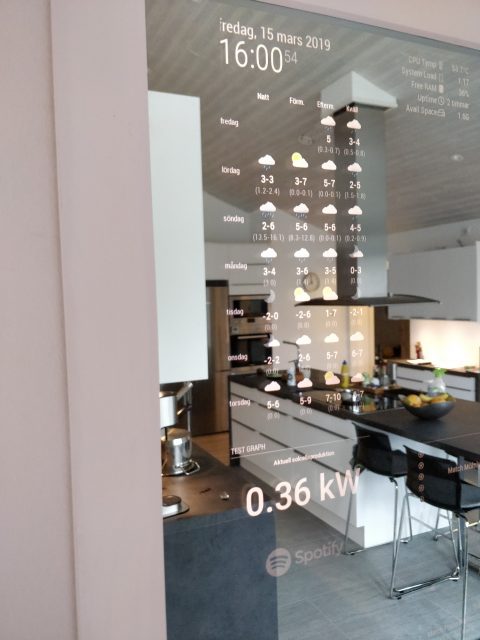
                            0_1553074397943_solarmirror-480x640.jpg

                            T 1 Reply Last reply Reply Quote 0
                            • T Offline
                              teitlebot @planet4
                              last edited by

                              @planet4 thanks
                              your post helped me half way
                              im using home assistant to host grafana so i needed to create an org called home assistant.

                              1 Reply Last reply Reply Quote 0
                              • P Offline
                                planet4
                                last edited by

                                @teitlebot I am using Home Assistant as well but Grafana is not used as an add-in on Hassio. I have it on a separate docker container. However I gave up Grafana in the end. It was to much problems. Now I use MQTT to get all information I want from Home Assistant to my Mirror. Like this:

                                http://www.planet4.se/magic-mirror-info-via-mqtt/

                                T 1 Reply Last reply Reply Quote 0
                                • T Offline
                                  teitlebot @planet4
                                  last edited by

                                  @planet4 What other problems did grafana give you? I am also using the mmm hass component to pull in sensor date but maybe I will switch to mmm mqtt. I really wanted to show some nice graph though. Also how did you build the total solar energy sensor saving in hass? I build it in graphana following someones tutorial,

                                  1 Reply Last reply Reply Quote 0
                                  • A Offline
                                    andreasm80
                                    last edited by

                                    edit reposted to be in same thread…

                                    Hi,
                                    Have been using this module for a couple of years now without any problems. Yesterday I upgraded my Grafana server and discovered they had implemented a security change where you had to allow_embedded=true. After doing this change I was back on track again, except that I can only see my GrafanaGauges when I point my browser to my MagicMirror IP, it does not show up on the MM screen itself. I see it takes it places and all modules around aligns perfectly around it, but the content onscreen is blank/black. Have been troubleshooting everything from both Grafana side and MagicMirror side. It will not show up on the screen only when I point my browser to the MM, then I see the screen with all content as it should…
                                    Now I am clueless… Not sure if this is module-specific or content from Grafana that does it. My next step to try som iFrame modules to show the same content…
                                    Any ideas?

                                    Regards

                                    1 Reply Last reply Reply Quote 0
                                    • A Offline
                                      andreasm80
                                      last edited by andreasm80

                                      edit
                                      Case closed.
                                      With no errors what so ever from the MM side, everything seemed to work normal. Either MM or the modules I tried did not resolve FQDN names… ! (MM is configured with two local DNS servers) I think this should be reported in some of the logs on MM… Nothing.
                                      I figured it out when I did a lsof on my Grafana server and there were no connection from the MM there… Only my own pc… LOL

                                      Well, back in business again after some hours troubleshooting… Probably learnt a thing or two also along the way.

                                      I tried with another module capable of showing iframes. Same problem there. It refuses to show the content on the MM monitor only on a browser from another computer. There everythings shows up as normal.
                                      Even removed all other modules sharing the same position as this one.

                                      I am stuck…

                                      1 Reply Last reply Reply Quote 0
                                      • I Offline
                                        iorifly
                                        last edited by

                                        Hello, thanks for your module!

                                        I would use the bar graph? Both vertical and horizontal?
                                        it’s possible ? If not, do I want to add this function? Thanks so much again for the module!

                                        1 Reply Last reply Reply Quote 0
                                        • I Offline
                                          iorifly
                                          last edited by

                                          Does anyone know if anything happened to dev? I haven’t seen anything from him on the internet since 2018.

                                          Is this project dead?

                                          B 1 Reply Last reply Reply Quote 0
                                          • B Offline
                                            Biebermann @iorifly
                                            last edited by

                                            @iorifly
                                            The project seems to be dead :(

                                            1 Reply Last reply Reply Quote 0

                                            Hello! It looks like you're interested in this conversation, but you don't have an account yet.

                                            Getting fed up of having to scroll through the same posts each visit? When you register for an account, you'll always come back to exactly where you were before, and choose to be notified of new replies (either via email, or push notification). You'll also be able to save bookmarks and upvote posts to show your appreciation to other community members.

                                            With your input, this post could be even better đź’—

                                            Register Login
                                            • 1
                                            • 2
                                            • 1 / 2
                                            • First post
                                              Last post
                                            Enjoying MagicMirror? Please consider a donation!
                                            MagicMirror created by Michael Teeuw.
                                            Forum managed by Sam, technical setup by Karsten.
                                            This forum is using NodeBB as its core | Contributors
                                            Contact | Privacy Policy