Read the statement by Michael Teeuw here.
Sync private iCloud calendar with MagicMirror
-
@Doubleve How did you fix this issue? I’m getting the same error.
-
Thanks for the tutorial, this is incredibly helpful.
I’m to the point where my MagicMirror displays events from my Home calendar, but it seems that vdirsyncer.timer is not actually working. When I run
systemctl --user enable vdirsyncer.timerthe console doesn’t output any errors and just returns to a new line. I never see any updates to events on the calendar if I remove/add.I’ve modified the timer settings, and changed a few settings on the MagicMirror side as well but the only way I can get the .ics files to update is if I manually run
vdirsyncer sync. I’ve ready through the docs over here: https://vdirsyncer.pimutils.org/en/stable/index.html but there really isn’t any useful information about the timer.Any thoughts or leads to finding an answer?
-
Hi all,
i’m trying to prepare everything on SW site before i start building MM and i have almost everything except birthdays … :(
i’m using iCloud to store my contacts birthdays but i’m not able to find way how to import them to calendar module on MM2
i’ve found and installed this module :
MMM-iCloud-Clienti’ve installed it and also dependecies :
npm install ical-generator
npm install icloud
npm install nedb --savein config/config.js i’ve updated entry with
{
module: ‘MMM-iCloud-Client’,
config: {
username: “appleID”,
password: “password”,
countrycode: “49”,
}
},also i’ve edited modules/default/calendar/calendar.js and added this code to it (below US-Holidays.ics …entry) :
{
symbol: ‘birthday-cake’,
url: ‘http://localhost:8080/MMM-iCloud-Client/birthdays’,
}but it’s still not showing any birthday even if upcomming are in 2 days.
Can someone help me what i’m doing wrong ?
Thank you
-
noone ? i realy want to see upcomming birthday but i’m not able to get it work
-
i’ve tried to remove module MMM-iCloud-Client
(rm -rf MMM-iCloud-Client in modules dir)then i’ve installed it from beginning as written in Readme
when i’ve executed “npm install” in MMM-iCloud-Client directory i get this information :
/MagicMirror/modules/MMM-iCloud-Client $ npm install
npm WARN deprecated node-uuid@1.4.8: Use uuid module instead
npm notice created a lockfile as package-lock.json. You should commit this file.
added 59 packages from 71 contributors and audited 74 packages in 14.839s
found 1 low severity vulnerability
runnpm audit fixto fix them, ornpm auditfor detailsi’ve executed “npm audit” and error is according lodash
i’ve tried also “npm audit fix” but i get
/MagicMirror/modules/MMM-iCloud-Client $ npm install
npm WARN deprecated node-uuid@1.4.8: Use uuid module instead
npm notice created a lockfile as package-lock.json. You should commit this file.
added 59 packages from 71 contributors and audited 74 packages in 14.839s
found 1 low severity vulnerability
runnpm audit fixto fix them, ornpm auditfor detailsi’ve searched and tried to install lodash manually by “npm install lodash”
/MagicMirror/modules/MMM-iCloud-Client $ npm install lodash
- lodash@4.17.10
updated 1 package and audited 74 packages in 7.673s
found 1 low severity vulnerability
runnpm audit fixto fix them, ornpm auditfor details
can someone help ? I’m not sure if this is root cause why Birthday is not working as it should but this is the only error i can see.
- lodash@4.17.10
-
Or is there any posibility how to add birthday ? Google calendar maybe?
-
there is a default calendar module that automatically came with MM2
And there are others, I personally like MMM-CalendarExt.
-
Yes but is there possibility to add birthday calendar ?
Icloud or google ? -
I work mainly with Google, I haven’t personally used iCloud. Have also worked with Yahoo and Hotmail. Google is my favorite…
This is my list of calendars:
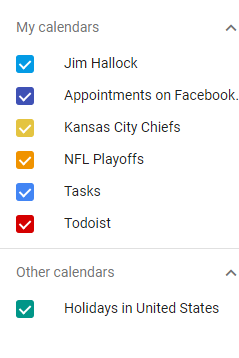
And, this is how I put into my calendar module…
"calendars": [ { "name": "Family Stuff", "symbol": "heart@fa", "url": "Calendar link here", "interval": 24*60*60*1000 }, { "name": "US Holiday", "url": "Calendar link here", "symbol": "gift@fa", "interval": 24*60*60*1000, "maxEntries": 50, "maxDays":365 }, { "name": "Birthdays", "symbol": "birthday-cake", "url": "Calendar link here" }, { // "name": "KC Chiefs", "symbol": "football-ball@fa", "url": "Calendar link here", "interval": 24*60*60*1000 }, { "name": "NFL Games", "url": "Calendar link here", "symbol": "football-ball@fa", "interval": 24*60*60*1000 }, { "name": "NFL Playoff Games", "url": "Calendar link here", "symbol": "football-ball@fa", "interval": 24*60*60*1000 }, ], -
@justjim1220 We are all able to do that, to clarify the issue. The objective is to find a way to use an iCloud calendar without having a public url, which is what your google calendar is currently using. By using a public URL, web crawlers are able to find and read your calendar events.
-
@maros you can add the bday calendar in the default calendar module by making your iCloud calendar public (tick the box circled in this screenshot), and you should be given a link that you can copy into the config file.
If you want to use google calendars, it should be similar. Just look up how to publicly share a google calendar, and get the link from there to put into your config.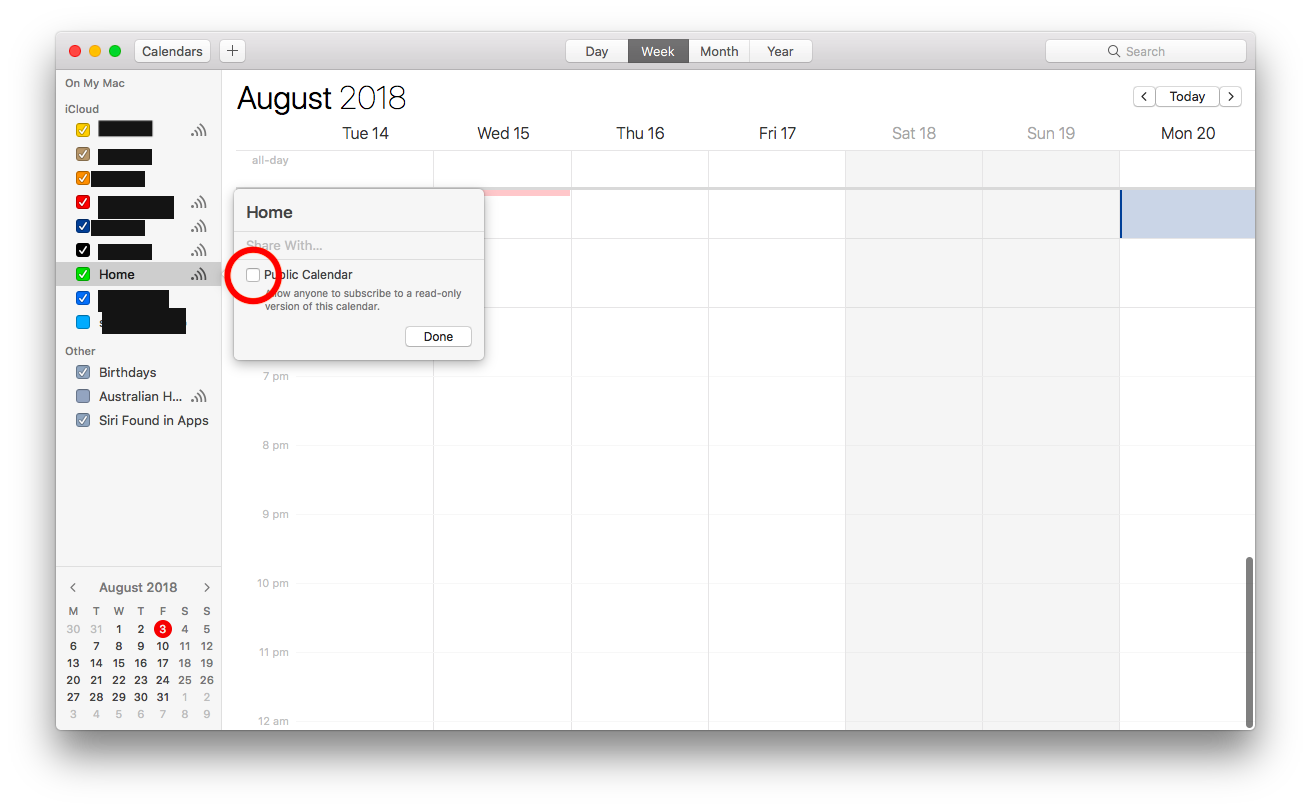
-
@maros One problem (which this thread was originally trying to solve) was the inability to prevent others from accessing the calendar. If a web crawler can find your link, they too will be able to read your calendar.
-
@Albinolan but in icloud calendar Birthday calendar have not option to public.
it’s marked as others
@justjim1220 i’ve tried also this in gmail i’ve copied url for birthday calendar (public url to this calendar) and add it to my calendar module
{
symbol: “calendar”,
url: “https://calendar.google.com/calendar/xxxxxxxxxxxx”
},but it’s not showing any upcomming birthday
ok i’ve made temporary solution but it’s not ideal …
what i’ve done - open Google Calendar - Export and Import
exported all calendars to .ics
i’ve copied birthday calendar to rpi (using scp birthday.ics pi@:MagicMirror/modules/calendars)in config.js i’ve creaded new entry for newly created calendar.
problem is it’s static so if you want to add new birthday you have to edit file birthday.ics
-
First, thank you! This is great. I got three different iCal calendars to all work perfectly.
I can’t, however, seem to get a holiday calendar to show. The
vdirsyncer discoverdoesn’t show the iCal US Holiday calendar, so I can’t use the one that is provided by iCloud. So I decided to use the calendarlabs that comes as a default with MagicMirror. But it’s showing up on electron when Inpm startI’ve included my code below. Can anyone tell me why the calendarlabs US holiday calendar isn’t showing up?
Do I need to create a 4th .ics file form calendarlabs to store locally to use with vdirsyncer? Is that why the default code in MagicMirror for calendarlabs no longer works?
Thanks.
{ module: 'calendar', position: 'top_left', // This can be any of the regions. Best results in left or right regions. config: { colored: true, // Activate coloring maximumNumberOfDays: 10, maximumEntries: 7, timeFormat: 12, calendars: [ // "ME Calendar" { url: 'http://localhost:8080/modules/calendars/home.ics', symbol: 'calendar', color: '#5bc0de' // Assign color }, // "YOU Calendar" { url: 'http://localhost:8080/modules/calendars/work.ics', symbol: 'calendar', color: '#FFF000' // Assign color }, // "ME & YOU Calendar" { url: 'http://localhost:8080/modules/calendars/65839DD3-D523-48E6-931B-D2DB201A1C36.ics', symbol: 'calendar', color: '#5bbf21' // Assign color }, // "Holiday Calendar" { url: 'http://www.calendarlabs.com/templates/ical/US-Holidays.ics', symbol: 'calendar', color: '#ab00ff' // Assign color } ] } }, -
Fantastic effort! Thanks!
I’ve got everything working except the timer functionality (just doesn’t seem to take). Any ideas? -
Thanks gentlemen for allowing me to join your group. I am presently stuck on the " touch ~/.vdirsyncer/config". My pi claims I am unable to use touch. error is touch: cannot touch '/home pi/.vdirsyncer/config. No such file or directory. Do I need to be in the MagicMirror directory to execute this command?
-
@showbizkid Did you create the
.vdirsyncerfolder first? Sounds like it is not present… -
@yk Dis you activate the systemd unit for the timer? You can enable it with
sudo systemctl enable vdirsyncer.timeryou can also check viasudo systemctl status vdirsyncer.timer, is it’s enabled already. If so, it should work… -
Does the https://caldav.icloud.com still work for you guys?
My credentials are right, the rest of the conig is same as the config,
I get this error:pi@raspberrypi:~ $ vdirsyncer discover Discovering collections for pair iCloud_to_MagicMirror Mirror: - "HERE-GOES-THE-UUID-OF-THE-CALENDAR-YOU-WANT-TO-SYNC" warning: Failed to discover collections for iCloud, use `-vdebug` to see the full traceback. error: Unknown error occured: 401 Client Error: Unauthorized for url: https://caldav.icloud.com/.well-known/caldav error: Use `-vdebug` to see the full traceback. error: 1 out of 1 tasks failed.Get an error if I type vdirsyncer discover -vdebug (no such option)
Have tried both Norwegian and US accounts, with and without two-way authentication.
-
I forgot that apple had changed all its calendars this fall. Generated an app+spesific password, and it worked…



Hello! It looks like you're interested in this conversation, but you don't have an account yet.
Getting fed up of having to scroll through the same posts each visit? When you register for an account, you'll always come back to exactly where you were before, and choose to be notified of new replies (either via email, or push notification). You'll also be able to save bookmarks and upvote posts to show your appreciation to other community members.
With your input, this post could be even better 💗
Register Login