Read the statement by Michael Teeuw here.
MMM-GooglePhotos
-
@teitlebot yeh, no idea either myself.
Maybe a web service on the Arduino callable from mm modulehttps://www.survivingwithandroid.com/2016/05/arduino-rest-api-iot.html/amp
another example, thinner, more local, esp8266 wifi…
https://mancusoa74.blogspot.com/2018/02/simple-http-rest-server-on-esp8266.html
using this second set of info, I was able to add a web server to my arduino ESP8266 sketch in 10 minutes… -
@teitlebot
Interesting Job. I can add notifications for current photo direction.
The only problem is, If frame would be rotated, other MM modules are not rotated automatically. -
@Sean I dont care about the other modules as I would have them off during rotation. Can notifications be sent out of MM to an arduino?
-
@sdetweil He just connects the arduino to the pi serial port. Or I can maybe use ifttt. thanks for the links though.
-
@Sean I think I can access IFTTT or Webhooks from my arduino. Is it possible to send out notifications that way?
-
@teitlebot yes but… image itself will not be rotated by frames direction. It should be rotated again by direction. Think about it. It is totally different work.
-
@teitlebot
There could be some issues.Just rotation will not be what you expect
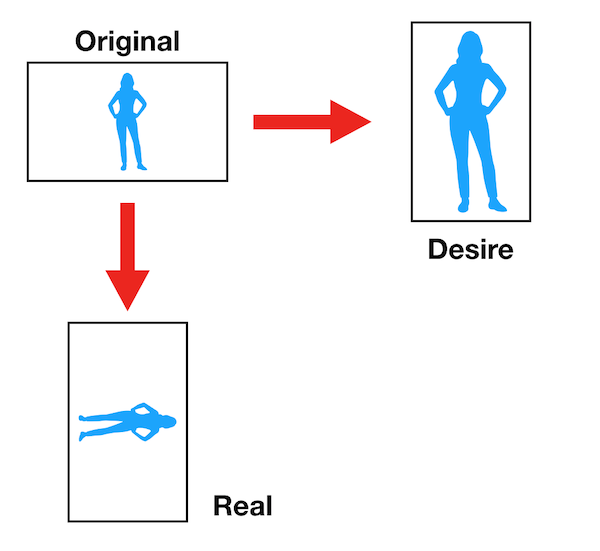
Unfortunately, as far as I know GooglePhotos remove all your EXIF and it’s metadata has no direction info. So cannot catch the photo direction.
With local stored original photos (or in Dropbox), it might be able to be done.
But it would be totally different program. -
@Sean cant you also catch the direction by height/width?
-
@teitlebot
impossible only with width/height. Imagine some pictures in your mind and rotate it. :D
Or…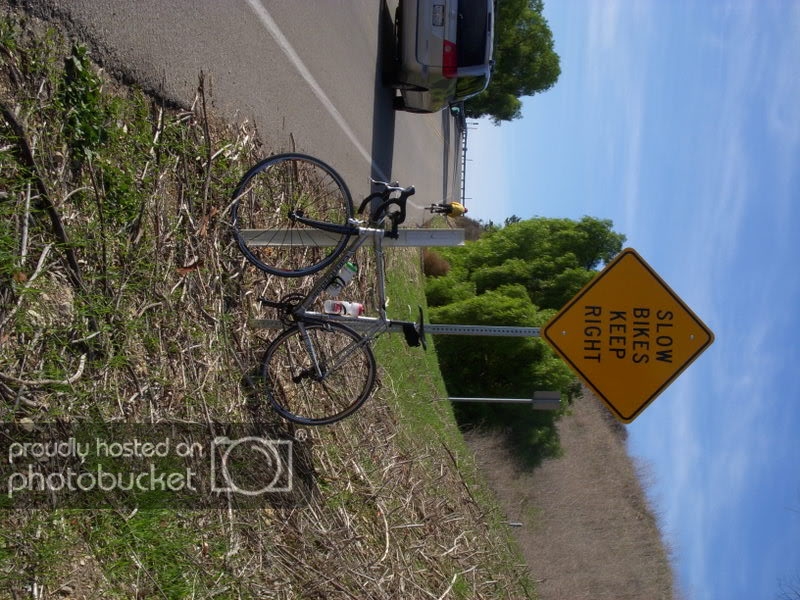
Which direction should this photo be rotated? clockwise? counterclockwise? How can we know the direction with only width/height? -
@Sean Interesting but Google Photos already rotates the picture correctly for us before it sends it to the mirror. So assuming it shows correct in the google photos album it will be correct in the mirror. Now take any picture that is width/height >1 and rotate the picture one way and rotate the screen in the opposite direction and it should work.
-
@teitlebot
If so, you can do that without notification. Just add eventlistener to target photo container element and check whether src be changed. Then you can activate xmlHTTPrequest to send request to your IFTTT server. -
@Sean Thank You. Will learn up on this and see if I can do it myself
-
Brilliant module - thanks for the development.
I am trying to get two instances of this module running on one magic mirror, so I can show one photo at the top and one at the bottom.
I have copied the module into a different folder, renaming it (and in the CSS files as necessary). I also set up a separate google API project and separate authorisation to see if that was an issue.
Both modules run, but the photos get loaded one on top of the other despite having different positions:
modules: [

{
  module: "MMM-GooglePhotos",
  position: "top_center",
  config: {
    albumId: "blanked for posting", // your album id(s) from result of `auth_and_test.js`
    refreshInterval: 1000*20,
    scanInterval: 1000*60*10, // too many scans might cause API quota limit also.
    //note(2018-07-29). It is some weird. API documents said temporal image url would live for 1 hour, but it might be broken shorter. So, per 10 min scanning could prevent dead url.

    sort: "random", //'time', 'reverse', 'random'
    showWidth: "800px", // how large the photo will be shown as. (e.g;'100%' for fullscreen)
    showHeight: "400px",
    originalWidthPx: 1024, // original size of loaded image. (related with image quality)
    originalHeightPx: 728, // Bigger size gives you better quality, but can give you network burden.
    mode: "hybrid", // "cover" or "contain" (https://www.w3schools.com/cssref/css3_pr_background-size.asp)
    //ADDED. "hybrid" : if you set as "hybrid" it will change "cover" and "contain" automatically by aspect ratio.
  }
},


{
  module: "MMM-GooglePhotos2",
  position: "bottom_left",
  config: {
    albumId: "blanked for posting", // your album id(s) from result of `auth_and_test.js`
    refreshInterval: 1000*15,
    scanInterval: 1000*60*10, // too many scans might cause API quota limit also.
    //note(2018-07-29). It is some weird. API documents said temporal image url would live for 1 hour, but it might be broken shorter. So, per 10 min scanning could prevent dead url.

    sort: "random", //'time', 'reverse', 'random'
    showWidth: "1024px", // how large the photo will be shown as. (e.g;'100%' for fullscreen)
    showHeight: "728px",
    originalWidthPx: 1024, // original size of loaded image. (related with image quality)
    originalHeightPx: 728, // Bigger size gives you better quality, but can give you network burden.
    mode: "hybrid", // "cover" or "contain" (https://www.w3schools.com/cssref/css3_pr_background-size.asp)
    //ADDED. "hybrid" : if you set as "hybrid" it will change "cover" and "contain" automatically by aspect ratio.
  }
},


]

};
Any ideas where I have gone wrong? Thanks!
-
@mirrorman2
Each instance would be rendering different doms but they have same “Id”. That would make this behavior. Sorry, I haven’t considered duplicated instances on development.
If you want duplicated instances, modify source where “id” is used.
By example;
wrapper.id = “GPHOTO” -
This post is deleted! -
@stephaniesal
Is there any error or suspicious log message on execution? Without log, I cannot guess what happened. -
This post is deleted! -
Hi there,
is it possible just to show the last three images of the given album ? And moreover is there any chance to display the comments which belongs to the photo ? -
- Cannot limit the number currently. And I thought, If you want just a few pictures, you’d better to store your photos locally and to display them with other local-based module.
The better way I think is, to create new album for selected photos and use it. - There is no API to get comment. Sorry.
- Cannot limit the number currently. And I thought, If you want just a few pictures, you’d better to store your photos locally and to display them with other local-based module.
-
Thank you for making this great module and a very a good set of instuctions. I am struggling with the last step.
I run the
node auth_and_test.jsand it opens the browser windows asking me to login. I proceed to do that, go through my 2FA and then land on a page which is asking me to select a google account form a list of 1 (just my account). Clicking my account just redirects me back to the same exact page. Have you seen this issue before? Any idea on how to fix this?
Hello! It looks like you're interested in this conversation, but you don't have an account yet.
Getting fed up of having to scroll through the same posts each visit? When you register for an account, you'll always come back to exactly where you were before, and choose to be notified of new replies (either via email, or push notification). You'll also be able to save bookmarks and upvote posts to show your appreciation to other community members.
With your input, this post could be even better 💗
Register Login