Read the statement by Michael Teeuw here.
DropboxWallpaper pictures are rotated to the left
-
@djc27 When in
containmode also photos are rotated? -
@sean Too many days are gone, so my remembrance is not perfect. But as I remember, I didn’t put any rotation for pictures in the module. It means your original photos are taken as rotated. But your photo viewers could show automatically pictures in its right direction. But My module doesn’t check any direction information from the pictures.
Anyway, I’ll check furthermore, if there is any possible fixing about that.
-
@sean Thank you for your quick reply. I have checked ‘contain’ and ‘hybrid’ mode and all the pictures remain rotated to the side… Your help would be much appreciated.
-
@djc27
First, InDropboxAPI, there is no information about the direction of Photo. Maybe withEXIFparsing, I could abstract that info from photos. But additional EXIF parser routines should be added.
Nowadays common digital cameras automatically save pictures with right direction. I guess, your photos were taken with somewhat older camera.
And your manual rotating pictures might be not progressed in original files. current common photo viewers/editors (like Apple Photos) using a copy of the original file for manipulating and showing for the user.Anyway, I’ve found also my MMM-DropboxyWallpaer are using older version of API. I will update in somedays, but not promise.
-
@sean Some pictures were indeed taken with an older camera (approx. 6 years old) but some were taken with a recent smartphone. I encountered the problem with all of them. The dimensions of the pictures seem to change correctly, when they are manually rotated. But anyway thanks for your help. I might just try and safe some of the pictures in landscape mode with two black bars on the side so that the pictures will be shown the right way up and appear to be in landscape mode for the magicmirror.
-
@Sean Same here all… pictures are rotated very few are the right way … the majority of photos are taken with a Samsung Galaxy S8+ and some with older camera
Denis -
@DJC27 @richland007
Could you send me some pictures with wrong orientations for a test?
My all photos are alreadyrotatedto the right orientation, so, I couldn’t test.
my email address is in my profile. I think one or two photos are enough. -
@DJC27 @richland007
V2.0.0 is beta-released.
https://github.com/eouia/MMM-DropboxWallpaper/And… Please read the last section of
README.md -
@sean Thank you very much. I’ll try that tomorrow and I will consider the README file.
-
@sean Thnak you will try it this evening as well
I did use your advise on the free photo editor and already saved my pics the right way and uploaded to dropbox so when i go home it will be easy to load the git clone the new version and try it out
thanks again in advance -
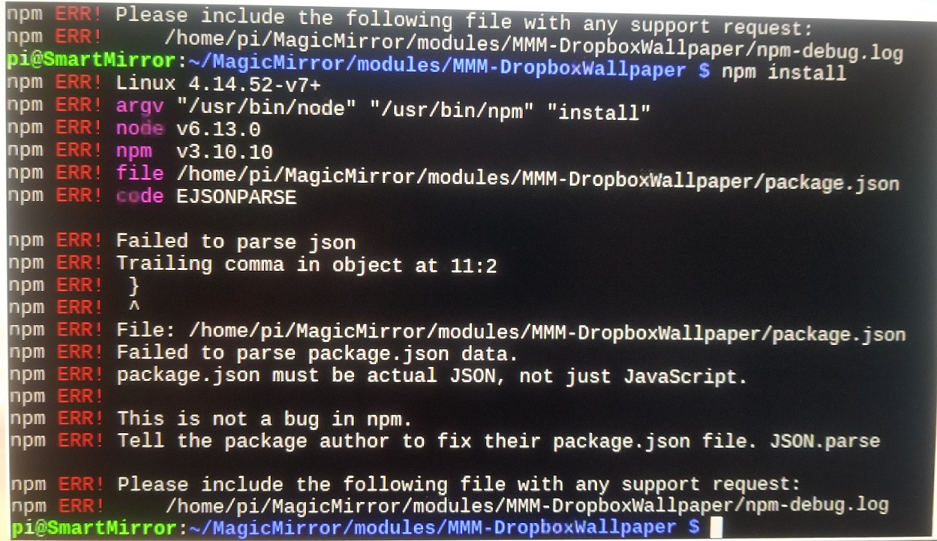
@sean we hit a bump i think i am getting this when i try to run
npm installafter thegit pull
inside the MMM-DropboxWallpaperObviously an error of some sort but i dont know whether it has to do with syntax or something else such as versions miss match who are always a pin in the neck i am on the latest MM version 2.4.1 which has electron 2.0
Denis
-
@richland007 sorry, there is a syntax error in package.json i’all fix
-
@richland007
Remove last comma.
’isomorphic-fetch": "^2.2.1’ -
@sean Hey things happen :) …what should we do clone it one more time or go and manually change something ??
D -
-
@sean Thank you very much, all seems to work, and the orientation of the pictures appears to be correct. There is only one small issue. Sometimes the mirror only shows a very small part of the pictures (approx. a fourth or so). Not always, but sometimes. I have got no idea what might cause that, because all the pictures were taken with the same smartphone.
-
@djc27 that was what I said. ’transform:rotation()’ could make image rotated but resized. Hmmm difficult to explain.
Assume a portrait photo with 1000px width and 2000px height but has 90 degree clockwise orientation.(you took the picture with camera vertically, and your camera hadn’t saved it as right orientation)
It is recognized as landscape photo with 1000 height and 2000 width.(that was your prior problem)
Now module can rotate with right orientation. But rotated photo should have same dimensions, h1000 and w2000. It means the real image size would be h1000 and w500 and extra black area w750 on left and right sides of image(total w2000 and h1000). photo is now resized by 1/4.Sorry, I couldn’t fix it any more.
-
@sean Yeah I see. No worries though, I still really like the module. Cheers
-
@Sean works good thank you for your support and work

Hello! It looks like you're interested in this conversation, but you don't have an account yet.
Getting fed up of having to scroll through the same posts each visit? When you register for an account, you'll always come back to exactly where you were before, and choose to be notified of new replies (either via email, or push notification). You'll also be able to save bookmarks and upvote posts to show your appreciation to other community members.
With your input, this post could be even better 💗
Register Login