MagicMirror Forum
    • Recent
    • Tags
    • Unsolved
    • Solved
    • MagicMirror² Repository
    • Documentation
    • 3rd-Party-Modules
    • Donate
    • Discord
    • Register
    • Login
    A New Chapter for MagicMirror: The Community Takes the Lead
    Read the statement by Michael Teeuw here.

    Default Calendar and Daylight Savings Problems

    Scheduled Pinned Locked Moved Unsolved Troubleshooting
    13 Posts 3 Posters 2.9k Views 3 Watching
    Loading More Posts
    • Oldest to Newest
    • Newest to Oldest
    • Most Votes
    Reply
    • Reply as topic
    Log in to reply
    This topic has been deleted. Only users with topic management privileges can see it.
    • J Offline
      johnnyboygee
      last edited by

      Hey All… Thanks for taking the time to look at my post.

      My magic mirror is finally up and running and I was able to connect the default calendar to my work’s O365 calendar. After the time change this weekend I noticed that my calendar entries did not adjust. I looked at the ics file and I’m seeing references to my time offset being correct (-6) and being in standard time.

      I have also confirmed that my RPi is also set to the correct timezone and is showing the correct time.

      Does anyone have any suggestions about how to track down and correct the offset from -5 to -6?

      -John

      J 1 Reply Last reply Reply Quote 0
      • J Offline
        johnnyboygee @johnnyboygee
        last edited by

        Crap… I fixed this and didn’t write it down… and now I’m having trouble again…

        S 1 Reply Last reply Reply Quote 0
        • S Do not disturb
          sdetweil @johnnyboygee
          last edited by sdetweil

          @johnnyboygee 2.13 has some bugs relative to calendar offset.

          download the develop branch for fixes
          https://forum.magicmirror.builders/topic/13770/2-13-calendar-fix-for-office-365-users/2

          Sam

          How to add modules

          learning how to use browser developers window for css changes

          1 Reply Last reply Reply Quote 0
          • D Offline
            DaHarry
            last edited by

            Hi, i have same Problem after switch daylight saving time. With 2.13 i have -1 hour Offset, with 2.14.dev i have -2 hour offset.
            So I have a Calendar entry for 9 am and Magic Mirror Calendar “2.13” shows 8 am and “2.14 .dev” shows 7am… Timezone are set korrek, also the Time show the Time korrekt.

            S 1 Reply Last reply Reply Quote 0
            • S Do not disturb
              sdetweil @DaHarry
              last edited by

              @DaHarry when did u pull dev? additional fixes were posted yesterday

              can u show me a vevent block from the ics ( just a text file)

              Sam

              How to add modules

              learning how to use browser developers window for css changes

              1 Reply Last reply Reply Quote 0
              • D Offline
                DaHarry
                last edited by

                Hi, I hav the last dev. I Pull it three days ago. Direkt bevor my post.

                S 1 Reply Last reply Reply Quote 0
                • S Do not disturb
                  sdetweil @DaHarry
                  last edited by sdetweil

                  @DaHarry did u npm install after the update to get the latest library update too. need those as well

                  can u share a cal entry that shows this problem? the ics file is just a text file so u can edit it
                  use the url in your browser to download the file

                  Sam

                  How to add modules

                  learning how to use browser developers window for css changes

                  1 Reply Last reply Reply Quote 0
                  • D Offline
                    DaHarry
                    last edited by DaHarry

                    Hello, I found out that the wrong time is only displayed with series appointments that start before the end of daylight saving time.
                    Single Entries will shown correctly

                    S 1 Reply Last reply Reply Quote 0
                    • S Do not disturb
                      sdetweil @DaHarry
                      last edited by sdetweil

                      @DaHarry sounds like u don’t have the latest fixes which were merged on Monday afternoon

                      Sam

                      How to add modules

                      learning how to use browser developers window for css changes

                      1 Reply Last reply Reply Quote 0
                      • D Offline
                        DaHarry
                        last edited by

                        This shows the wrong Time:

                        DTSTART;TZID=Europe/Berlin:20201009T090000
                        DTEND;TZID=Europe/Berlin:20201009T100000
                        RRULE:FREQ=WEEKLY;WKST=MO;UNTIL=20210212T225959Z;BYDAY=FR
                        DTSTAMP:20201112T202528Z
                        UID:xyz???@google.com
                        CREATED:20201112T195618Z
                        DESCRIPTION:
                        LAST-MODIFIED:20201112T200229Z
                        LOCATION:
                        SEQUENCE:2
                        STATUS:CONFIRMED
                        SUMMARY:TestTermin
                        TRANSP:OPAQUE
                        END:VEVENT
                        END:VCALENDAR
                        

                        This shows the right Time:

                        DTSTART;TZID=Europe/Berlin:20201030T090000
                        DTEND;TZID=Europe/Berlin:20201030T100000
                        RRULE:FREQ=WEEKLY;WKST=MO;UNTIL=20210212;BYDAY=FR
                        DTSTAMP:20201112T203337Z
                        UID:15rntv5mhhm7gluupq8offllmn@google.com
                        CREATED:20201112T195618Z
                        DESCRIPTION:
                        LAST-MODIFIED:20201112T203230Z
                        LOCATION:
                        SEQUENCE:3
                        STATUS:CONFIRMED
                        SUMMARY:TestTermin
                        TRANSP:OPAQUE
                        END:VEVENT
                        END:VCALENDAR
                        
                        S 1 Reply Last reply Reply Quote 0
                        • S Do not disturb
                          sdetweil @DaHarry
                          last edited by

                          @DaHarry thanks. will look at it. I am away til Saturday…

                          Sam

                          How to add modules

                          learning how to use browser developers window for css changes

                          1 Reply Last reply Reply Quote 0
                          • D Offline
                            DaHarry
                            last edited by

                            I have create two new series appointments. One Starts bevor End of Saving Daylight Time, the second starts after 25. Oct.:

                            DTSTART;TZID=Europe/Berlin:20201023T100000
                            DTEND;TZID=Europe/Berlin:20201023T110000
                            RRULE:FREQ=WEEKLY;WKST=MO;UNTIL=20201120T225959Z;BYDAY=FR
                            DTSTAMP:20201112T204328Z
                            UID:@google.com
                            CREATED:20201112T204057Z
                            DESCRIPTION:
                            LAST-MODIFIED:20201112T204157Z
                            LOCATION:
                            SEQUENCE:0
                            STATUS:CONFIRMED
                            SUMMARY:SavingDaylightTime
                            TRANSP:OPAQUE
                            END:VEVENT
                            BEGIN:VEVENT
                            
                            DTSTART;TZID=Europe/Berlin:20201030T100000
                            DTEND;TZID=Europe/Berlin:20201030T110000
                            RRULE:FREQ=WEEKLY;WKST=MO;UNTIL=20201120T225959Z;BYDAY=FR
                            DTSTAMP:20201112T204328Z
                            UID:@google.com
                            CREATED:20201112T204000Z
                            DESCRIPTION:
                            LAST-MODIFIED:20201112T204211Z
                            LOCATION:
                            SEQUENCE:0
                            STATUS:CONFIRMED
                            SUMMARY:AfterSavingDaylightTime
                            TRANSP:OPAQUE
                            END:VEVENT
                            END:VCALENDAR
                            

                            Result:
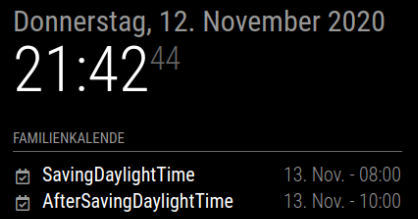
                            mmSavindDaylightTimeProblem.PNG

                            S 1 Reply Last reply Reply Quote 0
                            • S Do not disturb
                              sdetweil @DaHarry
                              last edited by

                              @DaHarry great, that’s what I am looking for…

                              Sam

                              How to add modules

                              learning how to use browser developers window for css changes

                              1 Reply Last reply Reply Quote 0

                              Hello! It looks like you're interested in this conversation, but you don't have an account yet.

                              Getting fed up of having to scroll through the same posts each visit? When you register for an account, you'll always come back to exactly where you were before, and choose to be notified of new replies (either via email, or push notification). You'll also be able to save bookmarks and upvote posts to show your appreciation to other community members.

                              With your input, this post could be even better 💗

                              Register Login

                              • 1 / 1
                              • First post
                                Last post
                              Enjoying MagicMirror? Please consider a donation!
                              MagicMirror created by Michael Teeuw.
                              Forum managed by Sam, technical setup by Karsten.
                              This forum is using NodeBB as its core | Contributors
                              Contact | Privacy Policy