Read the statement by Michael Teeuw here.
MMM-Hue-Lights - new module for your Philips Hue lights!
-
@michael5r You have just made my day. After messing about for the best part of a day trying to get the module working, your post has made this module spring to life! I installed via Magic Mirror Package Manager and the folder name had upper and lower case naming. Im going to get a beer now!! lol…
-
Hey guys,
first off, great module @michael5r, thanks a lot. Unfortunately I have issues getting it to work as soon as I use the
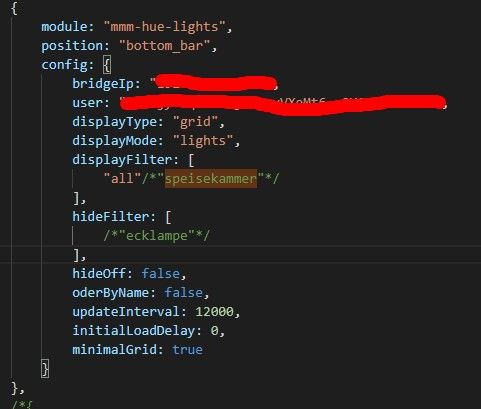
displayFilterattribute. Using the default works perfectly fine and shows all my lights. As soon as I only have one specific light in thedisplayFilter-array, I can only see “Loading…” on my mirror. Config looks fine (below) and logs are identical with default and specified.Side Note: The light I am calling is “Kugel” which is not an original Hue but Ikea Tradfri. Additionally I have other lights called “Kugel 30er” “Kugel 40er” and “Kugel 60er”. Could this be the source of failure?
Works:
Doesn’t work:
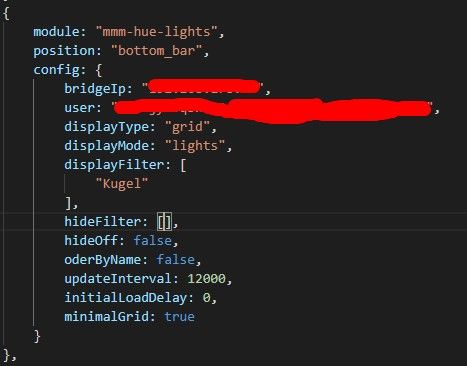
Thanks for help in advance.
-
I set this up and everything was working wonderfully. I shut down my pi and installed it into my frame with the same screen and now this module is not working but nothing has changed. It loads but I cannot see the module on my MM screen
-
Hello,
I am currently running in some problems setting up this module.
I accidently wiped my running mm2 installation and had to start from scratch.
Before that it was running just fine with this module.If it is relevant I first pulled the module inside the “MagicMirror” folder and ran “npm run install” there.
I then removed it again, navigated to the modules and pulled it there via git.I checked my hue developper account and my user is working
I also checked the IP of my bridge because this had changed before when we had an power outage.
I can ping the IP from my raspi.I already removed it from the modules folder and pulled it again via git.
My mirror is up and running.
As soon as I put the mmm-hue-lights module settings in the config I just get a black screen. The console gives me the following information and error messages:> magicmirror@2.17.1 start /home/pi/MagicMirror > ./run-start.sh $1 [22.10.2021 10:11.05.418] [LOG] Starting MagicMirror: v2.17.1 [22.10.2021 10:11.05.430] [LOG] Loading config ... [22.10.2021 10:11.05.443] [LOG] Loading module helpers ... [22.10.2021 10:11.05.446] [LOG] No helper found for module: alert. [22.10.2021 10:11.05.449] [LOG] No helper found for module: clock. [22.10.2021 10:11.05.462] [ERROR] WARNING! Could not load config file. Starting with default configuration. Error found: Error: Cannot find module 'request' Require stack: - /home/pi/MagicMirror/modules/mmm-hue-lights/node_helper.js - /home/pi/MagicMirror/js/app.js - /home/pi/MagicMirror/js/electron.js - /home/pi/MagicMirror/node_modules/electron/dist/resources/default_app.asar/main.js ... [22.10.2021 10:11.05.464] [LOG] Loading module helpers ... [22.10.2021 10:11.05.466] [LOG] No helper found for module: alert. [22.10.2021 10:11.05.468] [LOG] No helper found for module: clock. [22.10.2021 10:11.05.474] [ERROR] App threw an error during load [22.10.2021 10:11.05.480] [ERROR] Error: Cannot find module 'request' Require stack: - /home/pi/MagicMirror/modules/mmm-hue-lights/node_helper.js - /home/pi/MagicMirror/js/app.js - /home/pi/MagicMirror/js/electron.js - /home/pi/MagicMirror/node_modules/electron/dist/resources/default_app.asar/main.js - at Module._resolveFilename (internal/modules/cjs/loader.js:887:15) at Function.n._resolveFilename (electron/js2c/browser_init.js:257:1128) at Function.Module._resolveFilename (/home/pi/MagicMirror/node_modules/module-alias/index.js:49:29) at Module._load (internal/modules/cjs/loader.js:732:27) at Function.f._load (electron/js2c/asar_bundle.js:5:12913) at Module.require (internal/modules/cjs/loader.js:959:19) at require (internal/modules/cjs/helpers.js:88:18) at Object.<anonymous> (/home/pi/MagicMirror/modules/mmm-hue-lights/node_helper.js:2:15) at Module._compile (internal/modules/cjs/loader.js:1078:30) at Object.Module._extensions..js (internal/modules/cjs/loader.js:1108:10) [22.10.2021 10:11.05.486] [ERROR] Whoops! There was an uncaught exception... [22.10.2021 10:11.05.508] [ERROR] Error: Cannot find module 'request' Require stack: - /home/pi/MagicMirror/modules/mmm-hue-lights/node_helper.js - /home/pi/MagicMirror/js/app.js - /home/pi/MagicMirror/js/electron.js - /home/pi/MagicMirror/node_modules/electron/dist/resources/default_app.asar/main.js - at Module._resolveFilename (internal/modules/cjs/loader.js:887:15) at Function.n._resolveFilename (electron/js2c/browser_init.js:257:1128) at Function.Module._resolveFilename (/home/pi/MagicMirror/node_modules/module-alias/index.js:49:29) at Module._load (internal/modules/cjs/loader.js:732:27) at Function.f._load (electron/js2c/asar_bundle.js:5:12913) at Module.require (internal/modules/cjs/loader.js:959:19) at require (internal/modules/cjs/helpers.js:88:18) at Object.<anonymous> (/home/pi/MagicMirror/modules/mmm-hue-lights/node_helper.js:2:15) at Module._compile (internal/modules/cjs/loader.js:1078:30) at Object.Module._extensions..js (internal/modules/cjs/loader.js:1108:10) { code: 'MODULE_NOT_FOUND', requireStack: [ '/home/pi/MagicMirror/modules/mmm-hue-lights/node_helper.js', '/home/pi/MagicMirror/js/app.js', '/home/pi/MagicMirror/js/electron.js', '/home/pi/MagicMirror/node_modules/electron/dist/resources/default_app.asar/main.js', undefined ] }my config of the module currently looks like this (I tried working without the additional settings) at the moment only the obligatory ones IP and user:
{ module: "mmm-hue-lights", position: "top_left", // pick whichever position you want config: { bridgeIp: "xxxxxx", user: "xxxx", //updateInterval: 1000, //initialLoadDelay: 0, //displayType: "grid", //// displayFilter: ["all"], //minimalGrid: true, //displayMode: "lights", ////... and whatever else configuration options you want to use } }, -
{
    			module: "mmm-hue-lights",
    			position: "top_right",
    			config: {
        		bridgeIp: "XXXXXXXXXXX",
        		user: "XXXXXXXXXXXXXX",
    			updateInterval: "1000",
			hideOff: "false",
			displayMode: "groups",
			displayType: "list",
			minimalList: "true",
			coloredList: "true",
			hideFilter: ["home-away"],
			alignment: "right",
		        }
		},
Try this which is working on mine, download the Module again to see if that is the issue copy and past mine in then change it to what you want
-
-
@sdetweil Thank you.
I totally did NOT see the missing module ‘request’ right at the Beginning.
Now the mirror starts… the module is stuck on loading but I will figure it out ;D
Hello! It looks like you're interested in this conversation, but you don't have an account yet.
Getting fed up of having to scroll through the same posts each visit? When you register for an account, you'll always come back to exactly where you were before, and choose to be notified of new replies (either via email, or push notification). You'll also be able to save bookmarks and upvote posts to show your appreciation to other community members.
With your input, this post could be even better 💗
Register Login