MagicMirror Forum
    • Recent
    • Tags
    • Unsolved
    • Solved
    • MagicMirror² Repository
    • Documentation
    • 3rd-Party-Modules
    • Donate
    • Discord
    • Register
    • Login
    A New Chapter for MagicMirror: The Community Takes the Lead
    Read the statement by Michael Teeuw here.

    MMM-CalendarExt2

    Scheduled Pinned Locked Moved Utilities
    486 Posts 83 Posters 938.9k Views 83 Watching
    Loading More Posts
    • Oldest to Newest
    • Newest to Oldest
    • Most Votes
    Reply
    • Reply as topic
    Log in to reply
    This topic has been deleted. Only users with topic management privileges can see it.
    • ? Offline
      A Former User @jani.karna
      last edited by

      @jani-karna
      0_1575277296246_e7b38c60-d926-45c5-bd2e-0fdc0edec9ec-image.png
      Hmmm… in Original CSS, there was no huge gap. It would be only 2px. I think you probably have modified CSS by yourself, but I don’t know what you changed. Sorry, can’t help you.

      J 1 Reply Last reply Reply Quote 0
      • J Offline
        jani.karna @Guest
        last edited by

        @Sean said in MMM-CalendarExt2:

        Hmmm… in Original CSS, there was no huge gap. It would be only 2px. I think you probably have modified CSS by yourself, but I don’t know what you changed. Sorry, can’t help you.

        Thats fine, I’ll figure it out.

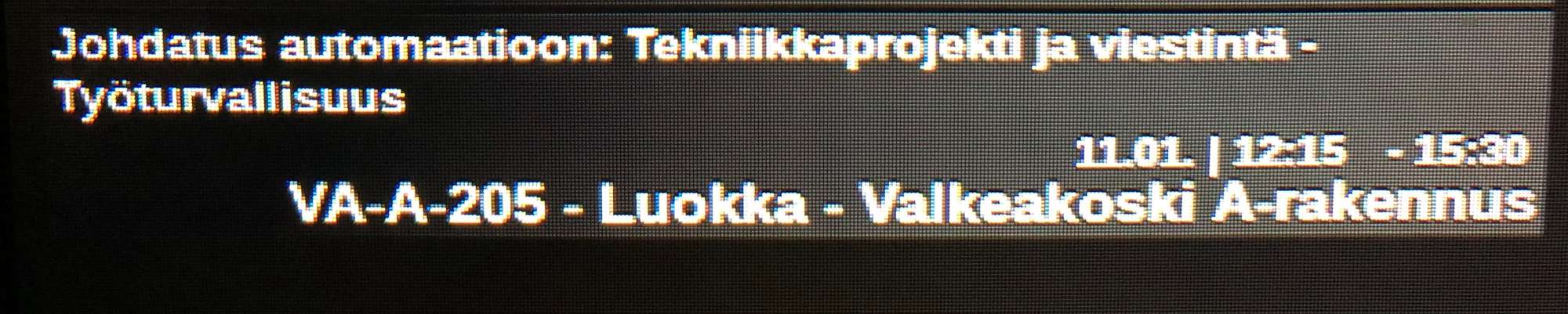
        In the upcoming calendar, I have location or additional information in the events and their font is too big. Can I somehow make it smaller? Here’s a pic, the last row being the additional information:
        0_1575325368287_IMG_0614.jpg

        ? 1 Reply Last reply Reply Quote 0
        • ? Offline
          A Former User @jani.karna
          last edited by

          @jani-karna
          https://github.com/eouia/MMM-CalendarExt2/wiki/4.-Styling
          Each event has eventSub (and its sub-elements eventLocation and eventDescription). By default, agenda(upcoming and current) views would reveal eventSub, so, you can use that CSS selector to specify.

          J 1 Reply Last reply Reply Quote 0
          • J Offline
            jani.karna @Guest
            last edited by

            @Sean said in MMM-CalendarExt2:

            @jani-karna
            https://github.com/eouia/MMM-CalendarExt2/wiki/4.-Styling
            Each event has eventSub (and its sub-elements eventLocation and eventDescription). By default, agenda(upcoming and current) views would reveal eventSub, so, you can use that CSS selector to specify.

            Missed that styling part… :grimacing_face: got it working, thank you again!

            1 Reply Last reply Reply Quote 0
            • C Offline
              code999
              last edited by

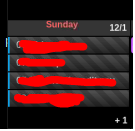
              Hello again. is there a way to scroll the events when there are so many on a single day with displaying the (+x).
              0_1575487198314_bfe79fce-4c8c-4cd5-ba04-86023f46686e-image.png

              Thanks.

              ? 2 Replies Last reply Reply Quote 0
              • ? Offline
                A Former User @code999
                last edited by

                @code999
                no. i was tried scrolling in my older CALEXT but too burden to rpi.

                C 1 Reply Last reply Reply Quote 0
                • ? Offline
                  A Former User @code999
                  last edited by

                  @code999
                  Instead, you can sort and filter the order of events to be shown.

                  1 Reply Last reply Reply Quote 0
                  • C Offline
                    ChickenBeard
                    last edited by

                    Did CalendarExt in Weeks (or Month) view automatically adjust the height of the day to accommodate the events?
                    I swear if there was only one or two events for a day (in a given week), the whole row was shorter.

                    ? 1 Reply Last reply Reply Quote 0
                    • ? Offline
                      A Former User @ChickenBeard
                      last edited by

                      @ChickenBeard
                      Not adjusted automatically. you can set the height of the slot manually.

                      1 Reply Last reply Reply Quote 0
                      • C Offline
                        ChickenBeard
                        last edited by

                        @Sean said in MMM-CalendarExt2:

                        Not adjusted automatically. you can set the height of the slot manually.

                        Is it CX2 .slot ?

                        ? 1 Reply Last reply Reply Quote 0
                        • ? Offline
                          A Former User @ChickenBeard
                          last edited by

                          @ChickenBeard
                          if you mean some table views (month, week), set slotMaxHeight of view configuration.
                          https://github.com/eouia/MMM-CalendarExt2/wiki/2c4.-View:week,-month

                          1 Reply Last reply Reply Quote 0
                          • C Offline
                            code999 @Guest
                            last edited by

                            @Sean okay. it would be great to have though. not seeing the events is not good. limited space on the screen so i cant just make more room because then i will lose a full week from the month view.
                            thanks.

                            1 Reply Last reply Reply Quote 0
                            • C Offline
                              code999
                              last edited by

                              @Sean could you help me do that anyway? lol
                              i would really like it to do that.
                              Thanks.

                              ? 1 Reply Last reply Reply Quote 0
                              • ? Offline
                                A Former User @code999
                                last edited by

                                @code999

                                could you help me do that anyway? lol
                                i would really like it to do that.

                                do what?

                                1 Reply Last reply Reply Quote 0
                                • C Offline
                                  code999
                                  last edited by

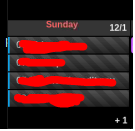
                                  @Sean make the events under a date that is not showing scroll.
                                  I am trying to figure it out but I have no coding knowledge at all so I just randomly change things and see what it does but I am not getting anywhere doing that at all.
                                  0_1575574501390_794eca7c-91f6-4458-83b2-0f08f2ef5f96-image.png

                                  ? 1 Reply Last reply Reply Quote 0
                                  • ? Offline
                                    A Former User @code999
                                    last edited by

                                    @code999
                                    To show more events in a cell, just set bigger slotMaxHeight. And shrinking the font-size and height of event element could be help.

                                    But anyway, Usual MagicMirror Screen has not so enough space to show many events with Table Views(month and week view). Even normal Desktop calendar programs like Google Calendar MS-Office or Apple Calendar couldn’t show too many events in a cell.

                                    Maybe you can make show 5 or 6 events in a day cell. But What about 7 events or 8 events? It could not be solved at last.

                                    Auto-scroll could be the ideal solution, but RPI has not enough power to maintain so many scrolling effects. (Maybe RPI4 could have enough power but many ppl also are using even RPI0)
                                    However, you want it, use MMM-CalendarExt instead. It has that feature but will be very slow.

                                    Another possible approach would be to filter and/or to sort events to show. Some of the events will not be more important than others to show in that view. You can filter unimportant events not to show, Or at least, you can sort them to hide.

                                    1 Reply Last reply Reply Quote 0
                                    • C Offline
                                      cskenney
                                      last edited by

                                      Just a general question. I have my calendar pulling from 6-7 different Google calendars. I have the module configured to retrieve the calendar data every 5 minutes. I did this to allow changes made to an entry to be updated pretty quickly on my display.

                                      The issue is if I modify a calendar entry in my Google calendar it doesn’t get updated in the MM calendar display. If I stop MM and then restart it then everything will be correct. But leaving it running it doesn’t update with the changes. I have also seen this if I deleted a calendar entry it will remain in my MM calendar on the display.

                                      Here is the code I am using. I put the scan interval for the calendars in the default section.

                                      				locale: "en",
                                      				defaultSet: {
                                      						calendars: {
                                      							maxItems: 500,
                                      							scanInterval: 1000*60*5,
                                      							beforeDays: 5,
                                      							afterDays: 60,
                                      							maxIterations: 100,
                                      						},
                                      
                                      ? 1 Reply Last reply Reply Quote 0
                                      • ? Offline
                                        A Former User @cskenney
                                        last edited by

                                        @cskenney
                                        scanInterval is just for scanning calendars, finding something changed, then loading them. So, your modified events would definitely be loaded on the module.
                                        But displaying is another issue. rotateInterval(when you are using multi-scenes) or updateInterval (When you are using single-scenes) could make refreshing the displaying.
                                        https://github.com/eouia/MMM-CalendarExt2/wiki/2e.-Configuration:Others

                                        C 1 Reply Last reply Reply Quote 0
                                        • C Offline
                                          cskenney @Guest
                                          last edited by cskenney

                                          @Sean I have the rotateInterval set to 0 and the updateInterval set to (5 minutes).

                                          I will post my code below but I will need to removed the URL to my calendars.

                                          		{	/*MMM-CalendardExt2*/
                                          			module: 'MMM-CalendarExt2',
                                          			config: {
                                          				rotateInterval: 0,	//rotate between scenes default = 60*1000; 0 disables
                                          				updateInterval: 5*60*1000,	//If not auto-rotated
                                          				firstDrawingDelay: 10*1000,	//delay to allow calendar parsing
                                          				locale: "en",
                                          				defaultSet: {
                                          						calendars: {
                                          							maxItems: 500,
                                          							scanInterval: 1000*60*5,
                                          							beforeDays: 5,
                                          							afterDays: 60,
                                          							maxIterations: 100,
                                          						},
                                          						view: {
                                          							timeFormat: "h:mm A",
                                          							transform: function(event) {
                                          								if (event.title.search("Panic") > -1) {
                                          								event.icon = "noto-softball";
                                          								event.className = "view_panic";
                                          								} else if (event.title.search("Arin") > -1) {
                                          								event.icon = "noto-softball";
                                          								} else if (event.title.search("Violin") > -1) {
                                          								event.icon = "emojione-monotone:violin";
                                          								}
                                          								return event;
                                          							},							
                                          						},
                                          						scene: {}
                                          				},
                                          				calendars: [
                                          					{
                                          						name: "Chris",
                                          						url: "https://calendar.google.com/calendar/ical...basic.ics",
                                          						className: "cal_chris",
                                          					},
                                          					{
                                          						name: "Kim",
                                          						url: "https://calendar.google.com/calendar/ical...basic.ics",
                                          						icon: "twemoji-medical-symbol",
                                          						className: "cal_kim",
                                          					},
                                          					{
                                          						name: "Lauren",
                                          						url: "https://calendar.google.com/calendar/ical...basic.ics",
                                          						className: "cal_lauren",
                                          					},
                                          					{
                                          						name: "Ryan",
                                          						url: "https://calendar.google.com/calendar/ical...basic.ics",
                                          						className: "cal_ryan",
                                          					},
                                          					{
                                          						name: "MHS Softball",
                                          						url: "https://calendar.google.com/calendar/ical/...basic.ics",
                                          						icon: "noto:softball",
                                          						className: "cal_mhs_softball",
                                          					},
                                          					{
                                          						name: "Softball Badgers",
                                          						url: "https://calendar.google.com/calendar/ical/...basic.ics",
                                          						icon: "noto-badger",
                                          						className: "cal_badgersoftball",
                                          					},
                                          					{
                                          						name: "BOPA",
                                          						url: "https://calendar.google.com/calendar/ical...basic.ics",
                                          						icon: "emojione-musical-score",
                                          						className: "cal_bopa",
                                          					},
                                          				],
                                          				views:[
                                          					{
                                          						name: "View_Daily",
                                          						mode: "daily",
                                          						position: "top_left",
                                          						calendars: ["Chris","Kim","Lauren","Ryan","MHS Softball","Softball Badgers","BOPA"],
                                          						hideOverflow: false,
                                          						filterPassedEvent: false,
                                          						slotCount: 2,
                                          						maxItems: 500,
                                          					},
                                          					{
                                          						name: "View_Upcoming",
                                          						mode: "upcoming",
                                          						slotTitle: "UPCOMING",
                                          						position: "top_center",
                                          						maxItems:10,
                                          						maxDays: 3,
                                          						hideOverflow: false,
                                          						filterPassedEvent: true,
                                          						calendars: ["Chris","Kim","Lauren","Ryan","MHS Softball","Softball Badgers","BOPA"],
                                          						className: "views_upcoming",
                                          					},
                                          					{
                                          						name: "View_5D_Overview",
                                          						title: "CALENDAR",
                                          						mode: "daily",
                                          						type: "row",
                                          						position: "bottom_bar",
                                          						maxItems: 500,
                                          						slotCount: 5,
                                          						hideOverflow: false,
                                          						filterPassedEvent: false,
                                          						calendars: ["Chris","Kim","Lauren","Ryan","MHS Softball","Softball Badgers","BOPA"],
                                          					},
                                          				],
                                          				scenes:[
                                          					{
                                          						name: "DEFAULT",
                                          						views: ["View_Daily","View_5D_Overview"],
                                          						className: "Scene_Default",
                                          					},
                                          				],
                                          			},
                                          		},//end of calendarext2 module
                                          	],
                                          
                                          };
                                          
                                          ? 1 Reply Last reply Reply Quote 0
                                          • BKeyportB Offline
                                            BKeyport Module Developer
                                            last edited by BKeyport

                                            hey, Sean -

                                            three minor issues and I got my install perfect:

                                            1. I’m trying to set up a wider slot for the calendar - I’ve got the region expanded and adjusted, but how do I get the item slots to match?:

                                              0_1576115348053_Capture.PNG
                                            .region.top.center {
                                              left: 40%;
                                              -moz-transform: translateX(-40%);
                                              -o-transform: translateX(-40%);
                                              -webkit-transform: translateX(-40%);
                                              -ms-transform: translateX(-40%);
                                              transform: translateX(-40%);
                                              min-width: 750px;
                                            }
                                            
                                            1. I’d like to get rid of the refresh fade. I find it annoying - how to do so?

                                            2. When I have the “Seahawks” calendar enabled, only the trash calendar loads initially, and after first refresh, the others come in. Can you help with why?

                                            {
                                            			module: 'MMM-CalendarExt2',
                                            				config: {
                                            					calendars : [
                                            						{
                                            							url: "https://calendar.google.com/calendar/ical/PRIVATE",
                                            							name: "Main Calendar", // Optional, Recommended
                                            							maxItems: 100,
                                            							scanInterval: 1000*60*1, // every minute, Appt Book, needs this speed
                                            							beforeDays: 0,
                                            							afterDays: 999,
                                            							maxIterations: 999,
                                            							forceLocalTZ: false,
                                            						},
                                            						{
                                            							url: "https://calendar.google.com/calendar/ical/PRIVATE2",
                                            							name: "Trash Calendar", // Optional, Recommended
                                            							maxItems: 100,
                                            							scanInterval: 24*60*60*1000, // Once a day
                                            							beforeDays: 0,
                                            							afterDays: 999,
                                            							maxIterations: 999,
                                            							forceLocalTZ: false,
                                            						},
                                            						{
                                            							url: "http://www.trumba.com/calendars/seattle-seahawks-schedule.ics",
                                            							name: "Seahawks Calendar", 
                                            							maxItems: 100,
                                            							scanInterval: 24*60*60*1000, // Once a day (Is once a week acceptable???) 
                                            							beforeDays: 0,
                                            							afterDays: 999,
                                            							maxIterations: 999,
                                            							forceLocalTZ: false,
                                            						},
                                            						
                                            					],
                                            					views: [
                                            						{
                                            							mode: "daily",
                                            							position: "top_center",
                                            							slotCount: 99,
                                            							timeFormat:"h:mm A",
                                            							hideOverflow: false,
                                            							name: "Daily View",
                                            							className: "remove_empty_slot",
                                            							calendars: ["Main Calendar","Trash Calendar","Seahawks Calendar"],
                                            							transform: function(event) {  
                                            								if (event.title.search("Recycle") > -1) {
                                            									event.icon = "mdi:recycle";
                                            								}
                                            								if (event.title.search("Yard Waste") > -1) {
                                            									event.icon = "entypo-leaf";
                                            								}
                                            								if (event.title.search("Seahawks") > -1) {
                                            									event.icon = "fa-solid:football-ball";
                                            								}
                                            								return event;
                                            							},
                                            //
                                            						},
                                            					],
                                            					scenes: [
                                            						{
                                            							name: "DEFAULT",
                                            						},
                                            					],
                                            				},
                                            		},
                                            

                                            Edit: I guess I have a fourth - I’d like to adjust anything to do with Seahawks (the transform above) to have the inverse color like an all day event. Possible?

                                            The "E" in "Javascript" stands for "Easy"

                                            ? 1 Reply Last reply Reply Quote 0

                                            Hello! It looks like you're interested in this conversation, but you don't have an account yet.

                                            Getting fed up of having to scroll through the same posts each visit? When you register for an account, you'll always come back to exactly where you were before, and choose to be notified of new replies (either via email, or push notification). You'll also be able to save bookmarks and upvote posts to show your appreciation to other community members.

                                            With your input, this post could be even better 💗

                                            Register Login

                                            • 1
                                            • 2
                                            • 21
                                            • 22
                                            • 23
                                            • 24
                                            • 25
                                            • 49 / 25
                                            • First post
                                              Last post
                                            Enjoying MagicMirror? Please consider a donation!
                                            MagicMirror created by Michael Teeuw.
                                            Forum managed by Sam, technical setup by Karsten.
                                            This forum is using NodeBB as its core | Contributors
                                            Contact | Privacy Policy