It worked with
pm2 stop MagicMirror
after
npm start dev
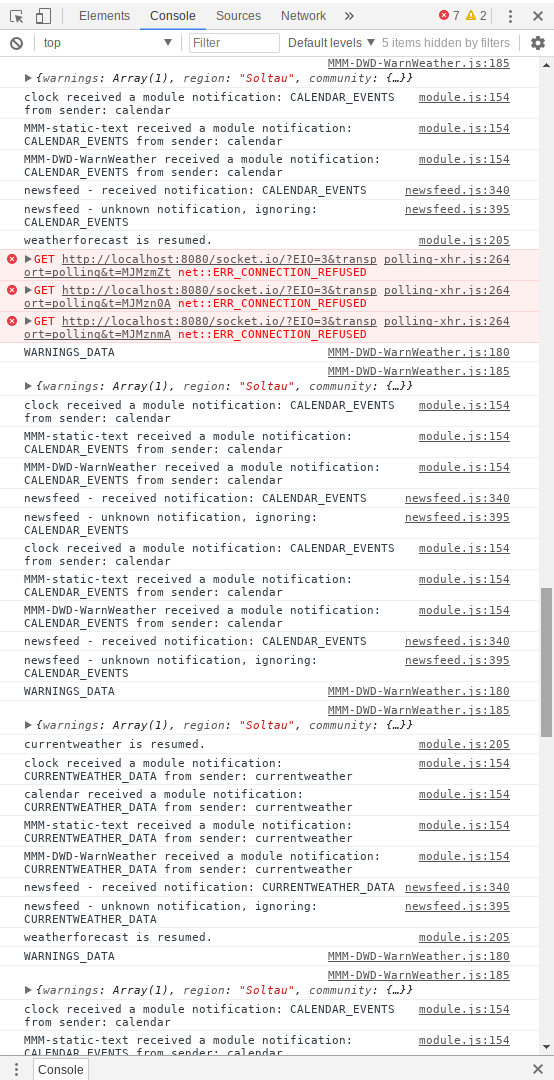
there are some errors… but they appeared after I connected via remote desktop
(see picture)!
0_1532617380576_forum.png
It worked with
pm2 stop MagicMirror
after
npm start dev
there are some errors… but they appeared after I connected via remote desktop
(see picture)!
0_1532617380576_forum.png
When I go to the MM folder and type
npm stop
I got an errors:
npm ERR! missing script: stop

npm ERR! A complete log of this run can be found in:
nom ERR!            /home/pi/.npm/_logs/2018-07-26T14_14_20_020Z-debug.log

but I can´t open the folder because there is no folder like this.
So I can´t stop it?!

I can´t stop the npm aswell via remote desktop from Windows...

I´m confused
Hello @ all,
unfortunately I don´t know how to describe my problem excactly and therefore I don´t know if its in the right corner of the forum.
After I start my Pi (connected via HDMI to the screen) it works fine. The MagicMirror starts automatically after a few seconds on the destop.
After 10 to 15 minutes the screen turns black but is still on (the notebook screen shines on the backside completly white).
If I connect a mouse and/or a keyboard to the pi and press any key nothing happend, so it seems not to be a screensaver issue?!
On the screen menu I switched the screen sleep mode to off so it can´t be this issue as well?!
Is there an sleep mode on the pi or included in the MagicMirror code?
Any help is appreciated.
Thanks in advance
Killing Joke aka Daniel
P.S.: Whenever I switch the screen off and on again it´s still black.
@strawberry-3-141 said in MMM-Fuel:
@killing-joke you wrote postion instead of position
Thank you very much. I checked a lot of times the comma and the spaces and braces but didn´t checked the writing.
It works fine. Cheers.
Hey @ all,
I think I have a small issue with the MMM-Fuel but I don´t know how to solve it. I installed the module as written in the manual but unfortunately it doesn´t show anything on the expected area (bottom_left)
Below the snippet of the code within the config.js-file.
{
			module: "MMM-Fuel",
			postion: "bottom_left",
			config: {
				provider: "tankerkoenig",
				api_key: "API-KEY",
				lat: 52.9863800,
				lng: 9.8433800,
				types: ["diesel", "e5"],
				sortby: "diesel",
				radius: 10,
				updateInterval: 900000,
				max: 5
				}
		},
Any ideas how I can fix it?
Thanks in advance
Hey @ all,
does anyone knows if it´s possible to use the MMM-TelegramBot bot with the number instead of a public name?
I don´t want to create a public name to stay in “private mode” for unknown persons.
Thanks in advance for your help.
Daniel
Hi @yawns ,
thanks a lot. This works fine after I copied your code into my file.
Just typing the rest of the missing code does´nt worked. I had to copy the code.
I assume a missing ; or ,.
Anyway I fixed with your help.
Thanks a lot!
Hi @yawns
I copied the complete helloworld-folder from modules/default to modules and renamed it to MMM-static-text.
I renamed all files as well.
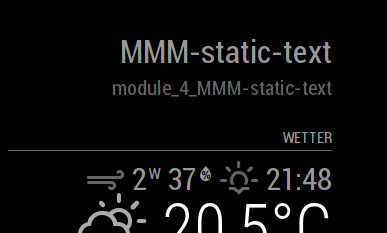
This is the outcome…
@agp42 said in Weather forecast only displays ‘invalid date’:
I did change the following on the file “/MagicMirror/modules/default/weatherferecast/weatherforecast.js” :
Thanks a lot. I got it.
I found a solution on https://github.com/MichMich/MagicMirror/commit/0e2e8d2e2aca2f8d0f1f2eb7b213577fcc4f623a
But I had to change the lines 338 and 339 instead of 336 and 337
var day = moment(forecast.dt_txt, "YYYY-MM-DD hh:mm:ss").format("ddd");
var hour = moment(forecast.dt_txt, "YYYY-MM-DD hh:mm:ss").format("H");
into
var day;
var hour;
if(!!forecast.dt_txt) {
	day = moment(forecast.dt_txt, "YYYY-MM-DD hh:mm:ss").format("ddd");
	hour = moment(forecast.dt_txt, "YYYY-MM-DD hh:mm:ss").format("H");
} else {
	day = moment(forecast.dt, "X").format("ddd");
	hour = moment(forecast.dt, "X").format("H");
}
It works for my MM.
same here.
Is there a possibilty to erase the comma and country code behind the location in the header?!
Hey @ all,
I´m a freshy at raspberrypi and I copied the “helloworld”-module to create a static-text-module with a name “MMM-static-text” just to avoid any problems in future if someone changes the “helloworld” for any reasons.
I changed the names of the folder, files and within the file to “MMM-static-text”
MMM-static-text.js:
/* global Module */

/* Magic Mirror
 * Module: MMM-static-text
 *
 * By Michael Teeuw http://michaelteeuw.nl
 * MIT Licensed.
 */

Module.register("MMM-static-text",{

	// Default module config.
	config: {
		text: "Wetterinformationen"
	}
});
config.js:
{	module: "MMM-static-text",
			position: "top_right",
			config:{
				text: "Wetterinformationen"
			}
		},
Unfortunatelly it doesn´t show “Wetterinformation”. Instead it shows “MMM-static-text” and below “module_4_MMM-static-text”. If I use the helloworld-module it is the same.
What is wrong with my module?
Thanks for any help.
Best Regards
Daniel
Hummel Hummel georg90,
thanks for you local-support.
The link in your github description is old and doesn´t work anymore.
You can use http://www.hvv.de/fahrplaene/abruf-fahrplaninfos/uebersicht/index.php instead which gives you 4 options to choose.
Your MMM isn´t installed on my Raspi at the moment but as soon as I have a better understanding of my Raspi and the MM2 I will install it!!!
Best wishes from Winterhude
Hi Mykle1,
thanks for answering.
I didn´t add any modules yet. Only the default modules.
I will try that. Thanks for your help.
Hello there,
I´m trying to configure my MagicMirror but unfortunately I´m completly new in this (Raspberry Pi coding).
I installed everything according to the manual from the MagicMirror homepage and it worked fine as default.
Afterthat I wanted to customize everything (my city for weather, calender/holidays for Germany, etc.), but thats where I´m stucked.
I changed the “config/config.js”-file (according to the MagicMirror homepage) and had some syntax errors.
Therefore I checked the internet and found a how-to “emilinate syntax errors for beginners” and I fixed everything and checked it with “npm run config:check” and it said “Your configuration file don´t containt syntax error :)” but when I want to start the npm I got a warning "WARNING! Could not validate config file. Please correct syntax errors. ".
My Problem are:
I would appreciate if someone could help me.
Best Regards
Daniel