MagicMirror Forum
    • Recent
    • Tags
    • Unsolved
    • Solved
    • MagicMirror² Repository
    • Documentation
    • 3rd-Party-Modules
    • Donate
    • Discord
    • Register
    • Login
    1. Home
    2. kusselin
    3. Posts
    A New Chapter for MagicMirror: The Community Takes the Lead
    Read the statement by Michael Teeuw here.
    Offline
    • Profile
    • Following 2
    • Followers 0
    • Topics 39
    • Posts 277
    • Groups 0

    Posts

    Recent Best Controversial
    • RE: MagicMirror/node_modules/electron/dist/electron exited with signal SIGBUS

      @sdetweil said in MagicMirror/node_modules/electron/dist/electron exited with signal SIGBUS:

      @frustrated SO much fun…

      SO… lets try to reinstall electron

      BUT it leans towards an sd card problem…

      cd ~/MagicMirror
      rm -rf node_modules/electron
      npm install electron@22.3.4
      

      then

      npm start 
      

      and see what we get

      root@magicmirror-test:/opt/magicmirror# npm start
      
      > magicmirror@2.31.0 start
      > npm run start:x11
      
      Hi Sam, I can't get enough of this...
      This message with Elektron has something to do with the displaying, doesn't it?
      why are these error messages suddenly appearing in Proxmox with LXC containers?
      
      Look....these are now the latest error messages after installing your tips..:
      
      > magicmirror@2.31.0 start:x11
      > DISPLAY="${DISPLAY:=:0}" ./node_modules/.bin/electron js/electron.js
      
      [0414/064255.384679:FATAL:electron_main_delegate.cc(299)] Running as root without --no-sandbox is not supported. See https://crbug.com/638180.
      /opt/magicmirror/node_modules/electron/dist/electron exited with signal SIGTRAP
      
      posted in Bug Hunt
      kusselinK
      kusselin
    • RE: MMM-ioBroker - it will not show

      @sdetweil
      Hello, thank you. I have installed the dependency in github to your link and made a reboot…unfortunately the temp and humidity is still not displayed :-(

      look i have now done “npm start” again…now this message comes up:

      root@magicmirror-test:/opt/magicmirror# npm start
      
      > magicmirror@2.31.0 start
      > npm run start:x11
      
      
      > magicmirror@2.31.0 start:x11
      > DISPLAY="${DISPLAY:=:0}" ./node_modules/.bin/electron js/electron.js
      
      /opt/magicmirror/node_modules/electron/dist/electron: error while loading shared libraries: libgtk-3.so.0: cannot open shared object file: No such file or directory
      

      it’s just strange…I’ve never had these messages before…I’ve reinstalled the MM several times…but I’ve never had these messages…

      As the developer of MM, could you explain to me what this message means?

      thanks a lot Sam

      posted in Troubleshooting
      kusselinK
      kusselin
    • RE: MMM-ioBroker - it will not show

      @sdetweil

      Do you mean then sudo apt install libnss3.so ?

      root@magicmirror-live:/opt# cd magicmirror
      root@magicmirror-live:/opt/magicmirror# apt install libnss3.so
      Reading package lists... Done
      Building dependency tree... Done
      Reading state information... Done
      E: Unable to locate package libnss3.so
      E: Couldn't find any package by glob 'libnss3.so'
      
      
      posted in Troubleshooting
      kusselinK
      kusselin
    • RE: MMM-ioBroker - it will not show

      @sdetweil
      Hi sdetweil, ha the MM is installed in a Proxmox LXC Container with Ubuntu 24.xx via the Proxmox Helpers scripts. But I already mentioned that above…MM is not installed on a PI…

      What does the message say?
      Have you discovered the error?

      But it worked all the time in the container.

      How do you load it into the container?

      Thank you

      posted in Troubleshooting
      kusselinK
      kusselin
    • RE: MMM-ioBroker - it will not show

      @sdetweil

       ping 192.168.200.38
      
      Ping wird ausgeführt für 192.168.200.38 mit 32 Bytes Daten:
      Antwort von 192.168.200.38: Bytes=32 Zeit<1ms TTL=64
      Antwort von 192.168.200.38: Bytes=32 Zeit<1ms TTL=64
      Antwort von 192.168.200.38: Bytes=32 Zeit<1ms TTL=64
      Antwort von 192.168.200.38: Bytes=32 Zeit<1ms TTL=64
      
      Ping-Statistik für 192.168.200.38:
          Pakete: Gesendet = 4, Empfangen = 4, Verloren = 0
          (0% Verlust),
      Ca. Zeitangaben in Millisek.:
          Minimum = 0ms, Maximum = 0ms, Mittelwert = 0ms
      
      MagicMirror LXC Container
          🌐   Provided by: community-scripts ORG | GitHub: https://github.com/community-scripts/ProxmoxVE
      
          🖥️   OS: Debian GNU/Linux - Version: 12
          🏠   Hostname: magicmirror-live
          💡   IP Address: 192.168.200.74
      root@magicmirror-live:~# cd /magicmirror
      -bash: cd: /magicmirror: No such file or directory
      root@magicmirror-live:~# cd /opt
      root@magicmirror-live:/opt# cd magicmirror
      root@magicmirror-live:/opt/magicmirror# npm start
      
      > magicmirror@2.31.0 start
      > npm run start:x11
      
      
      > magicmirror@2.31.0 start:x11
      > DISPLAY="${DISPLAY:=:0}" ./node_modules/.bin/electron js/electron.js
      
      /opt/magicmirror/node_modules/electron/dist/electron: error while loading shared libraries: libnss3.so: cannot open shared object file: No such file or directory
      
      posted in Troubleshooting
      kusselinK
      kusselin
    • RE: MMM-ioBroker - it will not show

      @sdetweil
      hi…i can´t sie that there is a different ID
      when you look in the config from MM config you see the ID for “OG-Schlafzimmer” an this is the same iD i posted "Sleeping room -OG.

      and when the ID were wrong between MM and iobroker the name don´t displayed, but it´s o.k. and the name is display…

      what else could it be?

      I’m a bit annoyed because there must be more people who do this with Iobroker…and no one answers here :-(

      posted in Troubleshooting
      kusselinK
      kusselin
    • RE: MMM-ioBroker - it will not show

      Hello everyone,
      hello stedweil,

      an update…I have reinstalled the MM and I have said that I have it running in a Proxmox container (LXC)…that also worked via this page:
      https://tteck.github.io/Proxmox/#miscellaneous

      the installation worked perfectly…then I adjusted the config one after the other…
      all modules work, regardless of whether they are MMM-Fuel, MMM-Clock or Calender…only not the MMM-ioBroker…my temperature and humidity data records are still not displayed

      @stedweil: Let’s please go through again step by step what I can do to possibly narrow down the error. I bought the Aquara parts especially to display this via MM and it actually worked until recently.

      Thank you in advance

      {
      		module: 'MMM-ioBroker',
      		position: 'top_left',
      		config: {
      		  host: '192.168.200.38',
      		  port: '8082',
      		  https: false,
      		  devices: [
                { name: 'EG-Ankleide',
                  deviceStates: [
                                    { id: 'zigbee.0.00158d0002fb4915.temperature', icon: 'wi wi-thermometer', suffix: '&deg;' },
                                    { id: 'zigbee.0.00158d0002fb4915.humidity',    icon: 'wi wi-humidity',    suffix: '%' }
                                ]
                },
      		  
      		  { name: 'EG-Büro',
                  deviceStates: [
                                    { id: 'zigbee.0.00158d0006d571bb.temperature', icon: 'wi wi-thermometer', suffix: '&deg;' },
                                    { id: 'zigbee.0.00158d0006d571bb.humidity',    icon: 'wi wi-humidity',    suffix: '%' }
                                ]
                },
      		  
      		  { name: 'EG-Bad',
                  deviceStates: [
                                    { id: 'zigbee.0.00158d0006e3ee77.temperature', icon: 'wi wi-thermometer', suffix: '&deg;' },
                                    { id: 'zigbee.0.00158d0006e3ee77.humidity',    icon: 'wi wi-humidity',    suffix: '%' }
                                ]
                },
      		  
      		  { name: 'EG-Wohnzimmer',
                  deviceStates: [
                                    { id: 'hm-rpc.0.NEQ1522239.1.TEMPERATURE', icon: 'wi wi-thermometer',  suffix: '&deg;' },
                                    { id: 'hm-rpc.0.NEQ1522239.1.HUMIDITY',     icon: 'wi wi-humidity', suffix: '%' }
                                ]
                },			
      	
      		{ name: 'Dach-Speicher',
                  deviceStates: [
                                    { id: 'hm-rpc.0.KEQ0242488.1.TEMPERATURE', icon: 'wi wi-thermometer',  suffix: '&deg;' },
                                    { id: 'hm-rpc.0.KEQ0242488.1.HUMIDITY',     icon: 'wi wi-humidity', suffix: '%' }
                                ]
                },			


      			{ name: 'Treppenhaus',
                  deviceStates: [
                                    { id: 'hm-rpc.0.LEQ0592936.1.TEMPERATURE', icon: 'wi wi-thermometer',  suffix: '&deg;' },
                                    { id: 'hm-rpc.0.LEQ0592936.1.HUMIDITY',     icon: 'wi wi-humidity', suffix: '%' }
                                ]
                },
      
      			{ name: 'OG-Bad',
                  deviceStates: [
                                    { id: 'zigbee.0.00158d008b644f6f.temperature', icon: 'wi wi-thermometer',  suffix: '&deg;' },
                                    { id: 'zigbee.0.00158d008b644f6f.humidity',     icon: 'wi wi-humidity', suffix: '%' }
                                ]
                },
      
      			{ name: 'OG-Wohnzimmer',
                  deviceStates: [
                                    { id: 'zigbee.0.00158d008b64556c.temperature', icon: 'wi wi-thermometer',  suffix: '&deg;' },
                                    { id: 'zigbee.0.00158d008b64556c.humidity',     icon: 'wi wi-humidity', suffix: '%' }
                                ]
                },		
      			
      			{ name: 'OG-Rumpelzimmer',
                  deviceStates: [
                                    { id: 'zigbee.0.00158d008b644eff.temperature', icon: 'wi wi-thermometer',  suffix: '&deg;' },
                                    { id: 'zigbee.0.00158d008b644eff.humidity',     icon: 'wi wi-humidity', suffix: '%' }
                                ]
                },
      
      			{ name: 'OG-Esszimmer',
                  deviceStates: [
                                    { id: 'zigbee.0.00158d008b6192cd.temperature', icon: 'wi wi-thermometer',  suffix: '&deg;' },
                                    { id: 'zigbee.0.00158d008b6192cd.humidity',     icon: 'wi wi-humidity', suffix: '%' }
                                ]
                },
      		  
      			{ name: 'OG-Schlafzimmer',
                  deviceStates: [
                                    { id: 'zigbee.0.00158d008b69c067.temperature', icon: 'wi wi-thermometer',  suffix: '&deg;' },
                                    { id: 'zigbee.0.00158d008b69c067.humidity',     icon: 'wi wi-humidity', suffix: '%' }
                                ]
                },
      		  	
      		  
      			{ name: 'UG-Waschküche',
                  deviceStates: [
                                    { id: 'zigbee.0.00158d008b619293.temperature', icon: 'wi wi-thermometer',  suffix: '&deg;' },
                                    { id: 'zigbee.0.00158d008b619293.humidity',     icon: 'wi wi-humidity', suffix: '%' }
                                ]
                },		
      		  
      				]
      		}
      		},
      

      Thermo and humidy of the sleeping room OG:

      zigbee.0.00158d008b69c067.temperature
      

      and

      zigbee.0.00158d008b69c067.humidity
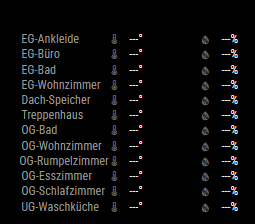
      

      Image 001.png

      posted in Troubleshooting
      kusselinK
      kusselin
    • RE: MMM-ioBroker - it will not show

      @sdetweil
      Thank you…that’s funny…I don’t have any SD in use. I have installed the MM in a Proxmox container…ok then I know that something is wrong and I have to create a new container…config and costum.css I save and modules too…

      Thank you again

      posted in Troubleshooting
      kusselinK
      kusselin
    • RE: MMM-ioBroker - it will not show

      @sdetweil
      look :-(

      mm@MagicMirror-live:~$ cd MagicMirror
      mm@MagicMirror-live:~/MagicMirror$ npm start
      npm error code ENOSPC
      npm error syscall write
      npm error errno -28
      npm error nospc ENOSPC: no space left on device, write
      npm error nospc There appears to be insufficient space on your system to finish.
      npm error nospc Clear up some disk space and try again.
      npm error A complete log of this run can be found in: /home/mm/.npm/_logs/2025-04-10T19_51_54_629Z-debug-0.log
      

      and

       verbose cli /usr/local/bin/node /usr/local/bin/npm
      1 info using npm@10.9.2
      2 info using node@v22.14.0
      3 silly config load:file:/usr/local/lib/node_modules/npm/npmrc
      4 silly config load:file:/home/mm/MagicMirror/.npmrc
      5 silly config load:file:/home/mm/.npmrc
      6 silly config load:file:/usr/local/etc/npmrc
      7 verbose title npm run start:x11
      8 verbose argv "run" "start:x11"
      9 verbose logfile logs-max:10 dir:/home/mm/.npm/_logs/2025-04-10T19_51_37_854Z-
      10 verbose logfile /home/mm/.npm/_logs/2025-04-10T19_51_37_854Z-debug-0.log
      11 silly logfile start cleaning logs, removing 1 files
      12 silly logfile done cleaning log files
      13 verbose cwd /home/mm/MagicMirror
      14 verbose os Linux 6.8.12-8-pve
      15 verbose node v22.14.0
      16 verbose npm  v10.9.2
      17 verbose exit 1
      18 verbose code 1
      
      posted in Troubleshooting
      kusselinK
      kusselin
    • RE: MMM-ioBroker - it will not show

      @sdetweil
      sorry, please forget me :-(

      and now?

      cd ~/MagicMirror
      mm@MagicMirror-live:~/MagicMirror$ npm install electron@35.1.2
      
      added 654 packages in 20s
      
      285 packages are looking for funding
        run `npm fund` for details
      mm@MagicMirror-live:~/MagicMirror$
      
      posted in Troubleshooting
      kusselinK
      kusselin
    • RE: MMM-ioBroker - it will not show

      @sdetweil
      is the pm2 log located at
      /home/mm/.pm2

      and how do I create the output of npm start?

      mm@MagicMirror-live:~$ npm start
      npm error code ENOENT
      npm error syscall open
      npm error path /home/mm/package.json
      npm error errno -2
      npm error enoent Could not read package.json: Error: ENOENT: no such file or directory, open '/home/mm/package.json'
      npm error enoent This is related to npm not being able to find a file.
      npm error enoent
      npm error A complete log of this run can be found in: /home/mm/.npm/_logs/2025-04-10T19_02_15_732Z-debug-0.log
      mm@MagicMirror-live:~$ cd MagicMirror
      mm@MagicMirror-live:~/MagicMirror$ npm start
      
      > magicmirror@2.31.0 start
      > npm run start:x11
      
      
      > magicmirror@2.31.0 start:x11
      > DISPLAY="${DISPLAY:=:0}" ./node_modules/.bin/electron js/electron.js
      
      sh: 1: ./node_modules/.bin/electron: not found
      mm@MagicMirror-live:~/MagicMirror$
      
      posted in Troubleshooting
      kusselinK
      kusselin
    • RE: MMM-ioBroker - it will not show

      @rkorell
      Sorry everyone, I still don’t get it…when I run the upgrade command with -force then node and npm is up to date and I don’t get an error message.

      Why does Iobroker with the Zigbee adapter suddenly stop displaying anything? Iobroker and the Zigbee adapter are running perfectly.

      posted in Troubleshooting
      kusselinK
      kusselin
    • RE: MMM-ioBroker - it will not show

      @sdetweil
      Hi sdetweil, thanks for your help. Since I am not a Linux expert I do everything with copy&paste…means also the installation of MM everything made by commands…

      Can you please tell me the Linux commands I need to use to get it working again. thank you!
      Or does it have something to do with Iobroker why the temp values are no longer displayed?
      But in iobroker everything works with the Zigbee adapter.

      I have not changed anything else in the config or anywhere else in MM

      Please help me.

      posted in Troubleshooting
      kusselinK
      kusselin
    • RE: MMM-ioBroker - it will not show

      @sdetweil Sorry, but I don’t understand what you mean by test run?

      Suddenly the temperature is no longer displayed and I don’t know where the error lies?

      What do I have to do to get it working again?
      thank you thank you thank you

      posted in Troubleshooting
      kusselinK
      kusselin
    • RE: MMM-ioBroker - it will not show

      @sdetweil is this o.k. so?

      mm@MagicMirror-live:~/MagicMirror$ git pull && npm run install-mm
      Already up to date.
      
      > magicmirror@2.31.0 install-mm
      > npm install --no-audit --no-fund --no-update-notifier --only=prod --omit=dev
      
      
      > magicmirror@2.31.0 postinstall
      > npm run install-vendor && npm run install-fonts && echo "MagicMirror² installation finished successfully!
      > "
      
      
      > magicmirror@2.31.0 install-vendor
      > echo "Installing vendor files ...
      > " && cd vendor && npm install --loglevel=error --no-audit --no-fund --no-update-notifier
      
      Installing vendor files ...
      
      
      changed 1 package in 1s
      
      > magicmirror@2.31.0 install-fonts
      > echo "Installing fonts ...
      > " && cd fonts && npm install --loglevel=error --no-audit --no-fund --no-update-notifier
      
      Installing fonts ...
      
      
      changed 2 packages in 4s
      MagicMirror² installation finished successfully!
      
      
      > magicmirror@2.31.0 prepare
      > [ -f node_modules/.bin/husky ] && husky || echo no husky installed.
      
      no husky installed.
      
      added 6 packages, removed 7 packages, and changed 193 packages in 34s
      mm@MagicMirror-live:~/MagicMirror$ bash -c  "$(curl -sL https://raw.githubusercontent.com/sdetweil/MagicMirror_scripts/master/upgrade-script.sh)"
      update log will be in /home/mm/MagicMirror/installers/upgrade.log
      
      doing test run = true, NO updates will be applied!
      
      Check current Node installation ...
      Node currently installed. Checking version number.
      Minimum Node version: v22.14.0
      Installed Node version: v22.14.0
      No Node.js upgrade necessary.
      Check current NPM installation ...
      NPM currently installed. Checking version number.
      Minimum npm version: V10.9.2
      Installed npm version: V10.9.2
      No npm upgrade necessary.
      
      saving custom.css
      upgrading from version 2.31.0 to 2.31.0
      MagicMirror running under control of PM2, stopping
      [PM2] Applying action stopProcessId on app [MagicMirror](ids: [ 0 ])
      [PM2] [MagicMirror](0) ✓
      ┌────┬────────────────┬─────────────┬─────────┬─────────┬──────────┬────────┬──────┬───────────┬──────────┬──────────┬──────────┬──────────┐
      │ id │ name           │ namespace   │ version │ mode    │ pid      │ uptime │ ↺    │ status    │ cpu      │ mem      │ user     │ watching │
      ├────┼────────────────┼─────────────┼─────────┼─────────┼──────────┼────────┼──────┼───────────┼──────────┼──────────┼──────────┼──────────┤
      │ 0  │ MagicMirror    │ default     │ 2.31.0  │ fork    │ 0        │ 0      │ 437  │ stopped   │ 0%       │ 0b       │ mm       │ disabled │
      └────┴────────────────┴─────────────┴─────────┴─────────┴──────────┴────────┴──────┴───────────┴──────────┴──────────┴──────────┴──────────┘
      fetching latest revisions
      
      Checking for modules with removed libraries
      
      updating dependencies for active modules with package.json files
      
      
              processing for module MMM-Fuel please wait
      
              ----------------------------------
      
              skipped processing for MMM-Fuel, doing test run
      
              processing complete for module MMM-Fuel
      
      
              processing for module MMM-RNV please wait
      
              ----------------------------------
      
              skipped processing for MMM-RNV, doing test run
      
              processing complete for module MMM-RNV
      
      
              processing for module MMM-PublicTransportHafas please wait
      
              ----------------------------------
      
              skipped processing for MMM-PublicTransportHafas, doing test run
      
              processing complete for module MMM-PublicTransportHafas
      
      
              processing for module MMM-ioBroker please wait
      
              ----------------------------------
      
              skipped processing for MMM-ioBroker, doing test run
      
              processing complete for module MMM-ioBroker
      
      
              processing for module MMM-COVID19-AMPEL please wait
      
              ----------------------------------
      
              skipped processing for MMM-COVID19-AMPEL, doing test run
      
              processing complete for module MMM-COVID19-AMPEL
      
      
              processing for module MMM-soccer please wait
      
              ----------------------------------
      
              skipped processing for MMM-soccer, doing test run
      
              processing complete for module MMM-soccer
      
      
              processing for module MMM-Carousel please wait
      
              ----------------------------------
      
              skipped processing for MMM-Carousel, doing test run
      
              processing complete for module MMM-Carousel
      
      
              processing for module MMM-Remote-Control please wait
      
              ----------------------------------
      
              skipped processing for MMM-Remote-Control, doing test run
      
              processing complete for module MMM-Remote-Control
      
      restoring custom.css
      mm@MagicMirror-live:~/MagicMirror$
      
      posted in Troubleshooting
      kusselinK
      kusselin
    • MMM-ioBroker - it will not show

      Hello everyone, I have had the MMM-ioBroker module installed for some time and it has always worked and displayed my Aquara temperature gauges…recently it has stopped displaying anything :-( the module is up to date.

      what can I do? what is wrong?

      mm@MagicMirror-live:~/MagicMirror$ git pull && npm run install-mm
      Already up to date.
      
      > magicmirror@2.31.0 install-mm
      > npm install --no-audit --no-fund --no-update-notifier --only=prod --omit=dev
      
      npm error code EBADENGINE
      npm error engine Unsupported engine
      npm error engine Not compatible with your version of node/npm: magicmirror@2.31.0
      npm error notsup Not compatible with your version of node/npm: magicmirror@2.31.0
      npm error notsup Required: {"node":">=22.14.0"}
      npm error notsup Actual:   {"npm":"10.8.2","node":"v20.18.1"}
      npm error A complete log of this run can be found in: /home/mm/.npm/_logs/2025-04-09T19_49_38_299Z-debug-0.log
      

      what must i do? Im not the expert…how is the befehl for update npm?

      mm@MagicMirror-live:~/MagicMirror$ bash -c  "$(curl -sL https://raw.githubusercontent.com/sdetweil/MagicMirror_scripts/master/upgrade-script.sh)"
      update log will be in /home/mm/MagicMirror/installers/upgrade.log
      
      doing test run = true, NO updates will be applied!
      
      Check current Node installation ...
      Node currently installed. Checking version number.
      Minimum Node version: v22.14.0
      Installed Node version: v20.18.1
      Node should be upgraded.
      A Node process is currently running. Can't upgrade.
      Please quit all Node processes and restart the update.
      running process(s) are
      mm           304     271  0 Feb03 ?        00:00:00 sh -c node ./serveronly
      mm           305     304  0 Feb03 ?        01:28:58 node ./serveronly
      
      posted in Troubleshooting
      kusselinK
      kusselin
    • RE: weather forecast does not show on screen

      @sdetweil said in weather forecast does not show on screen:

      @kusselin on the module, you can use that or the default weather module supports forecast too

      Hi sam, how can i unstand this with standard module an forecast display?

      what must i do?

      posted in Troubleshooting
      kusselinK
      kusselin
    • RE: Protect MM from the outside with user and pass

      @sdetweil said in Protect MM from the outside with user and pass:

      @kusselin MagicMirror doesn’t provide that functionality,

      i don’t open any ports on my system anymore. i don’t want to learn and try to implement anti hacker solutions.
      i use a cloudflare tunnel, which has a token authorized agent running on my network connected to the cloudflare system to create the tunnel

      you need to provide a dns record which they can be the host for

      then i can create contact points on the entry and they will route traffic to them.

      cloudflare can provide the user authentication component

      i bought a dns record in the .xyz domain. so my host is something.xyz

      then my home assistant is
      ha.something.xyz
      i have 11 apps hosted this way
      none use https on my network (from the agent to the app)

      this tunnel approach also works where your isp doesn’t have or charges more for incoming traffic

      this tunneling service is currently free

      i used to use a dyndns host and open ports on my network but got some unwanted inbound traffic
      for an example
      see https://www.crosstalksolutions.com/cloudflare-tunnel-easy-setup/

      Ok Sam, thanks a lot for the information

      posted in General Discussion
      kusselinK
      kusselin
    • Protect MM from the outside with user and pass

      Hello everyone,

      I have the current MM running as a server and this is accessible from outside via proxy ngx.
      Now my question: can I protect it with a password login?
      I enter https://xxxxxxx.com in the browser and then a login screen with user and password appears.
      Is that possible? If so, what do I have to do? How can I protect the MM from the outside?

      Thank you very much for any information

      posted in General Discussion
      kusselinK
      kusselin
    • RE: MM-Update doesn´t work

      @sdetweil thank you sam…topp service

      posted in Troubleshooting
      kusselinK
      kusselin
    • 1 / 1
