Thank you for the adjustment. Now the pop-up window no longer freezes when calls are blocked. The installation worked as described here.
Regards,
Michael
Thank you for the adjustment. Now the pop-up window no longer freezes when calls are blocked. The installation worked as described here.
Regards,
Michael
Hello,
I have updated to 2.23.0.
Now I have a problem with MMM-DarkSkyForecast, which was still working before the update. At the moment nothing is displayed anymore, except loading…
The log file tells me:
<!DOCTYPE "... is not valid JSON
    at JSON.parse (<anonymous>)
    at Request._callback (/home/pi/MagicMirror/modules/MMM-DarkSkyForecast/node_helper.js:57:29)
    at self.callback (/home/pi/MagicMirror/modules/MMM-DarkSkyForecast/node_modules/request/request.js:185:22)
    at Request.emit (node:events:513:28)
    at Request.<anonymous> (/home/pi/MagicMirror/modules/MMM-DarkSkyForecast/node_modules/request/request.js:1154:10)
    at Request.emit (node:events:513:28)
    at IncomingMessage.<anonymous> (/home/pi/MagicMirror/modules/MMM-DarkSkyForecast/node_modules/request/request.js:1076:12)
    at Object.onceWrapper (node:events:627:28)
    at IncomingMessage.emit (node:events:525:35)
    at endReadableNT (node:internal/streams/readable:1358:12)
    at process.processTicksAndRejections (node:internal/process/task_queues:83:21)
[06.04.2023 10:45.14.538] [ERROR] MagicMirror² will not quit, but it might be a good idea to check why this happened. Maybe no internet connection?
[06.04.2023 10:45.14.540] [ERROR] If you think this really is an issue, please open an issue on GitHub: https://github.com/MichMich/MagicMirror/issues
[06.04.2023 10:55.11.221] [ERROR] Whoops! There was an uncaught exception...
[06.04.2023 10:55.11.224] [ERROR] SyntaxError: Unexpected token '<', "
I have carried out a new update of MMM-DarkSkyForecast, unfortunately without success.
Can anyone help me?
I had the same issue, I use MMM-PIR-Sensor-Lite to switch the monitor off and on again. On the command line “vcgencmd display_power 0” does not work, the return is always: “display_power=1”.
I have tried a few things, they all did not work.
Edit the “config.txt” in the “/boot” directory.
Go to:
“# Enable DRM VC4 V3D driver
dtoverlay=vc4-kms-v3d
max_framebuffers=2”
And change “dtoverlay=vc4-kms-v3d” to “dtoverlay=vc4-fkms-v3d”.
There is a bug in the “vc4-kms-v3d” driver.
After changing in the “config.txt” “vcgencmd display_power 0” returns a “display_power=0”.
MMM-PIR-Sensor-Lite now works as desired.
Looks good…
Here’s some issues:
Regards,
Michael
I found the clue.
In the description is the wrong path for cloning is given:
:cross_mark: git clone https://github.com/ianperrin/MMM-NetworkScanner.git
It has to be:
git clone https://github.com/spitzlbergerj/MMM-NetworkScanner.git
Now it works as expected!
Hi @Bugsounet,
I’ll be patient and I’ll wait…
Let me be your alpha and beta tester. :lady_beetle:
Thanks for your feedback.
I would like to extend the module.
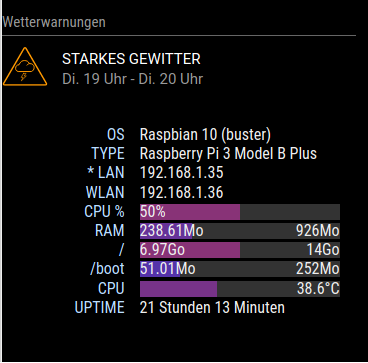
I would like to display both IP addresses.
What I have already done:
Changed the cmdline.txt to show a wlan0 as interface name again (ifconfig)
In node-helper.js I added the following:
IP: "ip -4 a show lo | grep inet",
IP_LAN: "ip -4 a show eth0 | grep inet"
IP_WLAN: "ip -4 a show wlan0 | grep inet"
Implemented these two functions:
 getIP_WLAN : function() {
    exec (this.scripts['IP_WLAN'], (err, stdout, stderr)=>{
      if (err == zero) {
        this.WLAN = stdout.trim().match(/\b\d{1,3}\.\d{1,3}\.\d{1,3}\.\d{1,3}\b/)
      }
    })
  },

  getIP_LAN : function() {
    exec (this.scripts['IP_LAN'], (err, stdout, stderr)=>{
      if (err == zero) {
        var matched = stdout.trim().match(/\b\d{1,3}\.\d{1,3}\.\d{1,3}\.\d{1,3}\b/)
        this.IP_LAN = (matched) ? matched[0] : "Unknown"
      }
    })
  },
Unfortunately, I did not get any further, I can’t manage to output the values. My goal is what is written there:
IP eth0: 192.168.1.xx, wlan0: 192.168.1.yy
Since I have no experience with JS, I am now stucking here…
Is anyone interested in helping me with this?
Greetings
That’s what I see:
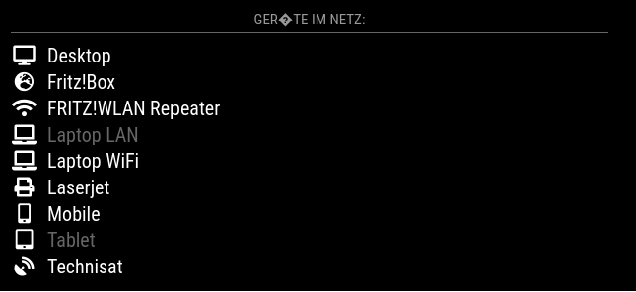
Technically it works, but the colors and formatting are not correct.
I need some help with the configuration of MMM-NetworkScanner, published by spitzlbergerj
I’d like to see that view:
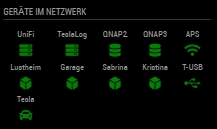
I’ve made some attempts to configure it, but I can’t get this view.
Does anyone have a working config and can publish it here?
Thanks for the help!