@fabbr You can’t nest the braces in CSS. Just take out the body { and last } entirely.
A New Chapter for MagicMirror: The Community Takes the Lead
Read the statement by Michael Teeuw here.
Read the statement by Michael Teeuw here.
N
Offline
Posts
-
RE: MMM-MyCalendar
-
Trouble with Smart Quotes, etc
Someone sent you here because you were probably having trouble with smart directional (aka angled or curly) quotes. Most often this is an issue with Macs because they do “smart punctuation” replacement, including in TextEdit, the default text editor.
This is mostly a problem for quotes, where it changes quotes (
") to their directional alternatives (“or”). Here is their support document on the topic. When writing prose, this is generally a good idea. In writing code, it’s not.In Windows, such smart replacement done at a program level on certain word processors, like Microsoft Word, but not in things like Notepad, the default text editor for Windows. This is why it’s more of a problem for Mac users.
Straight double quotes (
") are different characters from open and close quotes (“or”). They look very similar to us, but the JavaScript/Node.js parser doesn’t think so. Straight quotes have the code points ofU+0022orU+0027, but directional quotes have completely separate code points.If you’re having trouble with smart quotes, you’ll need to start using a proper text editor that doesn’t allow the system to automatically insert directional quotes. The default editor on Mac (called TextEdit) is much more of a note taking or word processing program (much more like WordPad) than a text editor for code. It doesn’t understand code, and does things that break it. Use a true text editor like Atom, BBEdit, TextMate, etc. Or more sophisticated tools like Coda. Pick one, download it, install it, and use that to open/edit/save your config and other code files. (NB: I recommend Atom because it is supported and distributed by GitHub, is free, and is well-supported and open-source, with a good plugin architecture and community. YMMV.)
Once you’ve downloaded and installed Atom (by moving it to your
~/Applicationsfolder on your Mac) you can run it then open the file, or right-click a file and select “Open with…” and choose Atom. Not only will it not break your code, it will colour-code (called “syntax-highlighting”) it, show you where brackets/braces match, and can help to make your code legible (called “Beautify” in Atom).In order to edit remotely on (for example) a Raspberry Pi on your local network, you can use an SFTP client like FileZilla or CyberDuck. SFTP will need to be enabled on your RPi. You can then connect to the RPi and edit files remotely (not download, edit, upload; both programs have an “edit” option that will let you edit and save remotely in an editor … change it to Atom for js/css/html files in the preferences). This should allow you to edit files on your MM remotely.
-
RE: Modules assistance for MM newbie! Help!
@Fookes Oh, understood. You can use the little art/photo icon to upload a photo in the forum.
Are you pasting via VNC? I suggest using an SFTP client like FileZilla or CyberDuck.
You can then connect to the RPi and edit files remotely (not download, edit, upload; both programs have an “edit” option that will let you edit and save remotely in an editor … change it to Atom for js/css/html files in the preferences).
You can also use Terminal (in Applications > Utilities) to connect to your RPi via
ssh(ex.ssh 192.168.0.100) to run commands remotely. -
RE: Modules assistance for MM newbie! Help!
Sorry @Fookes, when @yawns mentioned MacOS and you didn’t say you weren’t using a Mac, I assumed that to be the case (given the quotes problem). Did you install Atom on your own computer or the RPi? Are you editing your files on the RPi itself (via a keyboard, in Terminal) or are you connecting remotely from other computer (typically
ssh)?As a command-line text editor,
nanorespects quotes and should not cause a problem, although I typically avoid pasting code blocks – I find oversshthat the paste buffers and encodings can get weird. -
RE: MMM-MyCalendar
@fabbr There is nothing (iirc) that really constrains the MM regions … they expand to fit their content. Moreover, I think some modules aren’t written with a landscape orientation in mind. I suggest you try the following in your
custom.css:.module.MMM-MyCalendar { min-width: 200px; /* adjust number as necessary */ }Alternatively, you can try instead using:
.region.top.left { max-width: 30%; } -
RE: Modules assistance for MM newbie! Help!
@Fookes Yes, but how are you opening your
config.jsto paste in your options/configuration? There is an app/program that opens and interprets the file, then saves it again. Whatever you’re using, it is permitting MacOS to change your quotes, thereby breaking the file. -
RE: Modules assistance for MM newbie! Help!
@Fookes No problem. You need to use a program (app) to open any file. Right now, you’re using what came with your Mac (called TextEdit). But it’s much more of a note taking or word processing program than a text editor for code. It doesn’t understand code, and does things that break it. Once you’ve downloaded and installed Atom (by moving it to your
~/Applicationsfolder on your Mac) you can run it then open the file, or right-click a file and select “Open with…” and choose Atom. Not only will it not break your code, it will colour-code (called “syntax-highlighting”) your code, show you where brackets/braces match, and can help to make your code legible (called “Beautify” in Atom).For adding modules, check out this walkthrough for tips: https://forum.magicmirror.builders/topic/4231/how-to-add-modules-for-absolute-beginners
-
RE: Modules assistance for MM newbie! Help!
@yawns It’s usually Macs because they do “smart quote” replacement, including in TextEdit, the default text editor. Straight double quotes (
") are different characters from open and close quotes (“or”). Such smart replacement done at a program level on certain word processors, like Microsoft Word, but not in things like Notepad, the default text editor for Windows. This is why it’s more of a problem for Mac users.@Fookes The solution is to not use TextEdit (much more like WordPad) for any code. Use a true text editor like Atom, BBEdit, TextMate, etc. Download one, install it, and use that to open/edit/save your config and other code files.
-
RE: Schedule Module with XML/Feed source
@kruemel You can make a mashup of
MMM-WeeklySchedulefor display andMMM-HTTPRequestDisplayto fetch data which handles an XML response. -
RE: Magic mirror serving multiple clients
@zack949 Not of which I’m aware. Most dev effort is spent on the display/features end. It would also have to track the config options for dozens of regularly changing modules, which presents its own challenges.
I recommend using a syntax-highlighting code editor, like (the free) Atom. It will help with closing brackets/braces, and using the proper quotes. You can also run “Atom Beautify” in “Packages” regularly to keep formatting for legibility.
-
RE: Magic mirror serving multiple clients
@zack949 I suggest you register
mm1.sh,mm2.shandmm3.shwithpm2(per manual install guide). I would then also create amm-start.shthat runspm2 start mm1 && pm2 start mm2 && pm2 start mm3and likewise forstop. You might even create anmm.shthat just sends the following command (e.g.mm.sh start) for all three MM instances managed bypm2, but that will require some bash scripting. -
RE: Magic mirror serving multiple clients
@zack949 I think you’ll need to run three separate instances, but should be straightforward. You’ll want three installs (e.g.
~/MagicMirror1,~/MagicMirror2, etc.). Suggest you install/build MM, then just copy the directory twice with all the dependencies. You’ll need to set each up on its own port to avoid collisions.Interesting idea to permit multiple server instances from a single install, but I think it would become confusing for many. The single server/client does satisfy the vast majority of use cases atm.
-
RE: Modules assistance for MM newbie! Help!
Hey @Fookes,
Usually the screen going black with config changes means there’s a syntax error crashing the parser. Try pasting it into JSHint.
For Compliments, see here for the config options. You can either make an object with four arrays in the config, or create a file from which to load them.
Weather, I’ll have to look. I think the API/feed complains that I cannot use certain forecasts with the free WUndergound account. The same may be happening to you too.
I can’t see you screenshots. You might instead copy/paste the text into a block quote, like so:
````
// Code goes here
```` -
RE: Get weather at a calendar event location
@Albinolan I haven’t seen it done, but someone asked how to show driving directions to calendar event locations, and I described the basic process here. This is basically the same, but with weather.
The default
calendarmodule broadcasts events via the MM notification framework. You just need to modify a module to receive and interpret the notification/events.I question the overall utility, though. How often is the weather different from your house (or mirror) to the destination? I can see the utility if you travel a lot, or often visit neighboring towns, but imagine for most people seeing the weather forecast for their city should suffice.
-
RE: probleme avec une img
@frankoucth Votre question n’est pas tout à fait claire. Est-ce que c’est l’originale qui bloque, ou une nouvelle copie de votre carte? Quelle appli avez-vous utilisé pour le faire? Avez-vous essayé une deuxième fois de remettre la carte?
Voici une discussion (en anglais) de ce (genre de) problème:
If you have trouble resetting (formatting) your SD-card (resulting in no boot activity) you could try forgoing the NOOBS method, and instead directly image the card, with DD, WinDiskimager or another imaging program. Recently “etcher” a promising new tool available for Mac, Linux and Windows promises to make the task of writing an image to an SD-card much simpler, it can be downloaded here: https://www.etcher.io.
Always use it with the very latest version of Raspbian, which is the best choice for a first boot, and the default OS. Download it from here: https://www.raspberrypi.org/downloads/raspbian/.Il me semble que peut-être ’etcher’ fonctionnera bien pour créer une copie de votre image.
-
RE: Border
Hi @Peter,
I installed the module with your config (although
configwas calleddefaults, which took a while to debug).This works for me:
.module.MMM-MovieListings {
  max-width: 320px; /* adjust as needed */
}
As seen here:
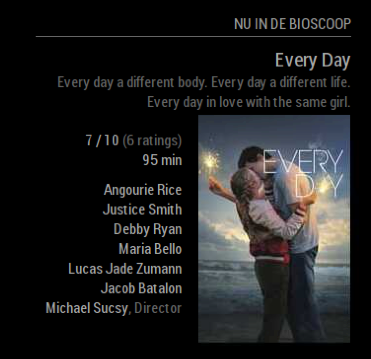
-
RE: How to display a local static html file...
@Deplorable Have you tried the
file://protocol? (e.g.file:///home/pi/intro.html)?Otherwise, every module can make files available through a
publicsubfolder. So I think you can make apublicfolder under your iFrame module and serve from that (e.g.http://localhost:8080/modules/iframe/public). -
RE: Border
@Peter can you share your
MMM-MovieListingsconfig? I’ll try to replicate the issue.If you start MM with
npm start dev, you can use the DOM inspector to see Inspect theMMM-MovieListingsmodule (or just press Ctrl+Alt+I). What classes does the module have? Can you see your CSS being applied? -
RE: Border
@Peter Suggest you try this to limit the width of the
MMM-MovieListingsmodule:.module.MMM-MovieListings { max-width: 400px; /* adjust as needed */ }You said it’s a long title, but isn’t the title “Every Day”? Is it the movie tagline stretching the
module? I think you could target it with something like this:.module.MMM-MovieListings div div:nth-child(2) { white-space: normal; /* why is it not wrapping? strange */ word-wrap: normal; /* break the text to a new line */ }There are no classes, so I’m just eyeballing something based on the markup generated here.