I could not install the package above on my pi installation: package not found
But sudo apt install fonts-symbola worked. I just needed to restart the magicmirror service. Although, the emojis are not colored. But still better than the square ;-)
P
Offline
A New Chapter for MagicMirror: The Community Takes the Lead
Read the statement by Michael Teeuw here.
Read the statement by Michael Teeuw here.
Posts
-
RE: 🎂🥂Emoji support
-
RE: Forum updated - I could use your help
I switched my settings now to the ones posted by MichMich. The display of posts was totally confused after switching off the pagination. I had to log out and on again. Now the latest posts are loaded as default and when I scroll up to the top older posts are loaded step by step until the opening post is reached.
And now my reply was shown immediately after I submitted it.
-
RE: Forum updated - I could use your help
Form Android with Chrome I see the same.
For the first post, there was nothing pre-filled. But I had to manually refresh to see the post after submitting. And now I have the pre-filling again.Funny enough, when I edit a previous post, this does not occur. The page is reloaded automatically and the edited post is shown right away.
It’s only when I want to create a reply. -
RE: Forum updated - I could use your help
I have the option “After posting a reply, show newest post” checked in my settings, yes.
And for this very reply now the text of my last reply from five days ago was pre-filled again in the reply box.
I was logged out for several days now.I guess we need some systematic testing to narrow this down. But sdetweil tried already all cases I could imagine:
- log off and on again -> no change for me
- clear cache and cookies -> haven’t tried yet
- restart system -> no change for me
- use different browser -> no change for me
- use different OS -> no change for me
- use different hardware -> no change for me
- use different account -> haven’t tried yet
I think, everything but a new account was already tested by Sam without success. Any more suggestions?
-
RE: Forum updated - I could use your help
No, I’m not a moderator user. I registered for this forum just 5 days ago (9th of April).
-
RE: Allocation of display sections (e.g. 'lower third' and so on) gives strange results after upgrade to 2.11.0
I have the following results now:
electron 3.x.x: working as expected
electron 4.x.x: not working at all, the screen stays black
fromelectron 5up to latest version (8.2.2) : The text of the different modules gets overlaid as shown in the screenshots.For the moment I stay at version 3.0.13 as all the modules I’m using are working fine.
(alert, updatenotification, clock, calendar, compliments, newsfeed, helloworls, MMM-ImageSlideshow)But I fear at some point I’ll have to update to be able to use the latest MagicMirror commit…
Can I somehow set this topic to “Closed” or “Solved” (at least for now ;-) )?
And, thank you very much for your help, @sdetweil !
-
RE: Forum updated - I could use your help
No, reload of the page is actually fine.
-
RE: Forum updated - I could use your help
Browser: Firefox
Version: 75.0 (64-bit)When I
Submita reply, it is not displayed right away. I have to re-open the topic (a simple re-load of the page opens the reply form again, I think. Let me try…).And when I want to make another reply, the form is still filled with the text from the previous one.
-
RE: Allocation of display sections (e.g. 'lower third' and so on) gives strange results after upgrade to 2.11.0
“I last tested 6.0.12, but don’t know if it was ok for profile use”
Did you mean ‘portrait’ use? But I have this problem also in landscape mode without rotated screen.I removed the electron folders in
node_modulesand didnpm install electron@3.0.6 --only=prodWith this version everything is fine again. I try to figure out for which version of electron it breaks…
-
RE: Allocation of display sections (e.g. 'lower third' and so on) gives strange results after upgrade to 2.11.0
I’m not sure if electron is the issue. I tried with several commits and figured out
7b3a594is still working fine for me, but6e7edd9(the one before the “Upgrade to Electron 6”) already causes this problem for me.Oh, I just realized there is an electron upgrade already in this commit (although it is not stated in the commit message):
> electron-chromedriver@6.0.0 install /home/pi/MagicMirror/node_modules/electron-chromedriver
> node ./download-chromedriver.js


> electron@6.1.7 postinstall /home/pi/MagicMirror/node_modules/electron
> node install.js
So might well be an electron issue. Can you give me some advice how I can try different versions to see which one is working for my setup?
-
RE: Allocation of display sections (e.g. 'lower third' and so on) gives strange results after upgrade to 2.11.0
Well, the backup is still working as before. So it is somehow related to the new version 2.11.0
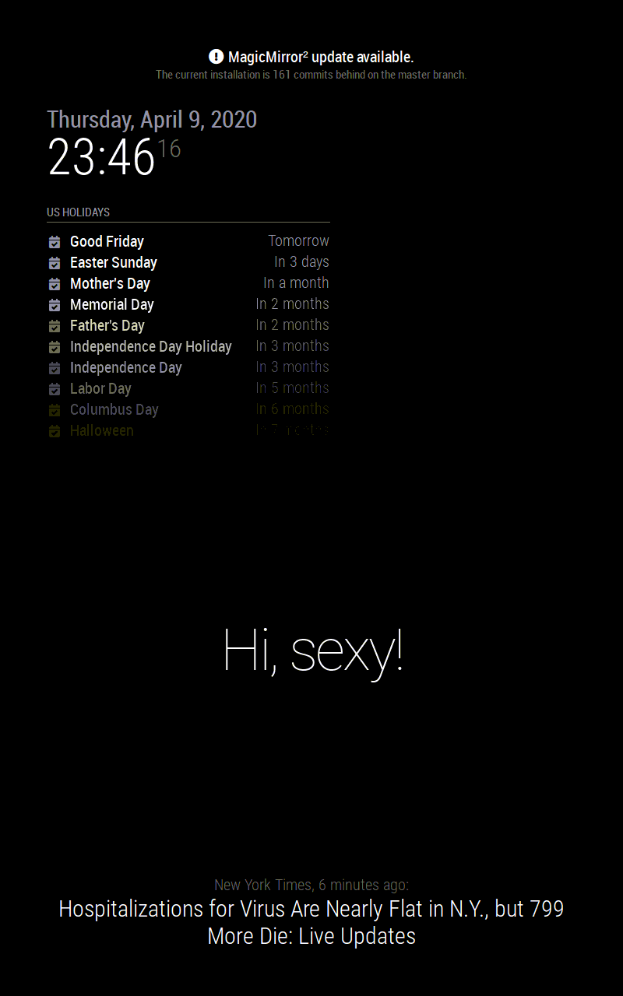
-
RE: Allocation of display sections (e.g. 'lower third' and so on) gives strange results after upgrade to 2.11.0
Yes, I have a
display_rotate=1in my /boot/config.txtBut even when I turn it back to 0 and restart the raspberry the issue seems to stay the same.
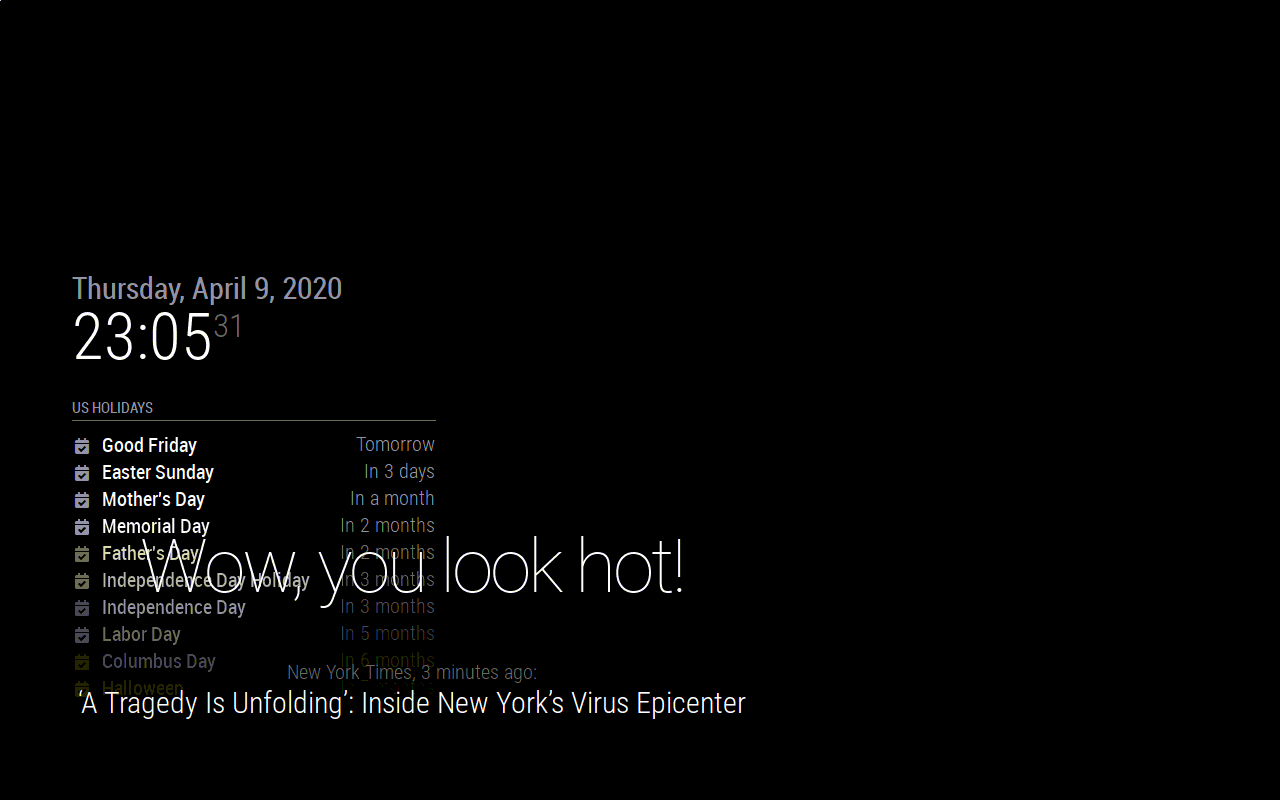
I’ll try to go back to the previous commit and my backup folder and have a look if the issue vanish or persist. Maybe it’s a driver problem…
-
RE: Allocation of display sections (e.g. 'lower third' and so on) gives strange results after upgrade to 2.11.0
Wow, this was a fast reply. Thanks @sdetweil !
Yes, I have a backup from before the upgrade. But the main.css and custom.css are identical to the current version.
There was also no change in my repo which prevented me from a fast forward pull. So I guess there was no change from me which was overwritten by the upgrade.
I’m not familiar with the functionality of
npm. Was there maybe some update of another software package? -
Allocation of display sections (e.g. 'lower third' and so on) gives strange results after upgrade to 2.11.0
Hi there!
I need help with the configuration of my display after the upgrade to version 2.11.0
I’m using a Pi 3 Model B+ with an old laptop screen in portrait orientation. As far as I remember there were no problems with the default display sections during the setup of my MagicMirror. Everything ended up where I wanted it to be.
But since the upgrade the different modules are shifted all together and are overlapping. I did a
git pullandnpm install, run also thenpm audit fixand installed the latest Node.js version as described in the Manual Installation guide. I also moved to the standard config.js and made a screenshot to show the issue: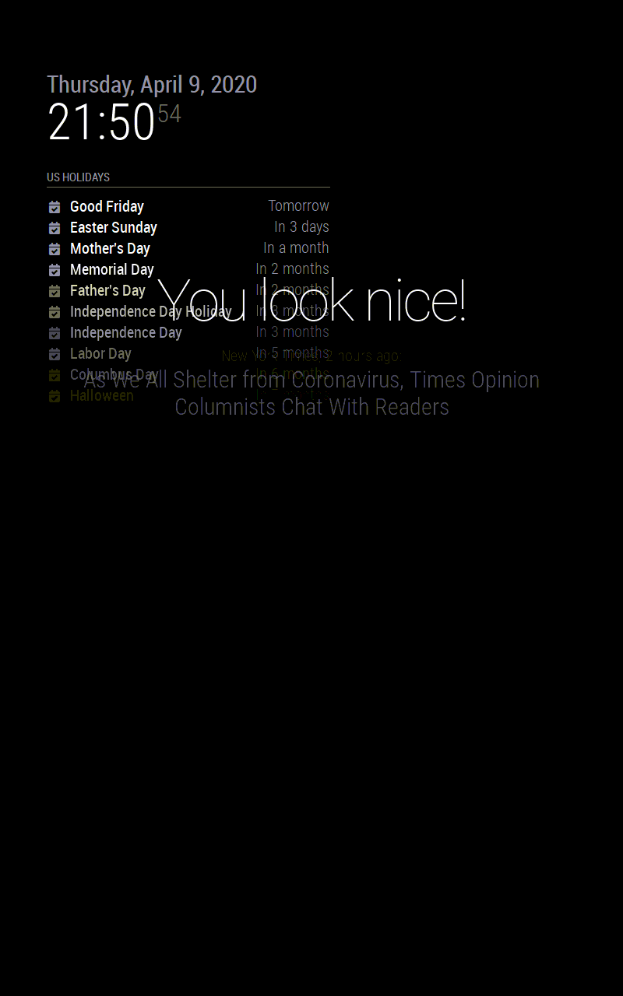
It seems like the lower part of the display is no longer taken into account for the calculation of the display sections.
Has anybody an idea where this could come from and how this could be solved?I’m happy to provide more information, but at the moment I have no clue where to look for the problem.
uname -a
Linux raspberrypi 4.19.66-v7+ #1253 SMP Thu Aug 15 11:49:46 BST 2019 armv7l GNU/LinuxThanks for your help!