however when I go to the website: https://eventful.com/caen/events
I did have some results (I tried eventful Movies but nothing found even in Paris …).
Maybe it’s a city precision problem? if MMM-Events could specify “city, country” (Caen, France), that might work, right?
A New Chapter for MagicMirror: The Community Takes the Lead
Read the statement by Michael Teeuw here.
Read the statement by Michael Teeuw here.
R
Offline
Posts
-
RE: MMM-Events : nothing to display on my Magic Mirror
-
RE: MMM-Events : nothing to display on my Magic Mirror
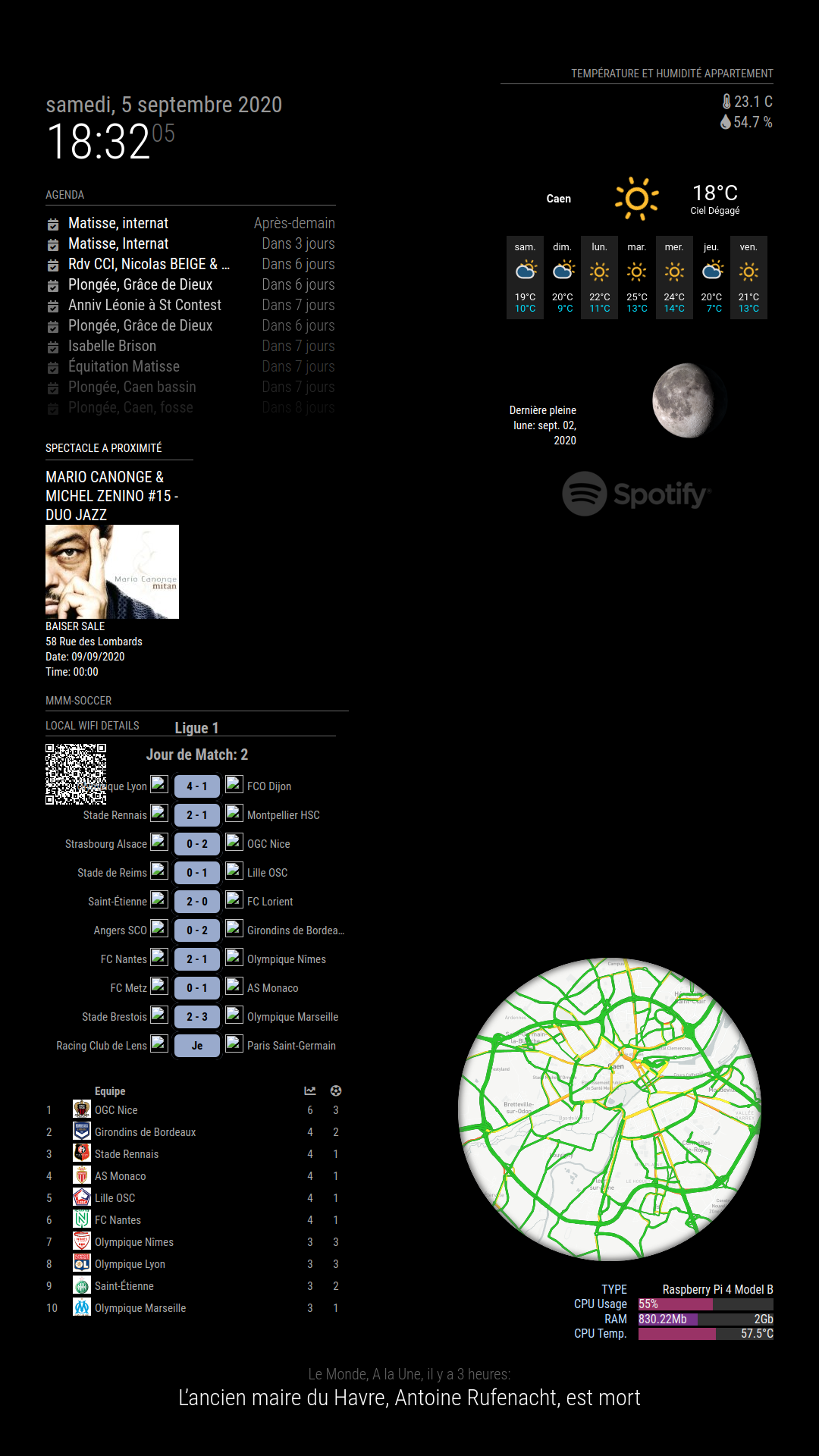
by changing the city “Caen” (I live in Caen in Normandy) for “Paris”, it works, it is therefore my city which is not recognized.
Any idea to solve the problem ?
-
MMM-Events : nothing to display on my Magic Mirror
Hello,
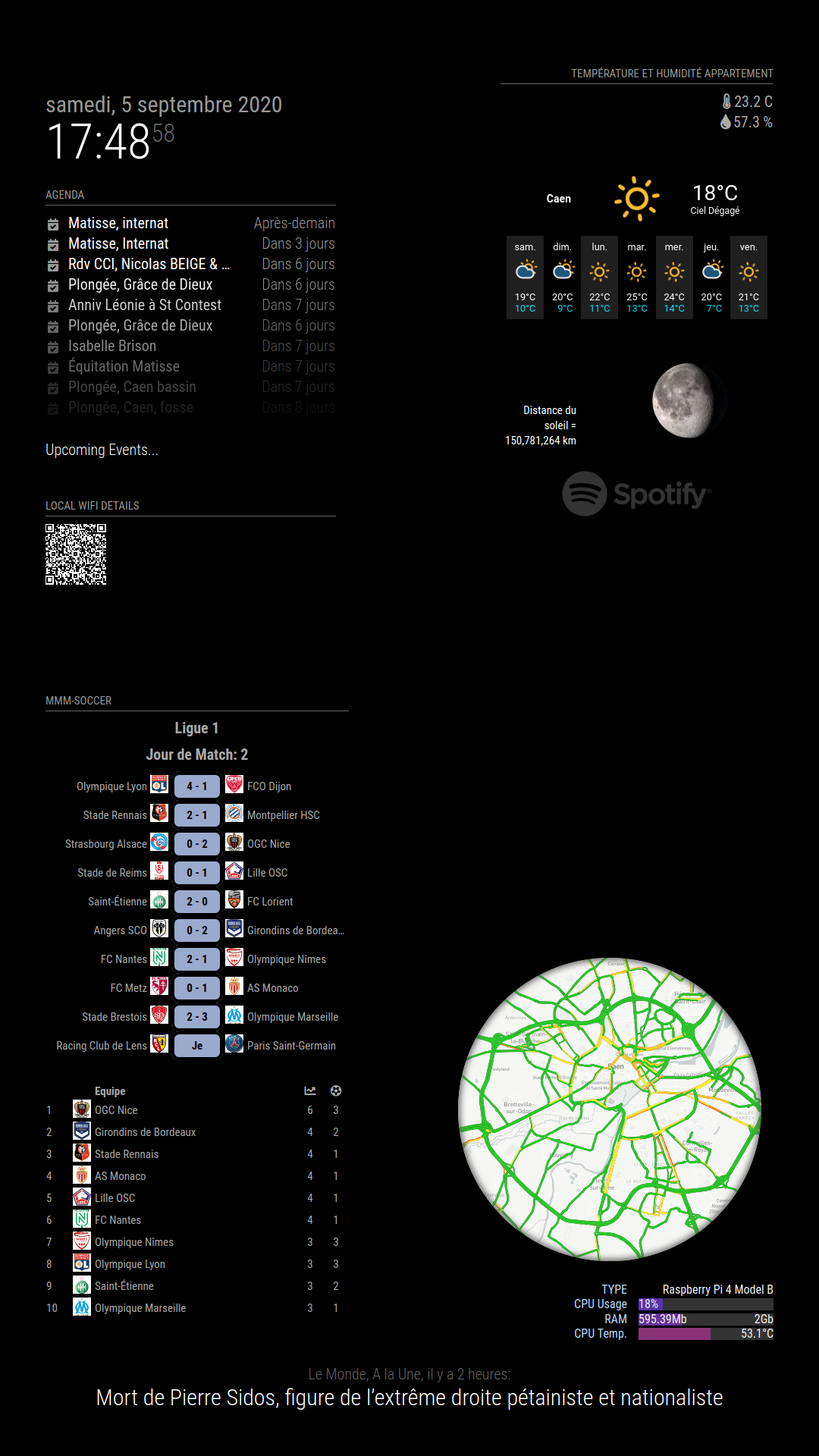
I just installed the MMM-Events module and no events are displayed on my MM it remains blocked with “upcoming Events”:
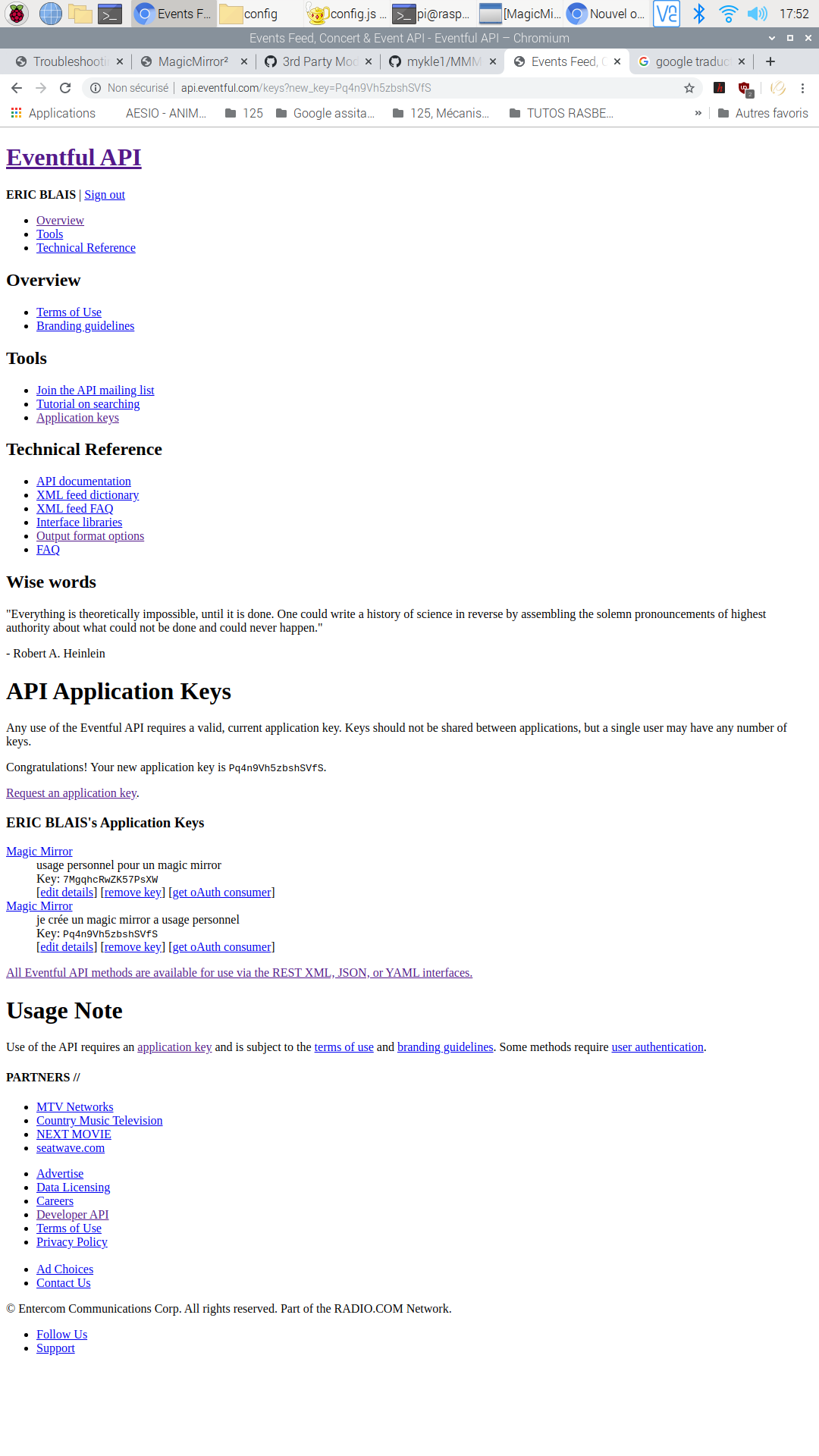
I created an API key :
here is my config.js:
		{
				module: 'MMM-Events',
				position: 'top_left',
				config: {
				city: "Caen",	           // Your City
				eventType: "music,movies_film,art", // One or more, seperated by commas. Choose from Events List below
				when: "This Week",                 // "All", "Future", "Past", "Today", "Last Week", "This Week", "Next week", and months by name, e.g. "October"
				mode: "noFrame",                   // "Frame" or "noFrame" (around picture)
				apikey: "Pq4n9Vh5zbshSVfS",
				rotateInterval: 5 * 60 * 1000,     // New Event Appears every 5 minutes
				useHeader: true,	           // Set to true if you want a header
				header: "Spectacle a proximité",
				animationSpeed: 3000,              // Event fades in and out
				picture: true,                     // true, false = no image
				}
			},
after typing the commands
pm2 restart mma reboot of my raspberry and created a new API Key always nothing…Can you help me ?
pi@raspberrypi:~ $ pm2 logs [TAILING] Tailing last 15 lines for [all] processes (change the value with --lines option) /home/pi/.pm2/pm2.log last 15 lines: PM2 | 2020-09-05T17:41:28: PM2 log: SIGTERM timeout : 1600 PM2 | 2020-09-05T17:41:28: PM2 log: =============================================================================== PM2 | 2020-09-05T17:41:28: PM2 log: App [mm:0] starting in -fork mode- PM2 | 2020-09-05T17:41:28: PM2 log: App [mm:0] online PM2 | 2020-09-05T17:48:17: PM2 log: Stopping app:mm id:0 PM2 | 2020-09-05T17:48:18: PM2 log: App [mm:0] exited with code [0] via signal [SIGINT] PM2 | 2020-09-05T17:48:18: PM2 log: pid=566 msg=process killed PM2 | 2020-09-05T17:48:18: PM2 log: App [mm:0] starting in -fork mode- PM2 | 2020-09-05T17:48:18: PM2 log: App [mm:0] online PM2 | 2020-09-05T17:55:58: PM2 log: Stopping app:mm id:0 PM2 | 2020-09-05T17:55:58: PM2 log: pid=7550 msg=failed to kill - retrying in 100ms PM2 | 2020-09-05T17:55:58: PM2 log: App [mm:0] exited with code [0] via signal [SIGINT] PM2 | 2020-09-05T17:55:58: PM2 log: pid=7550 msg=process killed PM2 | 2020-09-05T17:55:58: PM2 log: App [mm:0] starting in -fork mode- PM2 | 2020-09-05T17:55:59: PM2 log: App [mm:0] online /home/pi/.pm2/logs/mm-error.log last 15 lines: 0|mm | npm ERR! errno 1 0|mm | npm ERR! magicmirror@2.12.0 start: `DISPLAY="${DISPLAY:=:0}" ./node_modules/.bin/electron js/electron.js` 0|mm | npm ERR! Exit status 1 0|mm | npm ERR! 0|mm | npm ERR! Failed at the magicmirror@2.12.0 start script. 0|mm | npm ERR! This is probably not a problem with npm. There is likely additional logging output above. 0|mm | 0|mm | npm ERR! A complete log of this run can be found in: 0|mm | npm ERR! /home/pi/.npm/_logs/2020-09-05T15_41_17_727Z-debug.log 0|mm | [2020-09-05 17:41:45.213] [ERROR] (node:712) [DEP0005] DeprecationWarning: Buffer() is deprecated due to security and usability issues. Please use the Buffer.alloc(), Buffer.allocUnsafe(), or Buffer.from() methods instead. 0|mm | [2020-09-05 17:41:45.215] [ERROR] (node:712) [DEP0005] DeprecationWarning: Buffer() is deprecated due to security and usability issues. Please use the Buffer.alloc(), Buffer.allocUnsafe(), or Buffer.from() methods instead. 0|mm | [2020-09-05 17:48:27.538] [ERROR] (node:7571) [DEP0005] DeprecationWarning: Buffer() is deprecated due to security and usability issues. Please use the Buffer.alloc(), Buffer.allocUnsafe(), or Buffer.from() methods instead. 0|mm | [2020-09-05 17:48:27.540] [ERROR] (node:7571) [DEP0005] DeprecationWarning: Buffer() is deprecated due to security and usability issues. Please use the Buffer.alloc(), Buffer.allocUnsafe(), or Buffer.from() methods instead. 0|mm | [2020-09-05 17:56:11.781] [ERROR] (node:14911) [DEP0005] DeprecationWarning: Buffer() is deprecated due to security and usability issues. Please use the Buffer.alloc(), Buffer.allocUnsafe(), or Buffer.from() methods instead. 0|mm | [2020-09-05 17:56:11.782] [ERROR] (node:14911) [DEP0005] DeprecationWarning: Buffer() is deprecated due to security and usability issues. Please use the Buffer.alloc(), Buffer.allocUnsafe(), or Buffer.from() methods instead. /home/pi/.pm2/logs/mm-out.log last 15 lines: 0|mm | [2020-09-05 17:56:17.441] [LOG] [SNOWBOY] snowboy v1.6.2 Initialized... 0|mm | [2020-09-05 17:56:17.442] [LOG] [@bugsounet] ************************* 0|mm | [2020-09-05 17:56:17.443] [LOG] [@bugsounet] Special note to @ktoanlba89 (https://github.com/ktoanlba89) 0|mm | [2020-09-05 17:56:17.444] [LOG] [@bugsounet] Copying does not pay! 0|mm | [2020-09-05 17:56:17.444] [LOG] [@bugsounet] Try to make your own before delete my username ! 0|mm | [2020-09-05 17:56:17.445] [LOG] [@bugsounet] Don't play with me guy ! 0|mm | [2020-09-05 17:56:17.446] [LOG] [@bugsounet] ************************* 0|mm | [2020-09-05 17:56:17.459] [LOG] [ASSISTANT] RECIPE_LOADED: with-MMM-TelegramBot.js 0|mm | [2020-09-05 17:56:17.468] [LOG] [ASSISTANT] Assistant2Display Server Started 0|mm | [2020-09-05 17:56:17.475] [LOG] [ASSISTANT] Use native program (mpg321) for audio response 0|mm | [2020-09-05 17:56:17.491] [LOG] [SOUND] mpg321 Initialized 0|mm | [2020-09-05 17:56:17.509] [LOG] [NPM] Initialized v0.9.6 0|mm | [2020-09-05 17:56:18.054] [LOG] [ASSISTANT] Google Assistant is initialized. 0|mm | [2020-09-05 17:56:22.160] [LOG] Requests available: 8 0|mm | [2020-09-05 17:56:32.245] [LOG] Requests available: 6 0|mm | [2020-09-05 17:56:42.172] [LOG] 0|mm | Requests available: 4 0|mm | [2020-09-05 17:56:52.147] [LOG] 0|mm | Requests available: 2 0|mm | [2020-09-05 17:57:02.245] [LOG] 0|mm | Requests available: 0 0|mm | [2020-09-05 17:57:12.155] [LOG] 0|mm | An error occured while requesting the API for Data: Error: Request failed with status code 429 0|mm | [2020-09-05 17:57:12.155] [LOG] URL: http://api.football-data.org/v2/competitions/FL1/matches 0|mm | [2020-09-05 17:57:12.156] [LOG] 429: API Request Quota of 10 calls per minute exceeded. Try selecting less leagues. 0|mm | [2020-09-05 17:57:12.194] [LOG] 0|mm | An error occured while requesting the API for Data: Error: Request failed with status code 429 0|mm | [2020-09-05 17:57:12.201] [LOG] 0|mm | URL: http://api.football-data.org/v2/competitions/FL1/standings 0|mm | [2020-09-05 17:57:12.207] [LOG] 0|mm | 429: API Request Quota of 10 calls per minute exceeded. Try selecting less leagues. -
questions about MMM-SENEYE module
Hello,
Are there people who use the MMM-SENEYE module? I see that there is no issue on the module page, no problem because the repo dates October 2018?is the Seneye Home sufficient or should you buy the
Seneye Web Server & WiFi module?Thank you for your answers.
-
RE: how to connect the fans to a raspbery 4
a priori, the editing on the 1st photo is good because air comes out, not with the editing of the 1st photo
-
RE: how to connect the fans to a raspbery 4
Ok thanks, I tested with a light, the thumbnail of the fans should be up for mine.
-
how to connect the fans to a raspbery 4
what is the common sense to connect the fans to the case of my raspberry 4? the thumbnail of the fans should be up or down?
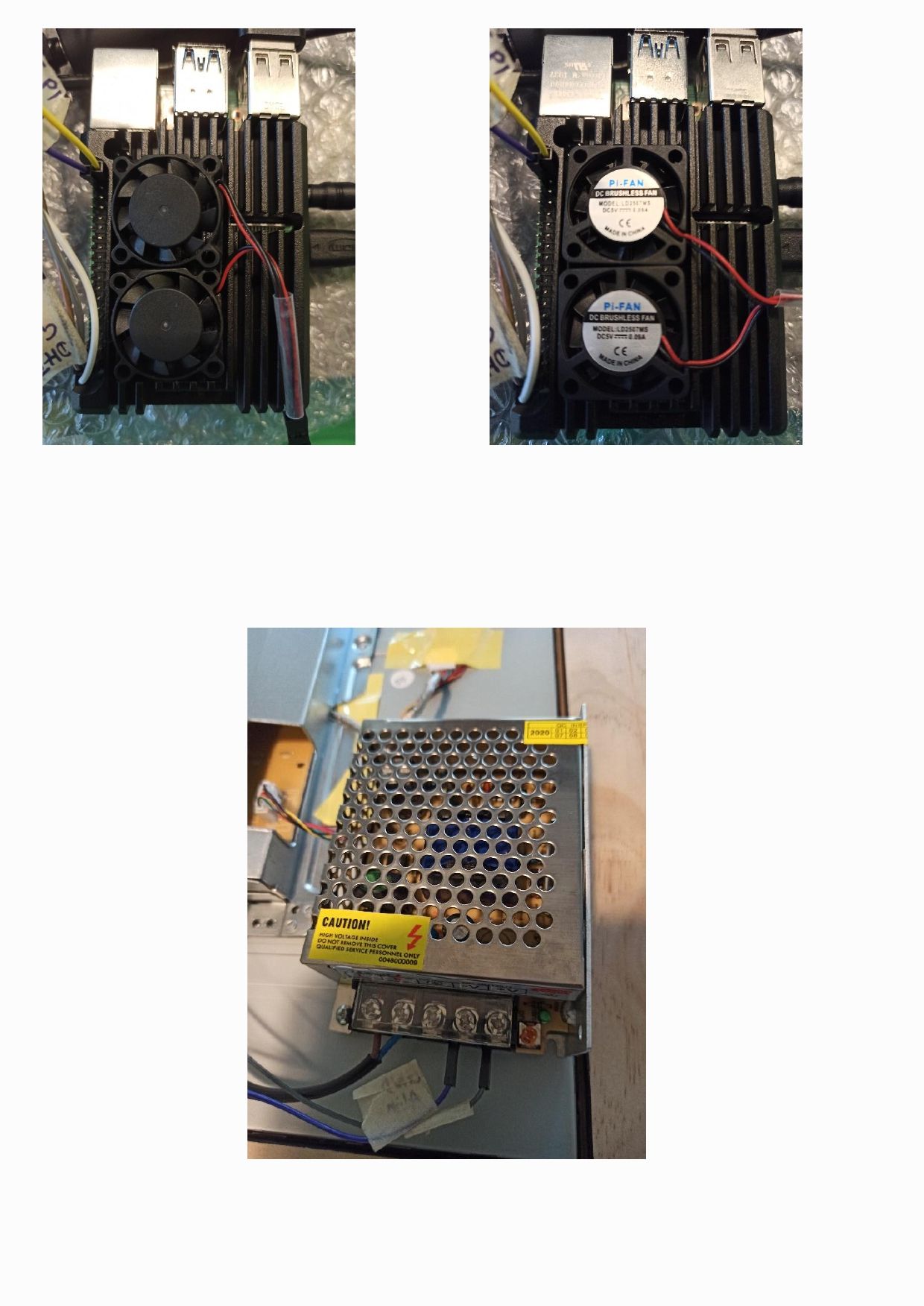
I also have the following diagram, is it preferable to connect the fans directly to the external power supply (5V, 5 A) in order to preserve the raspberry?
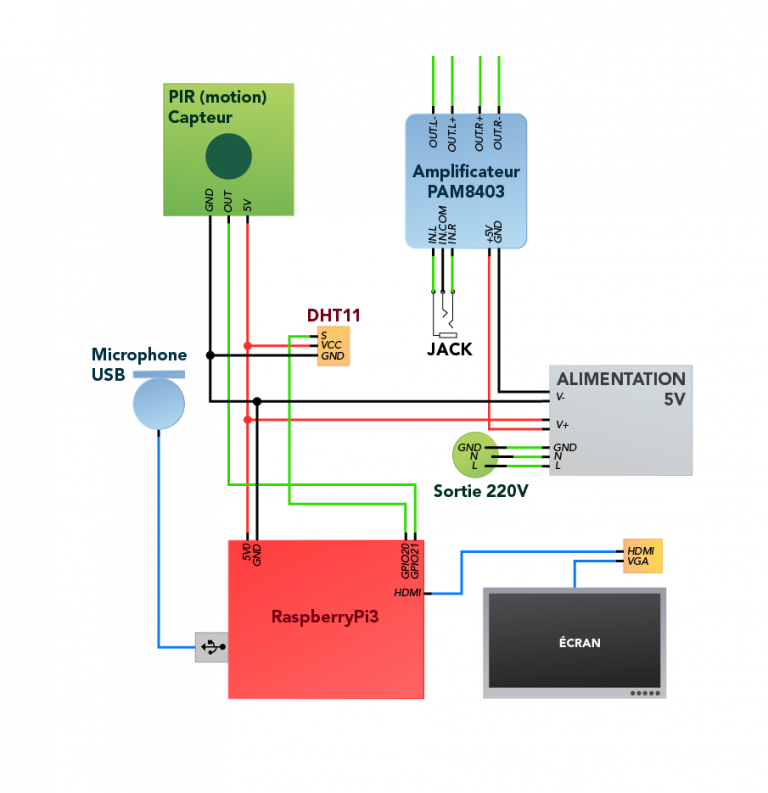
Thank you for your help.
-
RE: MMM-soccer : black screen, problem of config.js
so cool, it’s good
thank you so much -
RE: MMM-soccer : black screen, problem of config.js
I searched in various files in the MMM-soccer folder but could not find how to change and where to write instead:
- mmm-soccer over the line
- “Matchday” per “Journée”: 2
- “Team” by “Equipe”
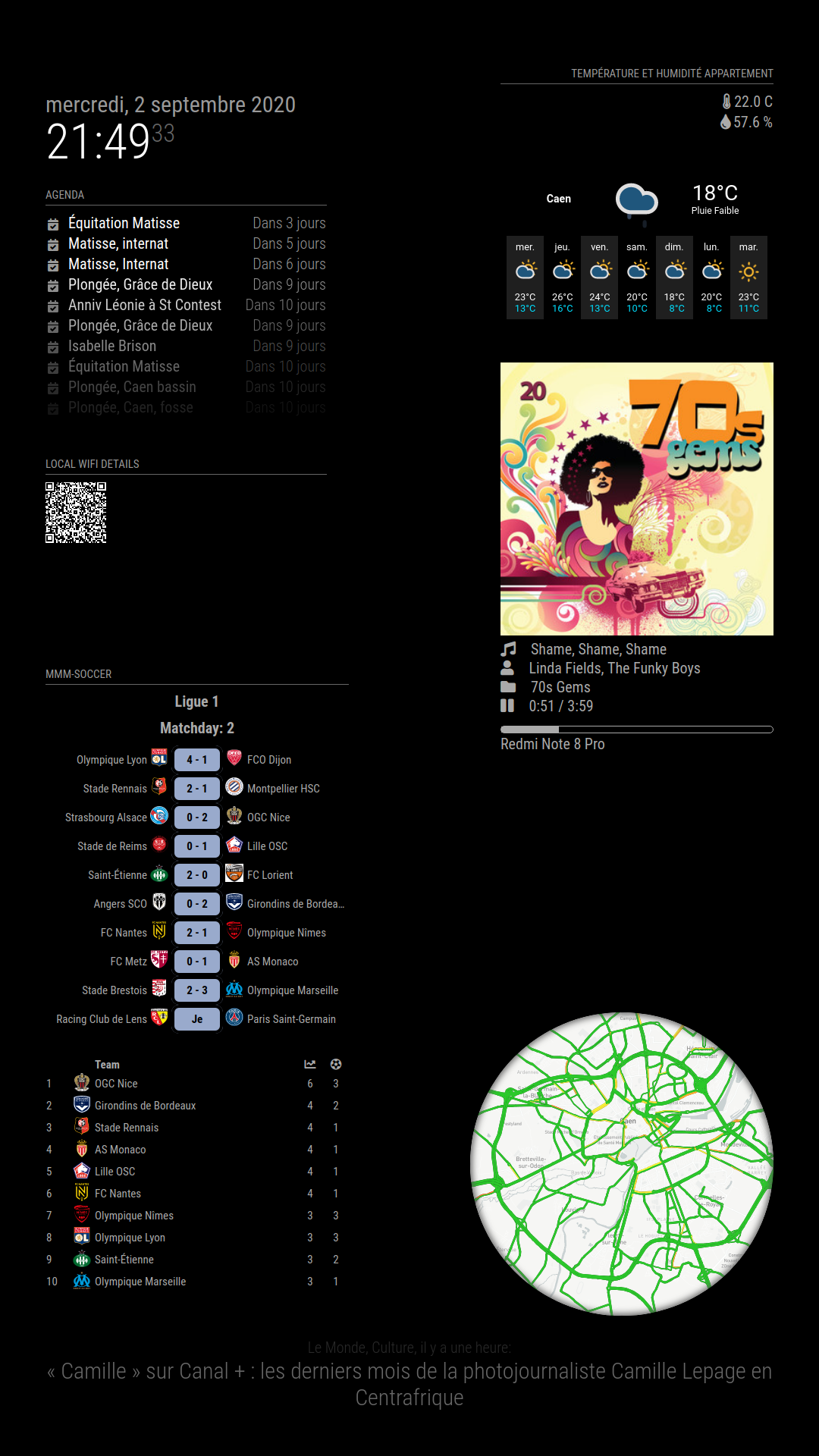
do you know which files to modify ?