@j.e.f.f said in MMM-MyCommute:
nextTransitVehicleDepartureFormat: “[Next:] HH:mm”,
It works like a charme. Thanks a lot!!
 R
Offline
R
Offline
@j.e.f.f said in MMM-MyCommute:
nextTransitVehicleDepartureFormat: “[Next:] HH:mm”,
It works like a charme. Thanks a lot!!
@j.e.f.f Thanks for the clarifications. Both of my questions seem to relate to grey text you referred to. In my case, it shows an english route summary including the departure times in the 12 hour format:
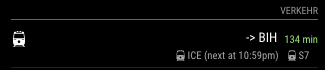
Having this string in German with 24h time format would be great. Maybe the region parameter could be a solution.
Hi @j.e.f.f,
is there a way to localize the output of MMM-MyCommute? I noticed that MMM-MyWeather uses a translate folder that contains a file for each supported language. Maybe something similar would be possible here, too. I am happy to provide German translations if you like.
Related to that would be adhering to the timeformat set in a users config.js. Currently, the module seems to only support the 12 hour am/pm-format. Having a 24h format as in my other modules would be great.
Thanks for caring to think about this!
@kapsolas Thanks for the quick reply. Another question on the side: It seems that only images are are loaded that where on Instagram before I restarted my MM. Is that intended behaviour or am I doing something wrong?
		{
			module: 'MMM-Instagram',
			position: 'middle_center',
			disabled: false,
			config: {
				access_token: '####.####',
				count: 200,
				min_timestamp: 0,
				animationSpeed: 2500,
				updateInterval: 30000
			}
		},
I waited an hour but non of my new images showed up. Only old ones. Even create a new account with only three images before booting my MM - and it keeps cycling those three and ignores later uploads…
Any idea?
Hi @kapsolas,
I think I need some help with the settings for
min_timestamp: 0,
Is there a way to set show only images from today and show nothing if there is no image uploaded today?
Thanks for your help
@olexs
The delay calculation and sorting issue seems to be even stranger. Now I have three upcoming ICE connections to Berlin. This is how they are shown:
The hafas output is:
Parsing: ICE 276 nach Berlin Hbf (tief) um Mon Jun 26 2017 20:14:00 GMT+0200 (CEST)
{"name":"ICE 276","class":1,"productCode":0,"productName":"ICE"}
{ when: 2017-06-26T18:14:00.000Z,
  delay: 900000,
  line: 'ICE 276',
  nr: undefined,
  type: 'ICE',
  color: '#006F35',
  direction: 'Berlin Hbf (tief)' }
Parsing: ICE 274 nach Berlin Hbf (tief) um Mon Jun 26 2017 22:01:00 GMT+0200 (CEST)
{"name":"ICE 274","class":1,"productCode":0,"productName":"ICE"}
{ when: 2017-06-26T20:01:00.000Z,
  delay: 120000,
  line: 'ICE 274',
  nr: undefined,
  type: 'ICE',
  color: '#006F35',
  direction: 'Berlin Hbf (tief)' }
Parsing: ICE 592 nach Berlin Hbf (tief) um Mon Jun 26 2017 23:01:00 GMT+0200 (CEST)
{"name":"ICE 592","class":1,"productCode":0,"productName":"ICE"}
{ when: 2017-06-26T21:01:00.000Z,
  delay: 120000,
  line: 'ICE 592',
  nr: undefined,
  type: 'ICE',
  color: '#006F35',
  direction: 'Berlin Hbf (tief)' }
Any idea how to fix this?
Hi @olexs,
I think I found a bug that we could fix quite easily. There seems to be a problem with the calculation of the delay. Looking at this output that comes from hafas:
Parsing: ICE 276 nach Berlin Hbf (tief) um Mon Jun 26 2017 20:14:00 GMT+0200 (CEST)
{"name":"ICE 276","class":1,"productCode":0,"productName":"ICE"}
{ when: 2017-06-26T18:14:00.000Z,
  delay: 900000,
  line: 'ICE 276',
  nr: undefined,
  type: 'ICE',
  color: '#006F35',
  direction: 'Berlin Hbf (tief)' }
Parsing: ICE 274 nach Berlin Hbf (tief) um Mon Jun 26 2017 22:01:00 GMT+0200 (CEST)
{"name":"ICE 274","class":1,"productCode":0,"productName":"ICE"}
{ when: 2017-06-26T20:01:00.000Z,
  delay: 120000,
  line: 'ICE 274',
  nr: undefined,
  type: 'ICE',
  color: '#006F35',
  direction: 'Berlin Hbf (tief)' }
The screen will show no delay for the ICE 274 and 20 Minutes delay for ICE 276. 15 minutes and 2 minutes, respectively, would have been correct according to the DB website.
I guess, the calculation is currently delay/60/100 instead of delay/60/1000. Would you mind checking on that? It also seems there is no space for a three-digit delay (eg. 120 mins), which sometimes happens with DB.
The time finally shown e.g. as 20:14h in the first example would be the actual delayed departure. I would prefer to see the original departure (time - delay) plus the current delay separately. Maybe you could add an option to switch between actual departure and original departure + delay separately?
Is there a way to sort the output by departure? Currently the next train is at the bottom of the list and later ones are added at the top. Having them sorted the other way round would seem more intuitive to me.
@j.e.f.f Thanks a lot for your quick help! Much appreciated :)
Hi @ItayXD and @Jopyth,
I have a question relevant to the modules MMM-AdminInterface and MMM-Remote Control you developed:
Is there a way to limit access to the Admin Interface/Remote Control panel independent of the global whitelist? I would like to limit access to both sites to my own devices while keeping a longer whitelist for the screen itself.
Thanks a lot for your work and ideas to go forward.
@cowboysdude Thanks for your reply. My white Lists work fine for the MM2 screen. I was looking for a way to separately limit access to the sites generated by the Remote Control and Admin interface module. Any ideas?
Hi @mochman,
I was wondering, if the whitelist could be used to limit the access to different MM sub-sites? I would like to have the MM screen itself open to a larger set of IP addresses but would like to lock down the MMM-RemoteControl & MMM-AdminInterface sites and limit access to my own devices.
Any idea how to achieve this?
Thanks for your advice!
@olexs That did the trick - thanks a lot!
Is there a real A > B query in the background (including switching trains) or does it check on the stations a train is calling?
@olexs Hi olexs,
I have not found another entry form you for the PublicTransportDB-module - so I am replying here. It is really great - thanks a lot!
I am commuting on a daily basis to Berlin and would like to use it to see, if my train is delayed. So far, I am using MMM-MyCommute to show the next connection to Berlin - but Google still lacks realtime-data on train delays.
Would it be possible to show only trains with defined destination (e.g. Berlin Hbf / Berlin Hbf (tief))? This would make it much easier to show only relevant departures. Alternatively, I have also tried the ignoredLines variable - but it is complex to exclude everything else and I did not have success to hide any of the irrelevant departures so far.
Thanks a lot for your help!
@j.e.f.f Hi j.e.f.f.,
it seems, as you made all the cool modules - so I keep coming back to you with questions. Hope that is OK.
I plan to use your module to show if today is a national holiday.
I have three questions for you:
If today is no holiday, you module shows “keine Termine” (=no entries). Is it possible to completely hide it, if no entry is present? (I limited the module to show only today’s entry from a public national holiday calendar).
You designed a nice way to integrate the number of the day into the calendar icon. I found this to be very useful for upcoming events - but would love to use custom symbols like in the original calendar for entries that are today (e.g. cake for birthdays) to visually separate things easily. The “symbol” variable does not seem to change it. Is it disabled? Or could it be used to overwrite your symbol?
*Every entry is shown with a symbol, the description and a text, when it will be. In this example “Dienstag” (=tuesday). Is it possible to hide this last element and show only the symbol and the description? As my holiday-checker only shows today’s entries, this could be omitted and look cleaner.
Thanks for your help!
@Anhalter42 That’s what I was looking for! Thanks a lot :)
Currently, I comment out all modules that I want to keep configured but don’t want to use currently line by line.
Is there an easier way to enable / disable modules in the config.js file?
If not, I would suggest a MM2-wide working variable (analog to header) to enable / disable modules, e.g.
module_active: true / false
What do you think?
Hi everyone,
thanks for your help and feedback. I have completely wiped my system and started again from scratch. This time, I can add modules without any errors. This indicates, that there likely was a problem with the framework nodejs and or MM2 depended on.
There is one noticeable difference: When I am connected using SSH, I can only start the Mirror using
node serveronly
The command I used up to now
DISPLAY=:0 npm start
does not work any more.
Is this intended behaviour?
@j.e.f.f Dear j.e.f.f.,
I am trying your fork of MMM-Wunderground and like your additions a lot.
Is there a way to completely hide the current weather and only use the forecast-table (or vice versa only the current weather)? I would like to split both parts to different sections of the screen. So far, I have not found or overlooked options to hide today’s weather or the table completely.
Also, would it be possible to use the 24h timeformat in the forecast-table as well? I have set the global variable and it works fine for e.g. the clock - but MMM-MyWeather uses am/pm times.