Hi Sam,
Thanks. So if not absolute, is there a way to display those headers at the same location on every page of the screen? Or is that what is meant by absolute?
Foreground - Not hidden, stays on top and visible.
Hi Sam,
Thanks. So if not absolute, is there a way to display those headers at the same location on every page of the screen? Or is that what is meant by absolute?
Foreground - Not hidden, stays on top and visible.
It is heasers. Say in clock module, I place date and time at different locations. I want their placement to be absolute and should always stay in foreground. Thanks.
Hi,
Currently I adjust the location of Titles etc… using classes in custom.css using left-margin, …
This means that they can move depending on page content.
Is it possible to specify absolute location using X and Y coordinates in pixels? Say for a 1920x1080p screen? Also, how can I make sure that they will always remain in foreground?
Thanks.
Thanks. If I had the skills I certainly will endeavor to do so. So for now may not be able to use Voice after all.
What would be another way to see future months in the Calendar when it is set as a display, say on the wall? Using mouse? Thanks.
Thanks. But clearly something is outdated? Snippets of error messages below. Does not install. Is it simply old version or something can be done to salvage or anu other alternative? Thanks.
://eslint.org/version-support for other options.
npm error code 1
npm error path /home/sankum/MagicMirror/modules/node-speaker/node_modules/speaker
npm error command failed
npm error command sh -c node-gyp rebuild
npm error make: Entering directory ‘/home/sankum/MagicMirror/modules/node-speaker/node_modules/speaker/build’
npm error CC(target) Release/obj.target/output/deps/mpg123/src/output/alsa.o
npm error make: Leaving directory ‘/home/sankum/MagicMirror/modules/node-speaker/node_modules/speaker/build’
npm error gyp info it worked if it ends with ok
npm error gyp info using node-gyp@11.0.0
npm error gyp info using node@22.16.0 | linux | arm64
…
Hi Sam,
Following is the source:
sankum@rpi:~/MagicMirror/modules/MMM-GoogleAssistant $ git remote -v
origin https://github.com/jeffmur/MMM-GoogleAssistant.git (fetch)
origin https://github.com/jeffmur/MMM-GoogleAssistant.git (push)
sankum@rpi:~/MagicMirror/modules/MMM-GoogleAssistant $
Hi Sam,
I clones a MMM-GoogleAssistant. When I run it it complains about speaker module not found:
[ERROR] Error when loading MMM-GoogleAssistant: Cannot find module ‘speaker’
Require stack:
Is there something missing or I need to install something else? Thanks.
Thanks for your feedback. Looking forward to your Touchscreen module demo.!
I have been looking into MMM-Jarvis-Voice-Control. Have installed it but not gotten it to work. The documentation for installation and plugins is not great.
Anybody else had experience with this module? Is it worth pursuing to make it work?
Thanks
Hello,
Any recommendations for MMM modules that support voice control and touchscreen functionality?
With voice control, want to be able to see future months in the calendar. Same with touchscreen and possibly local zoom in.
I am trying to install MMM-GoogleAssistant, but it seems it is not up to date? I keep getting errors like speaker module not found. When I I do npm install speaker, I get more errors as if more codes are outdated?
Any suggestions? I have a Raspberry Pi4B, 64bit, 2Gb Linux.
Thanks.
Thank you Sam. The guidelines were very helpful. I could use the web dev as you suggested.
I was also able to use classes and modify the styles I wanted in custom.css. I still have a few issues with the styles in the custom.css (mainly in syntax and largely due to my lack of knowledge) but will persevere. Thanks.
@rts58 Thanks. I did figure out what to do. I forked the module in github and then it all worked fine withe second ID. Not very elegant as it may cause issues when the original module is updated. I dont know any other way, so for now will do.
Thanks Sam,
I was trying to use the web dev tool in the browser. The trouble was that the screen display was quite busy and was hard to navigate to the right corners. Did not quite know how to disable other module displays, so I could focus on weather module.
Ultimately I just commented out some of the modules and then it was easier to navigate!! I found the dimming of the feels like is span.dimmed and dimmed is defined in main.css.
Dont quite know how to do undim in .feelslike so as to be a local effect, so for now I just defined the dimmed color. Is there another way?
Also, is it possible to disable displays of some modules in web dev tool other than have to comment them out in config.js? Thanks.
Hi,
In the default weather module, what names are given to temperature, wind speed, sunset time and feels like temperature? The default module displays three rows for these in the current weather. I would like to display them in one row. How can I do that?
Any clues for me? I guess it will need classes and custom css but for that I need to know what are the actual names being used by the module. Thanks.
Hello,
I am trying to set up randomBrainstormer/MMM-GoogleCalendar with two user IDs. Both Calendar IDs are just email addresses, I could go through all the steps and set up one ID and it works fine. I have the credentials.json for this UD in MMM-GoogleCalendar directory.
How do I add another credential to the same file in the same directory? I can get a new credential for the second ID but that would overwrite the first one. Should I just append? Am I missing something? Any help please?
Thanks.
Thanks for the explanation. Although it is a little bit over my head. I think I get the general idea. Will work through it. Thanks.
Hi Sam,
Thanks. I was able to figure out the element and change the background color. I a first time user of the developer tool and so a little confused.
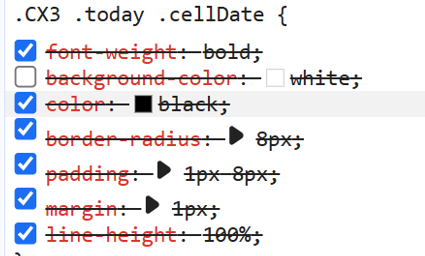
The background color was not declared in custom.css, is that why they are crossed out in the web developed element? See the image at the end.
Also is there a default setting in web developer which I can resort to, after I have changed things around and clicked on several things not knowing what I am doing!!?? Thanks.
Hello again,
Have been somewhat successful in customizing the css for CX3. I am now struggling with the inline-block on today’s date. The solid white box covers the date.
Where is this box defined and how can I change color or remove this?
Tried to guess and check with:
display: none
instead of below:
.CX3 .today .cellDate :not(.day) {
display: inline-block;
No success. Please help.
Also where is color setting for weather widgets?
Thanks.
Hi,
I am a new user. Installed MM and MM-CalendarExt3. Works ay default css settings.
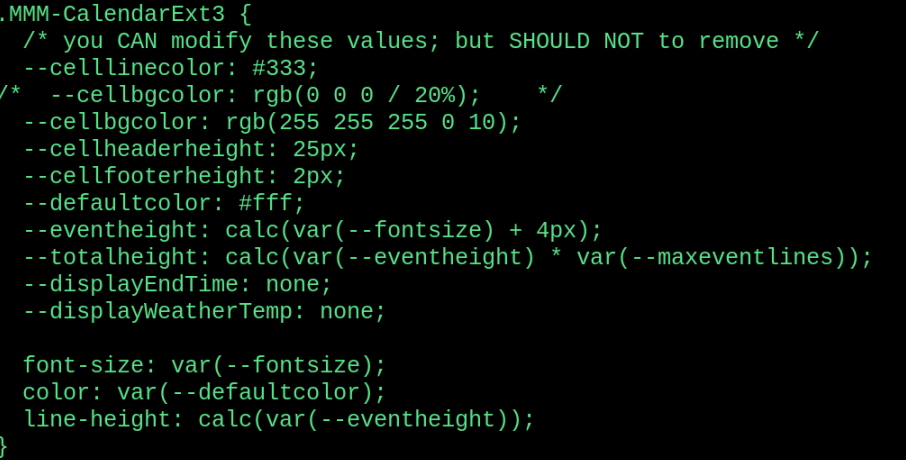
When I modify the custom.css in ~/MagicMirros/css the changes are not being picked up. What am I doing wrong? Please help. Thanks. Below is a few lines from custom.css: