@ricq you have to convert the xml to the json format.
i have now build a python script which provides the data from my sensors.
or you build a php script…
@ricq you have to convert the xml to the json format.
i have now build a python script which provides the data from my sensors.
or you build a php script…
Hy i solved the issue with jumping values.
you are deleting the y axis values in the file mmm-chart.js
but not the label dataarray.
i added the line:
this.chartData.labels = [];
at #296 and now i have fixed the jumping value issue
i also added the suggestedMin/Max parameter and to change the line chart to a stepped line chart
(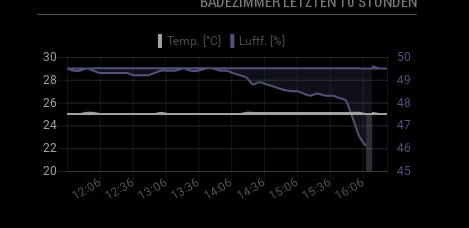 image url)
I have the issue that the graph is jumping back to the beginning.
Has anyone else this issue?
@zazzo hm strange your data looks code…
hy i didnot turn off the hdmi,
i will turn off the lcd with the gpio’s
screen is turning on normal but electron browser is showing a black screen (mous appears at moving)
@cdelaorden said in Electron CPU usage:
the full kms driver isnt compatib
hy now i use the fake kms driver, everything is working fine and realy fast.
but i have the problem that the mirror will go to a black screen after some hours.
only a pm2 restart mm helps in this case -.-
Hy
my mirror works fine for some hours.
suddenly a black screen with the mous appears.
the way to solve is, to restart the mm (pm2 restart mm)
as workaround i tried chromium, which is also working fine for some hours, but then it will lose the conneciton and i have to reload the page.
is there a solution for my issues?
i prefer to use the electron to view the mirror not chromium
Hy i also have troubles with the real time chart.
it shows the chart only for 0,5s and then it will disapear?
do you ever had this issue?
and is it possible to ad more ticks on the x-axis?
if i display temp data from a day, it will only show two ticks
Hy it was quite hard to get the dht22 values showing up with your chart.
finally i got the php script working to fetch mysql data to your json format:
//your code here


    //open connection to mysql db
    $connection = mysqli_connect("localhost","logger","password","temperatures") or die("Err$
    //fetch table rows from mysql db
    $sql = "select * from temperaturedata";

        $result = mysqli_query($connection, $sql) or die("Error in Selecting " . mysqli_erro$


        //create an array
        $emparray = array();
        $position=0;
        while($row =mysqli_fetch_assoc($result))
        {

                $emparray[$position][] = $row['dateandtime'];
                $emparray[$position][] = $row['temperature'];
                $emparray[$position][] = $row['humidity'];
                $position++;
        }
        echo json_encode($emparray);
        //close the db connection
        mysqli_close($connection);
the Problem is, i thought about the Project Building my prototype mirror, with plexiglas an mirror foil to a final mirror and i saw, that i have not enough time to do that. and it is to much Money, that the mirror is lying in the Corner…
Dear @Goldjunge_Chriz
please put me also down from the list.
thanks you for everything and great luck with your new webshop, maybe i will put my order in the nexts month there.
Hy Goldjunge,
when do you need the shipment adress or the information about the delivery/pickup?
Can you change my status to delivery or pickup?
Maybe i, or one of my co-workers is in the neer of schweinsfurt, so i do not know the state yet.
Hy this are good news.
Do you also tested the ad9960(or something like that) gesture modul?
Which Motion sensor do you tedted with your mirror?
Best regards
Hy
please change my dimensions to 50cm x 80cm
thanks :-)
Hy i am also interessted
i need a mirror with the dimensions 72cm x 50cm also with polished edges.
I am from Upper Austria, Vöcklabruck
how much are the shipping costs to austria?
maybe we can make a sending collection with gerbin and Pegasus?
lg
Hy thanks this is working very fine.
now i am trying to get it working with visual studio 2015.
has anyone expirience with that IDE and node.js?
i am able to load it, but i cannot start and debug the mm solution
do you know who it works with visual studio 2015?
hy
My Hardware Setup is:
raspi 3 with motion sensor (hc-sr501), gesture sensor (ADPS-9960) and the temperature sensor (dht-22) and a capacitiv sensor button.
now i want to show the temperatur with the mmm-dh2 modul => is working very fine…
But now i have a self writen c++ programm witch is reading the data from the motion and gesture sensor, => writes it to a file => a pythonscript read the command from the file and makes the http requests to the mirror => everything is working fine, the gestures and detected motions are detected and shown by the notification module.
But now the dht-22 modul is not working anymore.
it seems that my application is blocking the other ones gpio access,
How is this issue possible?
The same issue is, if i enable the PIR Module and the DHT22 Module ,
PIR is working fine but the dht22 no more
with best regards
hy
i have also the problem that the sensor shows only undefined.
if i run your dht_var it shows nothing…
sudo ./dht_var 2 5 returns after 5 seconds without any message…
found out that it is only not working if i have enabled the PIR-Sensor Modul…
hy i found out that node.js will not allow to call some functions.
it jumped everytime into the try catch.
but now it is working fine…
and you need to install the ws2801 npm packages from
https://www.npmjs.com/package/rpi-ws2801
here is the file:
(but i dont know if the uplaod worked…)
[0_1485084948629_node_helper.js](Uploading 100%)
/* global require */

const _ = require('lodash');
const Color = require('color');
const NodeHelper = require('node_helper');
const bodyParser = require('body-parser');
const LPD8806 = require('lpd8806-async');
//const WS2801	 = require('rpi-ws2801');
const async = require('async');

var ajv = require('ajv')({
    allErrors: true,
    format: 'full',
    coerceTypes: true
});

module.exports = NodeHelper.create({

    config: {},
    animationRunning: false,
    stopAnimationRequest: false,
    defaultSpeed: 100,

    /**
     * node_helper start method
     */
    start: function () {
        console.log('[PiLights] Starting node_helper');

        this.expressApp.use(bodyParser.json());
        this.expressApp.use(bodyParser.urlencoded({ extended: true }));

        this.expressApp.get('/PiLights', (req, res) => {
            console.error('[PiLights] Incoming:', req.query);

            if (typeof req.query.sequence !== 'undefined') {
                // Sequence

                this.runSequence(req.query.sequence)
                    .then(function () {
                        res.status(200)
                            .send({
                                status: 200
                            });
                    })
                    .catch(function (err) {
                        res.status(400)
                            .send({
                                status: 400,
                                error: err.message
                            });
                    });

            } else {
                res.status(400)
                    .send({
                        status: 400,
                        error: 'Sequence not specified'
                    });
            }
        });
    },

    /**
     *
     * @param {String} notification
     * @param {*}      payload
     */
    socketNotificationReceived: function (notification, payload) {
        if (notification === 'START') {
            this.config = payload;

            try {
                console.info('Trying to load leds');

                // Internal reference to rpi-ws2801
                this.leds = require("rpi-ws2801");
                this.leds.connect(this.config.ledCount, this.config.device);
                // Initialize off
                this.leds.fill(0x00, 0x00, 0x00);
                //this.leds.setMasterBrightness(this.config.brightness);

                console.log('[PiLights] Leds connected ok');

            } catch (err) {
                console.error('[PiLights] Unable to open SPI (' + this.config.device + '), not supported?', err.message);
                this.leds = null;
            }

        } else if (notification === 'SEQUENCE') {
            Promise.resolve(this.runSequence(payload)
                .catch(function (err) {
                    console.log('[PiLights] Sequence error: ' + err.message);
                }));
        }
    },

    /**
     * Runs a light sequence
     *
     * @param   {String}  sequence
     * @param   {Integer} [iterations]
     * @returns {Promise}
     */
    runSequence: function (sequence, iterations) {
        var self = this;
        iterations = iterations || 20;

        return new Promise(function (resolve, reject) {
            var colors = [0, 0, 0];

            switch (sequence) {
                case 'blue_pulse':
                    colors = [0, 0, 255];
                    break;
                case 'white_pulse':
                    colors = [255, 255, 255];
                    break;
                case 'lightblue_pulse':
                    colors = [0, 255, 255];
                    break;
                case 'red_pulse':
                    colors = [255, 0, 0];
                    break;
                case 'green_pulse':
                    colors = [0, 255, 0];
                    break;
                case 'orange_pulse':
                    colors = [255, 170, 0];
                    break;
                case 'pink_pulse':
                    colors = [255, 0, 255];
                    break;
                case 'off':
                    colors = [0, 0, 0];
                    iterations = 1;
                    break;
                default:
                    reject(new Error('Unknown sequence: ' + sequence));
                    return;
                    break;
            }
            resolve(self.pulse(colors[0], colors[1], colors[2], iterations, 20));

        });
    },

    /**
     * @param {Function} cb
     * @returns {*}
     */
    switchAnimation: function (cb) {
        if (!this.animationRunning) {
            return this.startAnimation(cb);
        }

        this.stopAnimationRequest = true;

        if (this.animationRunning) {
            //console.log('animation was running, delaying new animation');

            var self = this;
            setTimeout(function () {
                self.switchAnimation(cb);
            }, 100);
        } else {
            this.startAnimation(cb);
        }
    },

    /**
     *
     * @param {Function} cb
     * @returns {Function}
     */
    startAnimation: function (cb) {
        //console.log('[PiLights] Starting animation..');
        this.stopAnimationRequest = false;
        this.animationRunning = true;
        return cb();
    },

    /**
     *
     */
    stopAnimation: function () {
        //console.log('[PiLights] Animation stopped.');
        this.animationRunning = false;
    },

    /**
     *
     */
    update: function () {
        //        if (this.leds) {
        //            this.leds.update();
        //        }
    },

    /**
     *
     * @param {Integer} red
     * @param {Integer} green
     * @param {Integer} blue
     * @param {Integer} [iterations]
     * @param {Integer} [speed]
     */
    pulse: function (red, green, blue, iterations, speed) {
        if (this.leds) {
            this.switchAnimation(() => {
                console.log('[PiLights] Pulse (' + red + ',' + green + ', ' + blue + ') Iterations: ' + iterations + ', Speed: ' + speed);
                this.flashEffect(red, green, blue, iterations, speed);
            });
        }
    },

    /**
     *
     * @param r
     * @param g
     * @param b
     */
    fillRGB: function (r, g, b) {
        if (this.leds) {
            this.switchAnimation(() => {
                //console.log('[PiLights] Filling leds with', r, g, b);
                this.leds.fill(r, g, b);
                this.stopAnimation();
            });
        }
    },

    /**
     *
     */
    off: function () {
        if (this.leds) {
            //console.log('[PiLights] Setting Leds Off');
            this.leds.fill(0x00, 0x00, 0x00);
            this.stopAnimation();
        }
    },

    /**
     *
     * @param {Integer} r
     * @param {Integer} g
     * @param {Integer} b
     * @param {Integer} [iterations]
     * @param {Integer} [speed]
     */
    flashEffect: function (r, g, b, iterations, speed) {
        var self = this;
        var step = 0.05;
        var total_iterations = 0;

        speed = speed || 10; // ms
        iterations = iterations || 99999;

        var level = 0.00;
        var dir = step;

        function performStep() {
            if (level <= 0.0) {
                level = 0.0;
                dir = step;
                total_iterations++;
            } else if (level >= 1.0) {
                level = 1.0;
                dir = -step;
            }

            level += dir;

            if (level < 0.0) {
                level = 0.0;
            } else if (level > 1.0) {
                level = 1.0;
            }

            if (self.stopAnimationRequest || total_iterations > iterations) {
                self.stopAnimation();
                return;
            }

            self.leds.fill(r * level, b * level, g * level);


            setTimeout(performStep, speed);
        }

        if (this.leds) {
            performStep();
        }
    }

});
Hy
yeah i made a infinite mirror behind the magic mirror :-)
your animations are working fine with my change of your led strip class to my w2801 class.
But if i add some squences in the switch case, for example ‘off’ then i get the request error.
is there some hidn node.js thing where you define the possible sequences?
I have to say i am a C# developer and it is the first time with node.js…
No debugging and intellisense with nano is realy painfull^^