Hi
I don’t know where that would be. The RPi boots to a login prompt. Then docker takes over and launches MM in electron. There is no GUI for me to fiddle with
Steve
Hi
I don’t know where that would be. The RPi boots to a login prompt. Then docker takes over and launches MM in electron. There is no GUI for me to fiddle with
Steve
Hi
I am running MM via MagicMirrorOS on a RPi4B with an RPi monitor in portrait. I use MMM-Universal-Pir to turn the screen on and off during the day (with wlr-randr commands) which works great but the screen switches off for good overnight, the PIR cannot wake it up. I have disabled Screen Blanking with raspi-config but that makes no difference.
If I run wlr-randr in the labwc container (access via docker exec -it labwc bash) I normally get (some resolutions removed for brevity):
HDMI-A-1 "Raspberry PI RPI MON156 81005568472 (HDMI-A-1)"
  Make: Raspberry PI
  Model: RPI MON156
  Serial: xxxxxxxxxxxx
  Physical size: 350x190 mm
  Enabled: yes
  Modes:
    1920x1080 px, 60.000000 Hz (preferred, current)
...
    640x480 px, 59.939999 Hz
  Position: 0,0
  Transform: 90
  Scale: 1.000000
  Adaptive Sync: disabled
However, once the display has gone to sleep that same wlr-randr command gives
failed to connect to display
this make me feel it is something in the docker set up but i see nothing in the docker logs
Note that I also have RANDR_PARAMS="--output HDMI-A-1 --transform 90" in the .env file to rotate the display at boot.
Cheers
Steve
Hi
I’ve discovered the CSS for the agenda module has a hard height limit
.CX3A .agenda {
  max-height: 600px;
}
increasing that to 1325px fills the screen height . I can’t tell if that was the problem all along as the patch is in place now!
overriding the font and width as follows has given me the size of agenda I wanted.
.CX3A {
  font-size: 30px;
  max-width: 600px;
}
.CX3A .event .headline.useSymbol .symbol {
  font-size: 25px;
}
many thanks for your help
Hi
I ran npm run install-mm in the docker container as the above commands and rebooted. The agenda is still truncated
Steve
Hi
following the same process that i used to install MMM-CalendarExt3Agenda in the fiirst place i ran the git inside the docker but it hasn’t changed the display. Have i done it incorrectly?
magicm@magicmirror:/opt/mm/run $ docker exec -it mm bash
node@magicmirror:/opt/magic_mirror$ ls
CHANGELOG.md      clientonly                entrypoint.sh      js               mount_ori            serveronly
Collaboration.md  config                    eslint.config.mjs  jsconfig.json    node_modules         tests
LICENSE.md        create_restore_script.sh  fonts              mm2.png          package-lock.json    translations
README.md         cspell.config.json        index.html         module-types.ts  package.json         vendor
build.info        css                       jest.config.js     modules          prettier.config.mjs
node@magicmirror:/opt/magic_mirror$ git fetch origin pull/3679/head:_fix_clipping
remote: Enumerating objects: 27479, done.
remote: Counting objects: 100% (27479/27479), done.
remote: Compressing objects: 100% (9077/9077), done.
remote: Total 27158 (delta 17476), reused 26718 (delta 17037), pack-reused 0 (from 0)
Receiving objects: 100% (27158/27158), 22.64 MiB | 12.11 MiB/s, done.
Resolving deltas: 100% (17476/17476), completed with 228 local objects.
From https://github.com/MagicMirrorOrg/MagicMirror
 * [new ref]           refs/pull/3679/head -> _fix_clipping
 * [new tag]           v2.0.0              -> v2.0.0
 * [new tag]           v2.0.1              -> v2.0.1
 * [new tag]           v2.0.2              -> v2.0.2
 * [new tag]           v2.0.3              -> v2.0.3
 * [new tag]           v2.0.4              -> v2.0.4
 * [new tag]           v2.0.5              -> v2.0.5
 * [new tag]           v2.1.0              -> v2.1.0
 * [new tag]           v2.1.1              -> v2.1.1
 * [new tag]           v2.1.2              -> v2.1.2
 * [new tag]           v2.1.3              -> v2.1.3
 * [new tag]           v2.10.0             -> v2.10.0
 * [new tag]           v2.10.1             -> v2.10.1
 * [new tag]           v2.11.0             -> v2.11.0
 * [new tag]           v2.12.0             -> v2.12.0
 * [new tag]           v2.13.0             -> v2.13.0
 * [new tag]           v2.14.0             -> v2.14.0
 * [new tag]           v2.15.0             -> v2.15.0
 * [new tag]           v2.16.0             -> v2.16.0
 * [new tag]           v2.17.0             -> v2.17.0
 * [new tag]           v2.17.1             -> v2.17.1
 * [new tag]           v2.18.0             -> v2.18.0
 * [new tag]           v2.19.0             -> v2.19.0
 * [new tag]           v2.2.0              -> v2.2.0
 * [new tag]           v2.2.1              -> v2.2.1
 * [new tag]           v2.2.2              -> v2.2.2
 * [new tag]           v2.20.0             -> v2.20.0
 * [new tag]           v2.21.0             -> v2.21.0
 * [new tag]           v2.22.0             -> v2.22.0
 * [new tag]           v2.23.0             -> v2.23.0
 * [new tag]           v2.24.0             -> v2.24.0
 * [new tag]           v2.25.0             -> v2.25.0
 * [new tag]           v2.26.0             -> v2.26.0
 * [new tag]           v2.27.0             -> v2.27.0
 * [new tag]           v2.28.0             -> v2.28.0
 * [new tag]           v2.29.0             -> v2.29.0
 * [new tag]           v2.3.0              -> v2.3.0
 * [new tag]           v2.3.1              -> v2.3.1
 * [new tag]           v2.4.0              -> v2.4.0
 * [new tag]           v2.4.1              -> v2.4.1
 * [new tag]           v2.5.0              -> v2.5.0
 * [new tag]           v2.6.0              -> v2.6.0
 * [new tag]           v2.7.0              -> v2.7.0
 * [new tag]           v2.7.1              -> v2.7.1
 * [new tag]           v2.8.0              -> v2.8.0
 * [new tag]           v2.9.0              -> v2.9.0
node@magicmirror:/opt/magic_mirror$ git switch _fix_clipping
error: Your local changes to the following files would be overwritten by checkout:
        package-lock.json
        package.json
Please commit your changes or stash them before you switch branches.
Aborting
node@magicmirror:/opt/magic_mirror$ rm package-lock.json
node@magicmirror:/opt/magic_mirror$ rm package.json
node@magicmirror:/opt/magic_mirror$ git switch _fix_clipping
D       config/config.js.sample
Previous HEAD position was c24de64d Release 2.30.0 (#3673)
Switched to branch '_fix_clipping'
node@magicmirror:/opt/magic_mirror$ ls
CHANGELOG.md      clientonly                entrypoint.sh      js               mount_ori            serveronly
Collaboration.md  config                    eslint.config.mjs  jsconfig.json    node_modules         tests
LICENSE.md        create_restore_script.sh  fonts              mm2.png          package-lock.json    translations
README.md         cspell.config.json        index.html         module-types.ts  package.json         vendor
build.info        css                       jest.config.js     modules          prettier.config.mjs
node@magicmirror:/opt/magic_mirror$ exit
exit
magicm@magicmirror:/opt/mm/run $
@smegbadger said in Getting MMM-CalendarExt3Agenda to show more than 10 days out:
I took it to maximumEntries: 500 but that didn’t change anything.
Which directory do i need to be in to execute the git pull for the patch as the structure is slightly different with docker?
/opt/mm/mounts/modules or /opt/mm/mounts/modules/default (where the calendar module is)
Thanks
@sdetweil config.js
/* Config Sample
 *
 * For more information on how you can configure this file
 * see https://docs.magicmirror.builders/configuration/introduction.html
 * and https://docs.magicmirror.builders/modules/configuration.html
 *
 * You can use environment variables using a `config.js.template` file instead of `config.js`
 * which will be converted to `config.js` while starting. For more information
 * see https://docs.magicmirror.builders/configuration/introduction.html#enviromnent-variables
 */
let config = {
        address: "0.0.0.0",     // Address to listen on, can be:
                                                        // - "localhost", "127.0.0.1", "::1" to listen on loopback interface
                                                        // - another specific IPv4/6 to listen on a specific interface
                                                        // - "0.0.0.0", "::" to listen on any interface
                                                        // Default, when address config is left out or empty, is "localhost"
        port: 8080,
        basePath: "/",  // The URL path where MagicMirror² is hosted. If you are using a Reverse proxy
                                                                        // you must set the sub path here. basePath must end with a /
        ipWhitelist: [],        // Set [] to allow all IP addresses
                                                                        // or add a specific IPv4 of 192.168.1.5 :
                                                                        // ["127.0.0.1", "::ffff:127.0.0.1", "::1", "::ffff:192.168.1.5"],
                                                                        // or IPv4 range of 192.168.3.0 --> 192.168.3.15 use CIDR format :
                                                                        // ["127.0.0.1", "::ffff:127.0.0.1", "::1", "::ffff:192.168.3.0/28"],
A
        useHttps: false,                        // Support HTTPS or not, default "false" will use HTTP
        httpsPrivateKey: "",    // HTTPS private key path, only require when useHttps is true
        httpsCertificate: "",   // HTTPS Certificate path, only require when useHttps is true

        language: "en",
        locale: "en-GB",   // this variable is provided as a consistent location
                           // it is currently only used by 3rd party modules. no MagicMirror code uses this value
                           // as we have no usage, we  have no constraints on what this field holds
                           // see https://en.wikipedia.org/wiki/Locale_(computer_software) for the possibilities

        logLevel: ["INFO", "LOG", "WARN", "ERROR"], // Add "DEBUG" for even more logging
        timeFormat: 24,
        units: "metric",

        modules: [
                {
                        module: "alert",
                },
                {
                        module: "updatenotification",
                        position: "fullscreen_above"
                },
                {
                        module: "MMM-Universal-Pir",
                            position: "bottom_right",
                            config: {
                                gpioCommand: "gpiomon -r -b gpiochip0 23",
                                onCommand: "wlr-randr --output HDMI-A-1 --on --transform 90",
                                offCommand: "wlr-randr --output HDMI-A-1 --off",
                                deactivateDelay: 60 * 1000,
                                }
                },
                {
                        module: "clock",
                        position: "top_left",
                        config: {
                                displayType: "both",
                                analogPlacement: "top",
                                //displaySeconds: false,
                                dateFormat: "dddd, D MMMM YYYY",
                                showSunTimes: true,
                                showMoonTimes: "phase",
                                lat: 51.8236443,
                                lon: -0.7986995
                        }
                },
                {
                        module: "calendar",
                        header: "Family Schedule",
                        position: "top_center",
                        config: {
                                dateFormat: "Do MMM",
                                maximumEntries: 100,
                                calendars: [
                                        {
                                                name: "uk-holidays",
                                                fetchInterval: 7 * 24 * 60 * 60 * 1000,
                                                symbol: "calendar-check",
                                                url: "https://ics.calendarlabs.com/75/4e419f5b/UK_Holidays.ics"
                                        },
                                        {
                                                name: "kemp-schedule",
                                                fetchInterval: 60 * 1000,
                                                url: "https://calendar.google.com/xxxxxxxxxxxxxxxxxxxxxxxxxxxxxxxx.ics"
                                        }
                                ]
                        }
                },
                {
                        module: "MMM-CalendarExt3Agenda",
                        position: "top_right",
                        //header: "Family Agenda",
                        config: {
                                instanceId: "Calendar",
                                locale: "en-GB",
                                firstDayOfWeek: 1,
                                startDayIndex: 0,
                                endDayIndex: 20,
                                refreshInterval: 1000 * 60 * 5,
                                calendarSet: ['uk-holidays', 'kemp-schedule']
                        }
                },
                {
                        module: "weather",
                        position: "bottom_left",
                        config: {
                                weatherProvider: "openmeteo",
                                type: "current",
                                windUnits: "mph",
                                showWindDirectionAsArrow: true,
                                lat: 51.8236443,
                                lon: -0.7986995
                        }
                },
                {
                        module: "weather",
                        position: "bottom_left",
                        //header: "Forecast",
                        config: {
                                weatherProvider: "openmeteo",
                                type: "forecast",
                                roundTemp: true,
                                maxNumberOfDays: 8,
                                fadePoint: 1,
                                lat: 51.8236443,
                                lon: -0.7986995
                        }
                },
                {
                        module: "newsfeed",
                        position: "bottom_bar",
                        config: {
                                feeds: [
                                        {
                                                title: "BBC News",
                                                url: "https://feeds.bbci.co.uk/news/world/rss.xml"
                                        }
                                ],
                                showSourceTitle: true,
                                showPublishDate: true,
                                broadcastNewsFeeds: true,
                                broadcastNewsUpdates: true
                        }
                },
        ]
};

/*************** DO NOT EDIT THE LINE BELOW ***************/
if (typeof module !== "undefined") { module.exports = config; }
Hi
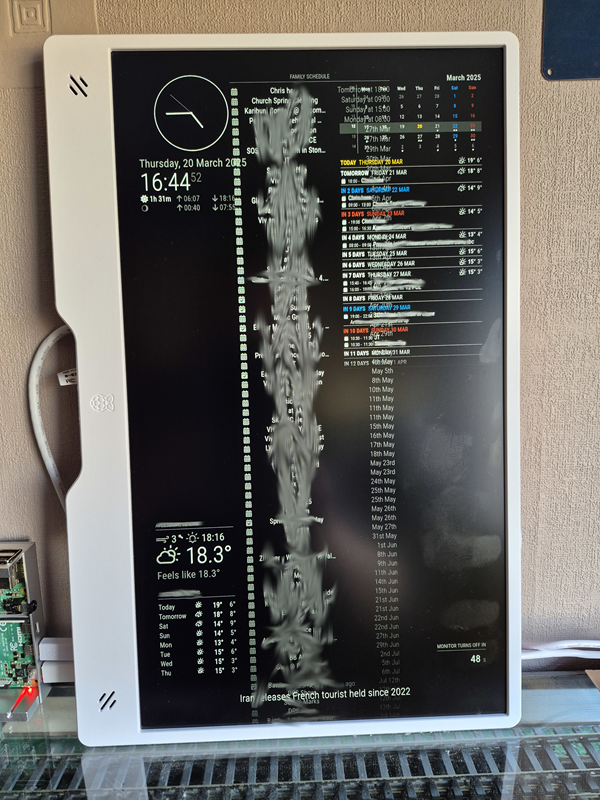
I am running MM via MagicMirrorOS on a RPi4B with a portrait monitor. Although the Calendar module is pulling through loads of events from Google, only the first ten days worth show. I’ve set startDayIndex to 0 and endDayIndex to 20 but ten days is all that will show.
I’ve left the main calendar visible in the screenshot so you can see the number of events returned (it obs will be hidden in the final version of the config).
I want the agenda to be bigger anyway, hopefully to take up 2/3 of the screen width. I tried adding
.CX3A {
  --fontsize: 26px; /* Or whatever you need. The default value is 16px */
}
.CX3A .event .headline.useSymbol .symbol {
  font-size: 20px; /* Or whatever you need. The default value is 75% of `.CX3A { --fontsize }` */
}
to /opt/mm/mounts/css/custom.css that I found in another forum post but that didn’t change any size
Many thanks in advance
Steve