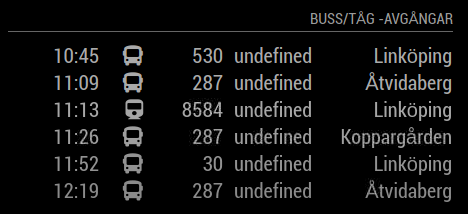
Left the project a few hours.
Had changed in MMM-ResRobot.js line 22 where the default settings were set. Entered my data there and now the variable to: works as it was supposed to.
Only departures that match my destination are displayed.
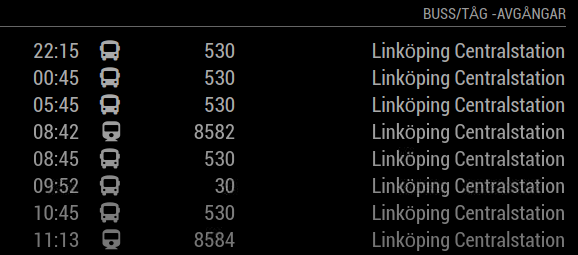
Left the project a few hours.
Had changed in MMM-ResRobot.js line 22 where the default settings were set. Entered my data there and now the variable to: works as it was supposed to.
Only departures that match my destination are displayed.
@sdetweil Sorry, old picture.
undefined is a reference to the track the departure is from and is not used in my location.
Modification in MMM-ResRobot.js is adjusted so that it only appears IF there is a specified track for the train / bus.
It should only be Linköping to the right column as it is the only “to:” the destination I am interested in and defined in to:the “to:”
I changed the tours and got the same results.
May be the API provider’s filter that fails.
New image that matches better with the problem.
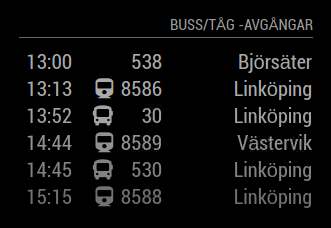
@Alvinger
Hello
I don’t get the settings to work properly.
“from:” works properly, “to:” does not seem to be taken into account.
I get all departures from my specified from: station.
The arriving station should only be Linköping Centralstation
I have made modification in MMM-ResRobot.js with depLineCell.innerHTML = departure.track || " ";
	{
		module: "MMM-ResRobot",
		position: "bottom_right",
		header: "Buss/Tåg -avgångar",
		config: {
			routes: [
				{from: "740000338", to: "740000009"},	// ResRobot Station IDs of starting and destination station(s). At least one route must be defined.
//				{from: "", to: ""},	// "from" is required but "to" is optional (set "to" to empty string to indicate all destinations)
			],
			skipMinutes: 0,		// Skip departures that happens within the next <value> minutes.
			maximumEntries: 6,	// Number of departures to show on screen
			truncateAfter: 5,	// A value > 0 will truncate direction name at first space after <value> characters. 0 = no truncation
			apiKey: "XXXXXXXXXXXXXXXXXXX"		// Your ResRobot apiKey
        }
    },