Read the statement by Michael Teeuw here.
CPU-Temperature as a graph with RRDtool
-
I added a graph about the progress of the CPU-temperture of my RPI3 to my MM via RRDtool:
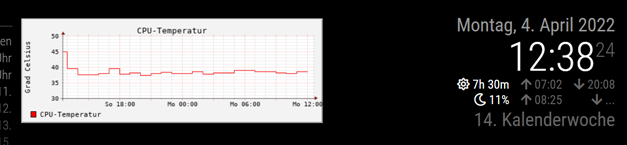
It looks a little bit nerdy, but the temperature is a nerdy hardware characteristic. OK, it is not so beautiful like grafana…but much easier to use.
Therefor, it needs only a few steps to realize it:sudo apt-get install rrdtoolwill install it.
Only one time create the database in the terminal session:rrdtool create cputemp.rrd --step 300 DS:temp:GAUGE:600:-20:90 RRA:AVERAGE:0.5:12:24 RRA:AVERAGE:0.5:288:31Add two tasks to crontab:
2-57/5 * * * * rrdtool update cputemp.rrd N:$(vcgencmd measure_temp | cut -c "6-9")moves every 5 minutes the temperature to the database established above.
0 * * * * rrdtool graph /home/pi/MagicMirror/modules/cputemp.gif --start -24h --title "CPU-Temperatur" --vertical-label "Grad Celsius" --disable-rrdtool-tag DEF:cputemperatur=cputemp.rrd:temp:AVERAGE LINE1:cputemperatur#ff0000:"CPU-Temperatur" ;generates once in an hour a graph which will be displayed later. If you like, you can adjust the map legend (“CPU-Temperatur” and “Grad Celsius”) with descriptions in your language.
Now create a file named cputemp.html in the modules-folder of your MM:
<HTML>
<HEAD>
<TITLE>CPU Temperatur</TITLE>
</HEAD>
<body bgcolor=#000000>
	<img src="cputemp.gif"/>
</body>
</HTML>
and use MMM-SmartWebDisplay in your config.js to show it:
//#################################################################################
		{
			disabled: false,
			module: 'MMM-SmartWebDisplay',
			position: 'top_center',
			config: {
				logDebug: false,
				height: "180",
				width:"500",
				updateInterval: 0,
				NextURLInterval: 0,
				displayLastUpdate: false,
				url: ["/modules/cputemp.html"],
				}
		},
//#################################################################################
Based on these steps, some more modifications of the appearance are possible. Please use your favorite search-engine for more.
-
 T thgmirror referenced this topic on
Hello! It looks like you're interested in this conversation, but you don't have an account yet.
Getting fed up of having to scroll through the same posts each visit? When you register for an account, you'll always come back to exactly where you were before, and choose to be notified of new replies (either via email, or push notification). You'll also be able to save bookmarks and upvote posts to show your appreciation to other community members.
With your input, this post could be even better 💗
Register Login