Read the statement by Michael Teeuw here.
help with OpenWeatherForecast
-
@gembob what happens?
-
Nothing unfortunately. It’s the same ‘Loading…’ message under the Forecast that appeared by default when I first installed MagicMirror.
-
@gembob edit the node_helper.js
and change this
var url = "https://api.openweathermap.org/data/2.5/onecall?" +to this
var url = "https://api.openweathermap.org/data/3.0/onecall?" + -
@sdetweil sorry for the long delay in my reply; I made the change as recommended and I’m still having the same issue, just a constant Loading screen for weather
-
@gembob i used your config and my api key and it worked ok
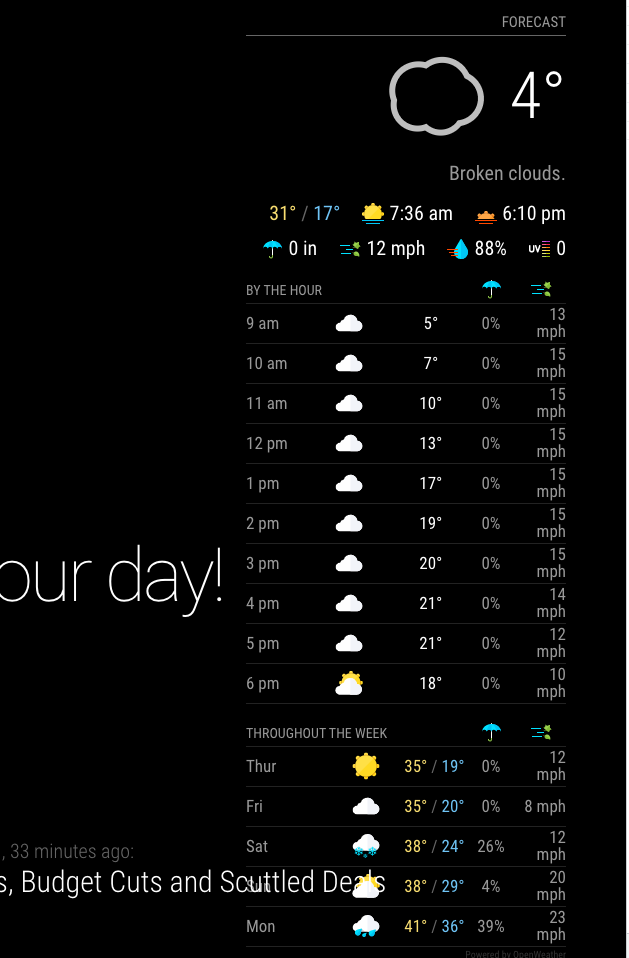
-
@sdetweil - well that’s frustrating! Would my best bet now be to try a new api key? Any other basic steps I could try that I might have screwed up?
-
@gembob I don’t know
I cloned
did npm install in the module folder
copied your config to my config.js
added my apikey
and ranno other changes
-
@sdetweil ok, thanks for testing it out for me.
-
I wiped and started over, and still having issues getting it to display like you are. I used by api key with the standard weather modules and it appears to work so I think I’m doing something wrong elsewhere. What do you do with the two existing weather modules that are in the config file by default, weather and weather forecast? Do you leave them, delete them?
-
@gembob I can do either… for this test I disabled them
-
@sdetweil Ok, thanks again for the assistance
Hello! It looks like you're interested in this conversation, but you don't have an account yet.
Getting fed up of having to scroll through the same posts each visit? When you register for an account, you'll always come back to exactly where you were before, and choose to be notified of new replies (either via email, or push notification). You'll also be able to save bookmarks and upvote posts to show your appreciation to other community members.
With your input, this post could be even better 💗
Register Login