Read the statement by Michael Teeuw here.
MMM-CalendarExt3 how do you create multiple events with color css?
-
Hi,
How do you create multiple events with color css?
Is there an example of what this looks like?
I now have the following and it works, but I don’t know how I want to add a second event, so in addition to outings, for example birthdays{
module: “MMM-CalendarExt3”,
position: “lower_third”,
title: “”,
config: {
eventTransformer: (ev) => {
if (ev.title.search(‘Uitje’) > -1) ev.color = ‘blue’
return ev
},I also wonder how I can get a nice icon in an event, for example a birthday cake icon, does anyone have an example that I can look at?
-
@Sam-0
First,
You can assign colour or class per eachcalendar. So check if your events are separated by different calendars. Check it first.In case your events are in one calendar and want to distinguish each by title of event, you can do this;
eventTransformer: (ev) => { if (ev.title.search('Uitje') > -1) ev.color = 'blue' if (ev.title.search('verjaardag' > -1) ev.icon = 'birthday-cake' /* and so on ... */ return ev }, -
@MMRIZE said in MMM-CalendarExt3 how do you create multiple events with color css?:
if (ev.title.search(‘verjaardag’ > -1) ev.icon = ‘birthday-cake’
Thanks for your help, it went wrong at first because a bracket was missing.) I adjusted this but unfortunately it doesn’t work. Could this be related to the fact that I have already adjusted the CSS?
{
module: “MMM-CalendarExt3”,
position: “lower_third”,
title: “”,
config: {
eventTransformer: (ev) => {
if (ev.title.search(‘Uitje’) > -1) ev.color = ‘blue’
if (ev.title.search(‘Verjaardag’) > -1) ev.icon = ‘birthday-cake’
return ev
},
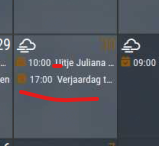
-
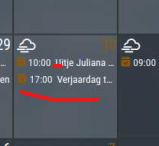
Thanks for your help, it went wrong at first because a bracket was missing.) I adjusted this but unfortunately it doesn’t work. Could this be related to the fact that I have already adjusted the CSS?
{
  module: "MMM-CalendarExt3",
  position: "lower_third",
  title: "",
  config: {
       eventTransformer: (ev) => {
              if (ev.title.search('Uitje') > -1) ev.color = 'blue'
              if (ev.title.search('Verjaardag') > -1) ev.icon = 'birthday-cake'
              return ev
       },
   }
}
-
@Sam-0 I’ve edited your post…
please try to include all the braces {}
so it is completely clearand use indents to add clarity to what is where …
-
@MMRIZE
I have removed the custom CSS so it is standard, but I do not see the icon but I do see the blue color. -
@Sam-0 sorry, it would not be ‘icon’, it would be ’ symbol’
-
-
@Sam-0 note the code should use symbol NOT icon
-
Sorry, the Previous version was not tested, I have shown the code only with my brain, not with a real device.
Here is the tested code.
eventTransformer: (ev) => { if (ev.title.search('Uitje') > -1) ev.color = 'gold' if (ev.title.search('Verjaardag') > -1) ev.symbol = ['birthday-cake'] return ev }, -
Thank you very much for your effort. I try to describe as best as I can what is working now so that others can learn from it.
Okay, I did some further research based on the term symbol and saw that the symbols had to be added in the general calendar. I also saw them in MMM-CalendarExt3 as below.
Will show my config code here:{ module: "calendar", header: "Familie agenda", position: "top_left", config: { calendars: [ { fetchInterval: 7 * 24 * 60 * 60 * 1000, symbol: "calendar-check", url: "outlook url" } ], customEvents: [ {keyword: "zwemmen", symbol: "person-swimming fas fa-fw fa-person-swimming"}, {keyword: "padel", symbol: "running fas fa-fw fa-running"}, {keyword: "zingen", symbol: "music fas fa-fw fa-music"}, {keyword: "verjaardag", symbol: "cake-candles fas fa-fw fa-cake-candles"}, {keyword: "volleybal", symbol: "volleyball fas fa-fw fa-volleyball"} ], } },{ module: "MMM-CalendarExt3", position: "lower_third", title: "", config: { eventTransformer: (ev) => { if (ev.title.search('Uitje') > -1) ev.color = 'blue' if (ev.title.search('Verjaardag') > -1) ev.color = '#FF69B4'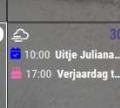
I will also try your previous code.
I would also like to control the color via CSS in the config file.
How are you doing this? I already tried something but this doesn’t seem to work. -
I also tested your code and it works fine too.
-
@Sam-0
If you have some knowledge about CSS, you can almost control the look of this module. Most needed info is described in readme md file. -
@Sam-0 said in MMM-CalendarExt3 how do you create multiple events with color css?:
Okay, I did some further research based on the term symbol and saw that the symbols had to be added in the general calendar. I also saw them in MMM-CalendarExt3 as below.
That is why I said;
First,
You can assign colour or class per each calendar. So check if your events are separated by different calendars. Check it first. -
Here’s my multi-transform code for reference. (The brackets may be off, I didn’t check on copy…)
eventTransformer: (ev) => {
					if (ev.title.search("🏠") > -1) {
						ev.title = ev.title.replace("🏠 Personal Commitment","🏠 Personal Event");
						ev.color = 'yellow';
					}
					if (ev.title.search("✈ Flight") > -1) {
						ev.title = ev.title.replace("✈ Flight","🏠 Personal Event");
						ev.color = 'yellow';
					}
					if (ev.title.search("busy") > -1) {
						ev.title = ev.title.replace("busy","🏠 Mom Event");
						ev.color = 'yellow';
					}
					if (ev.title.search("Weekley") > -1) {
						ev.title = ev.title.replace("Weekley","Weekly");
					}
					return ev
				}
I’m using both CX3 and CX3A
-
@MMRIZE said in MMM-CalendarExt3 how do you create multiple events with color css?:
First,
You can assign colour or class per each calendar. So check if your events are separated by different calendars. Check it first.I only have one calendar. I’ve already looked at an example but it doesn’t seem to work.
I found this example on this forum.
with customer.css
.CX3 .Ben {
color: brown;
}
eventTransformer: function(ev) { if (ev.title.search(“Ben”) > -1) ev.className = “Ben”; return ev }This doesn’t seem to do much, the color just remains white.
But is this possible? -
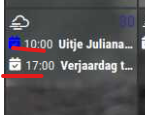
@Sam-0 in the default calendar, where you put url:
addcolor: … whatever

Hello! It looks like you're interested in this conversation, but you don't have an account yet.
Getting fed up of having to scroll through the same posts each visit? When you register for an account, you'll always come back to exactly where you were before, and choose to be notified of new replies (either via email, or push notification). You'll also be able to save bookmarks and upvote posts to show your appreciation to other community members.
With your input, this post could be even better 💗
Register Login