Read the statement by Michael Teeuw here.
How to set screen resolution
-
I am running MagicMirrorOS on a Raspberry Pi 4 Raspbian GNU/Linux 10 (buster) and using an HDMI monitor with a resolution of 1360x768
You can see modules are overlapping and does not look to be using the full screen
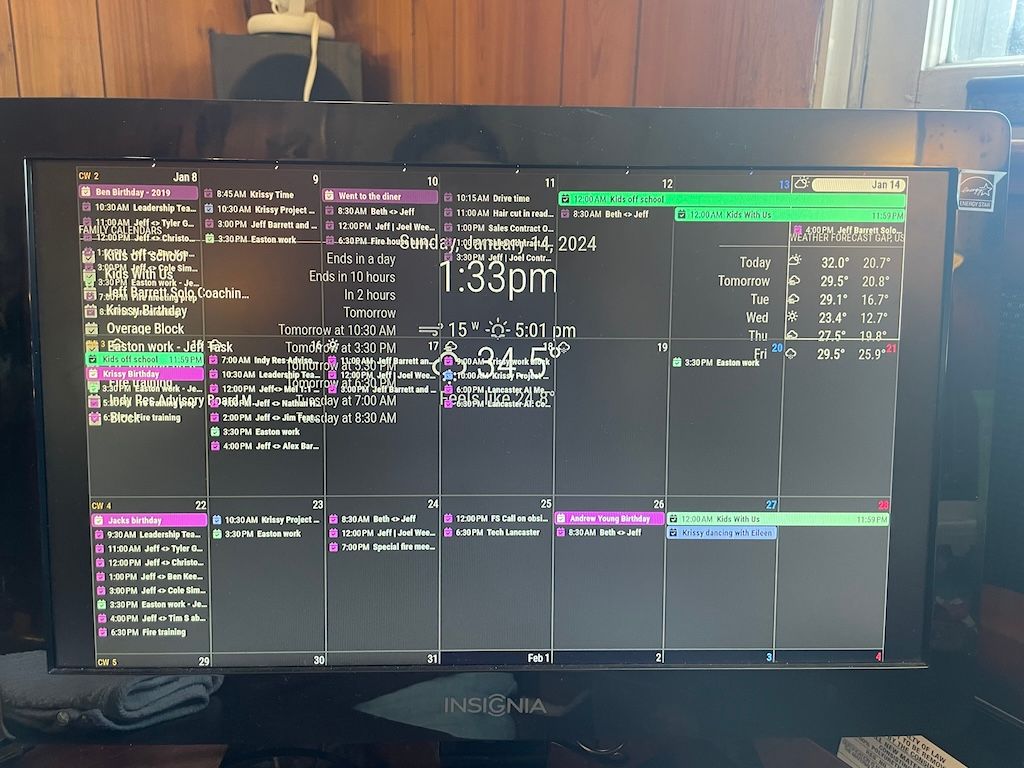
I have this in my config.js
electronOptions: {
width: 1360, height: 768,
fullscreen: true,
kiosk: true,
},Changing the settings for fullscreen or kiosk doesn’t change anything.
When I change the option to not autologin the login screen comes up in the full resolution. But once I login everything is mushed.
I am a bit confused as to what window manager is actually being used by MagicMirrorOS and by how it works with Docker to understand where I should be looking to change things.
This could also be that I am totally wrong in understanding where to fix this. Is it possible this is all just me needing to modify the CSS?
Thank you!
-
I solved it, changed the background to bright yellow and disabled the MMM-CalendarExt3 view. That showed the background going to the edges. So I just modified CSS to make it fit.
Hello! It looks like you're interested in this conversation, but you don't have an account yet.
Getting fed up of having to scroll through the same posts each visit? When you register for an account, you'll always come back to exactly where you were before, and choose to be notified of new replies (either via email, or push notification). You'll also be able to save bookmarks and upvote posts to show your appreciation to other community members.
With your input, this post could be even better 💗
Register Login