Read the statement by Michael Teeuw here.
Push button (MMM-Buttons) does not send out notification to MMM-StopwatchTimer
-
Hello all,
I am working with the MMM-Buttons module to connect a push button to GPIO pin 25 (physical pin: 22) and have it start the stopwatch by notification. I tested my button using my terminal and found that it was connected fine, but when I set the configurations it does not do anything :(. Any help is much appreciated!
Below is all I have modified.
By the way, after major googling I found that the module uploaded by SmartMirror was buggy so I replaced it with this repository: https://github.com/sdetweil/MMM-Buttons.
config.js file:
},
		{
			module: "MMM-StopwatchTimer",
			config: {
				animation: true,
				sound: true,
				soundFile: 'buzz.wav',
				useNativeSound: true,
				useAlertStyle: true,
				//notification: ["START_STOPWATCH", "PAUSE_STOPWATCHTIMER"]
			}

		},
		{
		    	module: 'MMM-Buttons',
			position: "middle_center",
		    	config: {
				buttons: [
			    	{
					pin: 25,
					name: "test_button",
					longPress: {
					notification: "PAUSE_STOPWATCHTIMER",
				    	payload: {action: "PAUSE_STOPWATCHTIMER"}
				},
					shortPress: {
				    	notification: "START_STOPWATCH",
				    	payload: {action: "START_STOPWATCH"}
					}
			    	}

				]
		    	}
		}
buttons.js file:
Module.register("MMM-Buttons", { requiresVersion: "2.1.0", // Default module config. defaults: { buttons: [ { pin: 25, name: "test_button", longPress: { notification: "PAUSE_STOPWATCHTIMER", payload: {action: "PAUSE_STOPWATCHTIMER"} }, shortPress: { notification: "START_STOPWATCH", payload: {action: "START_STOPWATCH"} } } ], minShortPressTime: 0, maxShortPressTime: 500, minLongPressTime: 3000, bounceTimeout: 300 },``` -
@changaud 1st, never edit a modules source file. all config goes in config.js
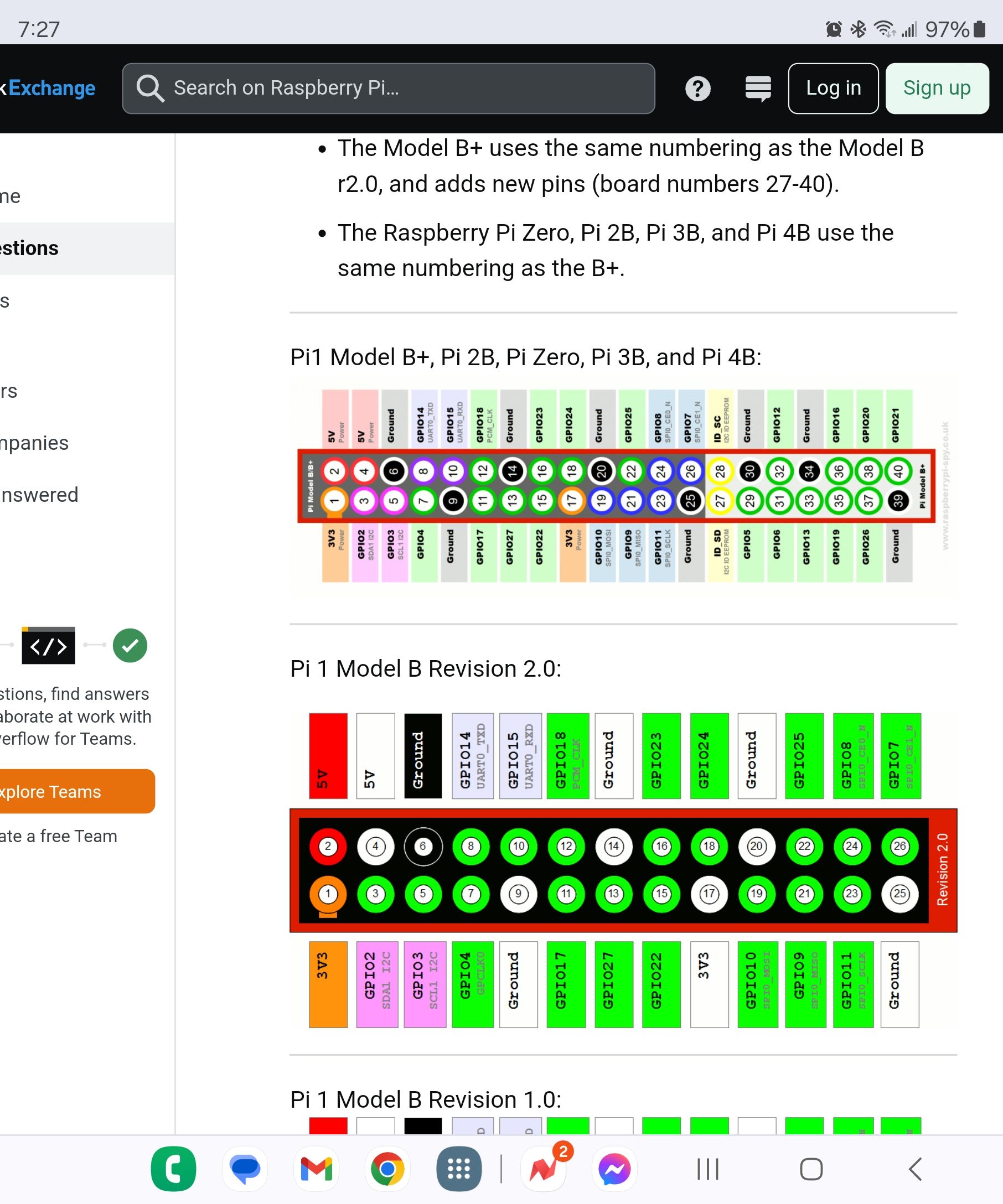
did you use the right pin number
?
-
@sdetweil Thank you for your response! I will keep that in mind, but do I just leave the button configuration in the buttons module blank then? Also, I have it connected to the physical button 22 which translates to GPIO 25 so I wrote 25 down in the configuration file.
-
@changaud said in Push button (MMM-Buttons) does not send out notification to MMM-StopwatchTimer:
but do I just leave the button configuration in the buttons module blank then
you already put it in the config.js file
{
		    	module: 'MMM-Buttons',
			position: "middle_center",
		    	config: {
				buttons: [
			    	{
					pin: 25,
					name: "test_button",
					longPress: {
					notification: "PAUSE_STOPWATCHTIMER",
				    	payload: {action: "PAUSE_STOPWATCHTIMER"}
				},
					shortPress: {
				    	notification: "START_STOPWATCH",
				    	payload: {action: "START_STOPWATCH"}
					}
			    	}

				]
		    	}
		}
config overrides whatever is defined in the source file defaults section
-
@changaud said in Push button (MMM-Buttons) does not send out notification to MMM-StopwatchTimer:
Also, I have it connected to the physical button 22 which translates to GPIO 25 so I wrote 25 down in the configuration file
it was just a question… many starting users don’t know about the different numbering
so, when u push the button, outside magic mirror it works…
-
@sdetweil Yes so weird and frustrating T^T… Here is a picture of my setup. In addition, sometimes I get the error (this image is also in the google drive) and sometimes I don’t. I think it goes away after I delete and reclone the buttons repository. https://drive.google.com/drive/folders/1y_QLDCuhfv9XELST0u2hwxTB4f3Fp4h9?usp=drive_link
-
@changaud said in Push button (MMM-Buttons) does not send out notification to MMM-StopwatchTimer:
@sdetweil Yes so weird and frustrating T^T… Here is a picture of my setup. In addition, sometimes I get the error (this image is also in the google drive) and sometimes I don’t. I think it goes away after I delete and reclone the buttons repository. https://drive.google.com/drive/folders/1y_QLDCuhfv9XELST0u2hwxTB4f3Fp4h9?usp=drive_link
is this a pi5?
-
@sdetweil This is a pi4 model b.
-
@changaud if you run your test script before launching mm does it work?
-
@sdetweil No it does not :( Do the errors possibly have something to do with it? I noticed the errors start to happen after the button is initialized. Also, do I have to have version 2.1.0 or is my current version (most updated) fine?
-
@changaud i do not know.
the error is that the pin is in read (input) mode, not write (output) mode.
i dont understand the change. on pi5 there is a change, but not pi4
my version of buttons only fixes install
Hello! It looks like you're interested in this conversation, but you don't have an account yet.
Getting fed up of having to scroll through the same posts each visit? When you register for an account, you'll always come back to exactly where you were before, and choose to be notified of new replies (either via email, or push notification). You'll also be able to save bookmarks and upvote posts to show your appreciation to other community members.
With your input, this post could be even better 💗
Register Login