Read the statement by Michael Teeuw here.
2.30.0 and MMM-CalendarExt3 missing calendars
-
@redfishbluefish hm… I have 3 instances , on pages, with multiple cals.
all three instances are working…I checked was downlevel (on 1.8.5), now on 1.9.4 latest… no change. all working as expected. I added a calendar fix reported by author, about calendar symbols in an array
symbol: [ “foo”, “bar” ]
but you aren’t seeing any exceptions
-
@sdetweil thanks for looking at this. I’d love to see an error of some sorts - much easier to track down! :)
I’ll strip down to a basic config.js and see if I can find something that works for me and maybe that will give some clues.
-
@redfishbluefish all you have to do is add
disabled:true,
after all the modules to turn off -
@redfishbluefish
or copy the sample config
add the cal and ext3 stuffthen
export MM_CONFIG_FILE=config/xxxxx
npm start
xxxx is the new config name -
@redfishbluefish
To make things simple;- Disable all other modules except
clock,calendar,MMM-CalendarExt3.
If you still have issue or found any error log (front-end log in your browser, not back-end log in your terminal), report me.
However, in my test, it works on the new installation of MM 2.30.
- Disable all other modules except
-
@MMRIZE I’m running a server-only instance in docker for testing now with this
config.js:let config = { address: "0.0.0.0", port: 8080, basePath: "/", ipWhitelist: [], useHttps: false, httpsPrivateKey: "", httpsCertificate: "", language: "en", locale: "en-US", logLevel: ["INFO", "LOG", "WARN", "ERROR"], timeFormat: 24, units: "metric", modules: [ { module: "clock", position: "top_left", config: { timeFormat: 12, }, }, { module: "calendar", position: "top_right", config: { broadcastPastEvents: true, // <= IMPORTANT to see past events defaultSymbol: "square", calendars: [ { url: "https://ics.calendarlabs.com/39/f7480acf/Canada_Holidays.ics", name: "can_holiday", // <= RECOMMENDED to assign name color: "crimson", // <= RECOMMENDED to assign color }, ], }, }, { module: "MMM-CalendarExt3", position: "bottom_bar", title: "", config: { mode: "week", weeksInView: 4, weekIndex: 0, useWeather: false, displayEndTime: false, instanceId: "basicCalendar", maxEventLines: 6, fontSize: '24px', eventHeight: '26px', refreshInterval: 1000 * 60 * 5, useMarquee: false, calendarSet: ['can_holiday'], } }, ] }; /*************** DO NOT EDIT THE LINE BELOW ***************/ if (typeof module !== "undefined") { module.exports = config; }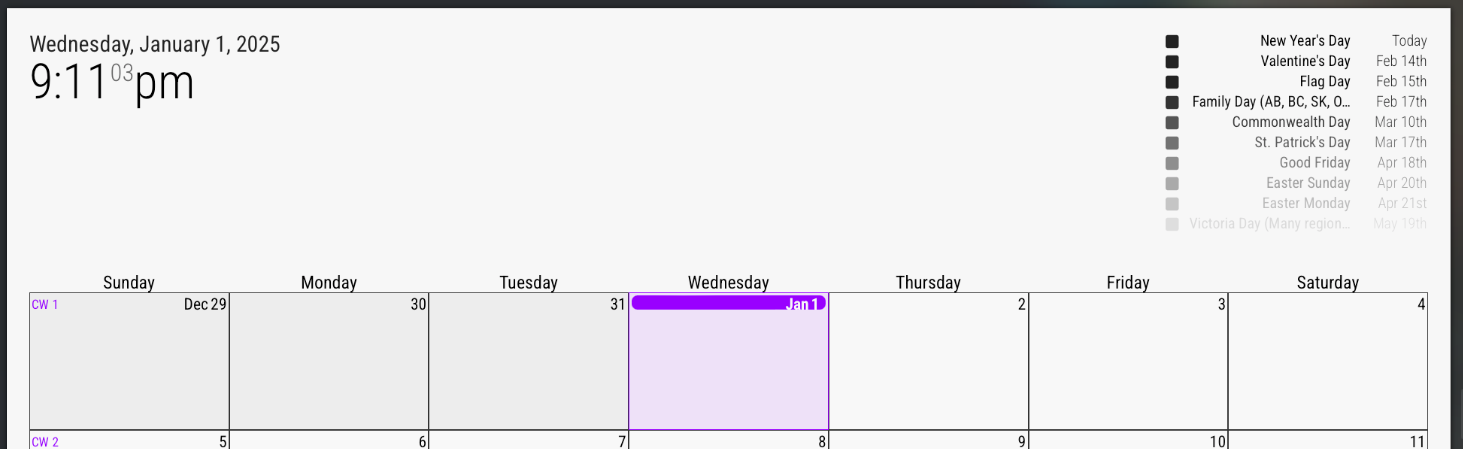
Today (Jan 1) should have a full day event on CalendarExt3 for New Year’s Day (as seen in top right calendar output).
Front end logs:
[Info] Initializing MagicMirror². (main.js, line 582)
[Log] Loading core translation file: translations/en.json (translator.js, line 116)
[Log] Loading core translation fallback file: translations/en.json (translator.js, line 132)
[Log] Load script: modules/default/clock/clock.js (loader.js, line 178)
[Log] Module registered: clock (module.js, line 489)
[Info] Bootstrapping module: clock (loader.js, line 151)
[Log] Load script: vendor/node_modules/moment/min/moment-with-locales.js (loader.js, line 178)
[Log] Load script: vendor/node_modules/moment-timezone/builds/moment-timezone-with-data.js (loader.js, line 178)
[Log] Load script: vendor/node_modules/suncalc/suncalc.js (loader.js, line 178)
[Log] Scripts loaded for: clock (loader.js, line 155)
[Log] Load stylesheet: modules/default/clock/clock_styles.css (loader.js, line 194)
[Log] Styles loaded for: clock (loader.js, line 158)
[Log] Translations loaded for: clock (loader.js, line 161)
[Log] Load script: modules/default/calendar/calendar.js (loader.js, line 178)
[Log] Check MagicMirror² version for module 'calendar' - Minimum version:  2.1.0 - Current version: 2.30.0 (module.js, line 481)
[Log] Version is ok! (module.js, line 483)
[Log] Module registered: calendar (module.js, line 489)
[Info] Bootstrapping module: calendar (loader.js, line 151)
[Log] Load script: modules/default/calendar/calendarutils.js (loader.js, line 178)
[Log] File already loaded: moment.js (loader.js, line 254)
[Log] Scripts loaded for: calendar (loader.js, line 155)
[Log] Load stylesheet: modules/default/calendar/calendar.css (loader.js, line 194)
[Log] Load stylesheet: vendor/css/font-awesome.css (loader.js, line 194)
[Log] Styles loaded for: calendar (loader.js, line 158)
[Log] Translations loaded for: calendar (loader.js, line 161)
[Log] Load script: modules/MMM-CalendarExt3/MMM-CalendarExt3.js (loader.js, line 178)
[Log] Module registered: MMM-CalendarExt3 (module.js, line 489)
[Info] Bootstrapping module: MMM-CalendarExt3 (loader.js, line 151)
[Log] Scripts loaded for: MMM-CalendarExt3 (loader.js, line 155)
[Log] Load stylesheet: modules/MMM-CalendarExt3/MMM-CalendarExt3.css (loader.js, line 194)
[Log] Styles loaded for: MMM-CalendarExt3 (loader.js, line 158)
[Log] Translations loaded for: MMM-CalendarExt3 (loader.js, line 161)
[Log] Load stylesheet: css/custom.css (loader.js, line 194)
[Info] Starting module: clock (clock.js, line 43)
[Info] Starting module: calendar (calendar.js, line 96)
[Info] All modules started! (main.js, line 601)
[Info] sorting events count=0 (calendar.js, line 699)
[Info] slicing events total maxcount=10 (calendar.js, line 739)
[Warning] [CX3] Module is not prepared yet, wait a while. (MMM-CalendarExt3.js, line 390)
[Info] sorting events count=10 (calendar.js, line 699)
[Info] sorting events count=10 (calendar.js, line 699)
[Info] slicing events total maxcount=10 (calendar.js, line 739)
[Info] event fullday (calendar.js, line 506, x10)
[Info] sorting events count=10 (calendar.js, line 699)
[Info] sorting events count=10 (calendar.js, line 699)
[Info] slicing events total maxcount=10 (calendar.js, line 739)
[Info] event fullday (calendar.js, line 506, x10)
And for completeness, backend logs:
[2025-01-01 21:05:03.871] [LOG] Starting MagicMirror: v2.30.0 [2025-01-01 21:05:03.886] [LOG] Loading config ... [2025-01-01 21:05:03.889] [LOG] config template file not exists, no envsubst [2025-01-01 21:05:04.171] [INFO] Checking config file /opt/magic_mirror/config/config.js ... [2025-01-01 21:05:04.216] [INFO] Your configuration file doesn't contain syntax errors :) [2025-01-01 21:05:04.217] [INFO] Checking modules structure configuration ... [2025-01-01 21:05:04.312] [INFO] Your modules structure configuration doesn't contain errors :) [2025-01-01 21:05:04.412] [LOG] Loading module helpers ... [2025-01-01 21:05:04.415] [LOG] No helper found for module: clock. [2025-01-01 21:05:04.583] [LOG] Initializing new module helper ... [2025-01-01 21:05:04.585] [LOG] Module helper loaded: calendar [2025-01-01 21:05:04.590] [LOG] No helper found for module: MMM-CalendarExt3. [2025-01-01 21:05:04.590] [LOG] All module helpers loaded. [2025-01-01 21:05:04.600] [LOG] Starting server on port 8080 ... [2025-01-01 21:05:04.602] [WARN] You're using a full whitelist configuration to allow for all IPs [2025-01-01 21:05:04.612] [LOG] Server started ... [2025-01-01 21:05:04.613] [LOG] Connecting socket for: calendar [2025-01-01 21:05:04.614] [LOG] Starting node helper for: calendar [2025-01-01 21:05:04.615] [LOG] Sockets connected & modules started ... [2025-01-01 21:05:04.615] [INFO] >>> Ready to go! Please point your browser to: http://0.0.0.0:8080 <<< [2025-01-01 21:05:04.744] [INFO] System information: ### SYSTEM: manufacturer: ; model: Docker Container; virtual: false ### OS: platform: linux; distro: Debian GNU/Linux; release: 12; arch: x64; kernel: 5.15.49-linuxkit ### VERSIONS: electron: undefined; used node: 22.12.0; installed node: 22.12.0; npm: 10.9.0; pm2: ### OTHER: timeZone: America/Toronto; ELECTRON_ENABLE_GPU: undefined [2025-01-01 21:05:18.517] [LOG] Create new calendarfetcher for url: https://ics.calendarlabs.com/39/f7480acf/Canada_Holidays.ics - Interval: 3600000 [2025-01-01 21:05:18.779] [INFO] Calendar-Fetcher: Broadcasting 34 events from https://ics.calendarlabs.com/39/f7480acf/Canada_Holidays.ics. [2025-01-01 21:13:12.600] [LOG] Use existing calendarfetcher for url: https://ics.calendarlabs.com/39/f7480acf/Canada_Holidays.ics [2025-01-01 21:13:12.601] [INFO] Calendar-Fetcher: Broadcasting 34 events from https://ics.calendarlabs.com/39/f7480acf/Canada_Holidays.ics. [2025-01-01 21:13:12.837] [INFO] Calendar-Fetcher: Broadcasting 34 events from https://ics.calendarlabs.com/39/f7480acf/Canada_Holidays.ics. -
@redfishbluefish
At first, I thought theNew Year's Dayevent wasn’t visible because of a time zone issue (since I live in Germany, it’s already January 2nd here).So, I downloaded the ICS file and changed the date of the
New Year's Dayevent from 20250101 to 20250102 for testing. When I tested it, I encountered the same issue you mentioned!!!I was quite confused, but to confirm, I used the following:
eventPayload: (events) => {
	console.log(events)
	return events
},
The
eventPayloadfunction is a great place to check what data has actually been broadcasted since it executes whenever events are received.As a result…
???New Year's Dayisn’t being broadcasted?? I still don’t know why.
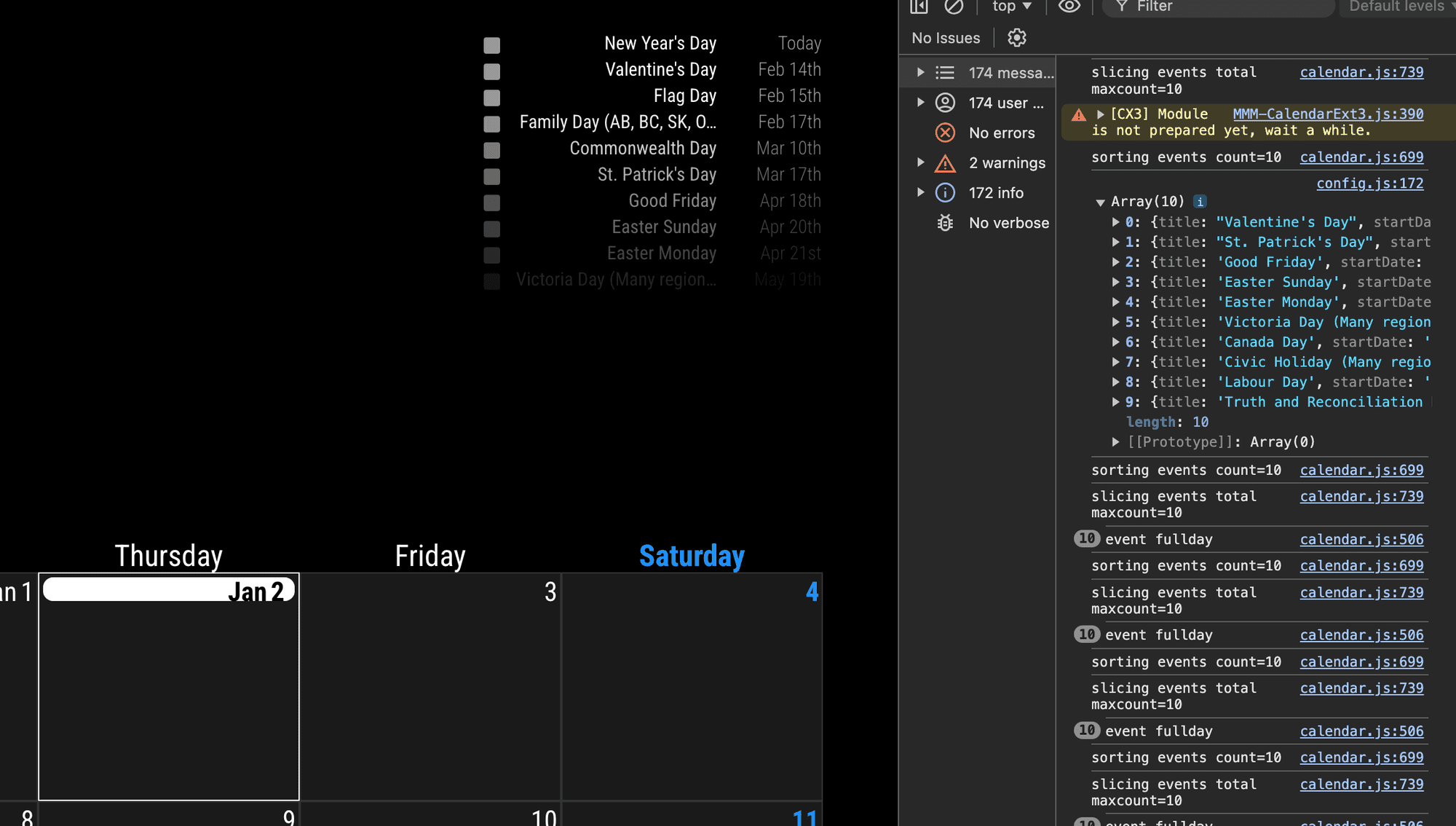
You can compare the display(left) and the console(right). In right, there is no
New Year's Dayevent. the calendar module doesn’t emit that event. CX3 cannot draw undelivered events.@sdetweil I think it’s better you check this symptom. the default calendar miss this event to broadcast, but don’t know why.
-
@MMRIZE ok will check it
if you change maxevents in default cal does it affect
the results -
I think I found it.
Add these into the default
calendarmodule.maximumEntries: 100, maximumNumberOfDays: 365,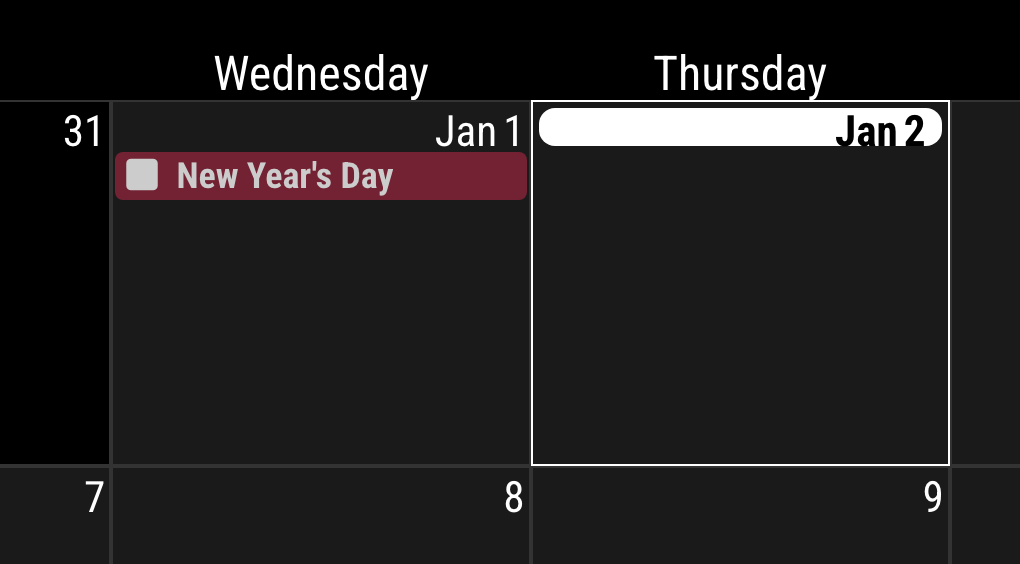
-
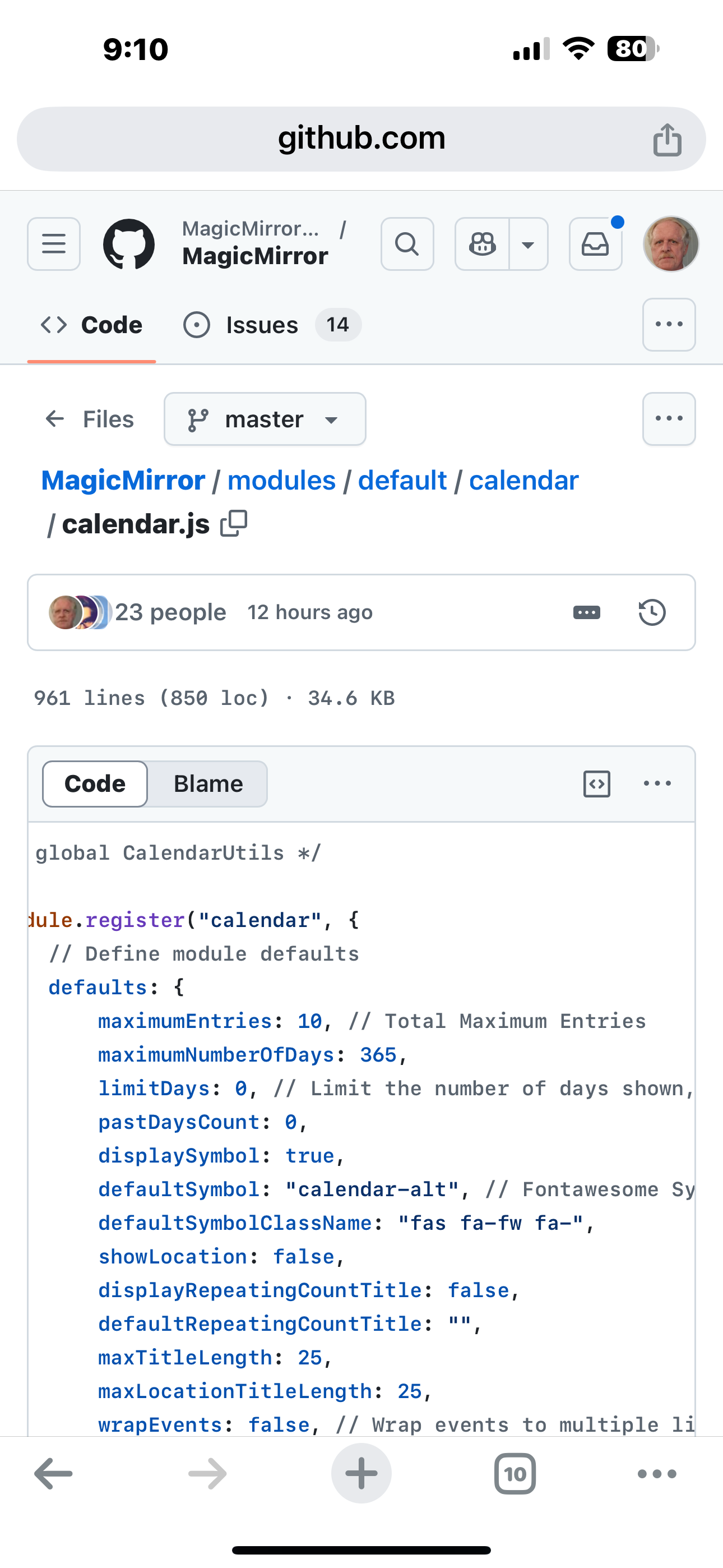
@MMRIZE the default
maxEntries is 10!
-
@MMRIZE was in 2.29 as well
-
@sdetweil I can confirm that setting
maximumEntries:100allows events to show on CalendarExt3 for the specific “Holiday” calendar in my testconfig.js.However, there’s something else that is coming into play. If I switch to a very busy calendar (300+ events) I actually get nothing showing up in CalendarExt3 but I can see that the events are in the calendar module. I used @MMRIZE
eventPayloadhook to dump to console and the events I’m getting start in Jan 2024.Note: I switched to
maximumEntries:20for this test.[Info] sorting events count=20 (calendar.js, line 699) [Log] Array (20) (config.js, line 308) 0 {title: "Paradigm ", startDate: "1704891600000", endDate: "1704898800000", fullDayEvent: false, recurringEvent: true, …} 1 {title: "Paradigm ", startDate: "1706101200000", endDate: "1706108400000", fullDayEvent: false, recurringEvent: true, …} 2 {title: "Paradigm ", startDate: "1707310800000", endDate: "1707318000000", fullDayEvent: false, recurringEvent: true, …} 3 {title: "Paradigm ", startDate: "1708520400000", endDate: "1708527600000", fullDayEvent: false, recurringEvent: true, …} 4 {title: "Tour", startDate: "1709391600000", endDate: "1709394300000", fullDayEvent: false, recurringEvent: false, …} 5 {title: "Paradigm ", startDate: "1709730000000", endDate: "1709737200000", fullDayEvent: false, recurringEvent: true, …} 6 {title: "Paradigm ", startDate: "1710936000000", endDate: "1710943200000", fullDayEvent: false, recurringEvent: true, …} 7 {title: "Paradigm ", startDate: "1712145600000", endDate: "1712152800000", fullDayEvent: false, recurringEvent: true, …} 8 {title: "Paradigm ", startDate: "1713355200000", endDate: "1713362400000", fullDayEvent: false, recurringEvent: true, …} 9 {title: "Paradigm ", startDate: "1714564800000", endDate: "1714572000000", fullDayEvent: false, recurringEvent: true, …} 10 {title: "Paradigm ", startDate: "1715774400000", endDate: "1715781600000", fullDayEvent: false, recurringEvent: true, …} 11 {title: "Paradigm ", startDate: "1716984000000", endDate: "1716991200000", fullDayEvent: false, recurringEvent: true, …} 12 {title: "Paradigm ", startDate: "1718193600000", endDate: "1718200800000", fullDayEvent: false, recurringEvent: true, …} 13 {title: "Paradigm ", startDate: "1719403200000", endDate: "1719410400000", fullDayEvent: false, recurringEvent: true, …} 14 {title: "Paradigm ", startDate: "1720612800000", endDate: "1720620000000", fullDayEvent: false, recurringEvent: true, …} 15 {title: "Amie and Jeff’s Anniversary ", startDate: "1721116800000", endDate: "1721203200000", fullDayEvent: true, recurringEvent: true, …} 16 {title: "Paradigm ", startDate: "1721822400000", endDate: "1721829600000", fullDayEvent: false, recurringEvent: true, …} 17 {title: "Paradigm ", startDate: "1723032000000", endDate: "1723039200000", fullDayEvent: false, recurringEvent: true, …} 18 {title: "Paradigm ", startDate: "1724241600000", endDate: "1724248800000", fullDayEvent: false, recurringEvent: true, …} 19 {title: "Paradigm ", startDate: "1725451200000", endDate: "1725458400000", fullDayEvent: false, recurringEvent: true, …}I then set
broadcastPastEvents:falseand I still get events from Jan 2024. -
-
@sdetweil I saw your note in the other thread about setting
maximumEntriesper calendar. I guess it means with this change there’s more thought required to determine the “right” values for each of the calendars you want to add.Example: As of today, Jan 2, this configuration for the calendar will show the “New Year’s Day” event on CalendarExt3:
config: {
	broadcastPastEvents: true,
	calendars: [
	{
		url: "https://ics.calendarlabs.com/39/f7480acf/Canada_Holidays.ics",
		name: "can_holiday",
		maximumEntries: 16,
	},
},
The following configuration will not show the “New Year’s Day” event:
config: {
	broadcastPastEvents: true,
	calendars: [
	{
		url: "https://ics.calendarlabs.com/39/f7480acf/Canada_Holidays.ics",
		name: "can_holiday",
		maximumEntries: 15,
	},
},
If I set
maximumNumberOfDays: 180then it actually changes the start date of the event array sliding window and the “New Year’s Day” event will show ifmaximumEntries: 15.Which makes me realize that the combination of:
broadcastPastEvents: true,
maximumNumberOfDays: 365, // default value
will actually return 2 years worth of events (assuming you don’t exceed the
maximumEntriessetting). -
@redfishbluefish well… could be up to 2 years if maximumNumberOfDays is 365 (default)
for each calendar ({…url…})
get the cal maximumEvents (specified, or default if not)//new code
save that ONLY cal maximumEvents on the list of total events
this COULD clip off events…
//
old code , save cal events on list of total events (all from cal)
//
we process the ical in the order presented, we ‘assume’ it is date ordered,
but do not check…sort the events by date // ONLY time ALL events are sorted in order explicitly this WILL intermingle events from different cals by datesend that to the other modules
in the ui
clip list to the FIRST maximumEvents. (old and new)
we COULD have too many OLD events and end up with no UPCOMING events in the listI’ve been thinking about that problem… and i think the only non-disruptive way to fix it is to clip NEW events only… that means we would have to FIND the point in the list for first new event, or last old event
so it there are 300 events, and max entries is 10, today we use the first 10, and could throw away 290
if in the 300 its 250 old and 50 new, we would never see the new, even with maxevents set to 200
but if we JUST clipped new
we would have sent 260… 250 and 10 new then we wouldn’t have these crazy UI troubles with maxevents flooding the screen (cause maxevents 10 would give us 10 for the screen)
because we had to get maximum events up to get to the new ones in the total list -
@sdetweil thank you for supporting the calendar module!
For my specific use case, I don’t display the default calendar module, it’s just used to fetch and broadcast events for CalendarExt3. With this in mind, the idea of a sliding window centered on a date (today in most cases) makes the most sense to me.
Is there a reason why the default for maximumEntries is 10? I had assumed performance but it looks like this is actually what’s used to control the number of events displayed.
-
@redfishbluefish i do not know, been that way since i got here in 2017. i assume it was for the display list.
generally you try to add without breaking old stuff.
i didn’t start working on cal til 21, when our users kept having trouble. same thing as now. mostly work on the event parser
-
-
@sdetweil thanks for the fix! I really appreciate your effort.
Just in case it’s useful for someone else who runs into the same problem, with the fix applied and my calendar configuration that worked in 2.29.0, I see:
[Debug] [Calendar] self update (calendar.js, line 950)
[Debug] pushing 18 events to total with room for 10 (calendar.js, line 695)
[Debug] events for calendar=10 (calendar.js, line 697)
[Debug] pushing 246 events to total with room for 10 (calendar.js, line 695)
[Debug] events for calendar=20 (calendar.js, line 697)
[Info] sorting events count=20 (calendar.js, line 699)
[Info] slicing events total maxcount=10 (calendar.js, line 739)
And when I set a new
maximumEntriesper calendar I get:[Debug] pushing 34 events to total with room for 50 (calendar.js, line 695) [Debug] events for calendar=34 (calendar.js, line 697) [Debug] pushing 295 events to total with room for 500 (calendar.js, line 695) [Debug] events for calendar=329 (calendar.js, line 697) [Info] sorting events count=329 (calendar.js, line 699)This does result in a different behaviour for users of other calendar modules as of 2.30.0 so might be handy if the authors could update their recommendations in their documentation?
-
R redfishbluefish has marked this topic as solved on
-
@redfishbluefish the pushing events for cal
thru to before the last sorting are ONLY used for the UI, not for the broadcastthe broadcast does NOT clip AT ALL with this fix, just like before
IF you don’t have the UI visible(position commented out or not supplied in default cal) , all of this is noise (wasted logging)
Hello! It looks like you're interested in this conversation, but you don't have an account yet.
Getting fed up of having to scroll through the same posts each visit? When you register for an account, you'll always come back to exactly where you were before, and choose to be notified of new replies (either via email, or push notification). You'll also be able to save bookmarks and upvote posts to show your appreciation to other community members.
With your input, this post could be even better 💗
Register Login