Read the statement by Michael Teeuw here.
2.30.0 and MMM-CalendarExt3 missing calendars
-
2.30.0 doesn’t seem to be playing nicely with MMM-CalendarExt3 in my setup and I don’t see any clues in the logs as to why. Default calendar modules appears to be working as expected and I can see that the Calendar-Fetcher is broadcasting events for all of my calendars.
Oddly, events from one of the 5 calendars I’m using do appear in MMM-CalendarExt3 correctly. Changing order of calendar definitions in the
config.jsmake no difference.The only error I see in logs is shown below but this appears to be related to a known issue in MMM-RemoteControl and MMM-CalendarExt3 (and the error goes away if I disable MMM-RemoteControl) which is also present when I’m running 2.29.0.
0|mm  | [2025-01-01 15:51:41.985] [ERROR] ERROR! Could not validate main module js file.
0|mm  | [2025-01-01 15:51:41.992] [ERROR] ReferenceError: HTMLElement is not defined
0|mm  |     at Object.<anonymous> (/home/pi/MagicMirror/modules/MMM-CalendarExt3/MMM-CalendarExt3.js:6:26)
0|mm  |     at Module._compile (node:internal/modules/cjs/loader:1484:14)
0|mm  |     at Module._extensions..js (node:internal/modules/cjs/loader:1564:10)
0|mm  |     at Module.load (node:internal/modules/cjs/loader:1295:32)
0|mm  |     at Module._load (node:internal/modules/cjs/loader:1111:12)
0|mm  |     at c._load (node:electron/js2c/node_init:2:17025)
0|mm  |     at Module.require (node:internal/modules/cjs/loader:1318:19)
0|mm  |     at require (node:internal/modules/helpers:179:18)
0|mm  |     at Class.loadModuleDefaultConfig (/home/pi/MagicMirror/modules/MMM-Remote-Control/node_helper.js:317:30)
0|mm  |     at /home/pi/MagicMirror/modules/MMM-Remote-Control/node_helper.js:271:26
0|mm  |     at FSReqCallback.oncomplete (node:fs:198:5)
I have since done a revert to 2.29.0 and with the exact same
config.jsetc, MMM-CalendarExt3 is working fine. I’m going to try and spin up a server only version of 2.30.0 to poke at since I can’t wipe out my main installation. -
-
@redfishbluefish i am using ext3 w 2.30
did u use my script or manual upgrade
because if the nodejs change you may need to nom instsll agsin to get the extension installed
-
@sdetweil manual upgrade. I also did a reinstall of the modules I use since nodes changed.
MMM-CalendarExt3 was installed/working with 2.30.0 as it shows up and has the info for one of the calendars but not for all calendars.
-
@redfishbluefish timing may have changed.
can you look at the output of npm start and see if the events were broadcastif using pm2, then pm2 logs --lines=xxxx
xxxx is the number of most recent lines to show, default 15
ext3 tries to wait and not flash every time events arrive .
there is a delay parm for next time to check, its fairly long -
@sdetweil I updated my docker server-only install to 2.30.0 to test on. The
config.jsfile is almost identical to what I have on my RPi and this is what I see after restarting MagicMirror:[2025-01-01 17:45:14.379] [LOG] Starting MagicMirror: v2.30.0 [2025-01-01 17:45:14.397] [LOG] Loading config ... [2025-01-01 17:45:14.400] [LOG] config template file not exists, no envsubst [2025-01-01 17:45:14.790] [INFO] Checking config file /opt/magic_mirror/config/config.js ... [2025-01-01 17:45:14.889] [INFO] Your configuration file doesn't contain syntax errors :) [2025-01-01 17:45:14.890] [INFO] Checking modules structure configuration ... [2025-01-01 17:45:14.971] [INFO] Your modules structure configuration doesn't contain errors :) [2025-01-01 17:45:15.119] [LOG] Loading module helpers ... [2025-01-01 17:45:15.123] [LOG] No helper found for module: alert. [2025-01-01 17:45:15.140] [LOG] Initializing new module helper ... [2025-01-01 17:45:15.141] [LOG] Module helper loaded: MMM-Wheel [2025-01-01 17:45:15.146] [LOG] No helper found for module: MMM-Carousel. [2025-01-01 17:45:15.194] [LOG] Initializing new module helper ... [2025-01-01 17:45:15.195] [LOG] Module helper loaded: updatenotification [2025-01-01 17:45:15.198] [LOG] No helper found for module: clock. [2025-01-01 17:45:15.211] [LOG] Initializing new module helper ... [2025-01-01 17:45:15.211] [LOG] Module helper loaded: MMM-UCDSB [2025-01-01 17:45:15.214] [LOG] No helper found for module: weather. [2025-01-01 17:45:15.391] [LOG] Initializing new module helper ... [2025-01-01 17:45:15.392] [LOG] Module helper loaded: calendar [2025-01-01 17:45:15.396] [LOG] No helper found for module: MMM-CalendarExt3. [2025-01-01 17:45:15.397] [LOG] All module helpers loaded. [2025-01-01 17:45:15.406] [LOG] Starting server on port 8080 ... [2025-01-01 17:45:15.409] [WARN] You're using a full whitelist configuration to allow for all IPs [2025-01-01 17:45:15.427] [LOG] Server started ... [2025-01-01 17:45:15.428] [LOG] Connecting socket for: MMM-Wheel [2025-01-01 17:45:15.429] [LOG] Starting module helper: MMM-Wheel [2025-01-01 17:45:15.429] [LOG] Connecting socket for: updatenotification [2025-01-01 17:45:15.430] [LOG] Starting module helper: updatenotification [2025-01-01 17:45:15.431] [LOG] Connecting socket for: MMM-UCDSB [2025-01-01 17:45:15.431] [LOG] Starting module helper: MMM-UCDSB [2025-01-01 17:45:15.432] [LOG] Connecting socket for: calendar [2025-01-01 17:45:15.432] [LOG] Starting node helper for: calendar [2025-01-01 17:45:15.432] [LOG] Sockets connected & modules started ... [2025-01-01 17:45:15.433] [INFO] >>> Ready to go! Please point your browser to: http://0.0.0.0:8080 <<< [2025-01-01 17:45:15.669] [INFO] System information: ### SYSTEM: manufacturer: ; model: Docker Container; virtual: false ### OS: platform: linux; distro: Debian GNU/Linux; release: 12; arch: x64; kernel: 5.15.49-linuxkit ### VERSIONS: electron: undefined; used node: 22.12.0; installed node: 22.12.0; npm: 10.9.0; pm2: ### OTHER: timeZone: America/Toronto; ELECTRON_ENABLE_GPU: undefinedI notice that there are no calendar events being broadcast at all (which likely makes sense since nothing has attempted to load the page yet).
After loading the site I get (calendar urls deleted):
[2025-01-01 17:48:40.701] [LOG]   Create new calendarfetcher for url: Holidays.ics - Interval: 3600000
[2025-01-01 17:48:40.786] [LOG]   Create new calendarfetcher for url: basic1.ics - Interval: 3600000
[2025-01-01 17:48:40.791] [LOG]   Create new calendarfetcher for url: calendarId=1509643 - Interval: 3600000
[2025-01-01 17:48:40.797] [LOG]   Create new calendarfetcher for url: basic2.ics - Interval: 3600000
[2025-01-01 17:48:40.803] [LOG]   Create new calendarfetcher for url: basic3.ics - Interval: 3600000
[2025-01-01 17:48:40.891] [INFO]  updatenotification: Updater Class Loaded!
[2025-01-01 17:48:40.892] [INFO]  updatenotification: Checking PM2 using...
[2025-01-01 17:48:40.892] [INFO]  updatenotification: Running in docker container, not using PM2 ...
[2025-01-01 17:48:40.893] [INFO]  Checking git for module: MMM-Wheel
[2025-01-01 17:48:40.895] [INFO]  Checking git for module: MMM-Carousel
[2025-01-01 17:48:40.920] [INFO]  Checking git for module: MMM-UCDSB
[2025-01-01 17:48:40.942] [INFO]  Checking git for module: MMM-CalendarExt3
[2025-01-01 17:48:41.003] [INFO]  Calendar-Fetcher: Broadcasting 34 events from Holidays.ics.
[2025-01-01 17:48:41.021] [INFO]  Checking git for module: MagicMirror
[2025-01-01 17:48:41.053] [INFO]  Calendar-Fetcher: Broadcasting 61 events from calendarId=1509643.
[2025-01-01 17:48:41.112] [INFO]  Calendar-Fetcher: Broadcasting 3 events from basic3.ics.
[2025-01-01 17:48:41.826] [INFO]  Calendar-Fetcher: Broadcasting 294 events from basic1.ics.
[2025-01-01 17:48:42.801] [INFO]  Calendar-Fetcher: Broadcasting 282 events from basic2.ics.
The
basic3.icscalendar event show in MMM-CalendarExt3 but nothing else. -
This post looks like a similar issue: https://forum.magicmirror.builders/topic/19273/mmm-calendarext3-not-showing-events-on-calendar-but-does-on-list-after-2-30-update
-
@redfishbluefish ok, cal module is working
ext3 is done all in browser,
open the developer window, ctrl-shift-i,
select the console tab
add ext to the filter field -
@redfishbluefish you both reported at approximately same time
-
@sdetweil I get what’s in the screenshot in the console but CalendarExt3 is loaded in the browser correctly.
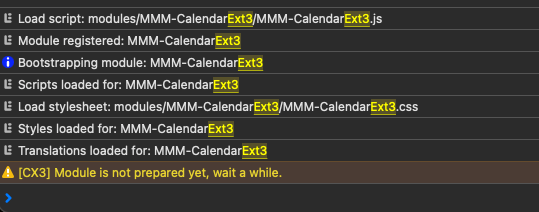
Note that this looks identical to what I see when running 2.29.0.
-
@redfishbluefish hm… I have 3 instances , on pages, with multiple cals.
all three instances are working…I checked was downlevel (on 1.8.5), now on 1.9.4 latest… no change. all working as expected. I added a calendar fix reported by author, about calendar symbols in an array
symbol: [ “foo”, “bar” ]
but you aren’t seeing any exceptions
-
@sdetweil thanks for looking at this. I’d love to see an error of some sorts - much easier to track down! :)
I’ll strip down to a basic config.js and see if I can find something that works for me and maybe that will give some clues.
-
@redfishbluefish all you have to do is add
disabled:true,
after all the modules to turn off -
@redfishbluefish
or copy the sample config
add the cal and ext3 stuffthen
export MM_CONFIG_FILE=config/xxxxx
npm start
xxxx is the new config name -
@redfishbluefish
To make things simple;- Disable all other modules except
clock,calendar,MMM-CalendarExt3.
If you still have issue or found any error log (front-end log in your browser, not back-end log in your terminal), report me.
However, in my test, it works on the new installation of MM 2.30.
- Disable all other modules except
-
@MMRIZE I’m running a server-only instance in docker for testing now with this
config.js:let config = { address: "0.0.0.0", port: 8080, basePath: "/", ipWhitelist: [], useHttps: false, httpsPrivateKey: "", httpsCertificate: "", language: "en", locale: "en-US", logLevel: ["INFO", "LOG", "WARN", "ERROR"], timeFormat: 24, units: "metric", modules: [ { module: "clock", position: "top_left", config: { timeFormat: 12, }, }, { module: "calendar", position: "top_right", config: { broadcastPastEvents: true, // <= IMPORTANT to see past events defaultSymbol: "square", calendars: [ { url: "https://ics.calendarlabs.com/39/f7480acf/Canada_Holidays.ics", name: "can_holiday", // <= RECOMMENDED to assign name color: "crimson", // <= RECOMMENDED to assign color }, ], }, }, { module: "MMM-CalendarExt3", position: "bottom_bar", title: "", config: { mode: "week", weeksInView: 4, weekIndex: 0, useWeather: false, displayEndTime: false, instanceId: "basicCalendar", maxEventLines: 6, fontSize: '24px', eventHeight: '26px', refreshInterval: 1000 * 60 * 5, useMarquee: false, calendarSet: ['can_holiday'], } }, ] }; /*************** DO NOT EDIT THE LINE BELOW ***************/ if (typeof module !== "undefined") { module.exports = config; }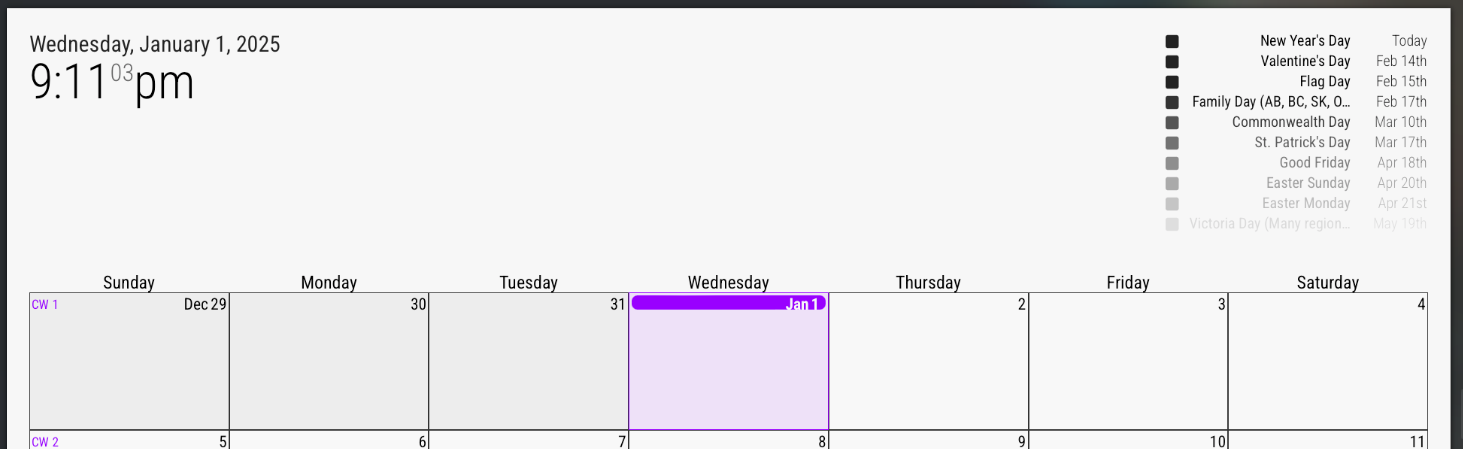
Today (Jan 1) should have a full day event on CalendarExt3 for New Year’s Day (as seen in top right calendar output).
Front end logs:
[Info] Initializing MagicMirror². (main.js, line 582)
[Log] Loading core translation file: translations/en.json (translator.js, line 116)
[Log] Loading core translation fallback file: translations/en.json (translator.js, line 132)
[Log] Load script: modules/default/clock/clock.js (loader.js, line 178)
[Log] Module registered: clock (module.js, line 489)
[Info] Bootstrapping module: clock (loader.js, line 151)
[Log] Load script: vendor/node_modules/moment/min/moment-with-locales.js (loader.js, line 178)
[Log] Load script: vendor/node_modules/moment-timezone/builds/moment-timezone-with-data.js (loader.js, line 178)
[Log] Load script: vendor/node_modules/suncalc/suncalc.js (loader.js, line 178)
[Log] Scripts loaded for: clock (loader.js, line 155)
[Log] Load stylesheet: modules/default/clock/clock_styles.css (loader.js, line 194)
[Log] Styles loaded for: clock (loader.js, line 158)
[Log] Translations loaded for: clock (loader.js, line 161)
[Log] Load script: modules/default/calendar/calendar.js (loader.js, line 178)
[Log] Check MagicMirror² version for module 'calendar' - Minimum version:  2.1.0 - Current version: 2.30.0 (module.js, line 481)
[Log] Version is ok! (module.js, line 483)
[Log] Module registered: calendar (module.js, line 489)
[Info] Bootstrapping module: calendar (loader.js, line 151)
[Log] Load script: modules/default/calendar/calendarutils.js (loader.js, line 178)
[Log] File already loaded: moment.js (loader.js, line 254)
[Log] Scripts loaded for: calendar (loader.js, line 155)
[Log] Load stylesheet: modules/default/calendar/calendar.css (loader.js, line 194)
[Log] Load stylesheet: vendor/css/font-awesome.css (loader.js, line 194)
[Log] Styles loaded for: calendar (loader.js, line 158)
[Log] Translations loaded for: calendar (loader.js, line 161)
[Log] Load script: modules/MMM-CalendarExt3/MMM-CalendarExt3.js (loader.js, line 178)
[Log] Module registered: MMM-CalendarExt3 (module.js, line 489)
[Info] Bootstrapping module: MMM-CalendarExt3 (loader.js, line 151)
[Log] Scripts loaded for: MMM-CalendarExt3 (loader.js, line 155)
[Log] Load stylesheet: modules/MMM-CalendarExt3/MMM-CalendarExt3.css (loader.js, line 194)
[Log] Styles loaded for: MMM-CalendarExt3 (loader.js, line 158)
[Log] Translations loaded for: MMM-CalendarExt3 (loader.js, line 161)
[Log] Load stylesheet: css/custom.css (loader.js, line 194)
[Info] Starting module: clock (clock.js, line 43)
[Info] Starting module: calendar (calendar.js, line 96)
[Info] All modules started! (main.js, line 601)
[Info] sorting events count=0 (calendar.js, line 699)
[Info] slicing events total maxcount=10 (calendar.js, line 739)
[Warning] [CX3] Module is not prepared yet, wait a while. (MMM-CalendarExt3.js, line 390)
[Info] sorting events count=10 (calendar.js, line 699)
[Info] sorting events count=10 (calendar.js, line 699)
[Info] slicing events total maxcount=10 (calendar.js, line 739)
[Info] event fullday (calendar.js, line 506, x10)
[Info] sorting events count=10 (calendar.js, line 699)
[Info] sorting events count=10 (calendar.js, line 699)
[Info] slicing events total maxcount=10 (calendar.js, line 739)
[Info] event fullday (calendar.js, line 506, x10)
And for completeness, backend logs:
[2025-01-01 21:05:03.871] [LOG] Starting MagicMirror: v2.30.0 [2025-01-01 21:05:03.886] [LOG] Loading config ... [2025-01-01 21:05:03.889] [LOG] config template file not exists, no envsubst [2025-01-01 21:05:04.171] [INFO] Checking config file /opt/magic_mirror/config/config.js ... [2025-01-01 21:05:04.216] [INFO] Your configuration file doesn't contain syntax errors :) [2025-01-01 21:05:04.217] [INFO] Checking modules structure configuration ... [2025-01-01 21:05:04.312] [INFO] Your modules structure configuration doesn't contain errors :) [2025-01-01 21:05:04.412] [LOG] Loading module helpers ... [2025-01-01 21:05:04.415] [LOG] No helper found for module: clock. [2025-01-01 21:05:04.583] [LOG] Initializing new module helper ... [2025-01-01 21:05:04.585] [LOG] Module helper loaded: calendar [2025-01-01 21:05:04.590] [LOG] No helper found for module: MMM-CalendarExt3. [2025-01-01 21:05:04.590] [LOG] All module helpers loaded. [2025-01-01 21:05:04.600] [LOG] Starting server on port 8080 ... [2025-01-01 21:05:04.602] [WARN] You're using a full whitelist configuration to allow for all IPs [2025-01-01 21:05:04.612] [LOG] Server started ... [2025-01-01 21:05:04.613] [LOG] Connecting socket for: calendar [2025-01-01 21:05:04.614] [LOG] Starting node helper for: calendar [2025-01-01 21:05:04.615] [LOG] Sockets connected & modules started ... [2025-01-01 21:05:04.615] [INFO] >>> Ready to go! Please point your browser to: http://0.0.0.0:8080 <<< [2025-01-01 21:05:04.744] [INFO] System information: ### SYSTEM: manufacturer: ; model: Docker Container; virtual: false ### OS: platform: linux; distro: Debian GNU/Linux; release: 12; arch: x64; kernel: 5.15.49-linuxkit ### VERSIONS: electron: undefined; used node: 22.12.0; installed node: 22.12.0; npm: 10.9.0; pm2: ### OTHER: timeZone: America/Toronto; ELECTRON_ENABLE_GPU: undefined [2025-01-01 21:05:18.517] [LOG] Create new calendarfetcher for url: https://ics.calendarlabs.com/39/f7480acf/Canada_Holidays.ics - Interval: 3600000 [2025-01-01 21:05:18.779] [INFO] Calendar-Fetcher: Broadcasting 34 events from https://ics.calendarlabs.com/39/f7480acf/Canada_Holidays.ics. [2025-01-01 21:13:12.600] [LOG] Use existing calendarfetcher for url: https://ics.calendarlabs.com/39/f7480acf/Canada_Holidays.ics [2025-01-01 21:13:12.601] [INFO] Calendar-Fetcher: Broadcasting 34 events from https://ics.calendarlabs.com/39/f7480acf/Canada_Holidays.ics. [2025-01-01 21:13:12.837] [INFO] Calendar-Fetcher: Broadcasting 34 events from https://ics.calendarlabs.com/39/f7480acf/Canada_Holidays.ics. -
@redfishbluefish
At first, I thought theNew Year's Dayevent wasn’t visible because of a time zone issue (since I live in Germany, it’s already January 2nd here).So, I downloaded the ICS file and changed the date of the
New Year's Dayevent from 20250101 to 20250102 for testing. When I tested it, I encountered the same issue you mentioned!!!I was quite confused, but to confirm, I used the following:
eventPayload: (events) => {
	console.log(events)
	return events
},
The
eventPayloadfunction is a great place to check what data has actually been broadcasted since it executes whenever events are received.As a result…
???New Year's Dayisn’t being broadcasted?? I still don’t know why.
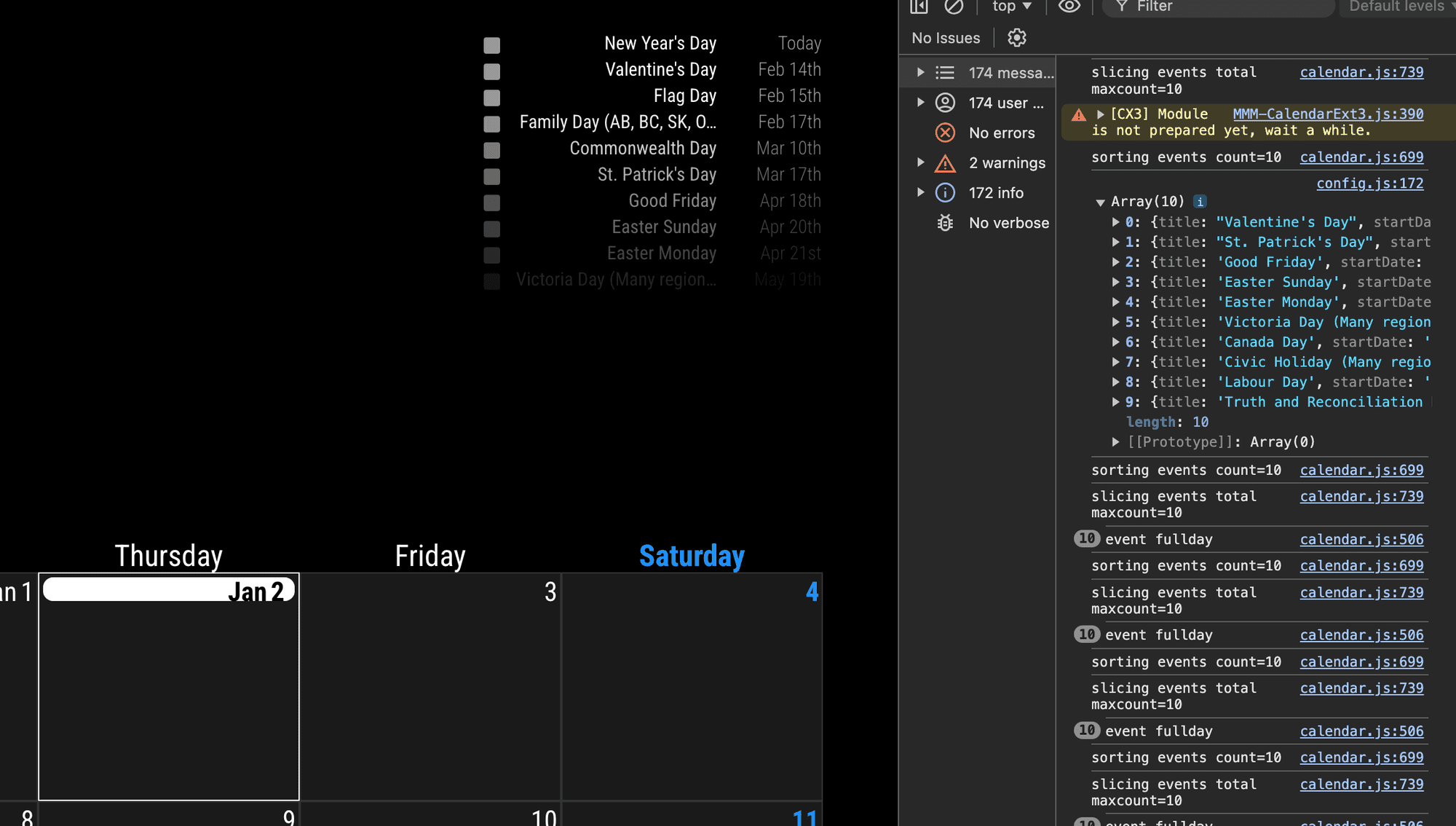
You can compare the display(left) and the console(right). In right, there is no
New Year's Dayevent. the calendar module doesn’t emit that event. CX3 cannot draw undelivered events.@sdetweil I think it’s better you check this symptom. the default calendar miss this event to broadcast, but don’t know why.
-
@MMRIZE ok will check it
if you change maxevents in default cal does it affect
the results -
I think I found it.
Add these into the default
calendarmodule.maximumEntries: 100, maximumNumberOfDays: 365,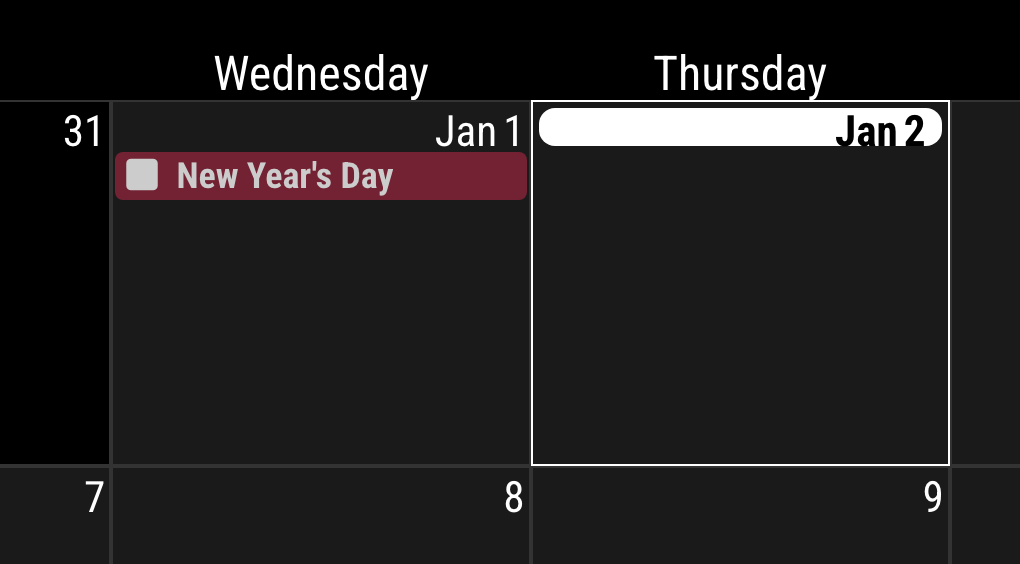
-
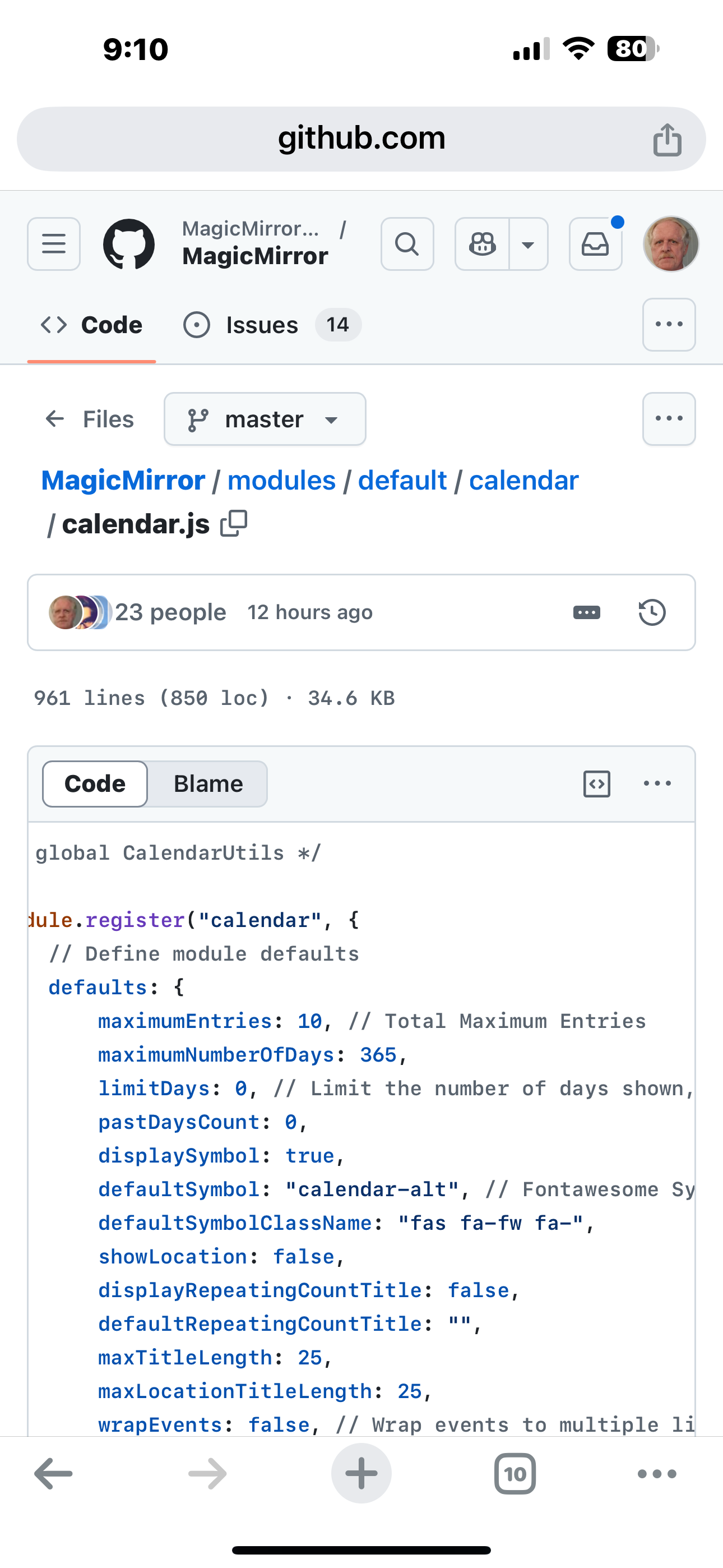
@MMRIZE the default
maxEntries is 10!
-
@MMRIZE was in 2.29 as well
Hello! It looks like you're interested in this conversation, but you don't have an account yet.
Getting fed up of having to scroll through the same posts each visit? When you register for an account, you'll always come back to exactly where you were before, and choose to be notified of new replies (either via email, or push notification). You'll also be able to save bookmarks and upvote posts to show your appreciation to other community members.
With your input, this post could be even better 💗
Register Login