MagicMirror Forum
    • Recent
    • Tags
    • Unsolved
    • Solved
    • MagicMirror² Repository
    • Documentation
    • 3rd-Party-Modules
    • Donate
    • Discord
    • Register
    • Login
    A New Chapter for MagicMirror: The Community Takes the Lead
    Read the statement by Michael Teeuw here.

    MMM-FRITZ-Box-Callmonitor-py3 and MMM-Callmonitor-Current-Call

    Scheduled Pinned Locked Moved Utilities
    69 Posts 7 Posters 14.8k Views 8 Watching
    Loading More Posts
    • Oldest to Newest
    • Newest to Oldest
    • Most Votes
    Reply
    • Reply as topic
    Log in to reply
    This topic has been deleted. Only users with topic management privileges can see it.
    • S Do not disturb
      sdetweil @xIExodusIx
      last edited by

      @xIExodusIx you said fork. how did you get your copy of those modules that you modified ? did you push the fork button on the original repo?

      Sam

      How to add modules

      learning how to use browser developers window for css changes

      X 1 Reply Last reply Reply Quote 0
      • X Offline
        xIExodusIx @sdetweil
        last edited by

        @sdetweil

        Hi sdetweil,
        I don’t really know what “fork” means, but I searched for paviro, saw that his module was outdated, but I could download it, I did the same with armybeans version of the module and the Python3 version from drtorchwood, one by one because of folder names.
        Then I used winscp to copy them from my raspberry in different folders on my PC and compared and merged, maybe merged is not the correct word, them using WinMerge.
        After that I send it back to my raspberry to the MagicMirror2 module folder and made a restart of my MM2 and it worked.
        So now I decided to help others that may have problems with these modules and tell the community here that there is now a working version that I would like to share.
        But I don’t know how.

        S 1 Reply Last reply Reply Quote 0
        • S Do not disturb
          sdetweil @xIExodusIx
          last edited by

          @xIExodusIx thanks, very helpful info…

          I will explain a couple things for you, help terminology

          usually when you want to make changes to a fellow contributor module , on their module page in the upper right is a button marked fork (here from MMM-RemoteControl module page, mouse pointer over the fork button)

          Snip20250304_7.png

          this does two things

          1. gives you a COPY
          2. LINKS your copy to the source of the fork… this LINK allows you to SUGGEST to the author you have change they might like to consider adding… if they PULL it from your copy.

          then after having made the copy, you download it just like any other module,
          git clone xxxurl

          git CLONE does all the file download AND updates the linkage in the cloned repo to point to its origin (where did it come from),
          git remote -v
          will show you where any repositiory came from

          this linkage enables you to make changes, commit them to the local source code repository (hidden in the .git folder) and PUSH those changes UP to the linked repo (IF you have push permission, which you DO on your fork, but do NOT Have on the original repo)

          now back to your problem

          as you merged three repos, this isnt really FROM any one source, (and isn’t a fork)
          but we have two choices

          1. consider it all new. with no prior history
          2. add it to the history where you got the first folder from

          SO, lets do option 2.

          git status

          in the module folder will show you the state of any changed or new files

          if you have untracked (new) files and you do NOT want them in the repo
          delete them now

          til git status shows JUST the changed files and any NEW files you added and need to be there for the module to work

          once git status shows correctly do
          git add .
          (. means all files modified and new)
          then git commit -m “whatever message you would like to be recorded in the history about these changes”

          do all this, and then post again and we’ll do the step to get it to github

          Sam

          How to add modules

          learning how to use browser developers window for css changes

          X 1 Reply Last reply Reply Quote 0
          • X Offline
            xIExodusIx @sdetweil
            last edited by

            @sdetweil
            Hello sdetweil,
            when I do the first 2 points all is good, but when I do git clone “mycopyurl” I get the error:
            Fatal: Target path ‘MMM-FRITZ-Box-Callmonitor-py3’ already exists and is not an empty directory.
            I tried also to delete the (my Master Branch?, because it is only a few Minutes old) Master Branch but that won’t work either.

            I think it’s my bad english, :-( Sorry for that. :-(

            S 1 Reply Last reply Reply Quote 0
            • S Do not disturb
              sdetweil @xIExodusIx
              last edited by

              @xIExodusIx you did not need to fork now… I was just explaining , but
              you cannot have two folders with the same name,
              so you could
              rename your current folder,
              git clone the fork,
              and copy the files from your old renamed folder to the new cloned folder
              then
              git add
              git commit
              git push

              if you have trouble with english, post in your native language and I will use a translator to help…

              also the page can usually be translated for you from my english
              in chrome is under the 3 dots menu to the right of the address fields

              Sam

              How to add modules

              learning how to use browser developers window for css changes

              X 1 Reply Last reply Reply Quote 0
              • X Offline
                xIExodusIx @sdetweil
                last edited by

                @sdetweil

                I’m commig up to “git push” asking for my username followed by my password, but then i got an error because of: Support for password authentication was removed on August 13, 2021.
                Why everything must be made so complicated. There’s no fun. :-( Nothing is smooth and easy anymore. :-(
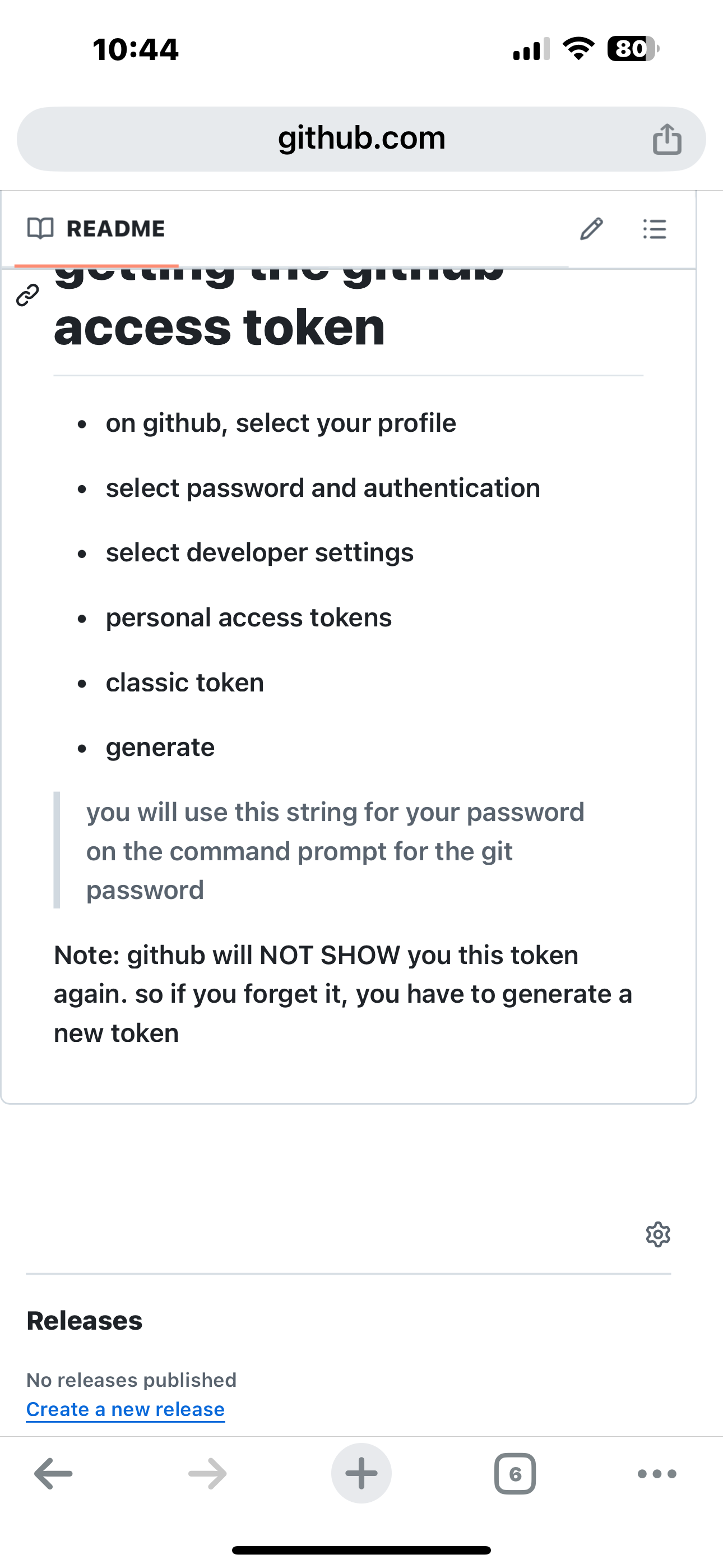
                I should authenticate now with a “Personal-Access-Token”. I don’t own one.
                To create a “Personal-Access-Token” I have to go to my Organization, I have no Organization, I’m a private person that tries to have a little fun with a MagicMirror2 and some other Raspberry Pi projects.
                When I create an Organization and then following the instructions to create Personal-Access-Tokens, no Tokens were created.
                Sorry, for today I had enough problems, will try tomorrow again.

                S 1 Reply Last reply Reply Quote 0
                • S Do not disturb
                  sdetweil @xIExodusIx
                  last edited by

                  @xIExodusIx yes, everybody is getting more serious about security in WAY too many different ways

                  for github, read the doc on my backup/restore tools
                  https://github.com/sdetweil/MagicMirror-backup-restore
                  IMG_0821.png

                  Sam

                  How to add modules

                  learning how to use browser developers window for css changes

                  S 1 Reply Last reply Reply Quote 0
                  • S Do not disturb
                    sdetweil @sdetweil
                    last edited by

                    @xIExodusIx

                    you can also save the settings for git
                    see
                    https://forum.magicmirror.builders/post/124488

                    Sam

                    How to add modules

                    learning how to use browser developers window for css changes

                    X 1 Reply Last reply Reply Quote 0
                    • X Offline
                      xIExodusIx @sdetweil
                      last edited by

                      @sdetweil

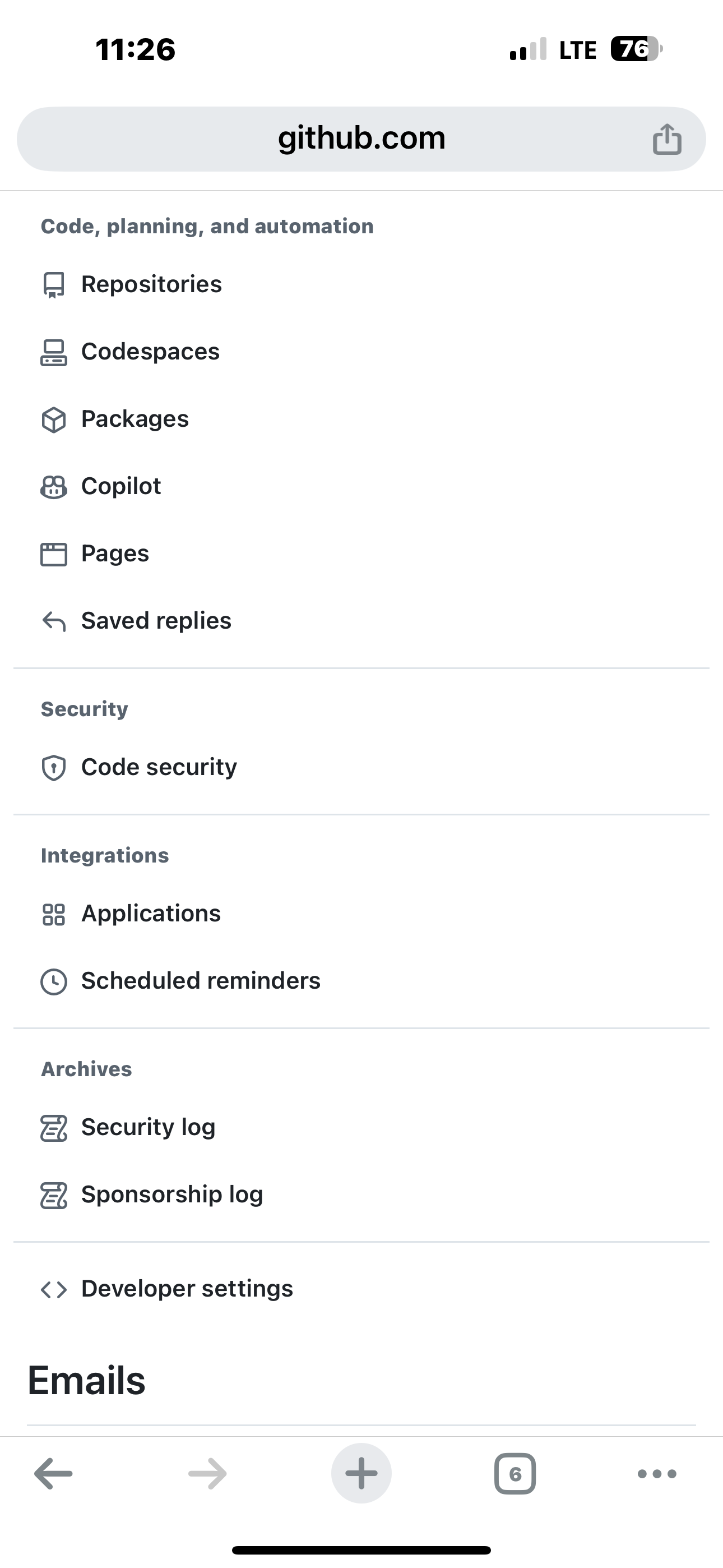
                      Sorry sdetweil, on my github account site at “Password and authentication” is no “developer settings”.
                      What I can see is;
                      Password and a button with Change Password
                      Passkeys and somthing toadd and modify them.
                      Two-factor authentication! with a bunch of settings.

                      But no “developer settings”.

                      S 1 Reply Last reply Reply Quote 0
                      • S Do not disturb
                        sdetweil @xIExodusIx
                        last edited by sdetweil

                        @xIExodusIx its moved, select settings, then at the bottom
                        IMG_0822.png

                        Sam

                        How to add modules

                        learning how to use browser developers window for css changes

                        X 1 Reply Last reply Reply Quote 0
                        • X Offline
                          xIExodusIx @sdetweil
                          last edited by

                          @sdetweil

                          Okay I hav now a “Personal-Access-Token” but the next problem is comming up afet I make “git push”
                          Problem:
                          remote: Permission to xIExodusIx/MMM-FRITZ-Box-Callmonitor-py3.git denied to xIExodusIx.

                          It’s really complicated and frustrating :-(

                          What have I to do now? I searched for permissons on github to modify for uploading but could not find anything.

                          S 1 Reply Last reply Reply Quote 0
                          • S Do not disturb
                            sdetweil @xIExodusIx
                            last edited by

                            @xIExodusIx show output of

                            git remote -v

                            Sam

                            How to add modules

                            learning how to use browser developers window for css changes

                            X 1 Reply Last reply Reply Quote 0
                            • X Offline
                              xIExodusIx @sdetweil
                              last edited by

                              @sdetweil

                              git remote -v
                              origin https://github.com/xIExodusIx/MMM-FRITZ-Box-Callmonitor-py3.git (fetch)
                              origin https://github.com/xIExodusIx/MMM-FRITZ-Box-Callmonitor-py3.git (push)

                              That is what I get.

                              S 1 Reply Last reply Reply Quote 0
                              • S Do not disturb
                                sdetweil @xIExodusIx
                                last edited by

                                @xIExodusIx you did use the token as the password, right?

                                Sam

                                How to add modules

                                learning how to use browser developers window for css changes

                                X 3 Replies Last reply Reply Quote 0
                                • X Offline
                                  xIExodusIx @sdetweil
                                  last edited by

                                  @sdetweil

                                  Yes, when I type git push, I have to type in my username and next I have to type in the “userpassword” for that I take the “Personal-Access-Toke” I got from github.

                                  Thats what I do:
                                  git push
                                  Username for ‘https://github.com’: xIExodusIx
                                  Password for ‘https://xIExodusIx@github.com’:
                                  remote: Permission to xIExodusIx/MMM-FRITZ-Box-Callmonitor-py3.git denied to xIExodusIx.
                                  Schwerwiegend: konnte nicht auf ‘https://github.com/xIExodusIx/MMM-FRITZ-Box-Callmonitor-py3.git/’ zugreifen: The requested URL returned error: 403

                                  The Problem is, that the “password” aka “Personal-Access-Token” is not showed in Linux (RaspiOS). I copy the “PAT (Personal-Access.-Token)” that I stored in Keepass on my PC and insert it using a klick with the right mouse-button in RaspiOS.

                                  1 Reply Last reply Reply Quote 0
                                  • X Offline
                                    xIExodusIx @sdetweil
                                    last edited by

                                    @sdetweil

                                    I got it, I made a new “Personal-Access-Token (classic)” giving it write access permissons for repositories and could now successful make “git push”.

                                    1 Reply Last reply Reply Quote 0
                                    • X Offline
                                      xIExodusIx @sdetweil
                                      last edited by

                                      @sdetweil

                                      What have I to do next?
                                      Can I edit my commit? I would like to give mor information and correct some typing errors.

                                      S 1 Reply Last reply Reply Quote 0
                                      • S Do not disturb
                                        sdetweil @xIExodusIx
                                        last edited by

                                        @xIExodusIx no , cannot edit a “commit”

                                        you can make another

                                        change files
                                        test
                                        git status
                                        git add
                                        git commit
                                        git push

                                        same workflow each time

                                        Sam

                                        How to add modules

                                        learning how to use browser developers window for css changes

                                        X 1 Reply Last reply Reply Quote 0
                                        • X Offline
                                          xIExodusIx @sdetweil
                                          last edited by

                                          @sdetweil

                                          okay :-)

                                          Thank you very, very much for your help.

                                          R 1 Reply Last reply Reply Quote 0
                                          • R Offline
                                            rkorell Module Developer @xIExodusIx
                                            last edited by

                                            Dear @xIExodusIx ,
                                            do you think it’s possible to get your re-compiled code?
                                            I’m really curious - because the current call monitor is “nice” but the improvements you had described seemed to be really promising…

                                            Thanks a lot.
                                            Warmest regards,
                                            Ralf

                                            X 1 Reply Last reply Reply Quote 0

                                            Hello! It looks like you're interested in this conversation, but you don't have an account yet.

                                            Getting fed up of having to scroll through the same posts each visit? When you register for an account, you'll always come back to exactly where you were before, and choose to be notified of new replies (either via email, or push notification). You'll also be able to save bookmarks and upvote posts to show your appreciation to other community members.

                                            With your input, this post could be even better 💗

                                            Register Login

                                            • 1
                                            • 2
                                            • 3
                                            • 4
                                            • 1 / 4
                                            • First post
                                              Last post
                                            Enjoying MagicMirror? Please consider a donation!
                                            MagicMirror created by Michael Teeuw.
                                            Forum managed by Sam, technical setup by Karsten.
                                            This forum is using NodeBB as its core | Contributors
                                            Contact | Privacy Policy