Read the statement by Michael Teeuw here.
Unable to get MMM-Calendar to broadcast past events
-
I’m a new user trying to get my MagicMirror up and running. I’m running into an issue with MMM-Calendar or MMM-CalendarExt3. I’m using the “week” view and as soon as events are in the past, it won’t show any of them.
I’ve done a bit of browsing on the forum (amazing community of helpful people, BTW!) and believe I have everything aligned, including setting maximumEntries, maximumNumberOfDays, pastDaysCount, and broadcastPastEvents in MMM-calendar.
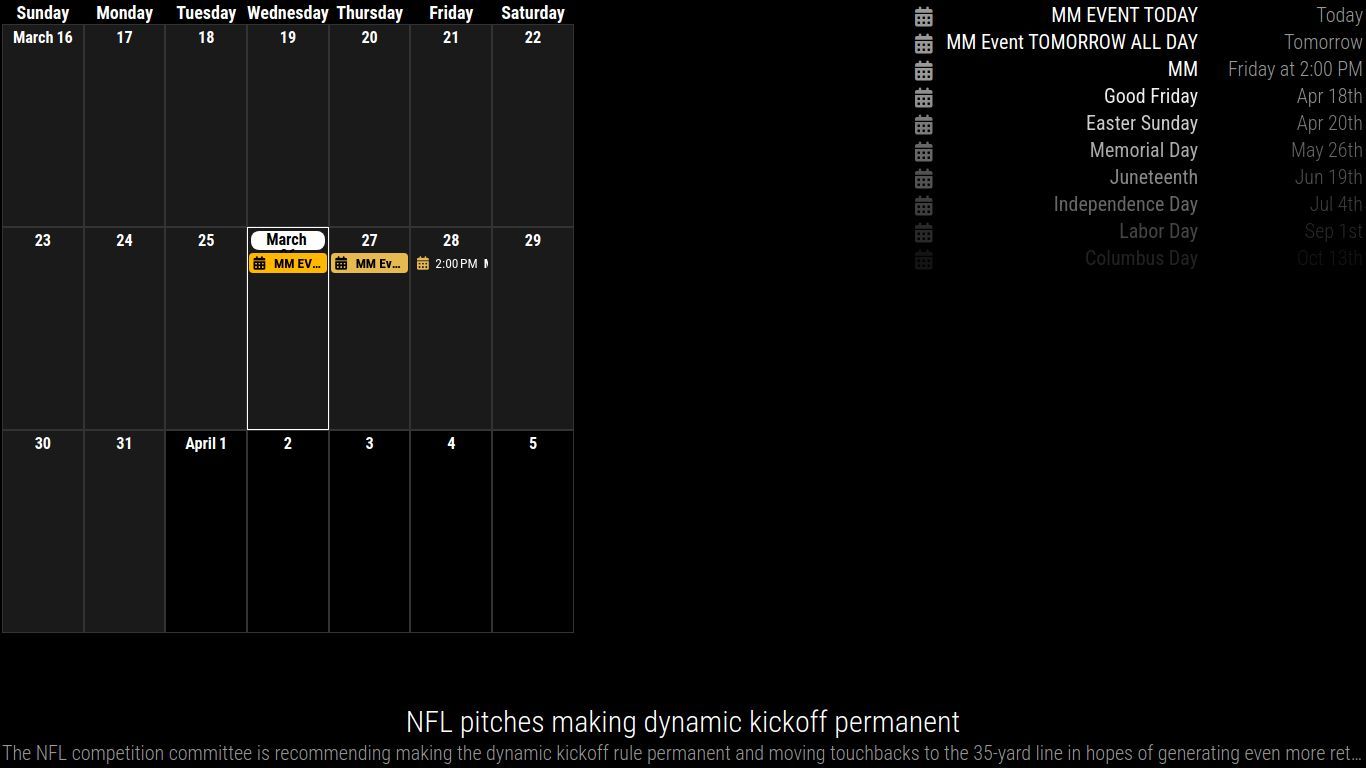
I created a test calendar to try to simplify things, and created 5 events, one on each day of the week this week. When running MagicMirror, I get a notification that Calendar-Fetcher for [FAMILY] is broadcasting 3 events, presumably today, tomorrow and Friday. See below for the 5 expected events.
Here’s my code (with personal details omitted):
	modules: [
                       		{
                       			module: "alert",
                       		},
                       		{
                       			module: "calendar",
                       			position: "top_right",
                       			maximumEntries: 10000,
                       			maximumNumberOfDays: 28,
                       			pastDaysCount: 14,
                       			maxTitleLength: 50,
                       			showLocation: false,
                       			wrapEvents: true,
                       			broadcastPastEvents: true,
                       			config: {
                       				calendars: [
                       					{
                       						//fetchInterval: 7 * 24 * 60 * 60 * 1000,
                       						url: "https://ics.calendarlabs.com/76/mm3137/US_Holidays.ics",
                       						name: "Holidays",
                       						color: "#7c7c7c",
                       					},
                       					{
                       						//Family Calendar
                       						url: "https://calendar.google.com/calendar/ical/[PRIVATE CALENDAR ADDRESS]/basic.ics",
                       						name: "Family",
                       						color: "#e7ba51",
                       					},
                       				]
                       			}
                       		},
                       		{
                       			module: "MMM-CalendarExt3",
                       			position: "top_left",
                       			title: "",
                       			config: {
                       				instanceID: "familyCalendar",
                       				mode: "week",
                       				weekIndex: 0,
                       				weeksInView: 2,
                       				maxEventLines: 5,
                       				firstDayOfWeek: 0,
                       				cellDateOptions: {month: 'long', day: 'numeric'},
                       				maxEventLines: 8,
                       				calendarSet: ['Holidays', 'Family', 'School'],
                       			}
                       		},
Here’s a screengrab of my Google Calendar and what I would expect to see in MMM-CalendarExt3:

And here’s what’s on my MagicMirror:
I’m guessing I’m missing something simple, but I just don’t see it. I appreciate everyone’s help!
-
@thecaptainzap
thanks… I missed something in your prior postall of these
                       			maximumEntries: 10000,
                       			maximumNumberOfDays: 28,
                       			pastDaysCount: 14,
                       			maxTitleLength: 50,
                       			showLocation: false,
                       			wrapEvents: true,
                       			broadcastPastEvents: true,
go AFTER the
config: {line in the module definition in config.js
as they are parameters TO the calendar module, NOT to the MagicMirror runtimealso, this seems to be a problem
fatal: refusing to fetch into branch 'refs/heads/_fix_clipping' checked out at '/home/tim/MagicMirror' -
-
@sdetweil Thanks so much for the reply! I didn’t know about that fix and have now applied it. However, it is still only broadcasting future events. I only get the 2 events (today and tomorrow). Nothing from the 24th-26th.
I ran into the “package-lock.json” error. Removed that file, proceeded with installation. Then restarted MM. No change so rebooted the machine to feel good about myself. Ran “npm run install-mm” again after the reboot. Still no change.
Here’s the result of the 2nd install (after reboot):
tim@calendar:~$ cd ~/MagicMirror/
tim@calendar:~/MagicMirror$ git fetch origin pull/3679/head:_fix_clipping
fatal: refusing to fetch into branch 'refs/heads/_fix_clipping' checked out at '/home/tim/MagicMirror'
tim@calendar:~/MagicMirror$ git switch _fix_clipping
M       index.html
Already on '_fix_clipping'
tim@calendar:~/MagicMirror$ npm run install-mm

> magicmirror@2.31.0-develop install-mm
> npm install --no-audit --no-fund --no-update-notifier --only=prod --omit=dev


> magicmirror@2.31.0-develop postinstall
> npm run install-vendor && npm run install-fonts && echo "MagicMirror² installation finished successfully!
> "


> magicmirror@2.31.0-develop install-vendor
> echo "Installing vendor files ...
> " && cd vendor && npm install --loglevel=error --no-audit --no-fund --no-update-notifier

Installing vendor files ...


up to date in 1s

> magicmirror@2.31.0-develop install-fonts
> echo "Installing fonts ...
> " && cd fonts && npm install --loglevel=error --no-audit --no-fund --no-update-notifier

Installing fonts ...


up to date in 1s
MagicMirror² installation finished successfully!


> magicmirror@2.31.0-develop prepare
> [ -f node_modules/.bin/husky ] && husky || echo no husky installed.

no husky installed.

up to date in 13s
tim@calendar:~/MagicMirror$
I appreciate your time & feedback!
-
@thecaptainzap
thanks… I missed something in your prior postall of these
                       			maximumEntries: 10000,
                       			maximumNumberOfDays: 28,
                       			pastDaysCount: 14,
                       			maxTitleLength: 50,
                       			showLocation: false,
                       			wrapEvents: true,
                       			broadcastPastEvents: true,
go AFTER the
config: {line in the module definition in config.js
as they are parameters TO the calendar module, NOT to the MagicMirror runtimealso, this seems to be a problem
fatal: refusing to fetch into branch 'refs/heads/_fix_clipping' checked out at '/home/tim/MagicMirror' -
@sdetweil Thank you! I knew I was doing something silly. Moving those config settings inside the config brackets fixed my issue!!
I think the “fatal” error was because I had already run that command once, but I can’t say for certain.
Again, I appreciate your help on this!
-
S sdetweil has marked this topic as solved on
Hello! It looks like you're interested in this conversation, but you don't have an account yet.
Getting fed up of having to scroll through the same posts each visit? When you register for an account, you'll always come back to exactly where you were before, and choose to be notified of new replies (either via email, or push notification). You'll also be able to save bookmarks and upvote posts to show your appreciation to other community members.
With your input, this post could be even better 💗
Register Login