Read the statement by Michael Teeuw here.
Help with a flexbox item that is not aligning.
-
Hello all,
Looking for a little advice on this. I have 4 modules positioned in my top_bar and I have then in a flexbox. 3 of the 4 items are lined up with the top of the box, but the 4th will not move. I’ve used the developers window to inspect elements and make changes on the fly, but no matter what I change, in either the custom.css or main.css that goofy Moonphase module will not line up. Even if I change the flex alignment, all the modules will change position, just that moon module is never in sync with the others if that makes sense. Anyway, is there a tool or way to determine if that module is being positioned by another css file? Any other suggestions are welcome.

Here is my custom.css for reference.
body { background-Image: url("background.jpg"); background-size: cover; position: absolute; margin: 0px; height: 100%; width: 100%; } header { border-bottom: none; color: #616161; } .wi.dimmed.wi-sunset { color: orange; } .wi.dimmed.wi-sunrise { color: yellow; } .wi-day-sunny { color: yellow; } .wi-day-cloudy { color: yellow; } .wi-rain { color: grey; } .wi-thunderstorm { color: grey; } .wi-snow { color: white; } .wi-fog { color: white; } .wi-night-clear { color: white; } .wi-night-cloudy { color: grey; } .wi-night-showers { color: blue; } .wi-night-rain { color: blue; } .wi-thunderstorm { color: yelow; } .wi-night-snow { color: white; } .wi-night-alt-cloudy-windy { color: grey; } .clock, .weather, .MMM-MoonPhase { display: inline-flex; justify-content: space-around; align-items: flex-start; margin-right: 25px; margin-left: 25px; background-color:rgba(255, 255, 255,0.6); width: 300px; height: 180px; border-radius:20px; padding: 8px; color: #616161; } .MMM-MoonPhase { background-color: rgba(255, 255, 255, 0.6); width: 250px; height: 180px; border-radius:20px; padding: 8px; color: #616161; } .lessontime { text-align: right; white-space: nowrap; padding-right: 2em; width: 1ex; font-size: 27px; color: #616161; } .lesson{ text-align: left; font-size: 27px; color: #616161; } .MMM-CalendarExt3{ background-color:rgba(255, 255, 255,0.6); border-radius:20px; padding: 8px; } .CX3 .cell { border: 1px solid var(--celllinecolor); background-color: var(--cellbgcolor); height: calc( var(--cellheaderheight) + var(--cellfooterheight) + calc(var(--eventheight) * var(--maxeventlines)) ); } .CX3 .weekGrid { display: grid; width: 100%; grid-template-columns: repeat(7, [cell-start] 1fr [cell-end]); grid-auto-columns: 0fr; margin-top: 5px; /* ADD THIS*/ } .CX3 .cw { display:none; } .CX3 .cellContainer .cell:nth-child(1) .cw { display: none; } .CX3 .cw::before { display: none; } .CX3 .event { margin: 6px 1px; padding: 15px 1px; text-align: left; grid-row: span 1; display: flex; justify-content: flex-start; gap: 0px; text-overflow: ellipsis; overflow: marquee; white-space: nowrap; min-width: 0; position: relative; eventheight: 35px; } .CX3 .event.singleday .headline:not(.useSymbol)::before { display: none; } .CX3 .event.singleday:not(.useSymbol)::before { content: ''; } .CX3 .event.singleday { border-left:6px solid var(--calendarColor); color: #616161; } .CX3 .cell.today { border: 2px solid #fff; /* default was 1px, so you can change to 2px or whatever */ } .CX3 .thisMonth { background-color: rgb(255 255 255 / 10%); } ---------------------------------------------------------------------------------------- -
@bobbylx the dev window will show you the classes and styles being applied and where they came from
-
@bobbylx many styles are not
inherited thru the content tree
you did
.MMM-MoonPhasethat is a class that appears on a div that also has .module
size styles do not inherit down, because then everything would be the same size, and just a jumble of bits
-
@bobbylx
google searchflexbox alignment styles
-
@sdetweil I’ve gone through a plethora of pages regarding Flexbox. What I am failing to understand, and probably in part due to my limited coding experience, is why only that single item of the 4 is not cooperating.
The way I understand is I have the flex container, which in this case is the top_bar? Then I have items within the container. My flex items would be the .clock, .weather, .weather and .MMM-MoonPhase. So should I be using a word other than .MMM-MoonPhase when adjusting the flex box position? Such as, in the example below, should .MMM-MoonPhase be replaced with another code that will then apply to the moon phase? This is where it gets muddy for me. And I know the second MMM-MoonPhase down there by itself is redundant, I was just testing..clock, .weather, .MMM-MoonPhase { display: inline-flex; justify-content: space-around; align-items: flex-start; margin-right: 25px; margin-left: 25px; background-color:rgba(255, 255, 255,0.6); width: 300px; height: 180px; border-radius:20px; padding: 8px; color: #616161; } .MMM-MoonPhase { background-color: rgba(255, 255, 255, 0.6); width: 250px; height: 180px; border-radius:20px; padding: 8px; color: #616161; }So if bring up the developers window, and change the inline-flex, align-items, they all 4 move around, just that single Moonphase is slight off from the others.
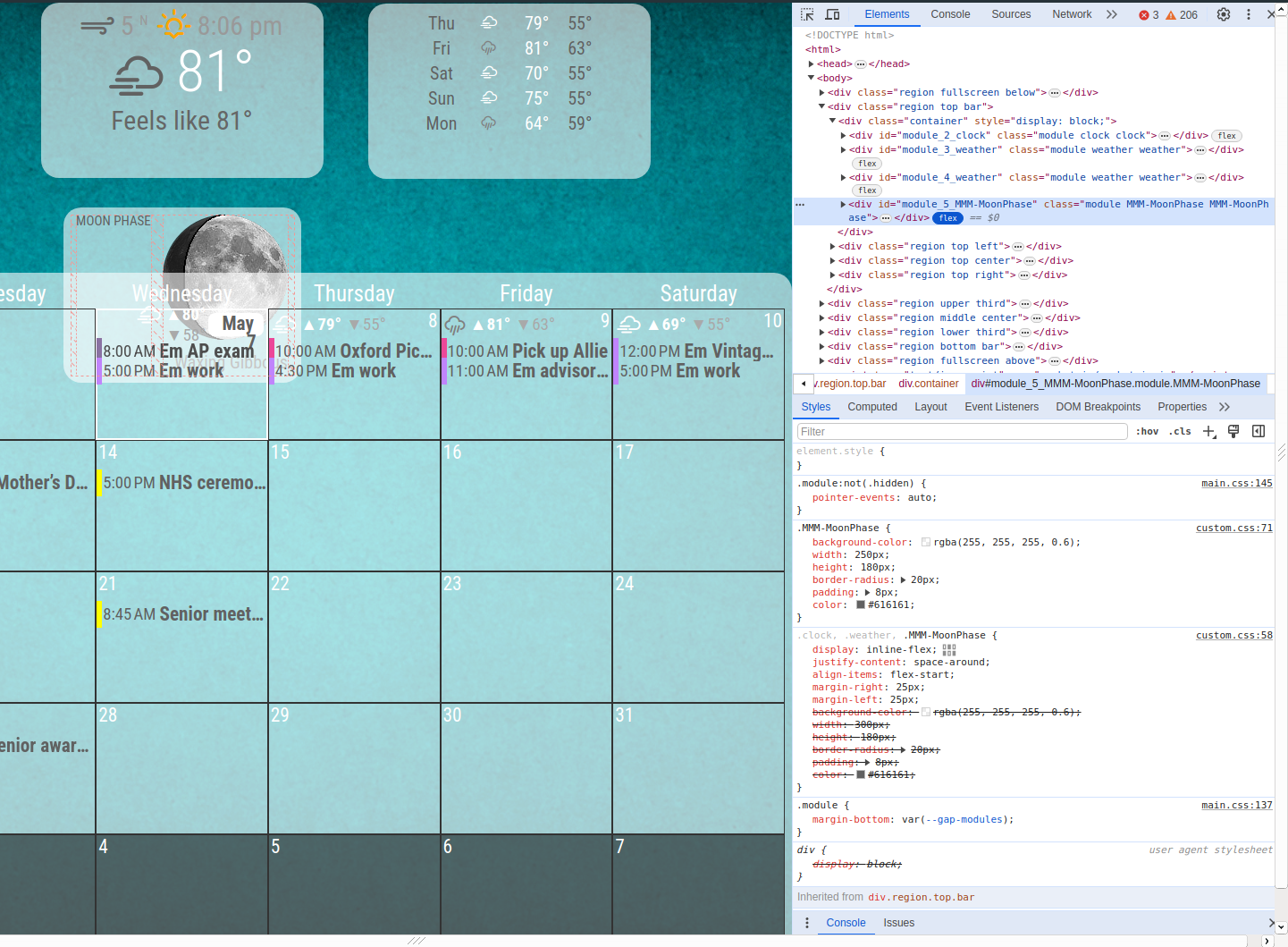
Honestly, I’ve been tweaking and editing this thing for a good year or so, I might be better off making a backup of some stuff and starting fresh.
-
@bobbylx when you are trying to do left right alignment you need to move the dev window to a different edge, else the content wraps, oops
this us called docking the dev window,
you can dock it on the bottom edge, top right of the dev window is the menu (3 dots) -
@bobbylx flex means slides
what are the rules for the flexbox?
when an item is in s flexbox its position is relative to the flex box position on the screen
flex-end puts me at the end of the flex, flex-center is center, flex-start is at the beginning, youmight need self-align, then x,y
relative to the flex box areax:50% starts your left edge at the middle
looks like moonphase set its own padding
-
Thanks for the info.
As for my horizontal alignment, I’ve got those where I like, and yeah I was aware of the content wrap. I have ssh session and a remote desktop over to my Pi box, so whenever I make a change I restart the process, which closes the developer box. I only open it to check things, but I’m not doing configurations based on the wrapped content when the box is present.
I’ll probably just remove that moonphase anyway, heck, I just need to look out the window.
-
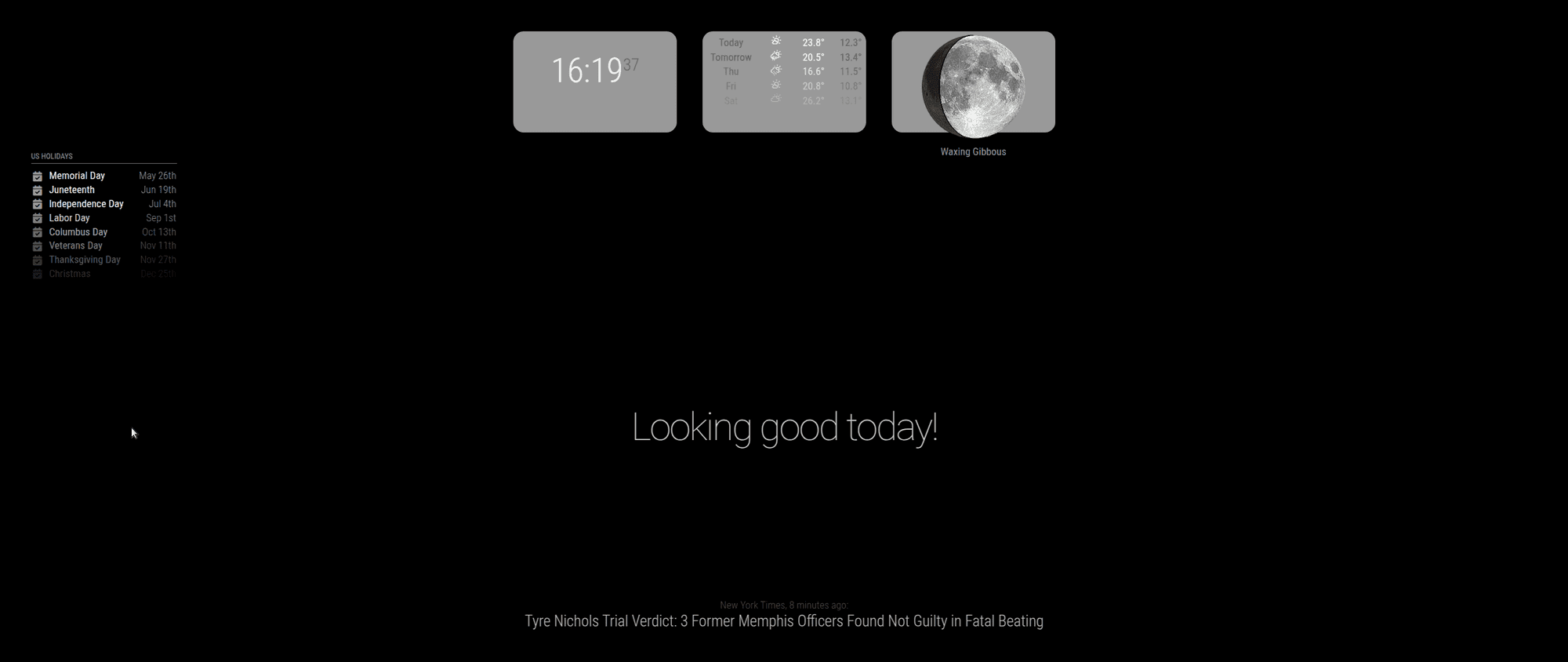
@bobbylx I did this
.region.bar.top .container {
        display: inline-flex !important;
        flex-direction: row;
}
.clock, .weather , .MMM-MoonPhase {
        margin-right: 25px;
        margin-left: 25px;
        background-color:rgba(255, 255, 255,0.6);
        width: 300px;
        height: 180px;
        border-radius:20px;
        padding: 8px;
}
and got this
-
@sdetweil You sir are a saint. That’s exactly what I was missing, I suspected I needed to separate the individual items from the flexbox, but lacked the knowledge to do it! Thank you!
-
@bobbylx it took me a few(hundred) tries too…
Hello! It looks like you're interested in this conversation, but you don't have an account yet.
Getting fed up of having to scroll through the same posts each visit? When you register for an account, you'll always come back to exactly where you were before, and choose to be notified of new replies (either via email, or push notification). You'll also be able to save bookmarks and upvote posts to show your appreciation to other community members.
With your input, this post could be even better 💗
Register Login