Read the statement by Michael Teeuw here.
Voice and Touch control modules
-
Hello,
Any recommendations for MMM modules that support voice control and touchscreen functionality?With voice control, want to be able to see future months in the calendar. Same with touchscreen and possibly local zoom in.
I am trying to install MMM-GoogleAssistant, but it seems it is not up to date? I keep getting errors like speaker module not found. When I I do npm install speaker, I get more errors as if more codes are outdated?
Any suggestions? I have a Raspberry Pi4B, 64bit, 2Gb Linux.
Thanks.
-
@sankum there are currently no good working voice modules for MagicMirror
touch is limited. MagicMirror was designed as an output only information panel, on a device with no touch support.
there are a couple modules that provide some touch support
search the 3rd party list, but nothing really MagicMirror controlling. maybe swipe to change logical pages w mmm-pages or carousel
or more recently
https://forum.magicmirror.builders/topic/19678/mmm-chores-manage-and-keep-track-of-your-household-choresMagicMirror runs in a web browser, so if your display supports touch, its possible to write more modules that support touch
-
@sankum
I searched for the same, but did not find anything that worked for me (not saying there is not anything out there, just did not fit my need).I have a 43" touch mirror (repurposed fitness smart mirror), and currently I have a WIP solution with a custom browser coded in python, that only display a menu icon in the top. In it I can open a menu for refreshing the page, restart the Docker container my MM is in, open and edit the config, git-pull any modules etc.
I can also predefine the tabs is should load, so main tab is MM-url, second is Homey-url, so I can control my Homey devices from the screen.I also have a custom (not released) module for showing “MM-tabs” with icons in the bottom of the screen, based on the MMM-Carousel module.
This way I can swipe “pages”, or just click a tab and it switches to that “page”.
Tripple tapping a tab deactivate the tab If i dont want to show it.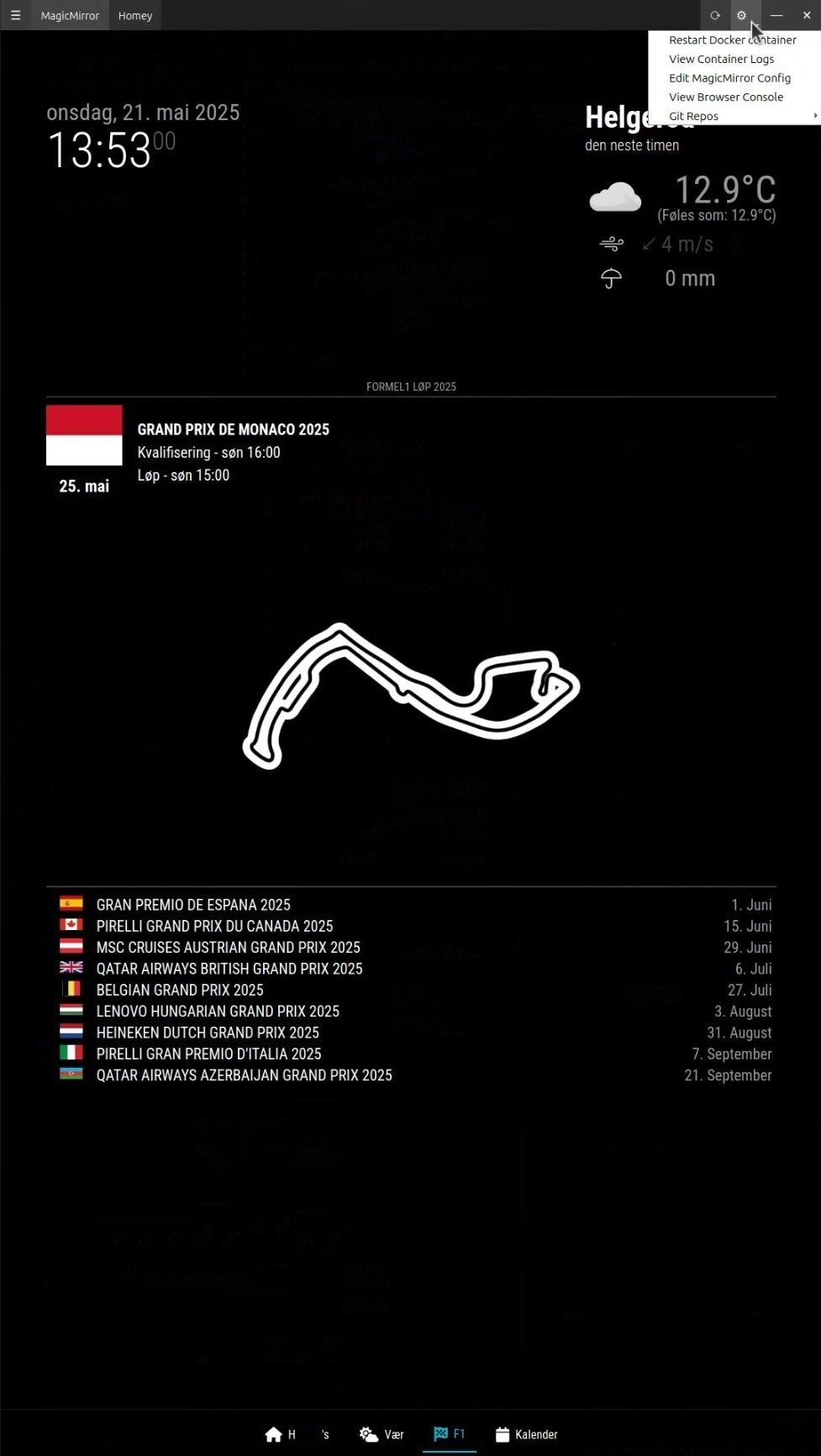
The repos for this is currently privat, as they are still WIP, but I’m probably going to publish them at some point.
-
Thanks for your feedback. Looking forward to your Touchscreen module demo.!
I have been looking into MMM-Jarvis-Voice-Control. Have installed it but not gotten it to work. The documentation for installation and plugins is not great.
Anybody else had experience with this module? Is it worth pursuing to make it work?
Thanks -
@sankum we had a really good google assistant, but the author left and took all his modules down.
not much work was done on others for quite a while -
Hi Sam,
I clones a MMM-GoogleAssistant. When I run it it complains about speaker module not found:
[ERROR] Error when loading MMM-GoogleAssistant: Cannot find module ‘speaker’
Require stack:- /home/sankum/MagicMirror/modules/MMM-GoogleAssistant/node_helper.js
- /home/sankum/MagicMirror/js/app.js
- /home/sankum/MagicMirror/js/electron.js
Is there something missing or I need to install something else? Thanks.
-
-
Hi Sam,
Following is the source:
sankum@rpi:~/MagicMirror/modules/MMM-GoogleAssistant $ git remote -v
origin https://github.com/jeffmur/MMM-GoogleAssistant.git (fetch)
origin https://github.com/jeffmur/MMM-GoogleAssistant.git (push)
sankum@rpi:~/MagicMirror/modules/MMM-GoogleAssistant $ -
@sankum yeh, I don’t know.
speaker still exists
https://www.npmjs.com/package/speakerthe module was last updated 4 years ago, so who knows…
-
Thanks. But clearly something is outdated? Snippets of error messages below. Does not install. Is it simply old version or something can be done to salvage or anu other alternative? Thanks.
://eslint.org/version-support for other options.
npm error code 1
npm error path /home/sankum/MagicMirror/modules/node-speaker/node_modules/speaker
npm error command failed
npm error command sh -c node-gyp rebuild
npm error make: Entering directory ‘/home/sankum/MagicMirror/modules/node-speaker/node_modules/speaker/build’
npm error CC(target) Release/obj.target/output/deps/mpg123/src/output/alsa.o
npm error make: Leaving directory ‘/home/sankum/MagicMirror/modules/node-speaker/node_modules/speaker/build’
npm error gyp info it worked if it ends with ok
npm error gyp info using node-gyp@11.0.0
npm error gyp info using node@22.16.0 | linux | arm64
… -
@sankum the working alternative no longer exists.
there is no author commitment to maintain their module contributions. if you care/want/can resurrect a module, more power to you.
here is the story on Alexa
https://forum.magicmirror.builders/topic/16069/alexa-implementations-now-more-difficult-and-some-features-will-stop-working -
Thanks. If I had the skills I certainly will endeavor to do so. So for now may not be able to use Voice after all.
What would be another way to see future months in the Calendar when it is set as a display, say on the wall? Using mouse? Thanks. -
@sankum i use mmm-pages, and 3 instances of MMM-Calendarext3 one for current month, next and after.
some have added swipe to that, so you can wave a hand, with the right sensor
page-indicator module can give you on screen buttons for direct page access too (assuming you have touch support, built in or ir frane)
Hello! It looks like you're interested in this conversation, but you don't have an account yet.
Getting fed up of having to scroll through the same posts each visit? When you register for an account, you'll always come back to exactly where you were before, and choose to be notified of new replies (either via email, or push notification). You'll also be able to save bookmarks and upvote posts to show your appreciation to other community members.
With your input, this post could be even better 💗
Register Login