Read the statement by Michael Teeuw here.
Different order in center after Upgrade to 2.32
-
Hi all,
I have 6 cameras with RTSPtoWeb module in position top_center. Until 2.32 they arranged in a 2x3 order, after upgrade to 2.32 they appear in 1x6 order und do not fit anymore.
Does anyone know, why is that, and how I can go back to the 2x3 rows?
Thank you,
Falter -
@falter sounds like someone might have changed the settings of the regions without using custom.css
-
I haven’t seen anything regarding this in he changelog to 2.32…
-
@falter no. i meant you. we didn’t change that.
we dont touch custom.css and that is the only other place where layout and style info is provided.
how fid you upgrade?
-
@sdetweil ahh, I had that feeling it could be me…
But I didn’t change anything css-related, as I don’t know css. I have two MM with different setup, only the cams are the same and the problem is with both.
The upgrade was as always: git pull and npm run install-mm -
@falter ok, if you had used my upgrade script we would have a log to examine
can you show the 1st hundred or so message for MagicMirror startup
if you are using the default calendar, note that our logging messages include the gull url, so blank them or make them unusable from the log messages
-
another thing is to open the developer window elements tab, and capture the html so we can look at it.
see the second link in my signature below
once you located the html content for the module,
tight click and copythen paste somewhere, send to me, same userid at gmail
-
@sdetweil thank you very much for taking the time!
For the logs, do I have to change the loglevel? There is not much in mm-out.log, or where do I have to look?Here is the content of the container from dev-window:
<div class="container"><div id="module_0_MMM-RTSPtoWeb" class="module MMM-RTSPtoWeb MMM-RTSPtoWeb" style="order: 0;"><header class="module-header" style="display: none;">undefined</header><div class="module-content"><video class="rtw-video" autoplay="" playsinline="" style="max-width: 100%;"></video></div></div><div id="module_1_MMM-RTSPtoWeb" class="module MMM-RTSPtoWeb MMM-RTSPtoWeb" style="order: 0;"><header class="module-header" style="display: none;">undefined</header><div class="module-content"><video class="rtw-video" autoplay="" playsinline="" style="max-width: 100%;"></video></div></div><div id="module_2_MMM-RTSPtoWeb" class="module MMM-RTSPtoWeb MMM-RTSPtoWeb" style="order: 0;"><header class="module-header" style="display: block;">Nordseite</header><div class="module-content"><video class="rtw-video" autoplay="" playsinline="" style="max-width: 100%;"></video></div></div><div id="module_3_MMM-RTSPtoWeb" class="module MMM-RTSPtoWeb MMM-RTSPtoWeb" style="order: 0;"><header class="module-header" style="display: block;">Terrasse</header><div class="module-content"><video class="rtw-video" autoplay="" playsinline="" style="max-width: 100%;"></video></div></div><div id="module_4_MMM-RTSPtoWeb" class="module MMM-RTSPtoWeb MMM-RTSPtoWeb" style="order: 0;"><header class="module-header" style="display: block;">Garten</header><div class="module-content"><video class="rtw-video" autoplay="" playsinline="" style="max-width: 100%;"></video></div></div><div id="module_5_MMM-RTSPtoWeb" class="module MMM-RTSPtoWeb MMM-RTSPtoWeb" style="order: 0;"><header class="module-header" style="display: block;">Südseite</header><div class="module-content"><video class="rtw-video" autoplay="" playsinline="" style="max-width: 100%;"></video></div></div></div> -
@falter out.log was where
here is formatted html
<div class="container">
   <div id="module_0_MMM-RTSPtoWeb" class="module MMM-RTSPtoWeb MMM-RTSPtoWeb" style="order: 0;">
      <header class="module-header" style="display: none;">undefined</header>
      <div class="module-content">
         <video class="rtw-video" autoplay="" playsinline="" style="max-width: 100%;"></video>
      </div>
   </div>
   <div id="module_1_MMM-RTSPtoWeb" class="module MMM-RTSPtoWeb MMM-RTSPtoWeb" style="order: 0;">
      <header class="module-header" style="display: none;">undefined</header>
      <div class="module-content">
         <video class="rtw-video" autoplay="" playsinline="" style="max-width: 100%;"></video>
      </div>
   </div>
   <div id="module_2_MMM-RTSPtoWeb" class="module MMM-RTSPtoWeb MMM-RTSPtoWeb" style="order: 0;">
      <header class="module-header" style="display: block;">Nordseite</header>
      <div class="module-content">
         <video class="rtw-video" autoplay="" playsinline="" style="max-width: 100%;"></video>
      </div>
   </div>
   <div id="module_3_MMM-RTSPtoWeb" class="module MMM-RTSPtoWeb MMM-RTSPtoWeb" style="order: 0;">
      <header class="module-header" style="display: block;">Terrasse</header>
      <div class="module-content">
         <video class="rtw-video" autoplay="" playsinline="" style="max-width: 100%;"></video>
      </div>
   </div>
   <div id="module_4_MMM-RTSPtoWeb" class="module MMM-RTSPtoWeb MMM-RTSPtoWeb" style="order: 0;">
      <header class="module-header" style="display: block;">Garten</header>
      <div class="module-content">
         <video class="rtw-video" autoplay="" playsinline="" style="max-width: 100%;"></video>
      </div>
   </div>
   <div id="module_5_MMM-RTSPtoWeb" class="module MMM-RTSPtoWeb MMM-RTSPtoWeb" style="order: 0;">
      <header class="module-header" style="display: block;">Südseite</header>
      <div class="module-content">
         <video class="rtw-video" autoplay="" playsinline="" style="max-width: 100%;"></video>
      </div>
   </div>
</div>
so you have 6 instances of module, which will be stacked vertically by default.
I see some change was made to container, now in main.css where is wasn’t before…
I think this is a side effect to the “order” config option…I don’t know how to fix it at the moment… I am busy most of the day
-
ok, what do you mean with change now in main.css, container and order config? Was it me? I have this running for years and it could be, some time ago, I script-kiddie’d something in main.css, but I think this would be overwritten by the update?
Any hint where I could look? -
just to let you know, I got it, now I copied the old main.css over the recent one and it’s working as before.
Diff says:242,254d241 < < /** < * Container Definitions. < */ < < .region .container { < display: flex; < flex-direction: column; < } < < .region .container.hidden { < display: none; < }so, this is a bug then?
-
@falter not you
if you look in main.css
container is defined
it was not in prior release
so i think it defaulted todisplay:block;now its defined as
display:flex; flex-direction:column; -
@falter not a bug, side effect
will examine later
-
is there anything I could put in custom.css for future updates?
This does not work:.region .container { display: block; } -
@falter I dont know yet. Haven’t had a chance to debug
-
@falter in my 2.31 I wanted rows in top left
so I did this in custom.css.region.bar.top.left { display: inline-flex !important; flex-direction: row; }it still works in 2.32
but this gives A row.
I think you need display: grid;
I think this will do it, this gives evenly spaced 3x2 grid
for the top center position only.region.top.center .container { display: grid; grid-template-columns: repeat(3,1fr); grid-template-rows: repeat(2,1fr); gap:10px; }using the top left (my modules) using the developers window you can see the space of the grid
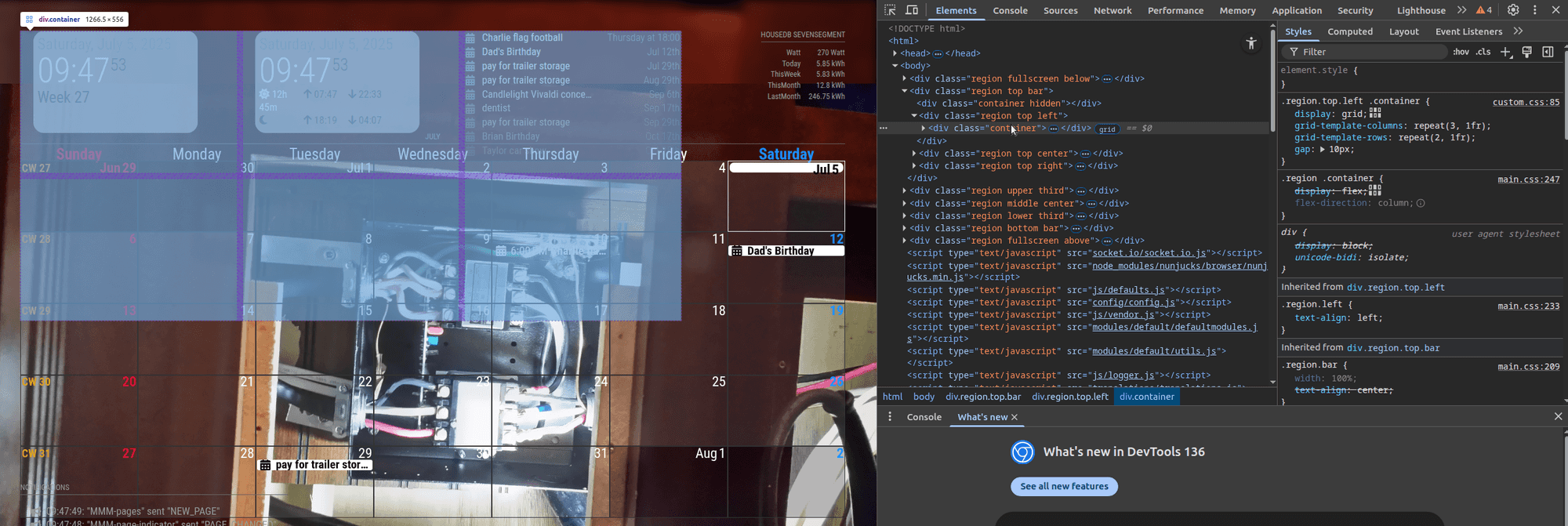
-
@sdetweil said in Different order in center after Upgrade to 2.32:
.region.top.center .container {
        display: grid;
        grid-template-columns: repeat(3,1fr);
        grid-template-rows: repeat(2,1fr);
        gap:10px;
}Thanks for the effort, unfortunatly this does not change anything visible.
The Video-Module uses this css, if that helps. I just added the fist width (else the video is too big for 2 coloumns, and changed the second one, so I have a little gap between them:.MMM-RTSPtoWeb { width: 38%; display: inline-block; } .region .rtw-video { width: 98%; display: block; } .rtw-error {}If I leave the css of the module untouched and put the above in custom.css, is does not apply. But that’s another story; as I said don’t know css, or better, understand…
-
@falter I can’t help more, can’t use module here, no cameras.
-
@sdetweil thanks anyway, at least I found out about the change in main.css, so I can keep using the recent version, which was most important. I just have to apply this change after future updates, which I can live with.
-
ahh, and not that I expect the effort, just for completeness: one could test the module without a camera, you just need a RTSPtoWeb stream…
Hello! It looks like you're interested in this conversation, but you don't have an account yet.
Getting fed up of having to scroll through the same posts each visit? When you register for an account, you'll always come back to exactly where you were before, and choose to be notified of new replies (either via email, or push notification). You'll also be able to save bookmarks and upvote posts to show your appreciation to other community members.
With your input, this post could be even better 💗
Register Login