Read the statement by Michael Teeuw here.
ALT or ALT+Spacebar
-
The ALT key is the bane of my MM existence.
I have an exceptionally old version of MM running and if I hit the ALT key by itself it toggles me out of fullscreen mode and offers me the option of launching developer tools which I use occasionally. Tap ALT key–> click View–> get dropdown —>Click Toggle Developer Tools and I’m off to the races.
One my latest install of MM, ALT by itself does nothing, searched forum and saw something about ALT + Spacebar, so I have tried that and can get myself out of fullscreen by way of this free floating option list. I do not get the selections across the top of the screen, one of which is view.
I can get MM out of fullscreen but here is what I get. The image shown here is the result of clicking Fullscreen when it is in Fullscreen so that will toggle in both directions .
After poking around in Chromium it looks like Ctrl+Shift+I will open developer Tools but
Any suggestions?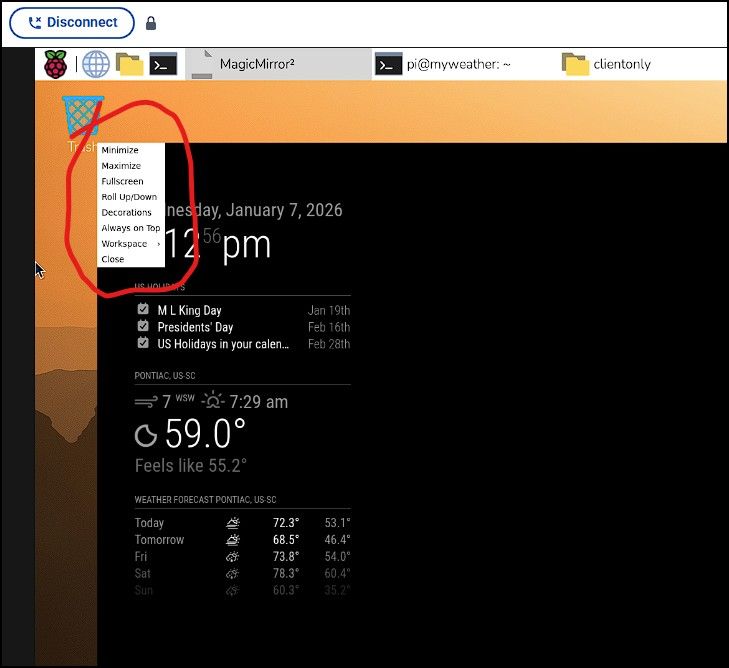
-
@ankonaskiff17 yes, ISN’T NICE that they decide to change these things
alt-spacebar still works, ctrl-m, too
if not pm2, then ctrl-q also
and with f keys, f11 is full screen in and outon my Linux desktop with Chrome, f11 shows the toolbar on the bottom of the page… fun huh?
-
@sdetweil So my only option is to do Ctrl+Sft+I to get Developer tools up?
-
@ankonaskiff17 restart it in dev mode
npm run start:dev
-
@sdetweil Am I right in that these problems are tied to this Wayland/labwc change?
Just looking at how MM appears when it goes from fullscreen to “not fullscreen” is what prompts my question. -
@ankonaskiff17 yes, its wayland and labwc. all new UI interface… SO much fun… not
-
@sdetweil I pulled to a stop on finishing this particular MM to make sure it was not something that I did incorrectly or something that could be resolved by me just changing a setting or something along those lines but after picking at it on and off for a few days that does not appear to be the case.
As of right now I feel like I can work around the problem, but is it something that is going to have to be resolved by yourself and the other maintainers?
Just my nature to poke at problems like this to better understand. There is very little information out there and mostly what is out there seems to be of minimal technical value. Sort of “We rolled out Wayland, enjoy” or “Raspberry Pi rolled out Wayland, enjoy” repeated in a hundred different locations.Related to the above, how do I determine the MM version? I have a MM, the first one I built that I felt really good about, and it has been chugging along just fine for a few years now. I know it needs updating but I have been reticent about doing that update because of this issue ever since Wayland was initially rolled out by Raspberry Pi. Sort of “If it ain’t broke, don’t fix it.”
-
@ankonaskiff17 mm version
cd ~/MagicMirror
grep version package.jsonWayland was introduced three Raspi OS releases ago.
its ‘better’ than X11 they sayWE MagicMirror don’t have any choice.

Hello! It looks like you're interested in this conversation, but you don't have an account yet.
Getting fed up of having to scroll through the same posts each visit? When you register for an account, you'll always come back to exactly where you were before, and choose to be notified of new replies (either via email, or push notification). You'll also be able to save bookmarks and upvote posts to show your appreciation to other community members.
With your input, this post could be even better 💗
Register Login