MagicMirror Forum
    • Recent
    • Tags
    • Unsolved
    • Solved
    • MagicMirror² Repository
    • Documentation
    • 3rd-Party-Modules
    • Donate
    • Discord
    • Register
    • Login
    A New Chapter for MagicMirror: The Community Takes the Lead
    Read the statement by Michael Teeuw here.

    MMM-JAST stopped updating a couple of days ago.

    Scheduled Pinned Locked Moved Solved Troubleshooting
    26 Posts 7 Posters 1.5k Views 6 Watching
    Loading More Posts
    • Oldest to Newest
    • Newest to Oldest
    • Most Votes
    Reply
    • Reply as topic
    Log in to reply
    This topic has been deleted. Only users with topic management privileges can see it.
    • KristjanESPERANTOK Offline
      KristjanESPERANTO Module Developer @plainbroke
      last edited by

      @plainbroke Please update to v2.10.3 and check. If it doesn’t work: Any unusual log entries in the node or browser console? Show me your config.

      plainbrokeP 1 Reply Last reply Reply Quote 0
      • plainbrokeP Offline
        plainbroke @KristjanESPERANTO
        last edited by plainbroke

        @KristjanESPERANTO
        I had to remove and reinstall, just updating with git pull did not fix it, but the reinstall fixed it. Thanks for your efforts.
        Much appreciated.

        Slow learner. But trying anyways.
        MM is on Raspberry Pi 4B w/8gb ram loaded on a 128gb nvme drive.
        Running Trixie and the latest MM version.

        S 1 Reply Last reply Reply Quote 0
        • S Offline
          sdetweil @plainbroke
          last edited by

          @plainbroke did you do an npm install after the git pull?

          Sam

          How to add modules

          learning how to use browser developers window for css changes

          plainbrokeP 1 Reply Last reply Reply Quote 0
          • plainbrokeP Offline
            plainbroke @sdetweil
            last edited by

            @sdetweil
            Yes
            npm ci
            Like his read me says to.
            Worked with reinstall so alls good on my mirror again.

            Slow learner. But trying anyways.
            MM is on Raspberry Pi 4B w/8gb ram loaded on a 128gb nvme drive.
            Running Trixie and the latest MM version.

            1 Reply Last reply Reply Quote 2
            • 1 Offline
              1a2a3a
              last edited by

              Ok, after git pull, had to do a npm ci and that fixes it!

              1 Reply Last reply Reply Quote 3
              • V Offline
                vgardenn
                last edited by

                Hi, I’m stuck at “Loading…” on this module as well. This is a new build I’ve been working on in the last week or so, first timer with MagicMirror so hopefully I’m not missing something obvious. I’ve not been able to get MMM-Jast to display any values at all, but I can get other modules working no problem.

                I’m running the latest 2.10.3 version and I’ve removed and reinstalled it a few times, as well as completely reloaded my raspi device from scratch, but no luck. pm2 logs don’t show any errors, but I’m unsure what other logs to evaluate.

                Here is my config. I’ve tried a bunch of different config options to see if anything kicks it into gear, including a completely bare config with just the example config from the README, but each attempt just shows “Loading”.

                    {
                      module: "MMM-Jast",
                      position: "middle_center",
                      config: {
                        displayMode: "none",
                        stocks: [
                          { name: 'DJIA', symbol: 'DIA' },
                          { name: 'SP500', symbol: 'VOO' },
                        ]
                        },
                    },
                
                
                KristjanESPERANTOK 1 Reply Last reply Reply Quote 0
                • KristjanESPERANTOK Offline
                  KristjanESPERANTO Module Developer @vgardenn
                  last edited by

                  @vgardenn Interesting. Your config works on my system.

                  Please show us your system information (you can see it when you run npm run start) - and looks like this:

                  [2026-01-19 21:07:04.407] [INFO]  [systeminformation] 
                  ####  System Information  ####
                  - SYSTEM:   manufacturer: Micro-Star International Co., Ltd.; model: MS-7D75; virtual: false; MM: v2.35.0-develop
                  - OS:       platform: linux; distro: Debian GNU/Linux; release: forky/sid; arch: x64; kernel: 6.17.13+deb14-amd64
                  - VERSIONS: electron: 39.2.7; used node: 25.0.0; installed node: 25.0.0; npm: 11.7.0; pm2: 6.0.14
                  - ENV:      XDG_SESSION_TYPE: wayland; MM_CONFIG_FILE: modules/MMM-Jast/config.demo.js
                              WAYLAND_DISPLAY:  wayland-0; DISPLAY: :0; ELECTRON_ENABLE_GPU: undefined
                  - RAM:      total: 61884.49 MB; free: 52612.92 MB; used: 9271.57 MB
                  - OTHERS:   uptime: 60 minutes; timeZone: Europe/Berlin 
                  
                  V 1 Reply Last reply Reply Quote 0
                  • V Offline
                    vgardenn @KristjanESPERANTO
                    last edited by

                    @KristjanESPERANTO Here is my system info from the npm run start output:

                    ####  System Information  ####
                    - SYSTEM:   manufacturer: Raspberry Pi Foundation; model: Raspberry Pi 5 Model B Rev 1.0; virtual: false; MM: 2.34.0
                    - OS:       platform: linux; distro: Debian GNU/Linux; release: 13; arch: arm64; kernel: 6.12.62+rpt-rpi-2712
                    - VERSIONS: electron: 39.2.7; used node: 22.21.1; installed node: 22.21.1; npm: 10.9.4; pm2: 6.0.14
                    - ENV:      XDG_SESSION_TYPE: tty; MM_CONFIG_FILE: undefined
                                WAYLAND_DISPLAY:  undefined; DISPLAY: :0; ELECTRON_ENABLE_GPU: undefined
                    - RAM:      total: 8062.92 MB; free: 7342.48 MB; used: 720.44 MB
                    - OTHERS:   uptime: 12 minutes; timeZone: America/Chicago 


                    This also highlighted an error I may have been missing in the pm2 logs output, so it may not be a module issue at all. I apologize if I had you looking at this and it was just an issue with my MM setup. I’ll start researching what this error means:

                    [2026-01-19 18:14:54.626] [ERROR] [app] WARNING! Config file appears empty, maybe missing module.exports last line? 
                    [2026-01-19 18:14:54.627] [ERROR] [app] WARNING! Could not load config file. Starting with default configuration. Error found: TypeError: userConfig.modules is not iterable 
                    
                    
                    S 1 Reply Last reply Reply Quote 0
                    • S Offline
                      sdetweil @vgardenn
                      last edited by sdetweil

                      @vgardenn show the last 5 lines of config.js
                      Compare to the sample in the same folder

                      What is this?

                      userConfig.modules

                      Sam

                      How to add modules

                      learning how to use browser developers window for css changes

                      1 Reply Last reply Reply Quote 0
                      • V Offline
                        vgardenn
                        last edited by

                        I’m unsure what that userConfig.modules is, from my googling it seems maybe related to node.js?

                        Here is the entire config.js. The last 5 lines look similar to the sample config:

                        let config = {
                          modules: [
                            {
                              module: "MMM-MagicMover",
                            },
                            {
                              module: "clock",
                              position: "top_bar",
                              config: {
                        	timeFormat: 12,
                        	displaySeconds: false,
                        	dateFormat: "dddd, MMMM D",
                                }
                            },
                            {
                              module: "weather",
                              position: "top_center",
                              config: {
                        	weatherProvider: "weathergov",
                                type: "current",
                        	tempUnits: "imperial",
                        	roundTemp: true,
                        	showFeelsLike: false,
                        	colored: true,
                        	showSun: false,
                        	lat: "xxxxxx",
                        	lon: "xxxxxxx",
                                }
                            },
                            {
                              module: "MMM-Jast",
                              position: "middle_center",
                              config: {
                        	displayMode: "none",
                        	stocks: [
                        	  { name: 'DJIA', symbol: 'DIA' },
                        	  { name: 'SP500', symbol: 'VOO' }
                        	]
                                }
                            },
                            {
                               disabled: true,	
                               module: "MMM-NowPlayingOnSpotify",
                               position: "bottom_center",
                               config: {
                               	 showCoverArt: false,
                                 clientID: "<YOUR_CLIENT_ID>",
                                 clientSecret: "<YOUR_CLIENT_SECRET>",
                                 accessToken: "<YOUR_ACCESS_TOKEN>",
                                 refreshToken: "<YOUR_REFRESH_TOKEN>"
                            	 }
                            },
                          ]
                        };
                        
                        
                        S 1 Reply Last reply Reply Quote 0
                        • S Offline
                          sdetweil @vgardenn
                          last edited by sdetweil

                          @vgardenn these lines are not at the bottom of your config file

                          /*************** DO NOT EDIT THE LINE BELOW ***************/
                          if (typeof module !== "undefined") { module.exports = config; }
                          

                          Typically to start your MagicMirror journey
                          You copy the sample and edit the copy for your use

                          Sam

                          How to add modules

                          learning how to use browser developers window for css changes

                          V 1 Reply Last reply Reply Quote 0
                          • V Offline
                            vgardenn @sdetweil
                            last edited by

                            Well you called it correct, I did not start with the sample config and adding that missing line at the end of my config got this mod working as expected. I had grabbed the example config from documentation here assuming it was good enough and was off to the races.

                            Thank you very much for your help on this @sdetweil and @kristjanesperanto

                            S 1 Reply Last reply Reply Quote 0
                            • S Offline
                              sdetweil @vgardenn
                              last edited by sdetweil

                              @vgardenn cool. We’ll fix that

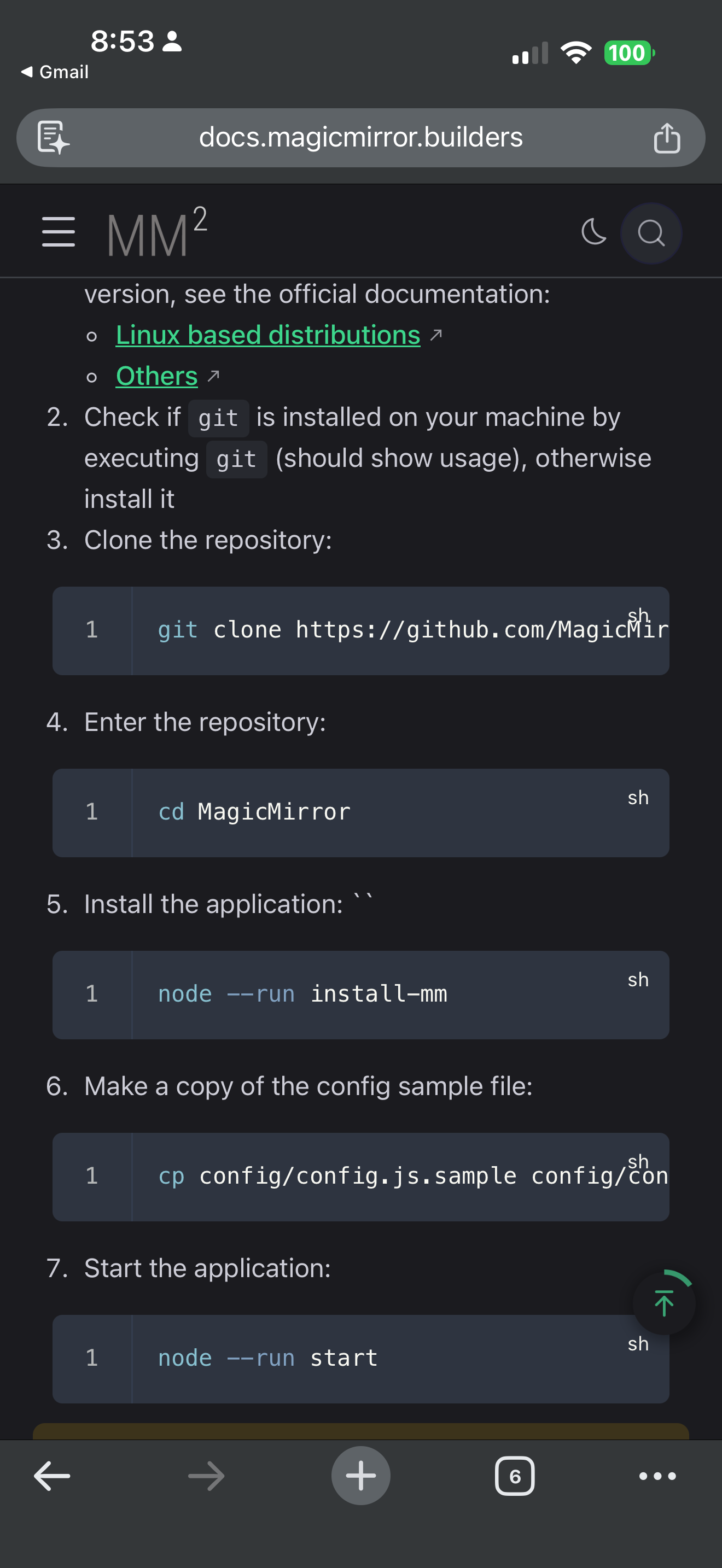
                              The MagicMirror install doc says

                              IMG_4726.png

                              Sam

                              How to add modules

                              learning how to use browser developers window for css changes

                              1 Reply Last reply Reply Quote 0
                              • S sdetweil has marked this topic as solved on
                              Hello! It looks like you're interested in this conversation, but you don't have an account yet.

                              Getting fed up of having to scroll through the same posts each visit? When you register for an account, you'll always come back to exactly where you were before, and choose to be notified of new replies (either via email, or push notification). You'll also be able to save bookmarks and upvote posts to show your appreciation to other community members.

                              With your input, this post could be even better 💗

                              Register Login

                              • 1
                              • 2
                              • 2 / 2
                              • First post
                                Last post
                              Enjoying MagicMirror? Please consider a donation!
                              MagicMirror created by Michael Teeuw.
                              Forum managed by Sam, technical setup by Karsten.
                              This forum is using NodeBB as its core | Contributors
                              Contact | Privacy Policy