Read the statement by Michael Teeuw here.
PM2 restart question (more of a linux question than MM)
-
Hi,
I’m trying to restart my mirror nightly with “pm2 restart mm” using a cron job. I’ve tried everything I can think of or find online but nothing works. I’ve created python and bash scripts, used the system crontab and the user crontab. I’ve tried it with and without “sudo” and also running it under the “pi” user. It always works interactively at the command line but not via crontab. Any suggestions?
Also, I saw the warning post about the April 1st upgrade and Pi Zero W. Does that also apply to the Zero 2W?
-
@wyovino using the user’s crontab from when the job was defined is the most important
so
crontab -e
(no sudo)and then you would look in the /var/logs folder for the syslog file
and should find a logs entry for the CRON task execution
Mar  1 07:30:01 sams CRON[2992838]: (root) CMD ([ -x /etc/init.d/anacron ] && if [ ! -d /run/systemd/system ]; then /usr/sbin/invoke-rc.d anacron start >/dev/null; fi)
Mar  1 07:30:01 sams CRON[2992839]: (sam) CMD (sshpass -f /home/sam/.idsync sudo rsync ....
it might tell you what is happening to the prior cron jobs. (mine above is rsync just for demonstration)
pm2 might already have cron support
Using the --cron-restart Option
This feature is used to ensure an application, which is intended to run continuously, is refreshed on a regular schedule.
Command Line:
bash
pm2 start xxxx --cron-restart "0 0 * * *"
pm2 save
-
-
Got it!
In the user crontab:
30 2 * * * /usr/local/bin/node /usr/local/bin/pm2 restart mm
Restarts the mirror every day at 2:30 am local time.
As always, thanks for your quick response!
Bill
-
Bill, I’m glad you found what you were looking for.
I’m curious - what issue are you addressing by restarting the MagicMirror daily?
I read this thread with interest because I too have thought about resorting to daily restarts on one of my mirrors. [I’ve figured out that daily restarts won’t meet my needs / fix my problem - so I haven’t gone down that road (yet). I guess I could design a cron schedule that staggers the restart enough that the photo display doesn’t show the same pictures every day, but not yet…]
-
@JohnGalt My mirror was sometimes stalling - falling to update even the clock.
-
@wyovino – Ok, good to know.
One of my magic mirrors stops every few days. There is only one module running on that mirror, MMM-BackgroundSlideshow, so it’s obvious when it happens.
-
@JohnGalt someone else has reported an out of memory w that module on discord
-
@sdetweil – Well, I’m not surprised. I have the pictures on a USB drive attached to the raspberry pi, and the more pictures on the drive the worse it gets. It does feel like the software is loading up memory with the pictures.
I tried some time ago pulling the pictures from a share on my NAS, (you had advised someone to do that on another thread) but I never got that to work.
Thanks for letting us know about the memory issue.
-
@JohnGalt what didn’t work? , glad to help if you want to try agsin
-
@sdetweil --Hi Sam
That was a while ago and my memory is foggy, but the issue was mapping a share on my NAS to the Raspberry Pi on which the MM is running…
As best I recall, I tried following directions to map the drive, but it didn’t work. I seem to recall being left with the sense that the process [a] had changed over time due to changes in distributions, and/or [b] that there was something left out of the directions that were likely too obvious to mention for someone who already knew, but was non-obvious to someone out of the know. At that point I gave up.
Fast forward to today - I’m happy to invest the time to learn and get it done if you’re willing to help!! I appreciate it. I sent you an email regarding how to best proceed.
-
@JohnGalt Hello. I have the same issue not being able to map to a NAS drive using the Terminal commands. I can map to the drive using the Files GUI. I couldn’t get it to work either - the problem seems to between my chair and the keyboard. Even though I got it to map with the FM, I still couldn’t get the MMM_ImagesPhotos module to access the NAS, which in my case is a USB flash drive on my Windows router USB port. I didn’t test to see if the drive letter is persistent between reboots/power failures. -Thanks
-
@thartley see instructions, next message
The trick is MMM-ImagesPhotos uses a fixed folder name, uploads, do you have to create a link from that to your mounted file share
Using the ln command
-
if your NAS is Synology, like mine
create a shared folder using the Control Panel, Shared folder function
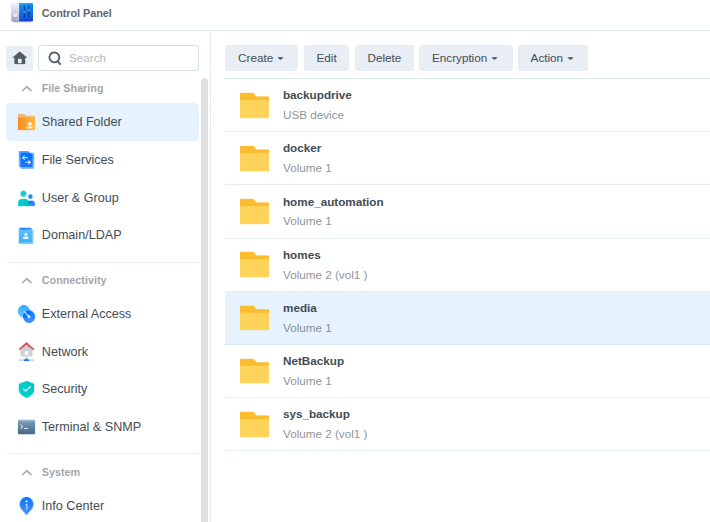
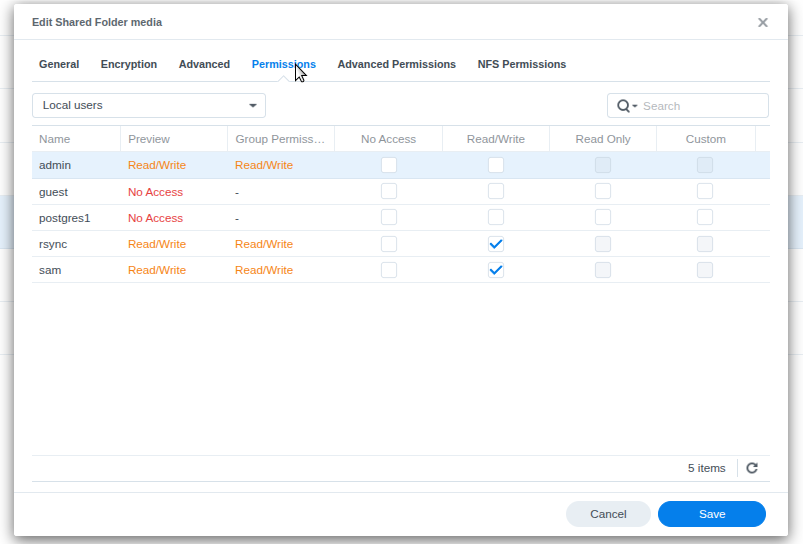
make sure the permissions are set for whatever user will be accessing it (here sam for me)
you should be able to see this share on a Windows or Mac system
now you need to enable access from the PI/linux this takes 2 steps
- create a folder of some name in the /media folder,
this will require sudo
sudo mkdir /media/xxx- create an entry in the /etc/fstab file
this will require sudo
sudo nano /etc/fstabhere is mine for the media folder above
//192.168.2.32/media /media/xxx cifs username=sam,password=xxxxxxx,iocharset=utf8,file_mode=0777,dir_mode=0777//NAS_ipaddress/shared_name local_system_folder (from step1),
set the username and password required to access this share (as defined in your nas)
save the fstab entry ctrl-o, ctrl-x
now mount the foldersudo mount -athen look at the mounted folder
ls /media/xxx(from step 1) you should see the files listed from the shared folder
from now on, when the system boots up, it will automount this share.
if the nas is down, or something causes lost connection, dosudo mount -aagain to reconnect
now, for the MMM-ImagesPhotos step
it uses a hard coded folder for the imagesMMM-ImagePhotos/uploadswe need to make that point to the mounted folder
so,
rename the folder out of the waycd ~/MagicMirror/modules/MMM-ImagePhotos mv uploads old_uploadsnow create a link , need sudo for this , still in the MMM-ImagesPhotos folder
sudo ln -s /media/xxx uploadsnote: if the folder of images you want to display is somewhere other than that root of the server share
just add the path to the folder , like this, where folder1 and folder2 are subfolders on the share
sudo ln -s /media/xxx/folder1/folder2 uploadsthen check it
ls uploadsyou should see the same output as in the end of step 2 above
now MMM-ImagePhotos will pull images from the mounted and linked share from your nas (file server…)
- create a folder of some name in the /media folder,
-
@thartley – Follow Sam’s instructions.
I am traveling so didn’t get to finish mine. I got to a point where I got a message that the action was in progress, but it would never finish. After some research I’m pretty sure I have a permission problem and will check it out when I get home in a couple of weeks.
Hello! It looks like you're interested in this conversation, but you don't have an account yet.
Getting fed up of having to scroll through the same posts each visit? When you register for an account, you'll always come back to exactly where you were before, and choose to be notified of new replies (either via email, or push notification). You'll also be able to save bookmarks and upvote posts to show your appreciation to other community members.
With your input, this post could be even better 💗
Register Login