Read the statement by Michael Teeuw here.
MMM-Bambulink: MagicMirror Module for Bambu Lab Printers
-
Bambulink Module for MagicMirror
Module: MMM-Bambulink
This MagicMirror module,
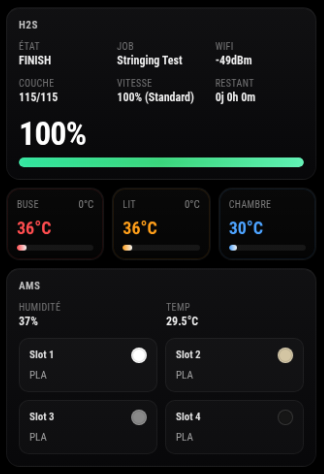
MMM-Bambulink is a third-party module for MagicMirror² designed to display information about your Bambu Lab printer directly on your MagicMirror screen. The module connects to your printer over the local network using Bambu Lab’s LAN credentials and updates information automatically at a configurable interval.
Important: ONLY LAN mode NOT must be enabled on the printer.
Requirements
To use this module, you need the following information:
- The IP address of your Bambu Lab printer
- The printer’s LAN Access Code
- The printer serial number
These three values are required in the configuration to establish the connection with your printer. MagicMirror² documentation recommends clearly listing required external dependencies and setup information in a module README.
Key Features
- Monitor your Bambu Lab printer directly from MagicMirror².
- Secure local connection using MQTT/TLS on port 8883.
- Configurable refresh interval for automatic updates.
- Custom printer title using the
printerModeloption. - Two temperature display modes:
- tile view (
tiles) - graph view (
graph)
- tile view (
- Visual AMS display including:
- AMS temperature,
- filament color,
- loaded filament type for each slot.
- Automatic highlight of the active AMS slot during printing, including when the printer switches filament. Bambu’s AMS workflow is built around slot-based filament selection and color mapping, which makes this type of visual highlighting consistent with how AMS data is handled in local workflows.
- Simple installation inside the standard MagicMirror² module structure.
Development Status
The module is functional and ready to use in a standard MagicMirror² environment. Installation, Node.js dependencies, configuration, and update steps follow the usual module workflow inside
~/MagicMirror/modules, which is the standard location for third-party MagicMirror² modules.The project is still evolving, especially in terms of UI improvements, advanced display options, and visual customization.
Compatibility
MMM-Bambulink is designed for MagicMirror² and Bambu Lab printers with LAN mode enabled.
The required parameters such as
ip,accessCode,serial,mqttPort, anduseTLSindicate that the module is intended to communicate with the printer locally through a secure network connection.Installation
Go to your MagicMirror
modulesdirectory:cd ~/MagicMirror/modulesClone the repository:
git clone https://github.com/TAGinside/MMM-BambulinkEnter the module directory:
cd MMM-BambulinkInstall the Node.js dependencies:
npm installMagicMirror’s module guides recommend keeping installation steps simple and directly copyable from the README.
Configuration
Add the module to the
modulesarray in yourconfig/config.jsfile:modules: [ { module: "MMM-Bambulink", position: "top_left", config: { ip: "192.168.1.x", // Printer IP address accessCode: "xxxxxxxx", // LAN Access Code serial: "XXXXXXXX", // Printer serial number updateInterval: 5000, // Refresh interval in ms printerModel: "H2S", // Displayed printer name or model temperatureDisplayMode: "tiles", // "tiles" or "graph" display: { scale: 1, width: 320, graphMinutes: 1 }, temperatureColors: { nozzle: "#ff4d4f", // Red bed: "#ff9f1a", // Orange chamber: "#4da3ff" // Blue } } } ]MagicMirror² modules are configured through
config/config.js, where each module is added to themodulesarray with its ownconfigobject. [web:134][web:267]How to Use
After adding the module to
config/config.js, restart MagicMirror².Once running, the module will display your Bambu Lab printer information in the selected MagicMirror position, such as
top_left, using the temperature display mode you configured.Update
To update the module:
cd ~/MagicMirror/modules/MMM-Bambulink
git pull
npm ci
Then restart MagicMirror².
Use Cases
MMM-Bambulink is especially useful in:
- a workshop,
- a technical office,
- a home lab,
- a smart home dashboard centered around MagicMirror².
It allows you to quickly monitor an active print, confirm that the printer is responding, and keep a live visual overview of the current job without constantly opening Bambu Studio.
About
MMM-Bambulink brings Bambu Lab printer monitoring directly into MagicMirror², making it possible to integrate 3D printing status into a broader smart home, workshop, or technical dashboard.
The module is open source and free to use and modify. For more information, updates, or contributions, visit the GitHub repository:
https://github.com/TAGinside/MMM-Bambulink
Feedback is always welcome, especially for printer compatibility, AMS behavior, and display improvements.
-
0.2 Graphical module done !
Hey question how i can promote my module now ? -
@TAGinside edit the wiki on the MagicMirror GitHub page to add your module to the appropriate section and the next day it will appear in the searchable list here
https://modules.magicmirror.builders/
You could also describe it on the discord or reddit MagicMirror channels
-
Hello TAGinside!
is it possible to make it run over internet?
i want to monitor my 5 BambuLABs at work from home :)Julian
-
@DerHerrB if you install something like Tailscale on phone, laptop and system running MagicMirror, then you can have direct personal access as if you were on the same lan.
Free, No open ports, no network configuration
I do this to access MagicMirror, hope Assistant , my synology nas, and have used it to monitor my 3d printer.(via octoprint)
-
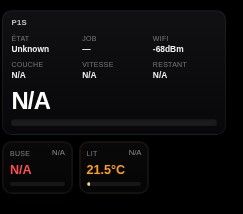
I have it up and running, and I have a P1S, but as you can see, it dosent have all the info that you have?
Do you know why. -
@BravoOscar who are you replying to ?
-
@sdetweil
it should have been @taginside

Hello! It looks like you're interested in this conversation, but you don't have an account yet.
Getting fed up of having to scroll through the same posts each visit? When you register for an account, you'll always come back to exactly where you were before, and choose to be notified of new replies (either via email, or push notification). You'll also be able to save bookmarks and upvote posts to show your appreciation to other community members.
With your input, this post could be even better 💗
Register Login