Read the statement by Michael Teeuw here.
Reverse Lookup MMM-FRITZ-Box-Callmonitor - help needed
-
Hi,
i am interested in extending MMM-FRITZ-Box-Callmonitor with a reverse lookup feature.I check following tutorial:
https://scotch.io/tutorials/scraping-the-web-with-node-js
The git can be found at: https://github.com/scotch-io/node-web-scraperI clone and installed it,
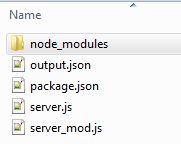
after this i modified it, so i can write parsed datas of http://www.dasoertliche.de/?form_name=search_inv&ph=[Phonenumber] in a output.json file.
This is what my server_mod.js looks like:
{
    "title": "1\n\nAutovermietung SIXT \n\n\t\t\t\t\n\t\t\t\t\tStreetsomething 1, 12345 City",
    "adresse": "Streetsomething 1, 12345 City",
    "anrufer": "Autovermietung SIXT"
}
Now i need some help, how to implement it into MMM-FRITZ-Box-Callmonitor, i have following problems:
- I still have a static phonenumber for reverse lookup in server_mod.js
url = 'http://www.dasoertliche.de/?form_name=search_inv&ph=[phonennumber]';- To create a output.json file i have to start
node server_mod.js(in Module directory) and have to callhttp://localhost:8081/scrapein my browser.
I think the first steps are made, maybe somebody can give me a hint how to move forward.
AxLED
-
I like this idea! @paviro, the developer of MMM-FR´TZ-Box-Callmonitor is certainly the better person to explain, but the idea intrigues me and I had a look at the module’s code on GitHub.
The relevant code for name resolution is in node_helper.js, line 150:
var callInfo = {
    "time": moment(call.Date[0], "DD.MM.YY HH:mm"),
    "caller": self.getName(call.Caller[0])
};

if (call.Name[0])
{
    callInfo.caller = call.Name[0];
}
When going through the list of callers, the modle calls
getName(caller)which is responsible for resolving the caller. This method does in essence this (node_helper.js, line 33):if (number_formatted in this.AddressBook) { return this.AddressBook[number_formatted]; } else { //Not in AdressBook return original number return number; }So it basically checks if the number is in the preloaded address book and if not it returns the original number.
I would put your reverse lookup here. In case the reverse lookup fails simply return the original number as is.
Try to condense the essence of the reverse lookup into a single method (potentially located in its own module), so that it does not require calling the localhost address in browser. Once this runs, I’d cache all numbers that were successfully resolved so that you don’t have to do the lookup again and again for the same number.
Sorry, it is hard to tell more as I know too little about your reverse lookup code.
-
I’ve had a look at the node-web-scraper in the Git you reference above.
Line 7 of server.js binds the web scraping functionality to a HTTP Get endpoint http://localhost/scrape . It uses the Express framework to do so, see
var app = require('express')and thenapp.get(...). You find a nice introduction to Express on the project’s website.app.get('/scrape', function(req, res){ ... request(url, function(error, response, html){ ... }) })You may want to extract the essential functionality and then put it into the module. This essential functionality is in the
requestcall in lines 11-33. Maybe make a methodgetNameByLookup(caller)in node_helper.js of the MMM-Fritz-Box-Callmonitor. This should do therequestto the online phone book page, usecheeriofor scraping, and extract the relevant information.Once you have this method, call it inside
getName(caller)as described in my previous post. Because you are taking therequestout of the callback ofapp.getyou get rid of this hosting on localhost. The express hosting is great for testing scraping functionality, but not so beneficial for a MM module.I think you’ve solved the tricky part already, i.e. finding the correct data source on the web and scraping the relevant information. Moving this into the module should be comparably easy.
You may want to fork the Git of MMM-Fritz-Box-Callmonitor, make a new branch (e.g. reverseLookup) and work there. This also allows you to channel back your change into the original module by sending a pull request (PR) to the module author. I’m happy to help if you tell me where your Git repo is.
-
@pinsdorf
I am moving forward and getting closer to my target.
With your tips i got rid of the Express framework (calling http://localhost/scrape to start web scraping). I also found a way two show the results in the console and addition writing a file (for my personal debugging).Right now i have to files:
package.json{ "name" : "MMM-Alex2", "version" : "0.0.1", "description" : "Reverse Lookup Phonenumber.", "main" : "server.js", "author" : "Alex", "repository" : { "type" : "git", "url" : "https://github.com/" }, "dependencies" : { "request" : "latest", "cheerio" : "latest" } }server.jsvar request = require('request'); var cheerio = require('cheerio'); var moment = require('moment'); var fs = require('fs'); var callnr = '0049xxxx'; var url = 'http://www.dasoertliche.de/?form_name=search_inv&ph=' + callnr; title = ''; adresse = ''; anrufer = 'kein Treffer auf Örtliche.de für '+ callnr; request(url, function (error, response, html) { if (!error) { var $ = cheerio.load(html); $('.left').filter(function(){ var data = $(this); title = data.text().trim(); //adresse = data.children().children().text().trim(); adresse = data.children().eq(2).text().trim(); }) $('.name ').filter(function(){ var data = $(this); anrufer = data.text().trim(); }) console.log('Anrufer: ' + anrufer); console.log('Adresse: ' + adresse); //console.log('Title: ' + title); console.log('Gesamt: ' + anrufer + ', ' + adresse + ' - '+ moment().format("DD.MM.YYYY HH:mm")); //Daten fortschreiben fs.appendFile('anrufe.txt', moment().format("DD.MM.YYYY HH:mm") + ' Gesamt: ' + anrufer + ', ' + adresse +'\n', function(err){ console.log('File successfully written!'); }) } else { console.log("We’ve encountered an error: " + error); } });If i put them in a folder (under
MagicMirror/modules) an do anpm installin that folder, it will install the depencies.If in now run
node server.jsinMagicMirror/modules/FOLDERNAMEi will get the result of a static phonenumber in the console and in a textfile inFOLDERNAME.My next step will be the implementation in MMM-Fritz-Box-Callmonitor, as you suggested.
AxLED
-
Hi,
i tried to implement Reverse lookup, so i extended the package.json file about the needed depencies and did a npm install afterwards, which worked fine.
Now i am struggeling in implementing aditional code in node_helper.js, as i dont know how to debug it. Some bugs are show in the console, as i start MM, but some not.
Is there a way to test node_helper.js by itself?
Or, how do you test new modules / module modifications?I am looking forward to get some tipps.
Regards AxLED
-
Hi @AxLed, great to see your progress!
There are a few remarks on testing that come to mind:
- I personally like to develop the module on my Windows PC using VisualStudio Code and additional tooling from the Internet as I need it. For this you have to install the MagicMirror on your PC. @Mykle1 has a nice walkthrough document for doing so.
- MM has a development mode. Start MM (with your to be tested module) with the command
npm start dev. This starts a browser UI for MM and in addition shows you the loaded HTML, CSS, source code, etc. In the browser’s source window you can set breakpoints and once they get hit, the program execution pauses and you have time to inspect variables. Please note that you don’t have to stop and start MM all the time with the command above. Just change source code in your programming editor, save it, and reload the MM browser (F5). This works both on Raspberry Pi and Windows PC. - If you want to test part of your code in isolation, then you can simply write a small helper program debug.js which calls your test subject’s methods the way you need it. You find this approach in the debug.js of calendar module to test the calendar fetcher component. In this case you do not start MM, but just execute your helper program with
node debug.js. - You can write a real (automated) test suite, but this may go a little beyond your current task. A test suite is helpful when you do test driven development and/or when you want to guarantee that a future change does not break expected behaviour.
-
Oh, one idea for your module. The calendar has a dedicated calendar fetcher as mentioned in my previous post. This may be interesting for your reverse lookup as well. Other people may want to use other online phone books, e.g. for different countries, and by configuring the right reverse lookup fetcher they could do so. Maybe have a look at the code of the calendar fetcher and the node helper where it is being called. However, IMHO you should first get your module working as it is. This is a suggestion for a future extension.
-
@pirnsdorf
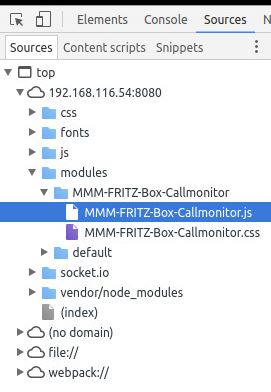
Thanks for the information, so i started one of my MM-Dev-Environments (Ubuntu 16.04) and run MM with npm start dev, unfortunatelly i can not mark
node_helper.js, as i only see theMODULNAME.jsand theMODULNAME.css.The part of code i want to debug is in
node_helper.js, how can i do this?
Screenshot:
AxLED
-
Hmm, this is weird. The original MMM-FRITZ-Box-Callmonitor comes with a
node_helper.js. Are you sure you did not delete it by accident resp. forgot to copy it to your dev environment? Moreoverpackage.jsonand theREADME.mdare missing.Are you familiar with git? I’d advice that you fork the MMM-FRITZ-Box-Callmonitor into your own GitHub account and make all your changes there. This would also allow me to read your latest code after each git commit. From this forked repository there is an easy way to get your improvement back into the original repository once you are done.
-
Hi pinsdorf,
all mentioned files are in the folder MMM-FRITZ-Box-Callmonitor but on debugging, i only can choose from the ones above (see my screenshot).I will follow your suggestion with git, if my code adaptation has passed the beta phase, as i still have some problems.
-
I almost made it, for debugging i went this way (as i dont know any better so far):
- Clientside: Browser with debugging feature
- Serverside (like node_helper.js):
console.logon every important location in the code
My workaround (so far):
I cloned the functiongetNametogetName2and use Reverselookup of phonenumbers only ingetName2.
I changed the call ofgetNametogetName2in following places:
Line 80-98://Incoming call monitor.on("inbound", function(call) { //If caller is not empty if (call.caller != "") { self.sendSocketNotification("call", self.getName2(call.caller)); }; }); //Call accepted monitor.on("connected", function(call) { self.sendSocketNotification("connected", self.getName2(call.caller)); }); //Caller disconnected monitor.on("disconnected", function(call) { //send clear command to interface self.sendSocketNotification("disconnected", {"caller": self.getName2(call.caller), "duration": call.duration}); }); console.log(this.name + " is waiting for incoming calls.");Reasons why i did this workaround:
loadCallList
This function is called initialy, when you start MM and everytime you get a call. I dont understand, whyloadCallListgoes through all calls from the fritzbox journal in the past (infinitely), no matter what configuration options of the module you choosed. This gives me an"Socket hang up" erroron reverse lookup after 100 requests. Now you know why i did this workaround.Regards
AxLED
-
cool feature, i will definitely upgrade to that version, if it is running well
thumbsup
and now the but…
is this really necessary these days?
I don’t know any of my friends or our generation who really publicate their phonenumber in the public phonebook.
Mobile numbers especially not.
So it is only helpful for bigger companies, right? -
@barnosch
Not necessarily. Even smaller companies (those without one base number and dozens of extensions) do add their phone number to public phonebooks. My phone solution does use online lookup and lots of craftspeople who called during our house building phase where identified on the phone showing “Dachdecker Hildebrandt” (for example). -
@pinsdorf
i created a fork, i am not sure if i did everything right (i checked some readme before and keeped on that), details see: https://github.com/Ax-LED/MMM-FRITZ-Box-Callmonitor/pull/1/filesThere is also a working beta of the reverse lookup feature.
I know the code is still quick n dirty.
AxLED
-
Hey @AxLed, sorry for the late reply. I’ve had a look at your code. It looks very good. Well done, man! Functionality is there. Certainly, you can do some cleanup as you say, but that is secondary. It is great that you have extended this module with such nice magic.
One suggestion I made earlier is putting the lookup at the online phone book (dasoertliche.de) & parsing into its own module. This would allow others to write phonebook lookup modules for their own country. I’m happy to do this change on your code base.
You did all the (sometimes confusing) Git stuff right: you forked from the original repository, checked out your repository, made changes, committed and pushed them back into your repository. There was just one step too much, which is the pull request. You typically make a pull request in the person’s repository that you have forked from to tell the original author ‘hey, here is cool new stuff that you may want to have in the original repository’. I would suggest that you accept or remove your own pull request.
If you want me to extract a module for the phonebook lookup & parsing, I can work on the latest version of your repository and either push directly to your repo (if you grant me write access) or I send my own pull request to you.
-
Hi pinsdorf,
thanks for your reply, here are some answers to your questions:
- putting the lookup in a own module.
=> Feel free, you just have to tell me, how i can grant write permissions to you (maybe via PN) - i closed my own pull request, as i didnt find any other option
Maybe you can also help in fixing this issue: https://github.com/paviro/MMM-FRITZ-Box-Callmonitor/issues/30
Regards
AxLED
- putting the lookup in a own module.

Hello! It looks like you're interested in this conversation, but you don't have an account yet.
Getting fed up of having to scroll through the same posts each visit? When you register for an account, you'll always come back to exactly where you were before, and choose to be notified of new replies (either via email, or push notification). You'll also be able to save bookmarks and upvote posts to show your appreciation to other community members.
With your input, this post could be even better 💗
Register Login