Read the statement by Michael Teeuw here.
Modules assistance for MM newbie! Help!
-
The problem with your code is, as with several other people (mostly on macs) wrong quotation marks.
{
module: "PushBulletNotes",
header: "iPhone Messages",
disabled: false,
position: "bottom_left", // Or any valid MagicMirror position.
config: {
	accessToken: "o.(middle bit left out)i",
	numberOfNotifications: 5,
	showNotificationIcon: true,
	showMessage: true,
	showCount: true,
	fade: true,
	maxMsgCharacters: 50,
	maxHeaderCharacters: 32
	}
},
Look at the quotation marks. Left is correct, right is using wrong ones. I think this is a problem with Mac keyboard or mac software.
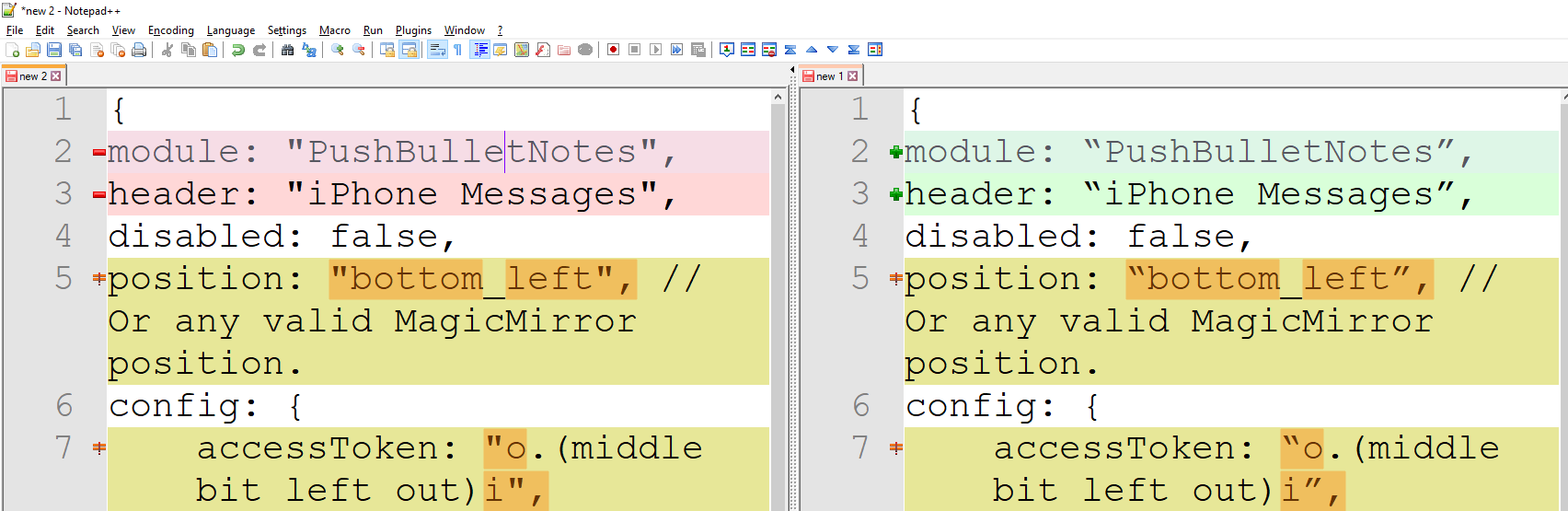
-
Thanks for the response.
Not that I’m doubting you for a second but wouldn’t that stop other modules working? I have other modules using quotation marks (denoting screen position, header etc) which seem to run without issue.
Secondly, how would I go about changing these to the correct format as I only have a Mac to use.
Thank you.
-
That’s a bad question, as I cannot answer that. I don’t have any mac available, so I cannot test it.
I don’t know if this is an unwanted feature - in this case - of the editor or of the entire operating system. On Windows I use “notepad++”, I’m sure there is something similar for Mac. -
@yawns It’s usually Macs because they do “smart quote” replacement, including in TextEdit, the default text editor. Straight double quotes (
") are different characters from open and close quotes (“or”). Such smart replacement done at a program level on certain word processors, like Microsoft Word, but not in things like Notepad, the default text editor for Windows. This is why it’s more of a problem for Mac users.@Fookes The solution is to not use TextEdit (much more like WordPad) for any code. Use a true text editor like Atom, BBEdit, TextMate, etc. Download one, install it, and use that to open/edit/save your config and other code files.
-
@ninjabreadman - thanks for the info. As explained throughout the thread I’m the exact definition of a ‘newbie’. When detailing text editors such as TextEdit, Atom etc, what role do they play in what I am trying to achieve?
As an example:
I want to install a TP module I’ve found (as this Pushbullet one is). There is a ‘using this module’ section which tells us to add the following configuration block to the ‘modules’. I have simply been copy and pasting this configuration in to the config.js section and tweaking the parts I can/want to. How and why would I use Atom to do this? Genuine question - I simply have no idea. I’m eager to learn but clearly need basic guidance on this.
Appreciate it.
-
@Fookes No problem. You need to use a program (app) to open any file. Right now, you’re using what came with your Mac (called TextEdit). But it’s much more of a note taking or word processing program than a text editor for code. It doesn’t understand code, and does things that break it. Once you’ve downloaded and installed Atom (by moving it to your
~/Applicationsfolder on your Mac) you can run it then open the file, or right-click a file and select “Open with…” and choose Atom. Not only will it not break your code, it will colour-code (called “syntax-highlighting”) your code, show you where brackets/braces match, and can help to make your code legible (called “Beautify” in Atom).For adding modules, check out this walkthrough for tips: https://forum.magicmirror.builders/topic/4231/how-to-add-modules-for-absolute-beginners
-
Have I actually been using TextEdit though? I simply ‘right click’ over what I want to copy from the modules section of the 3rd party modules page on MagicMirror2, before copying and then pasting in the config.js section. Where does TextEdit come in to my procedure?
I have downloaded and installed Atom as suggested. You suggest I 'open the file or right-click and select “open with…” ’ - What file am I opening or selecting to open with?
-
@Fookes Yes, but how are you opening your
config.jsto paste in your options/configuration? There is an app/program that opens and interprets the file, then saves it again. Whatever you’re using, it is permitting MacOS to change your quotes, thereby breaking the file. -
I’m simply (from the MagicMirror folder in terminal on Raspberry Pi - ‘pi@raspberrypi:~/MagicMirror $’ keying in ‘nano config/config.js’. I then paste and amend module stuff in there. I presume I’m doing this all wrong?
-
Sorry @Fookes, when @yawns mentioned MacOS and you didn’t say you weren’t using a Mac, I assumed that to be the case (given the quotes problem). Did you install Atom on your own computer or the RPi? Are you editing your files on the RPi itself (via a keyboard, in Terminal) or are you connecting remotely from other computer (typically
ssh)?As a command-line text editor,
nanorespects quotes and should not cause a problem, although I typically avoid pasting code blocks – I find oversshthat the paste buffers and encodings can get weird. -
@ninjabreadman - Hi.
I AM using a Mac! I’m simply VNC-ing into the Raspberry Pi. How can I easily attach images to my communications on this forum? Images of my procedure may help in explaining my situation clearly and concisely.
Regards
-
@Fookes Oh, understood. You can use the little art/photo icon to upload a photo in the forum.
Are you pasting via VNC? I suggest using an SFTP client like FileZilla or CyberDuck.
You can then connect to the RPi and edit files remotely (not download, edit, upload; both programs have an “edit” option that will let you edit and save remotely in an editor … change it to Atom for js/css/html files in the preferences).
You can also use Terminal (in Applications > Utilities) to connect to your RPi via
ssh(ex.ssh 192.168.0.100) to run commands remotely. -
Hi @ninjabreadman - Yes, I paste in to the config.js via VNC. I really appreciate your input and guidance on this. Would it be a request too far to ask you to breakdown the steps you take from start to finish to add a module? You suggest using an SFTP client but I have no knowledge of what this is, how it works, how I incorporate this in to what I’m doing and at what point. I’m happy to install whatever is recommended - I just need guidance on the process. I think you linked to a ‘newbie’s guide to installing a module’ which seemed to suggest the ‘cut and paste’ approach I have been doing - albeit probably on a PC rather than a Mac.
I’d be very grateful but I appreciate it if my request is a request too far…
-
Hi @Fookes,
I’ll try. This is what I use for adding modules:
Ingredients
- Text Editor (e.g. Atom) ‑ that supports syntax highlighting, code formatting, and won’t break your code (i.e. not MacOS’ TextEdit)
- SFTP Client (e.g. FileZilla)
- Terminal
- VNC Client (optional)
Directions
-
Connect to your MM via
sshin Terminal (e.g.ssh 192.168.0.101), and in yoursshsession do the following:
a. Change directories to~/MagicMirror/modules
b. Download your module withgit clone(e.g.git clone https://github.com/matteodanelli/MMM-cryptocurrency.git)
c. This will create the folder for your module -
Connect with your SFTP Client to your MM
a. Navigate to your~/MagicMirror/configdirectory
b. Tell the SFTP Client to open/edit yourconfig.jswith your Text Editor (this can sometimes be configured in File > Preferences) or by right-clicking the file (to select “Open with…”)
c. Copy the config options from the module’s GitReadme.md, website, etc. that you want to use
d. Paste the config options intoconfig.jsthat is open in your Text Editor
e. Save the file, and the SFTP Client will upload the file back to your MM -
In Terminal (still in
ssh) runpm2 restart mmornpm start devin~/MagicMirror/.
a. Have a look at your mirror to see that the changes took, or use a VNC Client to connect to and view your mirror
Hope that helps. Let me know if you have any questions.
-
@ninjabreadman - Thanks, appreciate you doing this for me. In step one, I’m presuming you’re doing all of this on the Pi - not from a Mac or PC?
-
@Fookes No problem. No, all of the above will be done from your separate Mac/PC. The directions explain how to use Terminal and SFTP Client to make changes as through you were in front of the machine. All of the apps (Text Editor, SFTP Client, and VNC Viewer) should be installed on your Mac/PC (read: not MM) remote machine.
Otherwise, you can just follow the excellent How to add modules for absolute beginners thread which covers everything as done on the RPi.
-
@ninjabreadman - Thank you. I shall give it a go shortly and let you know how I get on! Thanks again!
-
Hi @ ninjabreadman - Unbelievably I managed to follow your instructions to the letter! Sadly, it made no difference to the Pushbullet module I’m trying to add. As stated previously, the app ‘loads’ but constantly shows “No new Notifications”. I’ve put the relevant Pushbullet key in but it’s simply not displaying any messages.
Do you have any thoughts or suggestions?
Many thanks.
Hello! It looks like you're interested in this conversation, but you don't have an account yet.
Getting fed up of having to scroll through the same posts each visit? When you register for an account, you'll always come back to exactly where you were before, and choose to be notified of new replies (either via email, or push notification). You'll also be able to save bookmarks and upvote posts to show your appreciation to other community members.
With your input, this post could be even better 💗
Register Login