Read the statement by Michael Teeuw here.
Unable to Run the Head first developing MM module for extreme beginners :(
-
Hi,
I’m absolute beginner to developing Magic Mirror Modules, but I’m ver keen and eager to learn and develop them. I started to follow the tutorial available at https://forum.magicmirror.builders/topic/8534/head-first-developing-mm-module-for-extreme-beginners. but the problem here I’m facing is as below. I did a git pull and installed the dependencies. when I did a
node serveronlyand firing up my chrome browser and heading to thelocalhost:8080, I’m able to see the clock, compliments, etc… (defaults provided). And as per the tutorial, I went till the getDom() step, and I tried running it, And when I went to my browser and refreshed the window, to my surprise, nothing is shown up, not evenHello, World!, I went to the developer console and searched formyContent, there is no such div created with such class name. :frowning_face:Config.js
/* Magic Mirror Config Sample
 *
 * By Michael Teeuw http://michaelteeuw.nl
 * MIT Licensed.
 *
 * For more information how you can configurate this file
 * See https://github.com/MichMich/MagicMirror#configuration
 *
 */

var config = {
	address: "localhost", // Address to listen on, can be:
	// - "localhost", "127.0.0.1", "::1" to listen on loopback interface
	// - another specific IPv4/6 to listen on a specific interface
	// - "", "0.0.0.0", "::" to listen on any interface
	// Default, when address config is left out, is "localhost"
	port: 8080,
	ipWhitelist: ["127.0.0.1", "::ffff:127.0.0.1", "::1"], // Set [] to allow all IP addresses
	// or add a specific IPv4 of 192.168.1.5 :
	// ["127.0.0.1", "::ffff:127.0.0.1", "::1", "::ffff:192.168.1.5"],
	// or IPv4 range of 192.168.3.0 --> 192.168.3.15 use CIDR format :
	// ["127.0.0.1", "::ffff:127.0.0.1", "::1", "::ffff:192.168.3.0/28"],

	language: "en",
	timeFormat: 24,
	units: "metric",

	modules: [
		{
			module: "MMM-Test",
			position: "top_left"
		},
	]

};

/*************** DO NOT EDIT THE LINE BELOW ***************/
if (typeof module !== "undefined") { module.exports = config; }
MMM-Test.js
Module.register("MMM-Timetable", {
  defaults: {},
  start: function () {},
getDom: function() {
  var element = document.createElement("div")
  element.className = "myContent"
  element.innerHTML = "Hello, World!"
  return element
},
notificationReceived: function() {},
  socketNotificationReceived: function() {},
})
and my developer console output is as below.
Initializing MagicMirror.
Loading core translation file: translations/en.json
Loading core translation fallback file: translations/en.json
Load script: modules/MMM-Test//MMM-Test.js
Module registered: MMM-Timetable
Load stylesheet: css/custom.css
All modules started!
and below is my folder structure
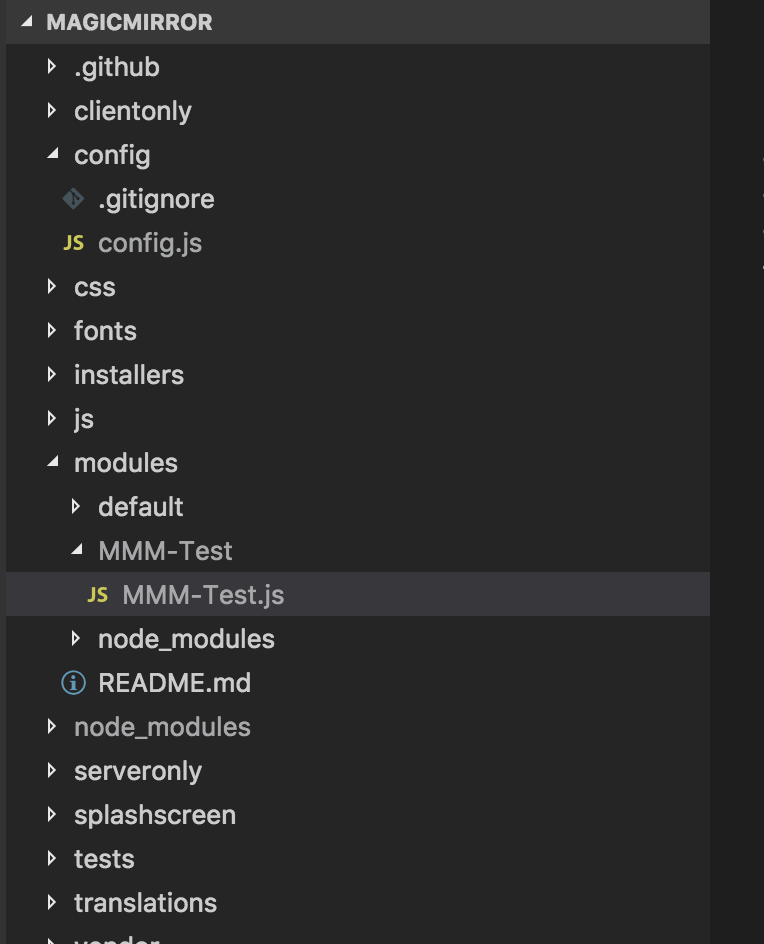
Please let me know where am I going wrong guys and please let me know on how can I fix this. Here are my codes.
Thanks,
Sunny -
Sorry for my dumbest question guys :frowning_face:. I got it working, changed
Module.register("MMM-Timetable",toModule.register("MMM-Test",and its working fine.Thanks,
Sunny -
@sunnykeerthi It’s my fault. But I cannot edit that topic anymore. I don’t know why. -_-a
Hello! It looks like you're interested in this conversation, but you don't have an account yet.
Getting fed up of having to scroll through the same posts each visit? When you register for an account, you'll always come back to exactly where you were before, and choose to be notified of new replies (either via email, or push notification). You'll also be able to save bookmarks and upvote posts to show your appreciation to other community members.
With your input, this post could be even better 💗
Register Login